Role guide · HR · Gemini · Workspace · Oct 2026
Gemini for HR (Oct 2026): Workspace drafts for people-ops notes
HR on Gemini in Docs/Sheets — policy FAQ drafts with counsel review gates. Soft CTA only if multiple AI seats overlap on the same people-ops jobs. Differentiates from ChatGPT for HR and the general Gemini / Gemini for ops pages.
Who this guide is for
People-ops / HR owners whose policy outlines and FAQ drafts already live in Google Docs and Sheets — and who want a repeatable Gemini loop with counsel review gates, not employment advice. Product deep-dive: gemini.html. ChatGPT-shaped sibling: chatgpt-for-hr.html. Other Gemini roles: Gemini for ops, Gemini for finance. HRIS peer (local): Rippling AI.
The people-ops Docs loop (picture)
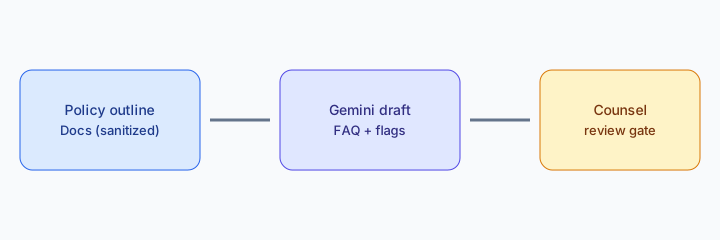
How an HR owner actually runs Gemini in Workspace
Examples at a glance: each pattern has a concrete people-ops example plus a short Try this.
1. Docs FAQ draft + counsel gates (primary)
What it is: In a sanitized policy outline Doc, ask Gemini to draft FAQ answers and mark counsel-review items. Never invent legal outcomes, termination language, or benefits eligibility not in the Doc. Output is a draft for HR + counsel — not a published handbook.
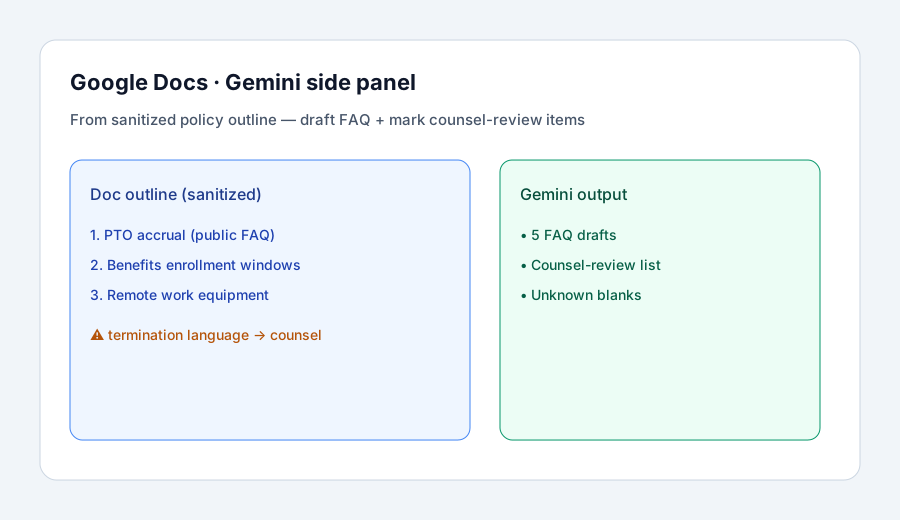
Primary SoT workflow:
From a sanitized policy outline in Docs: draft FAQ + mark counsel-review items.
2. Sheets tracking notes (optional companion)
What it is: When people-ops tracks FAQ gaps or onboarding checklist status in Sheets, use Gemini on selected ranges for status bullets — not for inventing headcount or legal status. Prefer Drive files over re-pasting into a second chat seat.
In Sheets with a sanitized FAQ-gap table selected:
From the selected range only: list 5 FAQ gap bullets and mark which need counsel. Never invent headcount, eligibility, or legal outcomes. Leave owner blanks.
3. Guardrails that keep people ops safe
What it is: Standing habits: answer only from the open Doc / selected Sheet; never invent legal outcomes; mark counsel-review items explicitly; humans provision access and collect acknowledgments outside Gemini. Soft CTA later only if ChatGPT or Claude is drafting the same FAQ from the same outline.
Standing prompt line for people-ops week:
Use only the open Doc / selected range. Output FAQ drafts and counsel-review flags. Never invent legal outcomes, never decide employment status. Flag missing policy as Unknown.
4. Vs ChatGPT for HR / Claude / Rippling
What it is: Same FAQ/people-ops jobs; different home seat. Gemini wins when Docs/Sheets already hold the outline. ChatGPT wins when shared Custom GPTs are the cadence habit (ChatGPT for HR). Claude wins when Projects + files are the weekly long-doc habit. Rippling AI when the HRIS of record is Rippling. Running three chat seats for identical FAQ drafts is usually seat overlap.
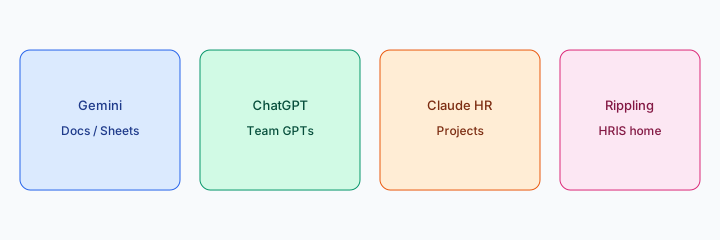
Home-for-the-job:
List 5 recurring people-ops draft jobs. Assign each to Gemini Docs, ChatGPT Team GPT, Claude Project, or Rippling — one sentence why. Do not invent a tool you do not use.
Pricing context (October 2026)
Gemini in Google Workspace is packaged with Workspace editions and Gemini add-ons — verify on Google’s public pages (start from workspace.google.com/pricing or your admin console). This page is dated October 2026 and is not a price sheet — we do not invent exact seat prices.
Uncertainty: Which editions include Gemini in Docs/Sheets, admin controls, or data protections change. Always verify on live Google pages and your admin before budgeting.
If your HRIS or a separate chat seat already drafts policy FAQs, check what you already pay for before adding Gemini for the same job. The $9 AI toolkit spreadsheet lists each HR and AI seat with its cost so overlap is easy to spot. See what the $9 AI toolkit spreadsheet covers or how the $19 AI toolkit audit works.
Want someone to do it for you? AI toolkit audit — $19
When Gemini for HR is useful (honest take)
Useful when people-ops already lives in Docs/Sheets, humans + counsel review before publish, and Gemini only drafts from the outline of record. Less useful when the real need is an HRIS-native assist already paid for in Rippling (or similar), when the outline is empty and you hoped AI would invent policy, or when employee PII is pasted into Gemini without a sanitization step.
Related options (educational)
| Need | Better home | Why |
|---|---|---|
| Docs/Sheets FAQ drafts | Gemini for HR (this page) | Workspace-native with counsel gates |
| Shared Custom GPT cadences | ChatGPT for HR | Team GPTs for recurring FAQ |
| Project + long policy files | Claude for HR | Projects with file grounding |
| HRIS-native jobs | Rippling AI | When Rippling is the SoR |
Inventory seats by job on the stack map for people ops.
Related comparisons
- BambooHR AI for small-team HRIS jobs
- Workday AI for HR and talent teams
- Gusto AI for payroll and people ops
- Lattice AI for performance and engagement
- Gemini in Google Sheets
FAQ
How should HR set up Gemini in Google Workspace?
Keep sanitized policy outlines in Docs; ask Gemini to draft FAQ and mark counsel-review items; never invent legal outcomes.
Is Gemini for HR legal advice?
No. Educational role guide only. Employment decisions stay with qualified humans and counsel.
Gemini vs ChatGPT / Claude / Rippling?
Stay where the outline or HRIS already lives. See related reviews linked above.
Where is the full Gemini product review?
See gemini.html. This page is the HR role guide.
Optional next step (if seats overlap)
If multiple AI seats already draft the same people-ops jobs and you still pay ChatGPT, Claude, and Gemini for identical FAQ drafts, optional help mapping overlap: $19 AI toolkit audit or $9 AI toolkit spreadsheet. Email Audit $19 or Toolkit spreadsheet $9.
Checkout is live via Stripe. After you pay, we email delivery (spreadsheet) or intake next steps (audit).