Tool · Ops & automation · Payroll · HR · Small teams · Oct 2026
Gusto AI review (Oct 2026): payroll and HR assists for small people ops
When Gusto AI helps payroll/HR FAQs for small teams — draft answers and mark items that need counsel or accountant review. Not legal advice. Peers: Claude for HR, ChatGPT for HR.
What Gusto AI covers here
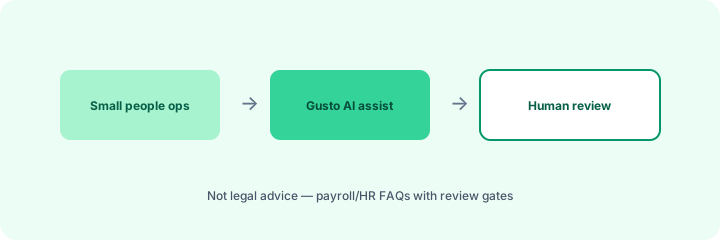
This page is for small people ops already (or clearly becoming) on Gusto for payroll/HR. We focus on FAQ drafting assists with human professional review gates — not a full Gusto catalog and not employment or tax advice. Product names and AI surfaces change; confirm on gusto.com. Diagrams are educational, not screenshots.
Major features (with how someone uses them)
Examples at a glance: each feature has a concrete people-ops example plus a short Try this.
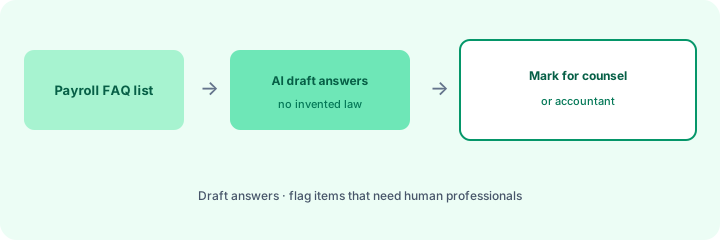
1. Payroll FAQ drafts + counsel/accountant marks (primary)
What it is: From a payroll FAQ list, draft plain-language answers grounded in your known policies — and explicitly mark items that need counsel or accountant review before publish.
2. Small people-ops cadence
What it is: Recurring assists for onboarding checklists, benefits FAQ stubs, and pay-period reminders — always with a human owner before employee-facing send.
3. Guardrails (not legal advice)
What it is: Hard stops: no invented tax outcomes, no employment classification decisions, no promises about leave eligibility by jurisdiction without a professional.
4. Vs Claude for HR / ChatGPT for HR
What it is: Prefer Gusto AI when payroll/HR SoR is Gusto. Prefer Claude for HR or ChatGPT for HR for broader policy/FAQ drafting in Projects or Custom GPTs outside Gusto.
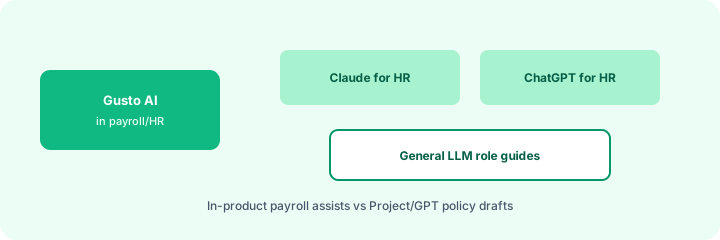
- Claude for HR — Projects + policy outline → FAQ + counsel list
- ChatGPT for HR — Team GPTs for recurring people-ops cadences
Pricing context (Oct 2026)
Gusto plans and any AI-labeled assists change by tier and region. We do not invent list prices. Confirm on gusto.com/pricing and product docs for your company. Dated October 2026.
When useful / when not
Useful when: Small teams already on Gusto need FAQ drafts with clear professional-review marks. Less useful when: You need general policy drafting outside Gusto — use Claude/ChatGPT for HR — or when questions are jurisdiction-specific legal/tax (go to professionals first). Educational — not a scorecard. Not legal advice.
Paying for Gusto AI and a few other AI tools? The $9 AI toolkit spreadsheet lists every AI subscription you have, what each one costs, and how fast it pays for itself, so you can see which ones are worth the money.
Want someone to do it for you? AI toolkit audit — $19
FAQ
When does Gusto AI help?
When Gusto is the payroll/HR home and FAQ drafts stay gated by counsel/accountant marks.
Is this legal advice?
No. Mark professional-review items; do not invent outcomes.
Vs Claude or ChatGPT for HR?
Gusto = in-product. Role guides = general LLM drafting loops.
What does it cost?
Confirm on gusto.com/pricing — we do not invent prices.
Optional next step (if seats overlap)
If several AI seats would cover the same jobs, optional help mapping overlap: $19 AI toolkit audit or $9 AI toolkit spreadsheet. Email Audit $19 or Toolkit spreadsheet $9.
Checkout is live via Stripe. After you pay, we email delivery (spreadsheet) or intake next steps (audit).
Inventory seats by job on the stack map for people ops.