How-to · Payroll · Gusto AI · Oct 11, 2026
Draft Gusto payroll FAQ answers with accountant/counsel flags
“Accountant/counsel flags” here means marking Gusto payroll FAQ drafts that need a CPA (certified public accountant), payroll admin, or counsel before publish — AI is not payroll, tax, or employment advice. Gusto is the system of record on this page; examples come from Gusto admin workflows, not BambooHR or Rippling ticket language.
Who this is for
Ops and finance leads at smaller companies whose payroll/HR home is already Gusto and who want FAQ drafting help with explicit flags. If BambooHR is HR system of record, see BambooHR AI. If Rippling is people/IT system of record, see Rippling AI. Do not paste BambooHR onboarding navigation answers into a Gusto payroll FAQ.
How to do it
This page is a how-to. It is not a ranking of payroll AI. Product detail and dated packaging notes live on Gusto AI. Confirm AI features on your Gusto plan before you pilot.

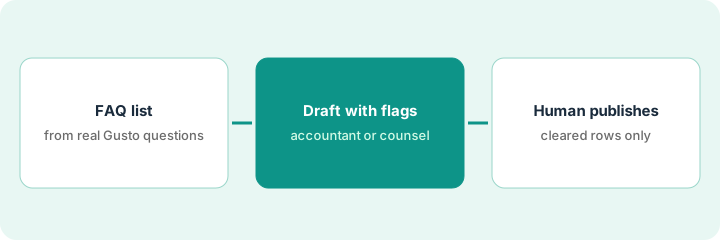
1. Step 1 — List payroll FAQ questions from Gusto reality
What it is: Collect eight to ten questions employees or admins already ask about Gusto payroll — pay stubs, direct deposit timing as shown in Gusto, how to update W-4 (federal tax withholding form) in Gusto, contractor vs employee navigation — not invented tax law FAQs.
- Sources: Gusto admin inbox, Slack #payroll, last payroll anomaly thread.
- Buckets: Product how-to (Gusto clicks) | Policy (company rules) | Tax/law-sensitive (always flagged).
- Name publisher (ops/finance) and reviewer (accountant and/or counsel per topic).
- Ban inventing withholdings, notice periods, or multi-state rules in the question list itself.
How-to: “Where do I download a pay stub in Gusto?”, “How do I update direct deposit in Gusto?” Policy: “When does our company cut off time off cashout requests relative to payroll?” Tax/law-sensitive: “Why did my withholding change?”, “Do I qualify for [state] disability?” — last two always flagged; answers not invented.
Ten real questions with Bucket column. Every withholding, unemployment, wage-hour, and classification question = Tax/law-sensitive. If questions are about BambooHR time-off paths, you are on the wrong system of record page.
2. Step 2 — Draft with accountant/counsel flags
What it is: Draft Product how-to answers from Gusto help/written procedure paste; flag everything else.
- Prompt: only from paste; Missing → Unknown; never invent IRS or state rules.
- Tags: AI-ok (after admin skim) · Needs accountant · Needs counsel.
- Withholding, classification, wage-hour, and notice-pay rows: Needs accountant/counsel regardless of model confidence.
- Keep drafts in a finance staging doc — not the employee handbook yet.
Pay-stub path draft from Gusto help → AI-ok after payroll admin skim. “Why withholding changed” → Needs accountant; AI leaves Unknown. “Final pay timing in my state” → Needs counsel; unpublished.
Draft only Product how-to rows (max five). Flag all Tax/law-sensitive as Unknown + reviewer. Reject any drafted statute citation not in your paste.
3. Step 3 — Human publishes cleared rows only
What it is: Publish to the employee FAQ your company already uses only after flags clear.
- Payroll admin clears Product how-to rows with sources.
- Accountant/counsel clears or rewrites sensitive rows — or leaves them unpublished.
- Date-stamp; revisit when Gusto payroll settings or entity states change.
- Do not dual-publish the same payroll FAQ via BambooHR AI if Gusto remains payroll system of record.
Five Gusto navigation FAQs published on the company wiki with “Reviewed: Payroll admin · Oct 11, 2026.” Three sensitive rows unpublished until the accountant clears them. No parallel Rippling payroll FAQ for the same EIN (employer ID number).
Checklist: Reviewer | Role (admin/accountant/counsel) | Date | Source | Live URL. No reviewer → no publish.
Pricing context (October 2026)
This how-to is not a price sheet. Plan notes live on Gusto AI. Recheck gusto.com/product/pricing and your Gusto account before you budget. Related paths: BambooHR AI, Rippling AI. Dated October 2026.
Checked Oct 11, 2026 on the vendor’s own pricing page: Gusto’s pricing page lists Simple at $49 per month plus $6 per person, Plus at $80 per month plus $12 per person, and Premium at $180 per month plus $22 per person. Some services cost extra, such as next-day pay ($15 per month plus $3 per person on Simple) and same-day pay ($90 per payroll). This page is not payroll or tax advice.
Uncertainty: Gusto AI-labeled assists and payroll add-ons vary by plan and entity setup. If an invoice and a review disagree, trust the invoice. Do not paste a marketing list price you did not pay. The only prices this site sells here are the optional $9 AI toolkit spreadsheet and $19 AI toolkit audit.
When this helps (honest take)
Useful when Gusto is payroll system of record, questions are real, and accountant/counsel flags are honored.
Not useful when you want AI tax answers, BambooHR/Rippling is the real home for the same FAQ, or no reviewer exists.
Related options (educational)
| Need | Where to look | Why |
|---|---|---|
| Gusto AI | Gusto AI | Primary path — Gusto payroll system of record |
| BambooHR onboarding FAQ split | BambooHR AI | When BambooHR is HR system of record |
| Rippling people/IT AI | Rippling AI | When Rippling is system of record |
| People stack map | Stack map for people ops | Job | Tool | Owner |
| Before another seat | Three checks before an AI seat · Find unused AI seats | Live how-tos |
Related reviews: Gusto AI · BambooHR AI · Rippling AI. Free: seat-waste calculator if multiple payroll/HR AI seats draft the same FAQ.
FAQ
Is this payroll or tax advice?
No. It is an ops drafting pattern with flags. AI output is not advice. Use your CPA/counsel.
Can AI explain why an employee’s withholding changed?
It can draft Unknown and route to an accountant. It must not invent tax reasons.
Where do dated prices live?
On the Gusto AI review plus the vendor site. This October 2026 how-to does not invent list prices. Our Oct 11, 2026 check of the vendor’s own pricing page is summarized in the pricing section above.
Does this routine replace our accountant?
No. The flags exist so an accountant or counsel answers the questions that depend on law, tax or your contracts. AI only words the routine how-to rows from Gusto’s own help text.
Optional next step
Free reviews stay free. Neither offer is required to use this page. If Gusto and another payroll/HR AI seat already draft the same FAQ, optional help: $9 AI toolkit spreadsheet or $19 AI toolkit audit when you want a written memo.