Role guide · HR · ChatGPT Team · Oct 2026
ChatGPT for HR (Oct 2026): Team GPTs for recurring people-ops cadences
HR on ChatGPT Team — Custom GPTs for onboarding/FAQ cadences with human review. Soft CTA only if multiple AI seats overlap on the same people-ops jobs. Differentiates from Claude for HR and the general ChatGPT / Custom GPTs pages.
Who this guide is for
People-ops / HR owners whose company already pays ChatGPT Team / Business and need a repeatable FAQ + onboarding cadence — not employment advice. Product deep-dive: chatgpt.html. Claude-shaped version: claude-for-hr.html. Sibling role guides: ChatGPT for ops, ChatGPT for finance, ChatGPT for revops.
The people-ops loop (picture)
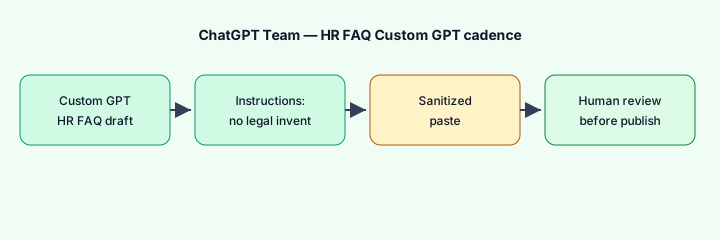
How an HR owner actually runs ChatGPT on Team
Examples at a glance: each pattern has a concrete people-ops example plus a short Try this.
1. Custom GPT HR FAQ draft (primary)
What it is: A shared Custom GPT with instructions that never invent legal outcomes. Run on sanitized pastes (no employee PII). Output is a draft FAQ for human review — not a published handbook.
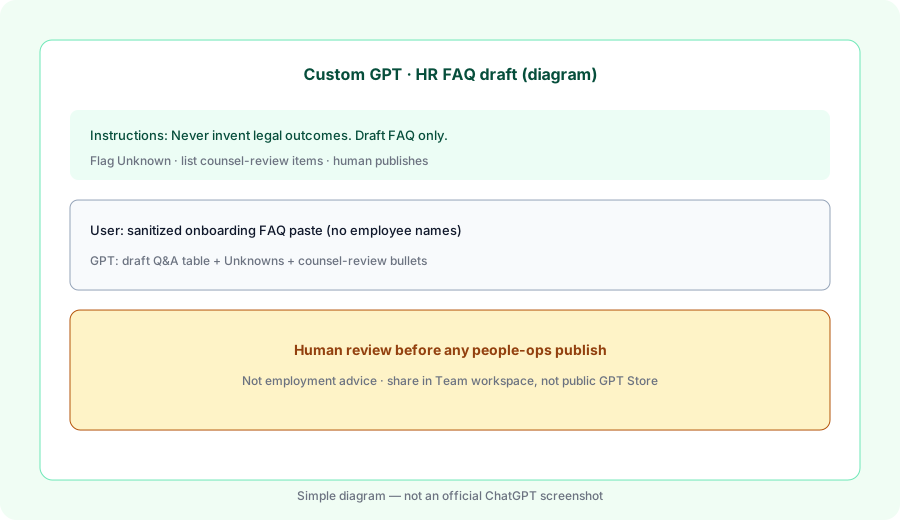
Primary SoT workflow:
Custom GPT HR FAQ draft. Instructions: never invent legal outcomes. Run on a sanitized paste.
2. Onboarding cadence GPT
What it is: A second shared GPT (or the same one with a clear mode) for recurring day-1 / week-1 FAQ cadences. Upload a sanitized onboarding outline as knowledge. Humans still provision access and collect legal acknowledgments outside the bot.
Cadence prompt:
From this sanitized onboarding FAQ paste: draft 5 Q&A updates and list items that need counsel. Never invent benefits eligibility or legal acknowledgments. Leave owner blanks.
3. Guardrails that keep people ops safe
What it is: Standing instructions + workspace sharing. Prefer Business workspace sharing over public GPT Store links. Do not put employee PII or case details into Memory — use Project/GPT files with clear retention habits (see Memory how-to).
Paste into GPT instructions (edit to match policy):
Answer only from uploaded outline + user paste. Output FAQ drafts or Unknown. Never invent legal outcomes, never decide employment status, never remember employee names in Memory. Flag anything not grounded in the paste as Unknown.
4. When ChatGPT Team fits vs Claude for HR
What it is: Same FAQ/onboarding jobs; different home seat. ChatGPT wins when shared Custom GPTs are already how the team encodes cadences. Claude wins when Projects + files are the weekly long-doc habit (see Claude for HR). Running both for identical FAQ drafts is usually seat overlap.
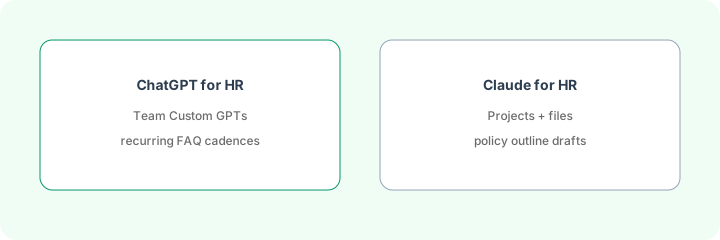
One decision this month:
List our paid AI seats. Circle which one already holds the HR FAQ SOP. Put FAQ + onboarding drafts only there for 30 days. Never invent legal outcomes in either seat.
When seats overlap
If ChatGPT Business, Claude, and Gemini are all drafting the same HR FAQ, you are paying three times for one habit. Pick the seat that already has the outline and shared bots. Soft next step below only if that overlap is real.
Pricing context (October 2026)
Figures summarized from OpenAI’s public Business / ChatGPT pricing and help pages as of October 2026. Plan names and seat types change — confirm live.
- ChatGPT Business (formerly Team): public pages have listed Standard about $25/user/month monthly or $20/user/month billed annually; Premium higher. Workspace typically requires at least two paid seats. Confirm on openai.com/business/pricing.
- Included for this guide: Business seats publicly advertise Custom GPTs, Projects, admin controls — verify current feature matrix on OpenAI’s pages.
- Plus (individual): often about $20/month — can build GPTs, but shared workspace HR bots fit Business better.
Uncertainty: Team→Business rename, Standard vs Premium limits, and seat caps have moved. Always confirm on live OpenAI pages before you buy. This is not employment or legal advice.
When ChatGPT for HR is useful (honest take)
It tends to help when the company already pays Team/Business and needs a shared HR FAQ GPT with strict “never invent legal outcomes” instructions and human review. It tends not to replace your handbook, counsel, or Claude when Projects are already the people-ops home. Paying ChatGPT + Claude for the same FAQ drafts is stack sprawl.
Paying for ChatGPT and a few other AI tools? The $9 AI toolkit spreadsheet lists every AI subscription you have, what each one costs, and how fast it pays for itself, so you can see which ones are worth the money.
Want someone to do it for you? AI toolkit audit — $19
FAQ
How should HR set up ChatGPT Team or Business?
Shared HR FAQ Custom GPT with never-invent-legal instructions; sanitized pastes only; human review before publish.
Is this employment advice?
No. Educational drafts only. Counsel and qualified humans own employment decisions.
When should we use Claude for HR instead?
When Projects + files are already the weekly loop. See Claude for HR.
Where is the full ChatGPT review?
chatgpt.html · Custom GPTs. This page is the HR role guide.
Optional next step (if seats overlap)
If ChatGPT Team is one of several AI seats doing the same people-ops FAQ loop, optional help: $19 AI toolkit audit or $9 AI toolkit spreadsheet — only if you are juggling overlapping seats. Email Audit $19 or Toolkit spreadsheet $9.
Checkout is live via Stripe. After you pay, we email delivery (spreadsheet) or intake next steps (audit).
Inventory seats by job on the stack map for people ops.