Tool · Recruiting · Ashby · Oct 2026
Ashby AI review (Oct 2026): AI-assisted application review, Ashby Assistant, and the AI Notetaker
Ashby is an all-in-one applicant tracking system (ATS) with sourcing, scheduling, and reporting built in. Its AI features sit on top of that one database: application review against criteria you write, a chat assistant that can act across your pipeline, interview notes, and outreach help. This page walks through each piece with a real recruiting job, a Try this, and where a person still has to make the call.
What this Ashby AI page covers
This page is for the person who owns hiring operations at a growing company — a head of talent, a recruiting coordinator who became the ATS admin, or a founder still reading every application. The question it answers: if we run Ashby, which AI features take real work off the team, and where does a human still have to read, decide, and sign?
Ashby’s pitch is that AI works better when sourcing, applications, interviews, offers, and reports live in one system. Its AI shows up in six places: AI-assisted application review, the Ashby Assistant with custom agents, the AI Notetaker and feedback summaries, sourcing AI (search filters, talent rediscovery, outreach tokens), AI help in reports, and an MCP server so outside assistants such as Claude or ChatGPT can work with your Ashby data.
Ashby states its AI is assistive: it says the application-review AI never ranks or gives numerical scores to applicants, shows citations for its outputs, redacts personal details from resumes sent to AI models, and does not train models on customer data. Everything below comes from Ashby’s public pricing page, AI page, product updates, and help docs as we read them on 6 October 2026. Hiring is a regulated activity in many places, so treat this as product education, not legal advice.
Major features (with how someone uses them)
Examples at a glance: each feature has a concrete example from a real job plus a short Try this you can run this week.
1. AI-assisted application review (primary)
What it is: You define objective criteria for a job — for example “has managed a US payroll cycle” or “has shipped production React” — and Ashby’s AI checks inbound applications against them. You can then filter by criteria to clear obvious no-fits or surface likely fits. Ashby says the AI never ranks applicants or gives them a numerical score, shows citations so you can verify or override each analysis, and warns in the app when a criterion could lead to bias. Ashby also offers candidate disclosures and opt-outs, and says it commissioned a third-party bias audit (FairNow). Application review, fraud detection, and talent rediscovery all draw on a monthly pool of AI credits.
Related tools sit in the same stage: Fast Application Review lets you annotate and advance or archive many candidates at once, auto-reject rules archive applicants whose form answers match conditions you set, and fraudulent candidate detection (September 2025) flags suspicious applications during review. Auto-reject rules are plain logic you configure — they are not the AI — so review them as carefully as any criterion.
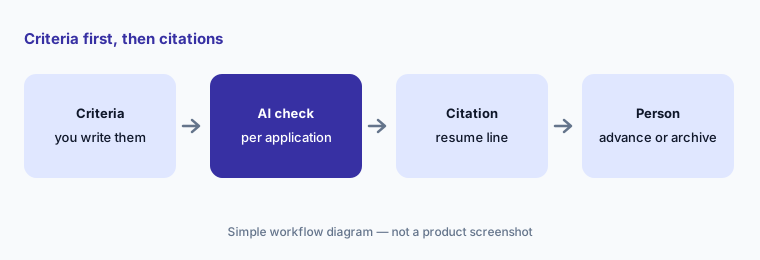
Primary workflow:
Write three objective, job-related criteria for one open role. Run AI-assisted application review on the last 20 applicants. Open the citation for every applicant marked as not meeting a criterion before you archive anyone, and note how many you would have wrongly rejected.
2. Ashby Assistant, custom agents, and AI in reports
What it is: Announced at Ashby One on 7 May 2026 and released in beta that day, the Ashby Assistant is a chat agent that answers questions and takes action across candidates, jobs, interviews, and pipelines — for example analyzing a pipeline, updating candidates, or drafting emails. Custom agents are reusable instructions in plain language for repeat work such as a debrief summary or a weekly pipeline check; they can be personal or shared with the organization. The Assistant also works in Slack, where people can ask questions, submit interview feedback, and call custom agents. Ashby’s product updates list the Assistant and Slack app on Foundations, Plus, and Enterprise.
Reporting has its own AI help: an AI-assisted report builder where you describe the report you want in chat, and AI report interpretations (February 2026) that write a plain-language summary of a report’s results. Ashby’s May announcement also previewed scheduling agents that coordinate interviews end to end; treat those as a preview until they show up in your account.
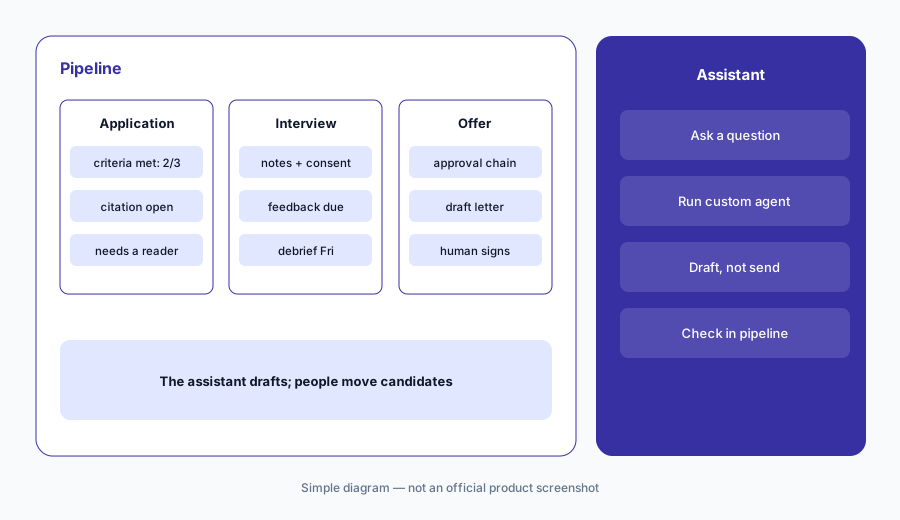
Weekly check:
Write one custom agent for a report you build by hand every week. Run it next to your manual version for two weeks. Add one instruction for every difference you find, and only share the agent once two runs in a row match.
3. AI Notetaker and feedback summaries
What it is: The AI Notetaker (released 25 September 2025) records, transcribes, and summarizes interviews and debriefs inside Ashby, with interview-specific chat, AI-assisted feedback, and consent controls. On Ashby’s pricing table it is a paid add-on on every plan. Separately, AI feedback summaries pull together the written feedback interviewers submitted across a process, citing the original feedback, so a debrief starts from what people actually wrote. AI feedback tokens drop a short summary of feedback into rejection or next-step emails, which you review before sending.
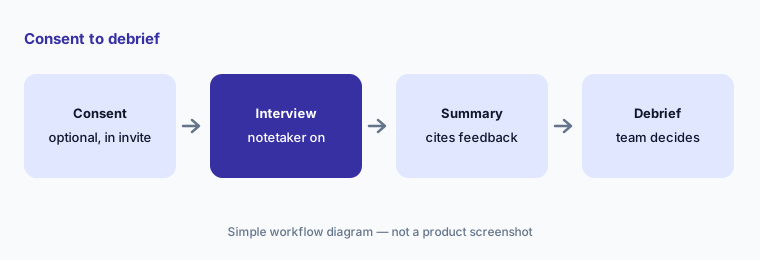
Debrief check:
Before your next debrief, open the AI feedback summary and click three of its claims back to the original interviewer feedback. Rewrite any line the source does not support, and tell the panel you did.
4. Sourcing AI: search filters, rediscovery, and outreach tokens
What it is: Three AI pieces help with outbound and with candidates you already know. AI candidate search turns a typed request (“backend engineers in Denver who interviewed with us in the last two years”) into filters you can edit. AI talent rediscovery (May 2026, Plus and Enterprise) scans your existing candidates, matches them to job criteria, and groups them into buckets such as silver medalists and warm leads, with prior feedback and a criteria breakdown. AI personalization tokens write a tailored line in sequence emails or LinkedIn messages from the job posting and the candidate’s resume; Ashby cites its own trend report for a roughly 46% lift in reply rate, which is a vendor figure, not ours. Smart reply tracking classifies replies as interested or not interested.
Rediscovery first:
Before sourcing for your next role, run AI talent rediscovery (or AI candidate search on past applicants). Read the prior feedback for the top five. Edit every AI outreach line so it only uses facts from the candidate’s public profile or resume.
5. Ashby MCP server for Claude, ChatGPT, and Cursor
What it is: On 29 June 2026 Ashby launched its MCP server in open beta on all plans. MCP is an open standard that lets AI assistants connect to other systems. With it, a tool such as Claude, ChatGPT, Cursor, or Gemini CLI can read most Ashby data and — in the first release — create candidates, add them to jobs, move stages, and add notes. Access mirrors each user’s Ashby permissions, and an Org Admin has to turn the MCP toggle on before anyone can connect. Ashby’s own rule of thumb: if a task starts and ends in Ashby, use the Assistant; if it needs Ashby data alongside other documents or systems, MCP may fit better; if you want a repeatable team workflow, make a custom agent.
Read before write:
Connect one assistant to Ashby’s MCP server with a read-focused task: “Summarize the pipeline for job X by stage and flag anyone waiting more than a week.” Check the answer against Ashby. Only then decide whether anyone should use write actions from outside Ashby.
6. Where Ashby AI fits against other options
What it is: Ashby’s AI is strongest when Ashby is already your ATS, because every feature reads the same candidate history. Greenhouse takes a different route for structured hiring: calibrated match labels in its Real Talent suite, plus its own notetaker. Metaview is a notes-and-agents layer that sits on top of whatever ATS you have, including Ashby. A general meeting notetaker such as Fireflies can transcribe an interview, but it does not know your interview plan or candidate record.
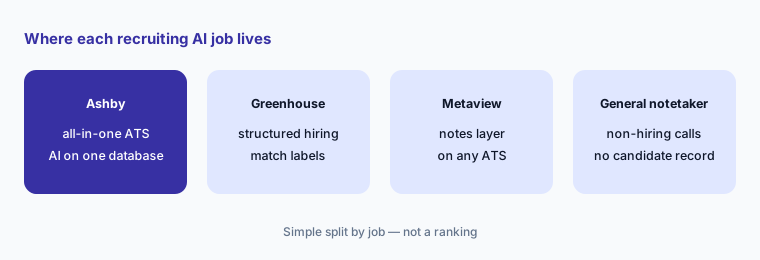
Home for the job:
List every tool that touches a candidate today — ATS, notetaker, sourcing, scheduling, chat assistant. For each, write which hiring step it owns and who can see the data. Remove any overlap before adding a new AI feature.
Pricing context (October 2026)
Ashby publishes part of its pricing on ashbyhq.com/pricing. When we checked on 6 October 2026, the Foundations plan (up to 100 employees) had a calculator showing monthly totals on a monthly term by company size: about $300/month for 1–10 employees, $400 for 11–25, $500 for 26–50, $700 for 51–75, and $900 for 76–100, with a 10% discount for annual commitments and emerging-market pricing available. Plus (best for 101–1,000 employees) and Enterprise (1,000+) list no price; Ashby says pricing depends on company size, usage, and commitment.
AI use draws on included AI credits: the pricing table listed 1,500 credits per month on Foundations, 2,500 credits per seat per year on Plus, and 12,500 per seat per year on Enterprise, with more available to buy. The AI Notetaker is a paid add-on on every plan, and the AI auto-scheduler sits in the Advanced Scheduling add-on (included in Enterprise); neither add-on price is public. Other listed extras: SSO at $100/month on Foundations, extra SMS at $90 per 1,000 messages, and extra sourcing email lookups as paid add-ons.
Uncertainty: The Foundations figures come from Ashby’s on-page calculator, not a contract, and may change or vary with term and region. How many AI credits one application review uses, the price of the notetaker add-on, and anything on Plus or Enterprise need a quote from Ashby. Which features are beta (the Assistant, custom agents, and MCP were beta when we checked) can also change.
When it’s useful (honest take)
Useful when Ashby is (or will be) your one recruiting system, you hire often enough that inbound volume or debrief prep eats real hours, and someone owns the criteria, consent wording, and AI settings. Then criteria-based review with citations, cited feedback summaries, and a shared custom agent or two can save time while keeping every decision with a person.
Less useful when you hire a handful of people a year — a spreadsheet, your HRIS hiring module, and careful reading are lighter. Less useful when nobody will write objective criteria or read citations, because the AI is only as fair as the criteria you give it. And if your company is standardized on another ATS, Ashby’s AI is a reason to evaluate a migration, not a bolt-on.
Paying for Ashby AI and a few other AI tools? The $9 AI toolkit spreadsheet lists every AI subscription you have, what each one costs, and how fast it pays for itself, so you can see which ones are worth the money.
Want someone to do it for you? AI toolkit audit — $19
Related options (educational)
| Need | Better home | Why |
|---|---|---|
| All-in-one ATS with AI review, assistant, and notes | Ashby (this page) | One database across sourcing, interviews, offers, reports |
| Structured hiring with calibrated match labels | Greenhouse AI | Talent Matching, Notetaker, fraud and ID checks |
| Interview notes and agents on top of any ATS | Metaview | Works with Ashby, Greenhouse, Lever, and more |
| Hiring inside an HRIS you already pay for | BambooHR AI or Workday AI | Fewer systems; lighter hiring features |
| Drafting job posts or interview questions only | Claude for HR or ChatGPT for HR | Sanitized drafts; no candidate data in personal accounts |
| A few hires a year | A shared sheet plus careful reading | No new seat; criteria still written down |
FAQ
Does Ashby’s AI rank or score applicants?
Ashby says its AI-assisted application review never ranks applicants or gives numerical scores. It checks applications against criteria you write and shows citations so a person can verify or override each result.
How much does Ashby cost in October 2026?
On 6 October 2026 Ashby’s calculator showed Foundations (up to 100 employees) from about $300 to $900 per month on a monthly term depending on company size, with 10% off annual commitments. Plus and Enterprise are quoted. The AI Notetaker is a paid add-on. Confirm on ashbyhq.com/pricing.
What is the difference between Ashby Assistant and the MCP server?
The Assistant is Ashby’s own chat agent inside Ashby and Slack. The MCP server lets outside assistants such as Claude or ChatGPT read Ashby data and take a few actions, with the same permissions the user has in Ashby.
Does Ashby train AI models on our candidate data?
Ashby says it does not train AI models on customer data, redacts personal details from resumes sent to AI models, and has a no-training agreement with its model provider. Ask for its AI documentation during procurement.
Do candidates need to be told about the AI?
Often, yes, depending on where you hire. Ashby provides candidate disclosure and opt-out controls, but as the employer you decide the wording and turn them on. Check local rules such as NYC Local Law 144 or GDPR with counsel.
Optional next step (if seats overlap)
If you pay for an ATS with a notetaker add-on, a separate interview notetaker, and a general meeting notetaker that all record the same candidate calls, that overlap is worth a look. Map the overlap with the $19 AI toolkit audit or the $9 AI toolkit spreadsheet. Email Audit $19 or Toolkit spreadsheet $9.
Checkout is live via Stripe. After you pay, we email delivery (spreadsheet) or intake next steps (audit).