How-to · Recruiting · Ashby AI · Oct 12, 2026
Write the weekly hiring readout from Ashby reports, not from recruiter memory
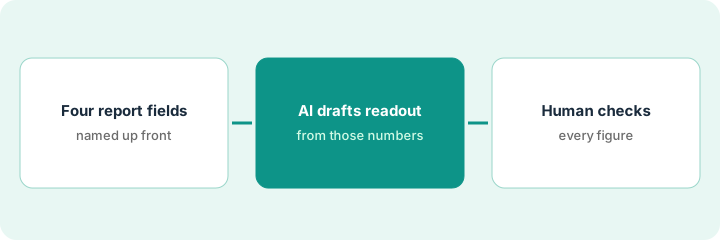
A weekly hiring readout tells leadership where each open role stands. When it's written from memory, numbers drift. This page shows a head of talent how to build it from four Ashby report fields, let AI turn them into readable sentences, and check every figure before it goes out.
Who this is for
Heads of talent and recruiting leads at small and mid-size companies whose applicant tracking system is Ashby and who send a weekly update to founders or department heads. If you're on Greenhouse, the steps carry over; see Ashby vs Greenhouse.
How to do it
This is a how-to, not a ranking. Feature detail, including Ashby Assistant and AI in reports, lives on the Ashby AI review.
1. Step 1 — Pick four report fields
What it is: Choose a small, fixed set of numbers that answer "are we on track?" and pull them the same way every week.
- A good starting four: open roles, candidates in onsite stage, offers out, and hires this week.
- Save the report in Ashby so next week's pull is identical.
- Add one free-text column per role for the recruiter's one-line note. Notes are opinions; numbers come from the report.
- If a field isn't tracked consistently, leave it out rather than estimating it.
Nine open roles. Report shows 14 candidates at onsite, 3 offers out, 1 hire this week. The recruiter note for the Sales Engineer role says "hiring manager out until Wednesday."
Build a saved report with Role | Open since | Onsite count | Offers out | Hires this week | Recruiter note. Export it Friday at the same time each week.
2. Step 2 — Draft the readout from the numbers
What it is: Ask Ashby Assistant, or a general AI assistant you already use, to turn the export into a short readout. The model writes sentences; it doesn't create numbers.
- Paste only the export and the recruiter notes.
- Ask for one line per role plus a three-line summary at the top.
- Any blank field shows as "Unknown," never a guess.
- Keep the readout under one screen. Leadership reads the top three lines.
"Nine roles open. Three offers out, one hire this week (Support Lead). Sales Engineer paused until the hiring manager returns Wednesday. Data Analyst onsite count: Unknown (stage not updated)."
Prompt: "Write a weekly hiring readout from this export. One line per role, plus a three-line summary. Use only numbers in the export. If a value is blank, write 'Unknown.' Do not add trends or forecasts."
3. Step 3 — A human checks every number
What it is: Before sending, someone compares each number in the readout to the export.
- Tick each figure against the export, line by line.
- Fix any number the draft rounded, combined, or invented.
- Turn every "Unknown" into a task for the recruiter who owns that role.
- Send from your own account. The readout is yours, not the tool's.
The draft said "about 15 at onsite." The export says 14. Fixed. One "Unknown" becomes a Monday task for the Data Analyst recruiter to update stages.
Add a "Checked by / time" line at the bottom of your internal copy. Don't send until it's filled in.
Pricing context (October 2026)
This how-to isn't a price sheet. Ashby plan and AI packaging notes live on the Ashby AI review. Confirm with your Ashby admin which AI features your plan includes. Dated October 2026.
Checked Oct 19, 2026 on the vendor’s own pricing page: Ashby’s pricing page publishes one plan price: Foundations (up to 100 employees) has a calculator showing about $300, $400, $500, $700, or $900 a month on a monthly term for 1–10, 11–25, 26–50, 51–75, or 76–100 employees, with 10% off annual commitments. Plus and Enterprise are quoted. Included AI credits are 1,500 a month on Foundations, 2,500 per seat per year on Plus, and 12,500 per seat per year on Enterprise; extra AI credits can be bought, with no price shown. (Our Oct 12 note described $90 per 1,000 and $100/month as AI credit prices; on Ashby’s page those are extra SMS messages and SSO on Foundations.) Confirm which AI features and credits your plan includes with your Ashby admin.
Uncertainty: Ashby's AI features and packaging change. If your contract and our review disagree, trust your contract. The only prices this site sells here are the optional $9 AI toolkit spreadsheet and $19 AI toolkit audit.
When this helps (honest take)
Useful when Ashby is your applicant tracking system, stages are kept up to date, and leadership wants the same short update every week.
Not useful when stages are rarely updated. Fix data hygiene first, or the readout will be half "Unknown." It's also the wrong tool for forecasting time-to-hire.
Related options (educational)
| Need | Where to look | Why |
|---|---|---|
| Ashby AI features | Ashby AI | Primary path on this page |
| Greenhouse instead | Ashby vs Greenhouse | Same readout, different applicant tracking system |
| People ops stack | Stack map for people ops | Who owns what |
| Before another seat | Three checks before an AI seat | Live how-to |
FAQ
Can AI add trends like "pipeline is healthier than last week"?
Only if you paste last week's numbers too, and even then a human should decide whether a change is meaningful. This pattern keeps the draft to what the export says.
Do I need Ashby Assistant for this?
No. Any AI assistant your company already approves works, as long as you paste the export rather than asking it to recall data.
Where do current prices live?
On the Ashby AI review and on Ashby’s pricing page. Foundations is about $300–$900 a month by company size (checked Oct 19, 2026); Plus and Enterprise are quoted. The pricing section above has the detail.
What if a report field is blank?
Leave it as Unknown in the readout. Do not let AI invent a number to fill the gap.
Optional next step
Free reviews stay free. If recruiting has an applicant tracking system, a notetaker, and a sourcing tool that overlap, the $9 AI toolkit spreadsheet helps map them, or the $19 AI toolkit audit gets you a written memo.