Tool · Recruiting · Interview notes · Oct 2026
Metaview review (Oct 2026): AI interview notes, application review, and sourcing agents for recruiters
Metaview started as an AI notetaker built only for hiring conversations and has grown into a set of recruiting agents: notes, application review, AI-led screening, and sourcing. It sits on top of the applicant tracking system you already use rather than replacing it. This page walks through each piece with a real recruiting job, a Try this, and the places a person has to stay in charge.
What this Metaview page covers
This page is for recruiters, recruiting coordinators, and hiring managers who spend too much of each interview typing, and for the talent lead deciding whether a hiring-specific notetaker is worth paying for when the company already has a general one. The question it answers: what does Metaview do that a general meeting notetaker does not, and which of its newer agents are worth trying?
Metaview’s product has two layers. The notes layer joins interviews, screens, intake calls, and debriefs, then writes structured notes from templates, with every line linked to the transcript. Around it sit an Assistant for cited answers, snippets (short clips), feedback-form autofill for Ashby and Greenhouse, Reports across many conversations, and an MCP connection for Claude and ChatGPT. The agent layer adds Application Review, AI-led Screening interviews, and a Sourcing agent — each sold on its own price card.
Metaview’s docs are unusually clear about limits: the notes and Assistant capture what was said and do not evaluate, rank, or recommend candidates. Everything below comes from Metaview’s pricing page and help center as we read them on 6 October 2026. Recording interviews has legal requirements in many places; Metaview’s own guidance is to tell candidates in advance and make the notetaker optional.
Major features (with how someone uses them)
Examples at a glance: each feature has a concrete example from a real job plus a short Try this you can run this week.
1. Interview notes with templates (primary)
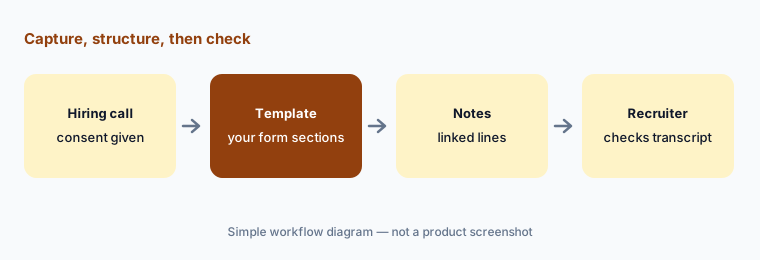
What it is: Metaview joins calls on Zoom, Google Meet, Microsoft Teams, and Webex, can capture phone calls, and accepts uploaded recordings or imported transcripts. After the call it writes notes using a template — the instruction set for which sections appear and what each should cover. Templates structure the notes, not the conversation: you can talk naturally and each section is filled from wherever the topic came up, while small talk is left out. When something was not covered, the section says so. Every line links back to the moment in the transcript it came from, and you can build a template with one section per question on your interview feedback form. Metaview also supports interviewing in one language and reading notes in another.
Metaview ships default templates such as Screening Call, Interview Debrief, and Question and Answer (the one template that follows the order questions were asked). Its best-practice guide asks you to keep custom templates factual — no sections that invite opinions about personality or “fit.”
Primary workflow:
Record one screen with a custom template that mirrors your interview feedback form. Click three lines in the notes back to the transcript. Fix anything the transcript does not say, and note which section was most often wrong.
2. The Assistant: cited answers from one call
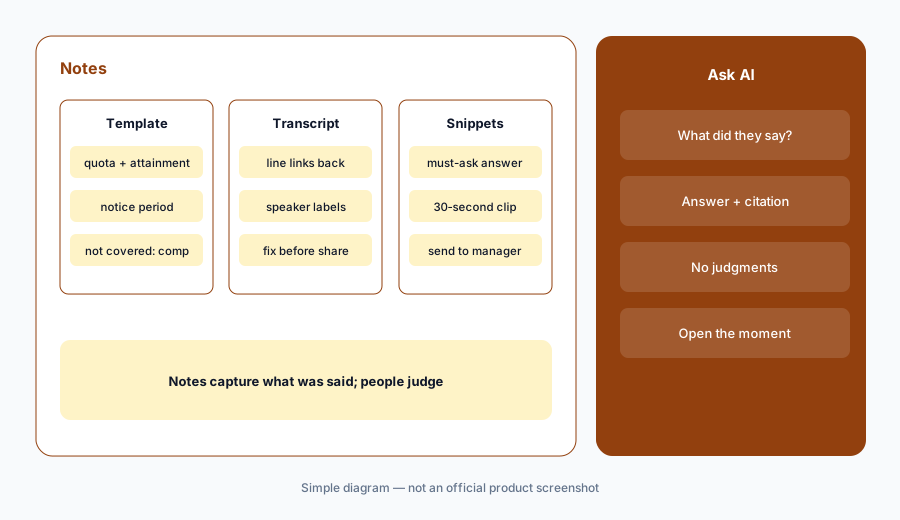
What it is: On any notes page, Ask AI opens the Assistant. You ask a retrieval question — “What notice period did they give?” or “What example did they use for the scaling question?” — and it answers in a sentence with a citation back to the transcript. Metaview’s docs say it only draws on that call’s transcript, and that it does not evaluate, rank, compare, recommend, or speculate about candidates; it works best on “what did the candidate say about…” questions. Metaview’s pricing FAQ says Assistant questions and note regenerations are included in the subscription with no credits or usage limits.
Retrieval, not judgment:
Ask the Assistant three factual questions about one recent interview (notice period, comp expectation, one example answer). Open every citation. Do not ask it whether the candidate is a good hire — that question belongs to the panel.
3. Snippets, sharing, and feedback-form autofill
What it is: A snippet is a short clip cut from a call recording, so you can show a hiring manager the thirty seconds where a candidate answered a must-ask question instead of describing it. Notes can be shared, exported, and organized into collections, with access controls and redaction for sensitive content. Metaview’s browser extension autofills key sections of interview feedback forms in Ashby and Greenhouse from your conversations, and a LinkedIn side panel shows what you already know about a candidate. Metaview lists integrations with dozens of ATS platforms, including Ashby, Greenhouse, Lever, Workday, iCIMS, and BambooHR.
Show, don’t summarize:
Ask your hiring manager for two must-ask questions on one role. Clip each answer as a snippet after the screen and send only the clips. Track whether second-round no-shows or late rejections drop over a month.
4. Reports and the MCP connection
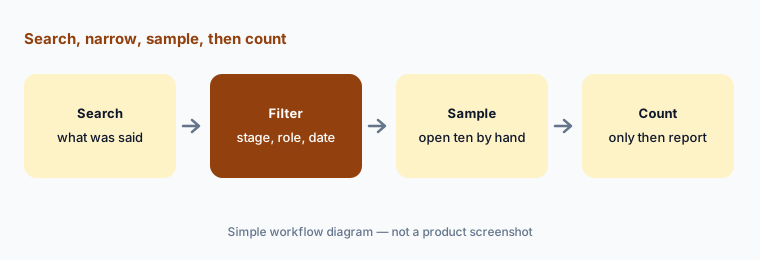
What it is: Reports is a premium add-on for talent leaders: you search across many conversations by what was said — for example, recruiter screens for one role in the past three months where candidates mentioned a skill — and filter by ATS properties such as interview stage. Metaview’s pricing FAQ says Reports is a flat-fee add-on with no per-report or per-recording charges. The MCP server lets AI tools work with your Metaview data: Metaview is listed as a connector in Claude and as an app in ChatGPT, and other MCP clients such as Cursor can connect with OAuth. Metaview also publishes “AI Skills” — reusable workflows such as interview prep, interview debrief, and a day-one brief for a new hire’s manager.
Sample before you count:
Run one Reports search across last quarter’s screens (for example, candidates who mentioned a competing offer). Open ten matched conversations and confirm each actually fits before you quote the total to anyone.
5. Application Review and AI-led Screening
What it is: Application Review pulls candidates from a stage in your ATS, builds an Ideal Candidate Profile (ICP) from the job, and evaluates each application against it with written reasoning; Metaview’s product page says it never auto-rejects, and you can configure how rejections are handled. One credit is used per application, and if credits run out, active reviews pause. Screening is a separate product: an AI interviewer runs a short two-way voice interview in the candidate’s browser, asks the questions your team sets, follows up on vague answers, and assesses each answer against a rubric you write, with reasoning. Each completed screening interview uses one Screening credit. Metaview’s docs say the AI interviewer only asks and listens — people decide who moves forward.
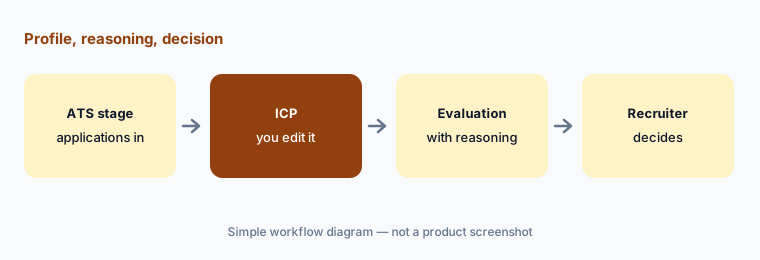
Read the reasoning:
Run Application Review on one role with an ICP you have edited to job-related criteria only. Read the reasoning for 20 low-fit evaluations before acting on any of them, and adjust the ICP if more than two look wrong.
6. Sourcing agent, sequences, and fillmore
What it is: The Sourcing agent searches the web for candidate profiles that fit a role you describe by typing, speaking, or uploading a job description or sample resumes, and it can start straight after an intake call. Metaview says it learns from your feedback on results. Found candidates can go into Sequences — multi-step outreach sent from your own Gmail or Outlook, with LinkedIn steps through the extension and separate enrichment credits for contact details. Metaview also markets fillmore, a Slack-based “AI coworker” that sources, writes outreach, and books screening calls you approve; its page says you only pay when you hire, with no published price.
Feedback loop:
Run one Sourcing search. Mark a reason on each of the first 15 profiles you reject. Re-run and count how many of the next 15 you would actually message — if it is under five, rewrite the brief rather than the outreach.
Pricing context (October 2026)
Metaview publishes per-agent prices on metaview.ai/pricing. When we checked on 6 October 2026: Notetaker — Free at $0 per user per month (25 calls a month, basic transcription) and Pro at $60 per user per month (unlimited calls, priority processing), with Enterprise at tailored pricing. Metaview’s help center adds that free users share a cap of 60 conversations a month per organization and can only open conversations from the last 14 days.
Sourcing — Free (first 100 profiles), Pro at $100 per user per month (200 profiles a month), Max at $300 per user per month (unlimited profiles), and Enterprise custom. Application Review — Free (50 applications a month) and Pro at $150 a month for 500 reviews with unlimited users. Screening runs on credit packs and Reports is a flat-fee add-on; we found no public price for either. The full “Agentic Recruiting Platform” and fillmore are quoted by sales.
Uncertainty: Metaview changes plans often, and each agent meters something different — calls, profiles, applications, or completed screens — so the real monthly cost depends on your volume. Credits for Application Review and Screening are separate pools, unused monthly credits do not roll over, and purchased credits expire. Confirm limits, annual terms, and Enterprise pricing with Metaview before you budget.
When it’s useful (honest take)
Useful when interviewers on your team type through every call, notes reach hiring managers late or uneven, and you want notes shaped like your interview feedback form without changing your ATS. Then templates, transcript links, and snippets save real time, and the Assistant answers “what did they say about…” in seconds.
Less useful when your ATS already includes a notetaker you are paying for — check that first, because two recorders on one interview is waste and a consent headache. Less useful when you run very few interviews (the free tier may be enough). And treat Application Review, Screening, and Sourcing as separate decisions: each touches candidates directly, so each needs its own owner, rubric, and candidate notice before you turn it on.
Paying for Metaview and a few other AI tools? The $9 AI toolkit spreadsheet lists every AI subscription you have, what each one costs, and how fast it pays for itself, so you can see which ones are worth the money.
Want someone to do it for you? AI toolkit audit — $19
Related options (educational)
| Need | Better home | Why |
|---|---|---|
| Hiring-specific notes on top of any ATS | Metaview (this page) | Templates per feedback form; transcript links |
| Notes built into your ATS | Ashby AI Notetaker or Greenhouse Notetaker | One less vendor if you already run that ATS |
| General meeting notes for internal calls | Fireflies, Otter, or Granola | Not built around candidates or consent flows |
| Deciding which notetaker owns which calls | Meeting notes seats | Avoid two recorders on one interview |
| Interview kits and debrief drafts from sanitized notes | Claude for HR | No recording; you paste what is allowed |
| Scheduling the interviews themselves | Calendly AI | Booking, not notes |
FAQ
How is Metaview different from a general meeting notetaker?
It is built around hiring: templates mirror your interview feedback form, notes sync to your ATS, the extension fills Ashby and Greenhouse forms, and consent tooling is designed for candidates. General notetakers do not know your interview plan.
How much does Metaview cost in October 2026?
On 6 October 2026 Metaview listed Notetaker Free and Pro at $60 per user per month, Sourcing Pro at $100 and Max at $300 per user per month, and Application Review Pro at $150 a month for 500 reviews. Enterprise and the full platform are quoted. Confirm on metaview.ai/pricing.
Does Metaview decide which candidates move forward?
No. Metaview says its notes and Assistant capture what was said and do not evaluate or recommend candidates, Application Review shows reasoning and does not auto-reject, and the Screening interviewer only asks and listens. People decide.
Do we need candidate consent to record interviews?
In many places, yes. Metaview recommends telling participants in advance, explaining the purpose, saying it is optional, and letting them decline. It offers a managed consent form. Check your local rules with counsel.
Can Metaview work with Claude or ChatGPT?
Yes. Metaview is listed as a connector in Claude and as an app in ChatGPT through its MCP server, and other MCP clients can connect with OAuth. Access follows your Metaview account.
Optional next step (if seats overlap)
If you pay for Metaview, an ATS notetaker add-on, and a company-wide meeting notetaker — and all three can join the same interview — that overlap is worth a look. Map the overlap with the $19 AI toolkit audit or the $9 AI toolkit spreadsheet. Email Audit $19 or Toolkit spreadsheet $9.
Checkout is live via Stripe. After you pay, we email delivery (spreadsheet) or intake next steps (audit).