Tool · Ops & automation · Calendly · Oct 2026
Calendly AI review (Oct 2026): scheduling assists for ops intake calendars
When Calendly AI helps intake copy, routing notes, and follow-up drafts for ops calendars — without inventing availability. Complements Motion AI, Reclaim AI, and Clockwise.
What Calendly AI covers here
This page is for ops leads who already run guest-facing intake on Calendly and want AI help for event-type copy, routing notes, and follow-up drafts — without treating AI as a source of available times. We focus on human-edited publish gates and when Motion, Reclaim, or open scheduling tools fit better. Feature names and packaging change — verify live on Calendly's site.
Major features (with how someone uses them)
Examples at a glance: each feature has a concrete ops example plus a short Try this.
1. Event-type descriptions + routing note (primary)
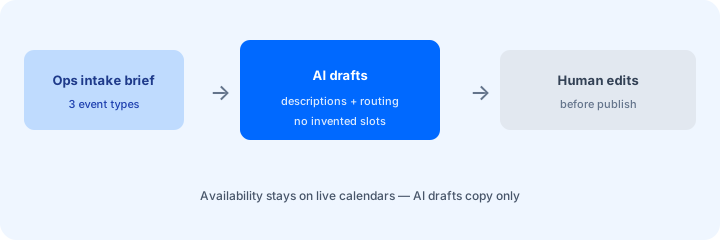
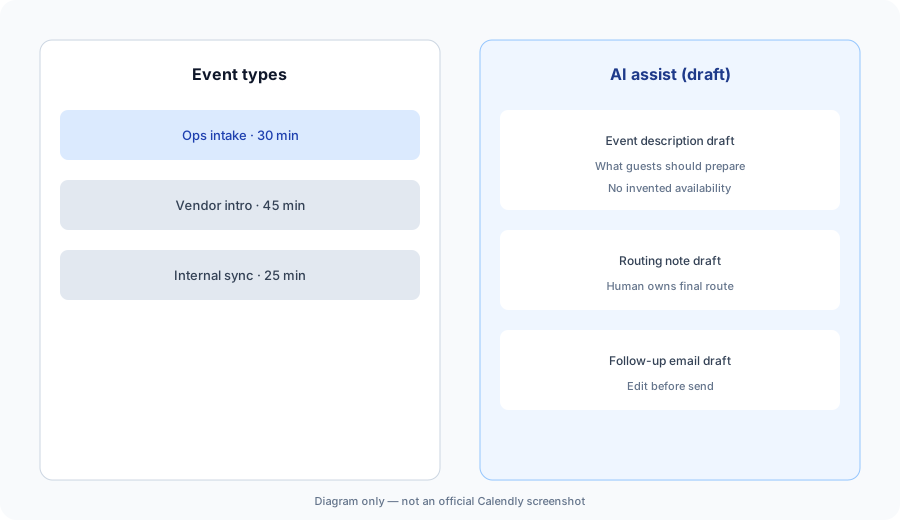
What it is: Use AI to draft clear event-type descriptions and a short routing note (who should get which meeting type). Calendly remains the scheduling SoR — AI does not invent open slots or override connected calendars.
Primary SoT workflow:
Draft 3 event-type descriptions and a routing note a human edits — no invented availability.
2. Follow-up and confirmation drafts
What it is: Propose confirmation and post-meeting follow-up copy from the event type and any intake answers that exist. Prefer placeholders over invented guest details. Never invent booking times.
Follow-up honesty:
From one event type + 3 sample intake answers (some blank): draft a confirmation email and mark Unknowns — never invent booking time or guest facts.
3. Intake questions and guardrails
What it is: Suggest intake questions that help routing (role, urgency, topic). If the brief has no routing logic, output Unknown instead of inventing paths that dump every guest on one owner.
Question set:
List 5 intake questions that help route ops vs vendor meetings. Flag any question that would collect sensitive data a human should not put in a public form.
4. Vs Motion / Reclaim / Cal.com
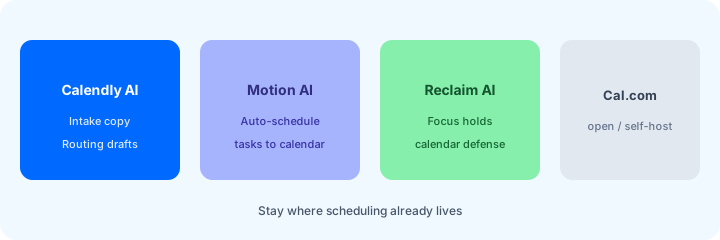
What it is: Stay in the tool you already pay for. Calendly AI for guest-facing intake copy; Motion AI for calendar-first task auto-scheduling; Reclaim AI for focus holds (Clockwise is discontinued: as of Oct 11, 2026, Clockwise says it shut down on March 27, 2026, source); Cal.com when open-source or self-host calendars matter (see Fri pack when that page ships). Soft $19/$9 below only if Calendly AI and other seats overlap on the same scheduling jobs.
Home-for-the-job:
List 6 recurring scheduling jobs this quarter. Assign each to Calendly AI, Motion AI, Reclaim AI, or Cal.com — one sentence why. Do not invent a tool you do not use.
Pricing context (October 2026)
Calendly publishes plans and AI packaging on its public site (start from calendly.com/pricing). This page is dated October 2026 and is not a price sheet — we do not invent exact per-seat or AI add-on prices.
Uncertainty: Which tiers include which AI surfaces, seat minimums, and regional availability change. Always verify on live Calendly pages and your admin before budgeting.
When Calendly AI is useful (honest take)
Useful when Calendly is already the guest-facing intake SoR, humans edit copy before publish, and availability stays on connected calendars. Less useful when the real problem is calendar defense (use Reclaim) or task→calendar auto-scheduling (use Motion), or when you hoped AI alone would invent open slots and routing without intake rules.
Paying for Calendly AI and a few other AI tools? The $9 AI toolkit spreadsheet lists every AI subscription you have, what each one costs, and how fast it pays for itself, so you can see which ones are worth the money.
Want someone to do it for you? AI toolkit audit — $19
Related options (educational)
| Need | Better home | Why |
|---|---|---|
| Guest-facing intake copy | Calendly AI (this page) | Event copy + routing drafts with human edit |
| Calendar-first auto-schedule | Motion AI | Tasks → calendar blocks |
| Focus holds / calendar defense | Reclaim AI / Clockwise | Protect deep work time |
| Open / self-host scheduling | Cal.com (Fri pack path) | When open-source control matters |
FAQ
What is Calendly AI?
Assists for scheduling copy and ops intake drafts a human should review. Verify live feature names on Calendly's site. Do not treat AI as a source of availability.
How much does it cost?
Confirm on Calendly's public pricing — this Oct 2026 page does not invent exact prices.
Should AI invent available slots?
No. Connected calendars and published rules own availability. Mark Unknown when intake rules are blank.
Calendly vs Motion / Reclaim / Cal.com?
Stay in the tool you already pay for. See related reviews linked above.
Optional next step (if seats overlap)
If several AI seats would cover the same scheduling, collab, and people-ops jobs, optional help mapping overlap: $19 AI toolkit audit or $9 AI toolkit spreadsheet. Email Audit $19 or Toolkit spreadsheet $9.
Checkout is live via Stripe. After you pay, we email delivery (spreadsheet) or intake next steps (audit).