Ops · Calendar · Focus time
Reclaim.ai review (Sep 2026): calendar defense for ops leads
Habits and tasks → defended focus time — when Reclaim helps meeting-heavy ops leads vs Motion (Clockwise is discontinued) — with concrete Try this prompts and honest Sep 2026 pricing notes.
Who this page helps
Ops leads whose weeks fill with recurring meetings and who still need protected deep-work blocks — without manually rebuilding the calendar every Sunday. If your company problem is team meeting-load culture and holdouts, note that Clockwise is no longer available (as of Oct 11, 2026, Clockwise says it shut down on March 27, 2026; source), so start with a one-lead Reclaim pilot and team rules. If your primary pain is PM tasks auto-scheduling into a personal calendar, look at Motion. This page is for calendar defense for an ops lead, not a claim that Reclaim fixes bad meeting culture alone.
What Reclaim.ai is
Reclaim.ai connects to Google Calendar or Outlook and continuously schedules Habits, Focus Time, Buffer Time, tasks (via integrations), and Smart Meetings around what is already booked. Public packaging emphasizes AI Agents per seat (Focus, Habits, Meeting Quality, and related agents) that keep optimizing as the week changes. This review focuses on defended focus for meeting-heavy ops leads — not a full enterprise workforce-analytics pitch.

Major features (with how someone uses them)
Examples at a glance: each feature has a concrete ops example plus a Try this mini-workflow.
1. Week plan with defended focus
What it is: Reclaim’s core job for ops is proposing a week where recurring meetings stay put (or flex as Smart Meetings) while Focus Time and Habits land in real gaps. You set goals (e.g. 2×90min focus) and priorities so customer calls never get auto-declined while lower-priority holds can move.
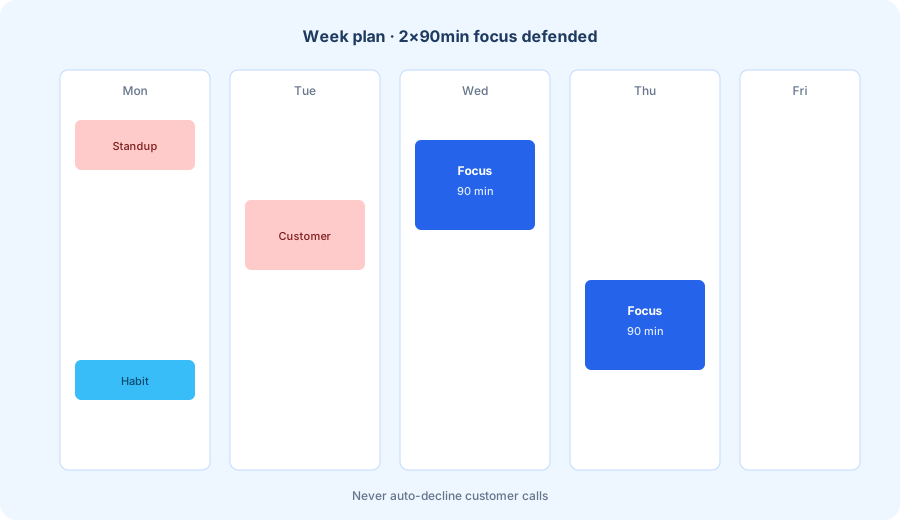
With your real recurring meetings listed:
Given these recurring meetings + 3 deep-work tasks (list them), propose a week plan that protects 2×90min focus blocks and never auto-declines customer calls.
2. Habits that find real slots
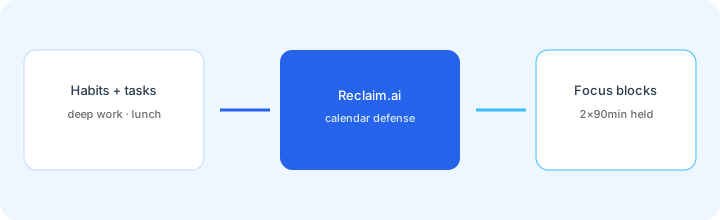
What it is: Habits are recurring blocks (lunch, admin hour, weekly planning) that Reclaim places flexibly inside allowed windows. Lite limits you to one Habit; paid plans unlock unlimited Habits. Best when the Habit is a real routine you will honor — not a wish-list of eight daily rituals you will ignore.
Before enabling more than two Habits:
Name one Habit you actually kept last month. Set its priority below customer calls and below executive 1:1s. Delete any Habit you skipped twice — do not add new Habits until that one sticks for two weeks.
3. Tasks → Focus Time
What it is: Reclaim can pull tasks from Google Tasks, Todoist, Asana, ClickUp, Jira, Linear (plan-dependent) and defend Focus Time so deep work gets calendar space before deadlines. Focus Time Agents aim at weekly goals with proactive or reactive modes. Useful when the task list is real; useless when the backlog is fiction.
With three real tasks that have owners and due dates:
Schedule Focus Time for these 3 tasks only. Prefer two 90-minute blocks mid-week. If a block would overlap a customer call or executive 1:1, move Focus — never the call.
4. Defense settings & auto-decline honesty
What it is: Reclaim can show Focus/Habits as busy or free, and optionally auto-decline meeting invites during Focus. That last toggle is powerful and dangerous for ops leads who must stay bookable for customers. Pair defense settings with clear priority rules and a human review of the first two weeks.
Before enabling auto-decline:
Write a one-line rule: “Never auto-decline: customer calls, board, exec 1:1s.” List meeting types that may auto-decline. If you cannot name the safe list in under five bullets, keep auto-decline off for 14 days.
Public pricing (September 2026)
From reclaim.ai/pricing (Sep 2026; yearly toggle is the default on the page):
- Lite: Free forever — 1 user; limited Habits / scheduling range / syncs / Scheduling Links; public cards cite ~5 AI Agents.
- Starter: about $10 / seat / month billed annually ($12 monthly) — up to 10 seats; unlimited Habits; ~8-week scheduling range; more calendar syncs and Scheduling Links; ~10 AI Agents per seat.
- Business: about $15 / seat / month billed annually ($18 monthly) — up to 100 seats; ~12-week range; unlimited syncs/links; Team OOO + Delegated Access; ~100 AI Agents per seat.
- Enterprise: about $22 / seat / month billed annually (monthly often unavailable) — 100+ seats; SSO/SCIM; org-chart aware scheduling; unlimited AI Agents on public cards.
- Add-ons / promos: Attendee Users (AUs) for multi-person Smart Meetings and analytics-only seats appear on public cards with time-boxed promos — treat those as changeable.
Uncertainty flags: The pricing page defaults to yearly numbers; monthly is higher. AI Agent counts, Connected Calendar caps, and Attendee User promos shift. Help-center articles sometimes list slightly different Connected Calendar counts than the marketing table. Never budget from a blog alone — open reclaim.ai/pricing for your billing cadence.
When Reclaim.ai is useful (honest take)
Reclaim tends to help when an ops lead already lives in Google/Outlook, has recurring meetings plus a short real task list, and needs Habits/Focus Time defended without Sunday tetris. It tends not to help when the real problem is org-wide meeting culture (Clockwise used to target that, but it is discontinued), when the backlog is fake, or when auto-decline would block customer access. Buying seats for the whole company “for Focus Time” before one lead proves a 30-day habit is usually premature.
Paying for Reclaim.ai and a few other AI tools? The $9 AI toolkit spreadsheet lists every AI subscription you have, what each one costs, and how fast it pays for itself, so you can see which ones are worth the money.
Want someone to do it for you? AI toolkit audit — $19
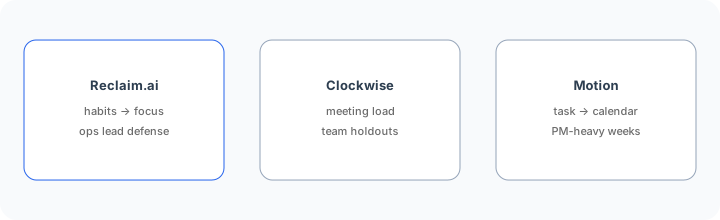
Alternatives compared: Reclaim vs Motion (and discontinued Clockwise)
| Axis | Reclaim.ai | Clockwise (discontinued) | Motion | Manual blocks |
|---|---|---|---|---|
| Best when… | Habits + Focus for an ops lead. | Team meeting-load / holdouts. | Task→calendar PM autopilot. | Simple weeks; low meeting load. |
| Cost shape (Sep 2026) | Free Lite → ~$10–$22/seat. | None: shut down March 27, 2026. | Motion seat plans (confirm live). | Near $0 tooling; human discipline. |
| Less useful when… | Org culture is the only problem. | You only need personal Habits. | You only need Focus Habits. | Meetings reshuffle daily. |
Also see ClickUp Brain, monday.com AI, Granola, and the ops & automation hub.
FAQ
What is Reclaim.ai?
A calendar defense tool that schedules Habits, Focus Time, tasks, and Smart Meetings around your existing Google or Outlook calendar.
How much does Reclaim.ai cost in September 2026?
Public cards: Lite Free; Starter ~$10/seat/mo annually ($12 monthly); Business ~$15/$18; Enterprise ~$22 annually. Confirm on reclaim.ai/pricing.
Reclaim vs Clockwise?
Clockwise is no longer an option: as of Oct 11, 2026, Clockwise says it shut down on March 27, 2026 and recommends Reclaim (source). Reclaim when personal habits→focus defense is the job. Overlap exists — pilot one lead for 30 days before dual seats.
Should Focus Time auto-decline meetings?
Only with an explicit safe-list. Many ops leads keep auto-decline off for customer and exec invites.
Optional next step (if seats overlap)
If Reclaim.ai is one of several AI seats and you want a written pass across the whole list, the optional $19 AI toolkit audit produces a short memo. Prefer an editable grid? The $9 AI toolkit spreadsheet is a one-time CSV. Soft offer only — this deep-dive stands alone.
Checkout is live via Stripe. After you pay, we email delivery (spreadsheet) or intake next steps (audit).