How-to · Calendar · Reclaim.ai · Oct 11, 2026
Add two meeting rules in Reclaim without inventing attendees
“Two meeting rules” here means two concrete Reclaim settings, a buffer after meetings and one protected no-meeting window, applied to the calendar you already have. You do not invent guests, fake holds, or phantom attendees to make the rules stick.
Who this is for
Meeting-heavy ops leads on Google Calendar or Outlook who want spacing and a protected window without fake attendees. Former Clockwise users fit here too. As of Oct 11, 2026, Clockwise says it shut down on March 27, 2026 (shutdown notice), and its notice points people to Reclaim. If you already set up Focus Time and one Habit with our Reclaim focus blocks how-to, this page is the next layer: meeting spacing, not focus goals. If tasks must auto-pack onto the calendar, see Motion AI.
How to do it
This page is a how-to. It is not a ranking of calendar AI products. Product detail and dated plan notes live on the Reclaim.ai review. Confirm Buffer Time and Hours settings on your Reclaim plan before you pilot.
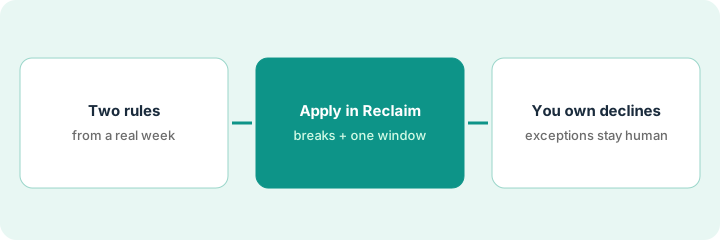
1. Step 1 — Write two rules from a real week sketch
What it is: From last week’s calendar as it actually happened, pick exactly two rules you will honor.
- Example pair: (A) a 10-minute break after any meeting of 30 minutes or longer; (B) no meetings Tue/Thu 9:00–11:00 local time.
- Ban inventing attendees, rooms, or “sync with Alex” holds to protect the window.
- Name exceptions up front: customer calls and the weekly exec meeting may land inside the window.
- Cap at two rules for week one. Rules you will ignore only add noise.
Sketch shows twelve back-to-back meetings on Wednesday and no open morning all week. Rules: 10-minute breaks after 30+ minute meetings; no meetings Thu 9–11. Exception list: named customer calls. No fake “Focus with Team” guests.
Print last week. Circle the pain (back-to-backs or no open morning). Write two rules and three allowed exceptions on a sticky note. Do not add guests.
2. Step 2 — Apply the rules in Reclaim
What it is: Set the two rules in Reclaim so they act on your real calendar and show busy or free honestly.
- Rule A: turn on Buffer Time for breaks after meetings and set one duration (10 minutes). Leave travel time off unless you actually travel to meetings.
- Rule B: protect the Tue/Thu window with a recurring block that has no invitees, and narrow your meeting hours so scheduling links do not offer that window.
- Show the protected window as busy so people who book you see it.
- Do not stack a second calendar tool on the same two rules in week one.
Reclaim adds a 10-minute break after the 45-minute Monday standup. The Thu 9–11 block shows busy with an empty guest list, and your scheduling link stops offering Thu mornings. A flexible internal sync moves; a pinned customer call does not.
Turn on only the two rules. Leave any auto-decline setting off until Step 3’s exception list is written. Screenshot the settings for your ops log.
3. Step 3 — Human owns declines and exceptions
What it is: You, not the tool, decide which invites may break the rules.
- Share the exception list with anyone who books you.
- Review mid-week: put back any customer meeting that moved but should have stayed pinned.
- Decline or renegotiate only with a human message. No silent mass declines on day one.
- Cancel a second calendar AI seat if it only repeats these two rules.
An internal brainstorm tries to land Thu 9:30, so you decline with a note pointing to office hours. A customer call at Thu 10 stays because it is on the exception list. No invented attendees appear on any block.
Friday: count invites that hit the protected window or ate a break. Keep, allow as an exception, or decline, each with a one-line reason. Adjust one rule at most for next week.
Pricing context (October 2026)
This how-to is not a price sheet. Plan notes live on the Reclaim.ai review. Recheck Reclaim’s pricing page and your calendar admin before you budget. Related path: Motion AI. Dated October 2026.
Checked Oct 11, 2026 on the vendor’s own pricing page: Reclaim’s pricing page lists Starter at $10 per seat per month billed yearly ($12 billed monthly), Business at $15 per seat per month billed yearly ($18 billed monthly), and Enterprise at $22 per seat per month (contact sales). It also offers a free 14-day trial. Buffer Time, Hours and scheduling-link limits differ by tier, so confirm both rules are on your plan.
Uncertainty: Which buffer, hours and scheduling features ship on each Reclaim tier changes over time. If an invoice and a review disagree, trust the invoice. Do not paste a marketing list price you did not pay. The only prices this site sells here are the optional $9 AI toolkit spreadsheet and $19 AI toolkit audit.
When this helps (honest take)
Useful when you can name two rules from a real painful week and will honor exceptions honestly.
Not useful when you want Reclaim to invent a social calendar, auto-decline every customer invite, or run alongside Motion on the same two rules.
Related options (educational)
| Need | Where to look | Why |
|---|---|---|
| Breaks and a protected window | Reclaim.ai | Primary path on this page |
| Focus Time and one Habit | Reclaim focus blocks how-to | Same product, different job: focus goals, not meeting spacing |
| Tasks auto-scheduled on the calendar | Motion AI | Mark pinned vs flexible first |
| Notion-native focus holds | Notion Calendar | When Notion is the task and calendar home |
| Before another seat | Three checks before an AI seat · Find unused AI seats | Live how-tos |
Related reviews: Reclaim.ai · Motion AI · Notion Calendar. Free: seat-waste calculator if two calendar AI seats enforce the same rules.
FAQ
Should I add fake attendees so people respect the no-meeting window?
No. Show busy honestly. Invented attendees create trust problems and calendar spam.
Can I turn on auto-decline on day one?
Only after the exception list is written and shared. Leads whom customers book directly should leave auto-decline off until the rules have run for a week.
Where do dated prices live?
On the Reclaim.ai review plus the vendor site. This October 2026 how-to does not invent list prices. Our Oct 11, 2026 check of the vendor’s own pricing page is summarized in the pricing section above.
Can I copy my Clockwise meeting rules over now that it has shut down?
Not automatically. As of Oct 11, 2026, Clockwise says it shut down on March 27, 2026 and deletes user data shortly after. Rewrite your two rules from last week’s calendar in Step 1 and set them up fresh in Reclaim.
Optional next step
Free reviews stay free. Neither offer is required to use this page. If Reclaim and another calendar AI seat already enforce the same two rules, optional help: $9 AI toolkit spreadsheet or $19 AI toolkit audit when you want a written memo.