Feature · Ops & automation · Notion · Oct 2026
Notion Calendar review (Oct 2026): calendar + Notion tasks for ops leads
When Notion Calendar helps ops leads sync Notion tasks with calendar without another seat. Complements Notion AI, Reclaim AI, and Motion AI.
What Notion Calendar covers here
This page is for ops leads who already live in Notion and want calendar focus that stays linked to Notion tasks — without buying another scheduling seat or inventing attendees. We focus on proposing focus holds from a week sketch, syncing calendar with Notion without seat sprawl, invite hygiene, and when Reclaim, Motion, or a general LLM is the better home. Feature names and packaging change — verify live on Notion’s site.
Major features (with how someone uses them)
Examples at a glance: each feature has a concrete ops example plus a short Try this.
1. Focus holds linked to Notion tasks (primary)
What it is: From a week sketch, propose three focus holds tied to real Notion tasks. An ops lead confirms times and task links. Never invent attendees, external invites, or commitments you cannot back with Notion truth.
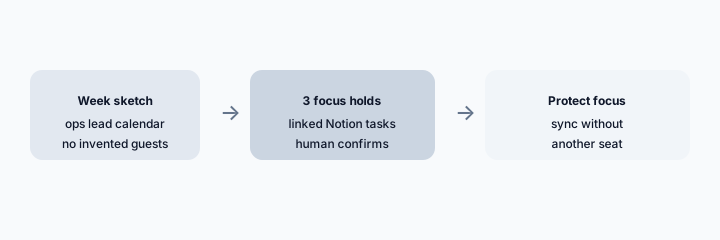
Primary SoT workflow:
From a week sketch: propose 3 focus holds linked to Notion tasks; never invent attendees.
2. Calendar + Notion sync without another seat
What it is: Notion Calendar’s value for many ops leads is staying inside the Notion stack — calendar next to tasks/pages — instead of adding a separate AI scheduler seat. Confirm which sync features exist on your Notion plan before assuming parity with dedicated calendars.
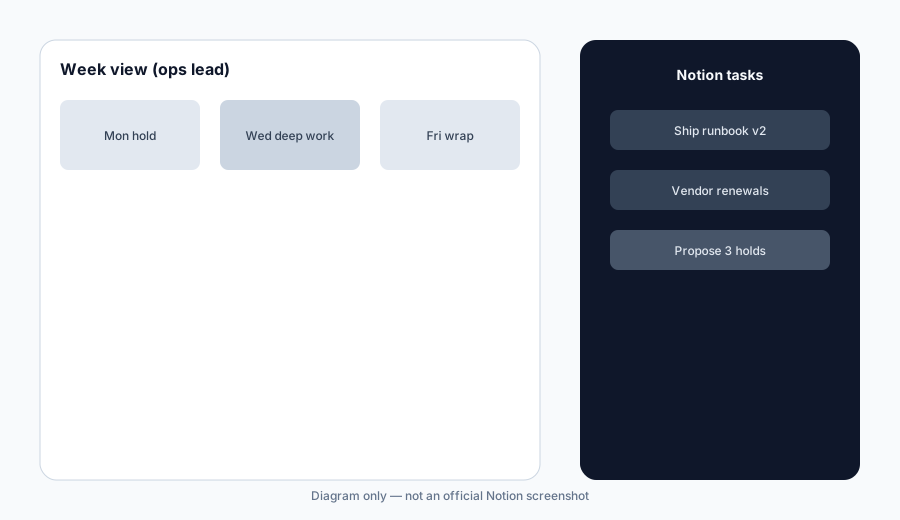
Seat honesty:
List calendar tools you already pay for. Mark which focus jobs Notion Calendar can cover today vs Unknown. Do not assume a feature you cannot see.
3. Attendee and invite hygiene
What it is: Focus holds are not meetings. Keep invite lists empty unless a real external or teammate meeting exists. Never let AI invent attendees from task assignees without human confirmation.
Invite gate:
For each proposed hold this week: label Focus-only vs Meeting. For Meeting, list real attendees from calendar truth — never invent names.
4. Vs Reclaim / Motion / ChatGPT / Claude
What it is: Stay in the stack you already pay for. Notion Calendar when Notion is the task/docs SoR; Reclaim AI for habit and meeting defense; Motion AI for auto-planned day packing; ChatGPT for ops / Claude for ops for drafting outside the calendar. Soft $19/$9 below only if seats overlap.
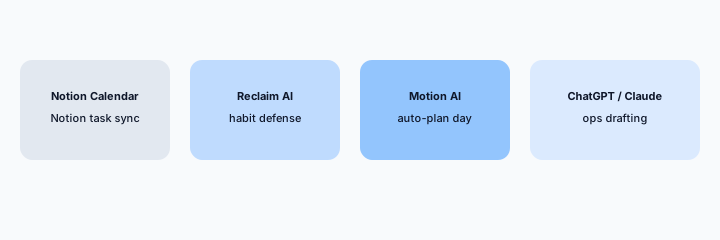
Home-for-the-job:
List 6 recurring focus/calendar jobs this quarter. Assign each to Notion Calendar, Reclaim, Motion, or ChatGPT/Claude — one sentence why. Do not invent a tool you do not use.
Pricing context (October 2026)
Notion publishes plans on its public site (start from notion.com/pricing). Notion Calendar availability and any AI-related packaging should be verified live. This page is dated October 2026 and is not a price sheet — we do not invent exact per-seat or Calendar prices.
Uncertainty: Which tiers include Calendar features, AI assists, and regional availability change. Always verify on live Notion pages and your admin before budgeting.
When Notion Calendar is useful (honest take)
Useful when Notion is already your task/docs SoR, you want calendar focus linked to Notion tasks, and a human confirms holds without inventing guests. Less useful when you need aggressive meeting defense (Reclaim), auto day-packing (Motion), or when Calendar features are not present on your plan.
Paying for Notion Calendar and a few other AI tools? The $9 AI toolkit spreadsheet lists every AI subscription you have, what each one costs, and how fast it pays for itself, so you can see which ones are worth the money.
Want someone to do it for you? AI toolkit audit — $19
Related options (educational)
| Need | Better home | Why |
|---|---|---|
| Notion tasks + calendar | Notion Calendar (this page) | Stay in Notion stack; no invented attendees |
| Notion AI writing / Q&A | Notion AI | Docs and workspace AI, not calendar holds |
| Habit / meeting defense | Reclaim AI | Protect habits against meetings |
| Auto-planned day | Motion AI | Day packing when Motion is SoR |
| Ops drafting outside calendar | ChatGPT for ops / Claude for ops | General LLM drafts |
FAQ
What is Notion Calendar?
Calendar alongside Notion tasks/pages for ops leads. This review focuses on focus holds linked to Notion tasks — never invent attendees.
How much does it cost?
Confirm on Notion’s public pricing — this Oct 2026 page does not invent exact prices.
Should AI invent meeting guests?
No. Focus holds stay invite-empty unless a real meeting exists.
Notion Calendar vs Reclaim / Motion?
Stay in the stack you already pay for. See related reviews linked above.
Optional next step (if seats overlap)
If several AI seats would cover the same calendar, backlog, or support jobs, optional help mapping overlap: $19 AI toolkit audit or $9 AI toolkit spreadsheet. Email Audit $19 or Toolkit spreadsheet $9.
Checkout is live via Stripe. After you pay, we email delivery (spreadsheet) or intake next steps (audit).