Tool · Ops & automation · Calendar · Oct 2026
Motion AI review (Oct 2026): calendar-first task planning for busy ops leads
When Motion-style auto-scheduling helps ops leads vs Reclaim / Clockwise — flexible blocks on the calendar, human-pinned work that must stay fixed.
What Motion covers here
This page is for busy ops leads who want calendar-first task planning — Motion (or Motion-style tools) proposing where flexible work lands, while 1:1s and board prep stay human-pinned. We compare that job to Reclaim.ai (habits/focus defense) and Clockwise, which covered focus holds on Google Calendar until it shut down (as of Oct 11, 2026, Clockwise says it shut down on March 27, 2026; source). Feature names and packaging change — verify live on Motion’s site.

Major features (with how someone uses them)
Examples at a glance: each feature has a concrete ops example plus a short Try this.
1. Recurring ops blocks: auto vs human-pin (primary)
What it is: List recurring work (inbox triage, vendor follow-ups, close checklist) and let Motion propose open slots for flexible items. Keep fixed times for stakeholder 1:1s, board prep, and anything that cannot move without people noticing.
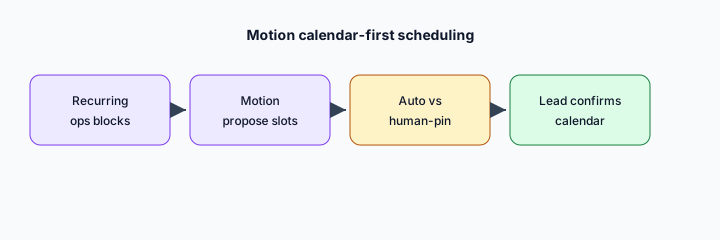
Primary SoT workflow:
List 8 recurring ops blocks. Propose which Motion may auto-schedule vs stay human-pinned.
2. Task list → week calendar
What it is: Pull open tasks into a week view so planning lives on the calendar, not only in a PM tool. Useful when Asana/monday already track work but the calendar is still empty air.
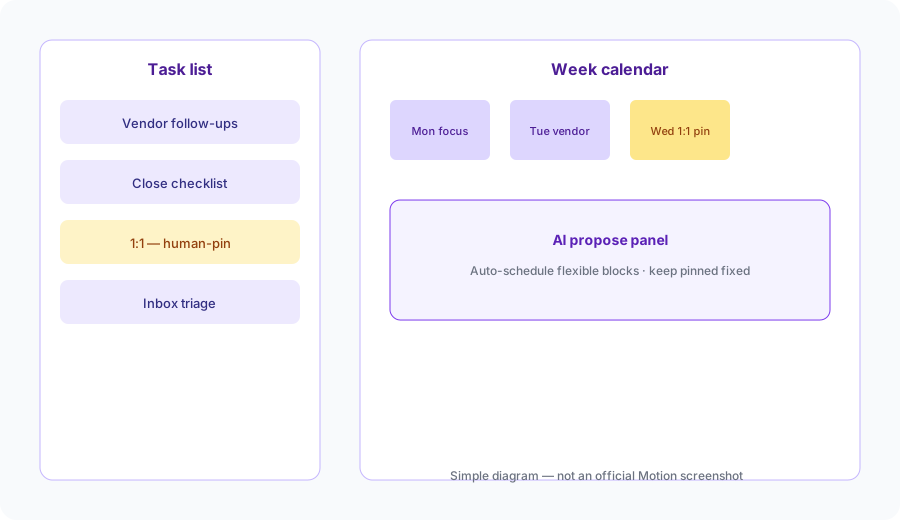
Week placement honesty:
From a 10-item task list (titles only): propose which 5 belong on this week’s calendar and which stay backlog. Do not invent due dates or attendees.
3. Deadline-aware reshuffle drafts
What it is: When a meeting lands or a deadline moves, Motion can propose a reshuffle of flexible blocks. Treat reshuffles as drafts — never auto-cancel a pinned stakeholder slot.
Reshuffle guardrails:
Assume one afternoon gets blocked by an urgent call. From your 8 recurring blocks, list which three may reshuffle and which must never move — one sentence why each.
4. Vs Reclaim / work trackers
What it is: Stay on the job you actually need. Motion for task→calendar auto-scheduling; Reclaim for habit/focus defense; Clockwise covered Google Workspace focus holds but is discontinued (shut down March 27, 2026); Asana Intelligence / monday.com AI when the work-management SoR needs AI, not the calendar.
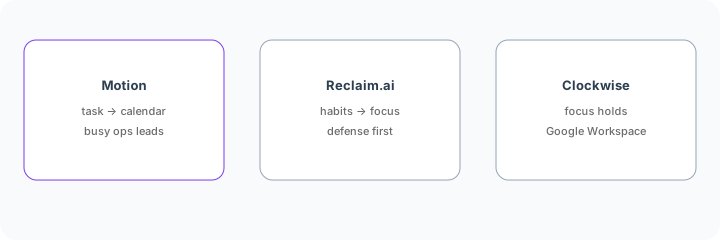
Home-for-the-job:
List 6 recurring calendar/ops jobs this quarter. Assign each to Motion, Reclaim, Asana Intelligence, or monday.com AI — one sentence why. Do not invent a tool you do not use.
Pricing context (October 2026)
Motion publishes plans on its public site (start from usemotion.com and Motion’s pricing pages). This page is dated October 2026 and is not a price sheet — we do not invent exact per-seat prices.
Uncertainty: Individual vs team tiers, AI packaging, and seat minimums change. Always verify on live Motion pages and your admin before budgeting.
When Motion is useful (honest take)
Useful when you already have a task backlog that never lands on the calendar, you can name flexible vs pinned blocks, and you will review auto-scheduled slots weekly. Less useful when the real problem is meeting culture (try Reclaim first), or when work-management AI in Asana/monday would fix the tracker — not the calendar.
Paying for Motion AI and a few other AI tools? The $9 AI toolkit spreadsheet lists every AI subscription you have, what each one costs, and how fast it pays for itself, so you can see which ones are worth the money.
Want someone to do it for you? AI toolkit audit — $19
Related options (educational)
| Need | Better home | Why |
|---|---|---|
| Tasks → calendar auto-schedule | Motion (this page) | Flexible blocks with human-pin guardrails |
| Habits / focus defense | Reclaim.ai | Defend time before tasks flood the week |
| Google Workspace focus holds | Clockwise | Focus + meeting rules on Google Calendar |
| Work already in Asana | Asana Intelligence | Fields/summaries in the tracker SoR |
| Work already on monday | monday.com AI | Board assists where work already lives |
FAQ
What is Motion AI for ops leads?
Calendar-first task planning that proposes slots for flexible work. Verify live feature names on Motion’s site. Compare to Reclaim for adjacent jobs; as of Oct 11, 2026, Clockwise says it shut down on March 27, 2026 (source).
How much does it cost?
Confirm on Motion’s public pricing — this Oct 2026 page does not invent exact prices.
Should every block auto-schedule?
No. Pin stakeholder-facing and fixed cadences. Auto-schedule only flexible recurring work.
Motion vs Reclaim (and Clockwise)?
Pick by job: tasks→calendar (Motion), habits/focus defense (Reclaim), Google focus holds were Clockwise’s job, but as of Oct 11, 2026, Clockwise says it shut down on March 27, 2026 (source); use Reclaim.
Optional next step (if seats overlap)
If Motion would sit beside chat and other calendar/finance AI seats on the same ops jobs, optional help mapping overlap: $19 AI toolkit audit or $9 AI toolkit spreadsheet. Email Audit $19 or Toolkit spreadsheet $9.
Checkout is live via Stripe. After you pay, we email delivery (spreadsheet) or intake next steps (audit).