How-to · Calendar · Motion AI · Oct 11, 2026
Mark pinned vs flexible ops blocks before Motion auto-schedules
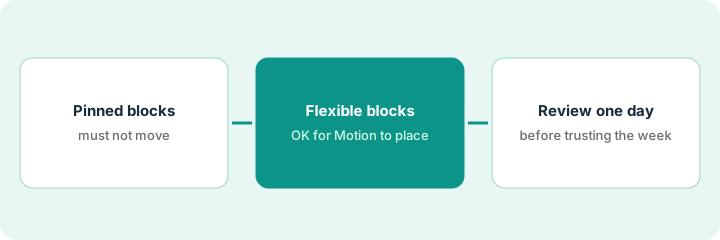
“Pinned vs flexible” here means labeling work before Motion packs your day: pinned blocks must not slide without a human; flexible blocks may. Skipping the labels is how auto-schedule quietly eats customer and compliance time.
Who this is for
Ops leads who already use (or are piloting) Motion to place tasks on the calendar and need an explicit pinned/flexible split first. If you only need Habits/Focus defense without task auto-pack, see Reclaim.ai. If you were using Clockwise for meeting rules, note that its own site says the product shut down on March 27, 2026. This is not a Todoist focus-trio or Sunsama shut-down guide — different product homes.
How to do it
This page is a how-to. It is not a ranking of calendar AI products. Product detail and dated packaging notes live on Motion AI. Confirm task and calendar AI behavior on your Motion plan before you pilot.

1. Step 1 — Label pinned ops blocks
What it is: List the chunks of work that must stay where a human put them this week.
- Pinned examples: customer calls already booked, board prep hard deadline, payroll submit window, compliance review with an external party.
- Enter them in Motion (or on the calendar Motion reads) as fixed / immovable per your plan’s controls — confirm labels in product.
- Do not invent meetings or attendees to “protect” pinned time.
- Cap week-one pinned list to what is already real on the calendar or in the task system of record.
Pinned: Wed 2pm customer quarterly business review (existing invite), Fri 10–11 payroll submit (hard window), Thu counsel call. No fake “Hold for Deep Work w/ Team” guests.
Sticky titled PINNED. Only items with a real invite, external dependency, or statutory deadline. Everything else waits for Step 2.
2. Step 2 — Label flexible ops blocks
What it is: Name the work Motion may place into open gaps.
- Flexible examples: inbox batch, doc cleanup, internal research, draft prep without a fixed meeting.
- Set durations you will actually honor (30–90 minutes beats fantasy 4-hour blocks).
- Point Motion at real tasks — do not invent a backlog so the AI has something to pack.
- Keep risk-adjacent flexible work out of overnight auto-moves if your process forbids it.
Three tasks: “Draft quarterly business review appendix” 60m, “Vendor folder cleanup” 45m, “Slack catch-up” 30m. Motion may place them around pinned quarterly business review and payroll. No new projects created by the model.
Add at most five flexible tasks with honest durations. Reject any AI-created task you did not already own.
3. Step 3 — Review one day of auto-schedule
What it is: After Motion packs one day, a human audits before you trust the week.
- Check every pinned block still sits where you left it.
- Move or delete flexible blocks you will not do — do not let guilt keep fiction on the calendar.
- Note one rule change (e.g. shorter flexible max, stricter pin).
- Do not run Reclaim Habits for the same pinned list in parallel in week one.
Tuesday pack: quarterly business review stayed. Appendix landed 9–10 (kept). Cleanup landed 4:30 (deleted — you never do cleanup at 4:30). Slack catch-up moved to Wednesday deliberately. One pin restored after an aggressive reshuffle.
End of day one: three columns — Kept | Moved by me | Wrongly moved by AI. Fix settings until Wrongly moved is zero for pins.
Pricing context (October 2026)
This how-to is not a price sheet. Plan notes live on Motion AI. Recheck usemotion.com pricing and your account before you budget. Related paths: Reclaim.ai. Dated October 2026.
Checked Oct 11, 2026 on the vendor’s own pricing page: Motion’s pricing page (Individuals tab, “Pay annually (Save 33%)” selected) lists Pro AI at $19 per seat per month with 7,500 AI credits per seat per month, and Business AI at $29 per seat per month with 15,000 credits, plus time tracking and team capacity planning. We did not record the monthly-billing figures, so we do not quote them.
Uncertainty: Auto-schedule aggressiveness and pin controls change by plan and version. If an invoice and a review disagree, trust the invoice. Do not paste a marketing list price you did not pay. The only prices this site sells here are the optional $9 AI toolkit spreadsheet and $19 AI toolkit audit.
When this helps (honest take)
Useful when Motion is (or will be) the packer, you can name pins, and you will review day one.
Not useful when everything is “pinned,” you invent tasks to feed the AI, or you want Motion plus Reclaim plus another calendar tool for the same week defense.
Related options (educational)
| Need | Where to look | Why |
|---|---|---|
| Task auto-schedule on calendar | Motion AI | Primary path on this page |
| Habits + focus defense | Reclaim.ai | No task packer required |
| Meeting rules and buffers | Reclaim.ai | Clockwise’s own site says the product shut down on March 27, 2026, so this page does not point you there. |
| Daily planner shut-down | Sunsama | End-of-day ritual, not auto-pack |
| Before another seat | Three checks before an AI seat · Find unused AI seats | Live how-tos |
Related reviews: Motion AI · Reclaim.ai. Free: seat-waste calculator if multiple calendar AI seats pack the same day.
FAQ
Can Motion move a pinned customer call if a higher-priority task appears?
Not in this pattern. Pins stay until a human moves them. If a setting allows pin breaks, turn it off for customer and compliance pins.
Is this the same as Reclaim focus blocks?
No. Reclaim-style focus defense is a different ritual. This page is about labeling before Motion’s task auto-schedule.
Where do dated prices live?
On the Motion AI review plus the vendor site. This October 2026 how-to does not invent list prices. Our Oct 11, 2026 check of the vendor’s own pricing page is summarized in the pricing section above.
Does Motion use credits for AI?
Its Oct 11, 2026 pricing page lists a monthly AI credit allowance per seat (7,500 on Pro AI, 15,000 on Business AI). Auto-scheduling one reviewed day in Step 3 is a small, cheap test before you let it plan a whole week.
Optional next step
Free reviews stay free. Neither offer is required to use this page. If Motion and another calendar AI seat already fight over the same pins, optional help: $9 AI toolkit spreadsheet or $19 AI toolkit audit when you want a written memo.