Tool · Ops & automation · Daily planning · Oct 2026
Sunsama review (Oct 2026): daily planning for ops makers
Daily shut-down and intentional planning vs calendar auto-schedulers. For ops makers who pull tasks from many systems and want a calmer end-of-day ritual — not only AI that fills empty calendar gaps. Pair with Reclaim.ai, Motion AI, and Clockwise when comparing auto-scheduling.
What Sunsama covers here
This page is for ops makers evaluating a daily planner that stresses intentional plan + shut-down — not a deep ITSM or ERP review. Feature names and AI add-ons change; confirm on sunsama.com. Diagrams below are educational workflows, not product screenshots.

Major features (with how someone uses them)
Examples at a glance: each feature has a concrete ops-maker example plus a short Try this.
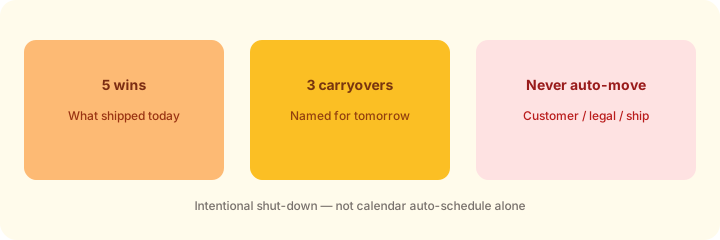
1. Shut-down checklist: wins, carryovers, never auto-move (primary)
What it is: End the day with a short ritual: name what shipped, what carries, and what must never silently slide. Sunsama markets guided shut-down as part of the daily loop — useful even if you later run the checklist in another tool.
2. Guided daily planning + timeboxing
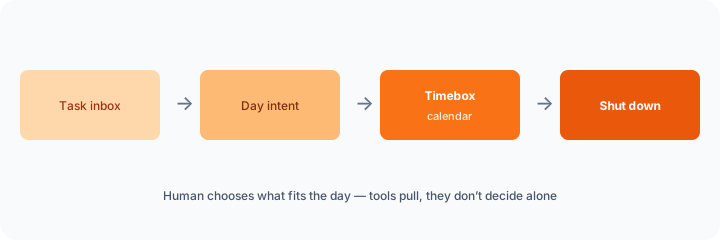
What it is: Pull a realistic day from inbox + calendar, then place work in timeboxes you accept — not an unbounded task dump. The human still chooses capacity.
3. Pulling work from many tools
What it is: Ops work often lives in Asana/Jira/email/Notion. A planner that imports or mirrors tasks can reduce tab-hopping — still treat imports as drafts until you accept them into the day.
4. Vs Reclaim / Motion
What it is: Intentional daily plan + shut-down (Sunsama-style) vs calendar auto-schedulers that place focus or meeting time for you. Prefer the job you actually need.
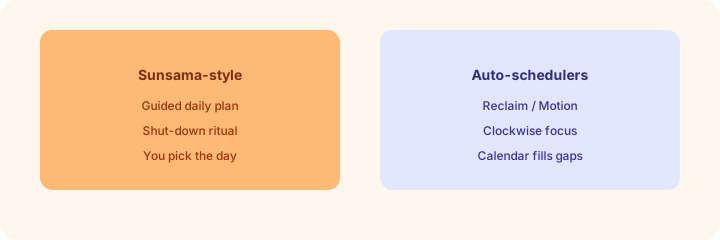
- Reclaim.ai — habits and focus blocks that defend calendar time
- Motion AI — auto-scheduled tasks on a dense calendar
- Clockwise — team focus time and meeting reshuffle patterns
- Asana Intelligence — when Asana is already the work home
Pricing context (Oct 2026)
Public Sunsama billing help and pricing pages have listed roughly $22/user/month billed monthly and about $17/user/month billed annually (often shown as $204/year), with a trial and no permanent free tier. Some FAQ copy on the same site has historically shown different dollar figures — treat that as uncertainty and verify on sunsama.com/pricing before you buy. We do not invent enterprise custom quotes. Dated October 2026.
When useful / when not
Useful when: You want a daily shut-down and intentional plan as an ops maker, and you will actually run the ritual. Less useful when: You already have a working auto-scheduler (Reclaim/Motion) for the same job, or you only need a shared team board AI (Asana/Jira). Educational — not a scorecard.
Paying for Sunsama and a few other AI tools? The $9 AI toolkit spreadsheet lists every AI subscription you have, what each one costs, and how fast it pays for itself, so you can see which ones are worth the money.
Want someone to do it for you? AI toolkit audit — $19
FAQ
What is Sunsama useful for in ops?
Guided daily planning and shut-down for makers who pull work from many tools — not ITSM or ERP posting.
How is it different from Reclaim or Motion?
Sunsama leans intentional plan + shut-down; those peers lean calendar auto-placement of focus or meetings.
What should never auto-move?
Customer commitments, legal/security deadlines, and ship/go-live calls.
What does it cost?
Public pages have listed ~$22/mo monthly or ~$17/mo annual ($204/year) — verify on the vendor pricing page; FAQ figures can disagree.
Optional next step (if seats overlap)
If several AI seats would cover the same jobs, optional help mapping overlap: $19 AI toolkit audit or $9 AI toolkit spreadsheet. Email Audit $19 or Toolkit spreadsheet $9.
Checkout is live via Stripe. After you pay, we email delivery (spreadsheet) or intake next steps (audit).