How-to · Daily planner · Sunsama · Oct 11, 2026
Run a shut-down checklist in Sunsama that never auto-moves risk work
A “shut-down checklist” here means a fixed end-of-day ritual in Sunsama: close the day, park flexible work, and leave risk items pinned until a human decides. It is not auto-rollover of everything unfinished.
Who this is for
Ops leads whose daily planner home is already Sunsama and who want a repeatable shut-down without silent rollover of response-time target, compliance, or customer-risk work. If Todoist is the task system of record and you only need a focus trio, see Todoist AI. If tasks must auto-land on the calendar, see Motion AI — and label pinned vs flexible first. If you are stacking a second daily planner seat, read three checks before an AI seat first.
How to do it
This page is a how-to. It is not a ranking of daily planners. Product detail and dated packaging notes live on Sunsama. Confirm shut-down and channel features on your plan before you pilot.
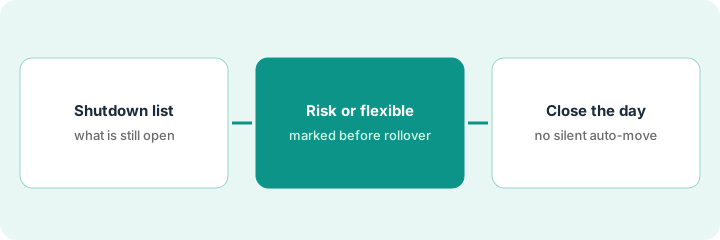
1. Step 1 — Build the shutdown list
What it is: Write a short end-of-day checklist you will run every workday — same order, five to seven lines max.
- Include: capture open loops, clear Today leftovers into risk vs flexible, set tomorrow’s top three, shut Slack/email intentionally.
- Exclude: inventing new projects, rewriting the week plan, or “process every backlog.”
- Keep the list in Sunsama (task or ritual) or a pinned note linked from the daily page.
- Name a hard stop time (e.g. 5:40 local) so shutdown is not infinite triage.
Shutdown lines: (1) Inbox zero for starred only, (2) Sort unfinished Today into risk/flexible, (3) Pick tomorrow’s three, (4) Close Slack, (5) One sentence win log. No “clean entire backlog.”
Write seven lines max on a sticky titled Shutdown. Timebox twenty minutes. If you regularly overrun, cut lines — do not buy another AI seat to “finish shutdown.”
2. Step 2 — Mark risk vs flexible before you close
What it is: Before Sunsama’s rollover or tomorrow planning assist runs, label unfinished work.
- Risk: customer response-time target, compliance, payroll-adjacent, exec-committed — human must move or keep.
- Flexible: admin, reading, nice-to-have polish — may roll to tomorrow.
- Do not invent new tasks during labeling.
- If AI suggests rolling everything, reject the risk subset.
Unfinished: “Send renewal quote” = risk (stays visible / pinned). “Reorganize Notion wiki” = flexible (may roll). AI draft that rolls both → you undo the risk roll.
Two columns on paper: Risk | Flexible. Place every unfinished Today card. Only Flexible may auto-suggest into tomorrow during shutdown.
3. Step 3 — Close the day without auto-moving risk
What it is: Complete the ritual so flexible work can move and risk work stays until you click.
- Run the checklist top to bottom once.
- Allow rollover / tomorrow planning only for Flexible.
- Leave Risk on today or consciously reschedule with a comment — no silent AI move.
- Do not enable a second planner (Todoist AI daily + Sunsama) to own the same shut-down job.
Flexible wiki task rolls to tomorrow 9:00. Renewal quote stays on today with a 7:30am hold you placed. Shutdown checklist checked at 5:45. No Motion auto-pack for the same risk item the same night.
Friday audit: count risk items that moved without your click this week. Target zero. Fix the setting or habit that caused each miss.
Pricing context (October 2026)
This how-to is not a price sheet. Plan notes live on Sunsama. Recheck sunsama.com pricing and your account before you budget. Related paths: Todoist AI, Motion AI. Dated October 2026.
Checked Oct 11, 2026 on the vendor’s own pricing page: Sunsama’s pricing page shows one Pro plan at $17 per month billed yearly, or $22 per month billed monthly (USD), with a 14-day free trial and AI, MCP and Zapier listed in the plan; Enterprise is contact-us. An FAQ lower on the same page still says $25 per month ($20 on yearly plans), so confirm the figure at checkout. These match the ~$22 / ~$17 in our Sunsama review.
Uncertainty: Channel integrations and AI-labeled assists change by plan and rollout. If an invoice and a review disagree, trust the invoice. Do not paste a marketing list price you did not pay. The only prices this site sells here are the optional $9 AI toolkit spreadsheet and $19 AI toolkit audit.
When this helps (honest take)
Useful when Sunsama is already the day home, you will honor a short ritual, and risk work is named.
Not useful when you want everything unfinished to vanish into tomorrow, or you refuse a hard stop time. Shutdown without a stop time becomes more work.
Related options (educational)
| Need | Where to look | Why |
|---|---|---|
| Sunsama daily planner | Sunsama | Primary path on this page |
| Todoist daily focus trio | Todoist AI | When Todoist is the task home |
| Pinned vs flexible before auto-schedule | Motion AI | Calendar packing, different ritual |
| Calendar focus holds | Reclaim.ai | When calendar defense is the job |
| Before another seat | Three checks before an AI seat · Find unused AI seats | Live how-tos |
Related reviews: Sunsama · Todoist AI · Motion AI. Free: seat-waste calculator if two daily-planner seats own the same shut-down.
FAQ
Can Sunsama auto-roll risk work if I forget shutdown?
Not in this pattern. Risk stays until you move it. If a setting rolls everything, turn that off for risk-labeled work.
Is shut-down the same as a focus block?
No. Shut-down is end-of-day triage. Focus blocks are defended calendar time — different job (see the Reclaim and Motion reviews).
Where do dated prices live?
On the Sunsama review plus the vendor site. This October 2026 how-to does not invent list prices. Our Oct 11, 2026 check of the vendor’s own pricing page is summarized in the pricing section above.
Is there a free Sunsama plan?
The pricing page we checked on Oct 11, 2026 showed a 14-day free trial and one paid Pro plan, not a free tier. Run the shutdown routine during the trial week if you are still deciding.
Optional next step
Free reviews stay free. Neither offer is required to use this page. If Sunsama and another planner seat already own the same end-of-day ritual, optional help: $9 AI toolkit spreadsheet or $19 AI toolkit audit when you want a written memo.