How-to · Calendar · Reclaim · Oct 6, 2026
Protect three focus blocks this week without inventing attendees
“Focus blocks” here means real, defended time on your calendar — not fictional meetings with fake attendees. You leave the week with three protected deep-work holds you will actually honor.
Who this is for
Meeting-heavy ops leads whose calendar is already the bottleneck. If you will ignore every hold you create, no scheduler will save you. If customer calls must always win, say that in your priority rules before you turn on auto-decline.
How to do it
This page is a how-to. It is not a ranking of calendar AI products. Product detail and dated pricing live on the reviews linked below.

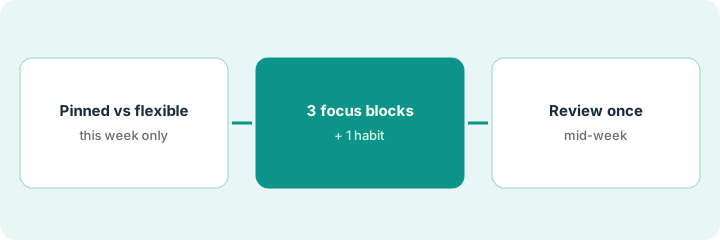
1. Step 1 — Name flexible vs pinned work
What it is: Before you connect Reclaim (or an alternative), write two lists for this week only.
- Pinned: stakeholder 1:1s, customer calls, board prep — must not move without a human.
- Flexible: inbox triage, admin hour, weekly planning, deep-work goals — may slide inside allowed windows.
- Do not invent attendees, rooms, or meetings that were not already on the calendar.
- Cap the first week: three focus goals beat eight rituals you will skip.
Pinned: Tuesday customer QBR, Thursday finance 1:1, Friday leadership. Flexible: two 90-minute focus blocks for the close checklist and one admin habit. No fake “sync with Alex” holds.
On a sticky, list every meeting that cannot move without people noticing. Everything else is a candidate for flexible focus time or a habit. Do not add guests to focus holds.
2. Step 2 — Set focus time and one habit (start with three blocks)
What it is: In Reclaim.ai, create Focus Time and Habits that land in real gaps. The free Lite plan includes Focus Time and Habits with a one-week scheduling range; paid plans extend the range and add integrations (see the pricing note below).
- Set a weekly focus goal — for example three blocks of 60–90 minutes.
- Add at most one or two habits you will honor (lunch, weekly planning).
- Pull tasks in only if the task list is real (Asana, Todoist, and others depend on plan).
- Show focus as busy so others see the hold. Decide on auto-decline carefully — Reclaim offers it as an optional setting, and it is risky for leads whom customers book directly.
Alternatives if Reclaim is not the fit: Clockwise is no longer one (as of Oct 11, 2026, Clockwise says it shut down on March 27, 2026; source), so the holds-and-meeting-rules steps on this page stay in Reclaim; Motion AI when tasks must land on the calendar automatically and pinned slots stay fixed by a human.
Reclaim places focus Tuesday 9–10:30, Wednesday 1–2:30, and Thursday 9–10:30. The admin habit finds a 30-minute gap on Friday. No new attendees appear on any hold.
Create exactly three focus blocks for this week and one habit. Leave auto-decline off for the first week unless you have already written which invite types may be declined.
3. Step 3 — Review declines and reshuffles once
What it is: Once mid-week, review what the scheduler moved or declined. Humans still own whether customers can book you.
- Scan declined or moved items. Restore any pinned meeting that should never have flexed.
- Delete focus holds you skipped twice — the tool is not the problem; the goal was unrealistic.
- Adjust priorities so customer calls outrank personal habits.
One focus block was taken by an urgent customer call (correct). One habit never happened (deleted). Because next week is QBR week, the focus goal drops from three blocks to two — honestly.
On Friday, open last week’s focus blocks and habits. Keep what you used. Delete what you ignored. Change one priority rule. Do not invent next week’s attendees to fill the calendar.
Pricing context (October 2026)
This how-to is not a price sheet. Plan detail for Reclaim.ai and Motion AI lives on those reviews; as of Oct 11, 2026, Clockwise says it shut down on March 27, 2026 (source), so there is no Clockwise plan to compare. Recheck each vendor’s site before you budget. Dated October 2026.
Checked Oct 6, 2026 on the vendor’s own pricing page: reclaim.ai/pricing lists Lite as free (one user, one-week scheduling range), Starter at $10 per seat per month billed yearly ($12 billed monthly), and Business at $15 per seat per month billed yearly ($18 billed monthly). Motion prices were not rechecked for this page — see their reviews and vendor sites.
Uncertainty: Plan limits, task integrations by plan, attendee add-ons, and auto-decline behavior change. If an invoice and a review disagree, trust the invoice. Do not paste a marketing list price you did not pay. The only prices this site sells here are the optional $9 AI toolkit spreadsheet and $19 AI toolkit audit.
When this helps (honest take)
Useful when meetings already crowd the week, you can name pinned vs flexible work, and you will honor three blocks.
Not useful when you want the tool to invent a social calendar, auto-decline every customer invite, or run Reclaim and Motion side by side “just in case.” Pick one primary calendar-defense tool.
Related options (educational)
| Need | Where to look | Why |
|---|---|---|
| Habits and personal focus defense | Reclaim.ai | Primary path on this page |
| Focus holds and meeting rules from a week sketch | Reclaim.ai (Clockwise used to cover this; as of Oct 11, 2026, Clockwise says it shut down on March 27, 2026, source) | Week sketch; never invent attendees |
| Tasks scheduled onto the calendar automatically | Motion AI | Flexible blocks; a human pins fixed work |
| Work already in Asana, not the calendar | Asana Intelligence | Tracker AI is not calendar defense |
Related reviews: Reclaim.ai · Clockwise (discontinued) · Motion AI. Free: seat-waste calculator if two calendar AI seats overlap.
FAQ
Should focus blocks include fake attendees so people respect them?
No. Show busy or free honestly. Invented attendees create trust problems and calendar spam.
Can I turn on auto-decline on day one?
Only if you have written which invite types may be declined. Ops leads whom customers book directly usually leave it off for the first week.
Reclaim or Motion? What about Clockwise?
Habits, focus defense, and holds or meeting rules from a week sketch → Reclaim. Tasks scheduled onto the calendar automatically → Motion. Clockwise is no longer an option: as of Oct 11, 2026, Clockwise says it shut down on March 27, 2026 (source). This page is not a ranking.
Where do dated prices live?
On the linked reviews and the vendor sites. This October 2026 how-to only repeats prices we checked on the vendor’s own pricing page on Oct 6, 2026.
Optional next step
Free reviews stay free. Neither offer is required to use this page. Optional help when calendar and task seats overlap: $9 AI toolkit spreadsheet or $19 AI toolkit audit.