Tool · Recruiting · Small teams · Oct 2026
Workable AI review (Oct 2026): AI job posts, screening help, and sourcing for small hiring teams
Workable is an all-in-one recruiting and HR system aimed at small and mid-size companies, with public prices and a 15-day free trial. Its AI covers job posts, interview questions, screening summaries, and sourcing, and the newer Workable Agent can run the top of the funnel on pay-per-action AI credits. This page walks through each with a real small-team hiring job, a Try this, and the points where the hiring manager still decides.
What this Workable AI page covers
This page is for founders, office managers, and the one HR generalist who also does all the hiring — teams opening a handful of roles a quarter without a recruiter. The question it answers: which of Workable’s AI features save that person real time, and what does the Workable Agent cost once it starts working candidates?
Workable’s AI comes in two layers. The built-in tools are on every plan: an AI job description generator, an AI interview question generator, AI screening summaries with match scores and requirement checklists, AI candidate recommendations and sourcing from a database Workable says holds over 400 million profiles, and automatic resurfacing of past applicants. The Workable Agent is a paid add-on that sources, emails, chats with, and evaluates candidates on its own, charging AI credits per action.
Everything below comes from Workable’s pricing, features, and Workable AI pages as we read them on 6 October 2026. Workable says the Agent scores only job criteria and excludes protected characteristics by design, and that recruiters keep the final call; your team still owns candidate notice and the decision on every person.
Major features (with how someone uses them)
Examples at a glance: each feature has a concrete example from a real job plus a short Try this you can run this week.
1. AI job description generator (primary)
What it is: The AI job description generator drafts a role-specific job post from a title and a few details about your company. Workable says it suggests wording that appeals to a broader pool, because long lists of requirements make qualified people rule themselves out. The draft is a starting point: it does not know which requirements you would actually reject someone for, and that is the part that decides who applies.
The fastest edit is subtraction. Every requirement you keep should be one you would really use to say no.
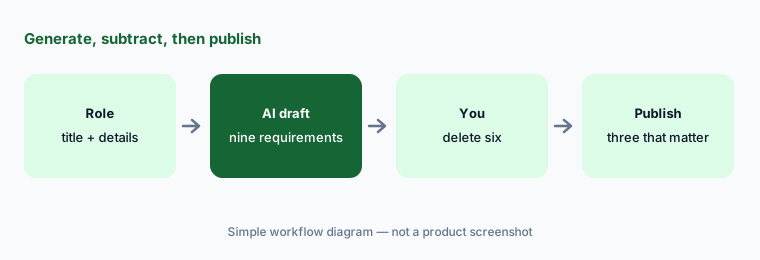
Primary workflow:
Generate a job post for one role. Delete every requirement you would not actually reject a candidate for. Keep the shorter post and compare the number of qualified applicants with your last opening.
2. AI screening summaries and anonymized review
What it is: When applications arrive, Workable can show an AI-generated summary of each profile with a match score and a requirement checklist against the job. Workable also offers anonymized screening that hides candidate details during the first resume pass so reviewers focus on qualifications. Both help one busy person get through a pile faster; neither should be the reason someone is rejected without a person reading the application.
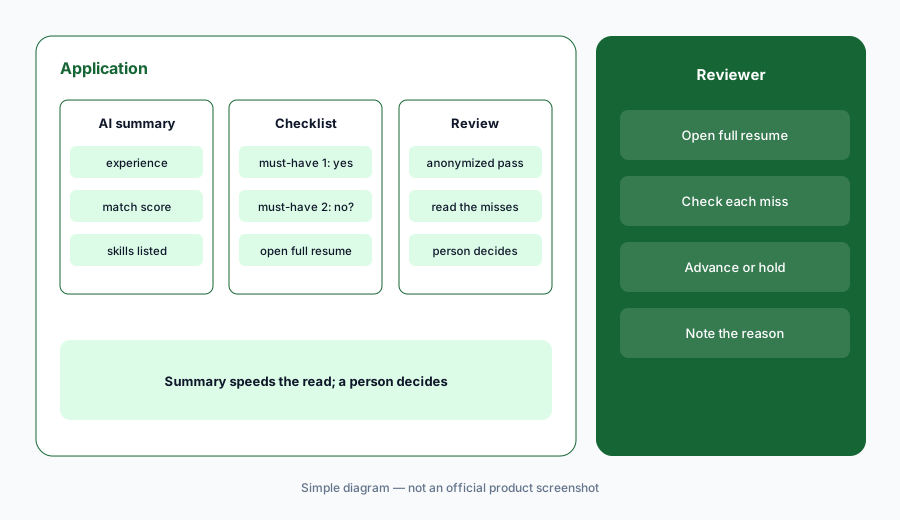
Check the misses:
Turn on anonymized screening for one role. For every applicant the checklist marks as missing a requirement, open the full resume. Count how many the summary got wrong before you trust it on the next role.
3. The Workable Agent
What it is: The Workable Agent runs the top of the funnel in sequence: it reads the role, helps you set an ideal candidate profile (must-haves, disqualifiers, what shows in the post), sources passive candidates, sends personalized emails, chats with candidates to collect basic facts such as work authorization or salary expectations, and evaluates them against up to 14 job criteria, each scored and normalized to a 0–100 scale with stated reasoning. Strong fits go to your shortlist or get a screening-call invite. Workable says every action is logged and reversible, the agent stops the moment you engage a candidate, and an admin kill switch turns it off account-wide.
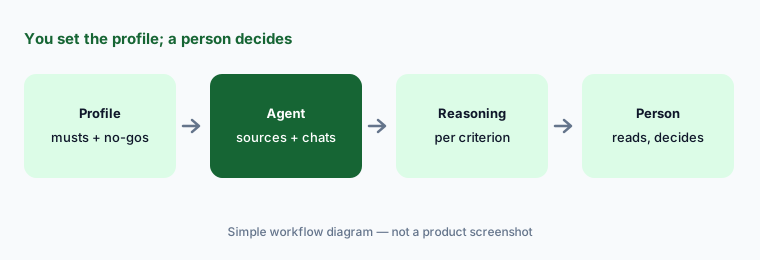
Profile before launch:
Before turning the Agent on, write the ideal candidate profile yourself: three must-haves and one disqualifier. After a week, read the reasoning for the ten lowest-scored candidates and fix the profile if more than two look wrong.
4. How AI credits add up
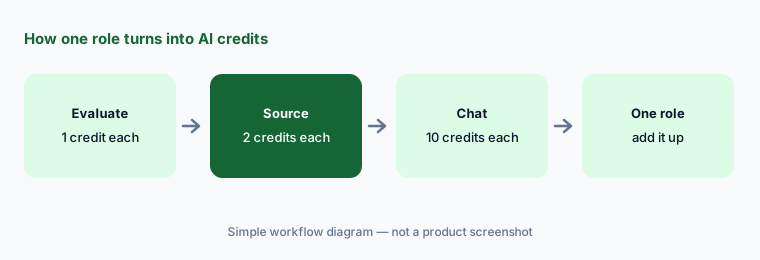
What it is: The Agent spends AI credits per action: 1 credit each time it evaluates a candidate against your profile, 2 when it adds a passive candidate to your pipeline, and 10 each time a candidate interacts with its chat. Every paid account starts with 3,000 free credits. Workable’s pricing page says credits expire one year after purchase, are non-refundable, and the free trial does not include the Agent.
Estimate one role:
For your next role, write expected applicants, passive candidates to source, and chats. Multiply by 1, 2, and 10 credits. Compare the total with your free 3,000 before you buy a pack.
5. AI sourcing, recommendations, and resurfacing
What it is: Without the Agent, every plan includes AI candidate recommendations from Workable’s 400M+ profile database based on your job ad, AI-assisted search with your own filters, automatic resurfacing of qualified past applicants when you post a new opening, and AI targeting that shows your job ad to passive candidates on social media. These widen the pool; they do not tell you whether a person is interested or a fit.
Past applicants first:
Before sourcing anyone new for a repeat role, open the resurfaced past applicants. Message only the ones you would have hired last time, and track replies for two weeks before paying for outreach.
6. AI interview questions and interview kits
What it is: The AI interview question generator suggests industry- and role-specific questions, and every plan includes interview kits and interview feedback forms so each interviewer asks and records the same things. Small teams gain the most here: when the founder and one manager interview every candidate, a shared kit is what keeps the comparison fair.
Questions tied to the post:
Generate interview questions for one role. Keep only questions that test a requirement left in your job post. Put them in an interview kit both interviewers use, and delete any question about personality or background.
Pricing context (October 2026)
Workable publishes plan prices on workable.com/pricing; they change with company size, billing term, and whether you add HR. When we checked on 6 October 2026, the recruiting plans for a 1–20 employee company billed annually showed Standard $299 a month ($3,588 a year), Premier $599 a month ($7,188 a year), and Enterprise $719 a month ($8,628 a year). The page says annual billing saves 20% versus monthly and bundling recruiting with HR saves up to 20%. On Standard, Texting (+$89/mo), Video interviews (+$109/mo), and Assessments (+$59/mo) are add-ons; Premier and Enterprise include them.
Workable Agent AI credits: 3,000 free with every paid account, then 5,000 credits at $0.12 each ($600), 10,000 at $0.10 ($1,000), or 50,000 at $0.095 ($4,750); larger packs are quoted. Credits expire one year from purchase and are non-refundable. A 15-day free trial with no credit card covers the platform but not the Agent.
Uncertainty: Plan prices rise with company size and differ for monthly billing; the figures above are for the smallest size band with annual billing and recruiting only. Agent credit use depends on how many candidates it evaluates, sources, and chats with. Re-check the calculator for your headcount and confirm what your plan includes before you budget.
When it’s useful (honest take)
Useful when you hire a few roles a quarter with no recruiter, want public prices, and need job posts, a shared interview kit, and a first pass through applications done quickly. The built-in AI covers most of that on every plan, and the Agent can run sourcing and basic questions for a busy role.
Less useful when you already have a recruiting team on a structured-hiring ATS, or you hire so rarely that a monthly plan sits idle. Also less useful if nobody will read the Agent’s reasoning: a 0–100 score with no human check is just a faster way to miss good people. Tell candidates when an AI agent is chatting with them.
Paying for Workable AI and a few other AI tools? The $9 AI toolkit spreadsheet lists every AI subscription you have, what each one costs, and how fast it pays for itself, so you can see which ones are worth the money.
Want someone to do it for you? AI toolkit audit — $19
Related options (educational)
| Need | Better home | Why |
|---|---|---|
| Recruiting + HR for a small team, public prices | Workable AI (this page) | AI job posts, screening, Agent on credits |
| ATS + CRM with AI for a team already on it | Lever AI | Talent Fit and AI Companions; quote-only |
| All-in-one ATS with criteria review and citations | Ashby AI | Published Foundations prices by company size |
| HR system first, hiring second | BambooHR AI or Rippling AI | If HR and payroll are the bigger job |
| Drafting job posts from a sanitized brief | ChatGPT for HR or Claude for HR | No ATS needed for a first draft |
| Interview notes on top of the ATS | Metaview or BrightHire | Notes and coaching across interviews |
FAQ
How much does Workable cost in October 2026?
On 6 October 2026, for a 1–20 employee company billed annually, Workable listed recruiting plans at Standard $299, Premier $599, and Enterprise $719 a month. Prices change with size and billing term. Check workable.com/pricing.
What does the Workable Agent cost?
It runs on AI credits: 1 per evaluation, 2 per sourced candidate, 10 per candidate chat. Paid accounts get 3,000 free credits; packs started at 5,000 credits for $600 on 6 October 2026.
Does the Workable Agent reject candidates on its own?
Workable says recruiters keep the final call, every Agent action is logged and reversible, and you can review or override any decision. Set your must-haves and disqualifiers yourself and read the reasoning before acting.
Is the AI included in the free trial?
The 15-day free trial covers the platform, including the built-in AI tools, but Workable’s pricing page says the free trial does not include the Workable Agent.
How does Workable handle bias and AI rules?
Workable says the Agent scores job criteria only, excludes protected characteristics, sends low-confidence inferences to a human, and is aligned with the EU AI Act. Check your local rules for automated hiring tools with counsel.
Optional next step (if seats overlap)
If you pay for Workable, a separate sourcing tool, and a general AI assistant that all write the same job posts and outreach, that overlap is worth a look. Map the overlap with the $19 AI toolkit audit or the $9 AI toolkit spreadsheet. Email Audit $19 or Toolkit spreadsheet $9.
Checkout is live via Stripe. After you pay, we email delivery (spreadsheet) or intake next steps (audit).