How-to · Recruiting · Workable AI · Oct 12, 2026
Draft a Workable job post from the hiring manager's intake notes, then cut the fluff
AI job description generators write fast, and they love to fill gaps with perks and promises nobody approved. This page shows a recruiter how to start from real intake notes in Workable, generate a draft, and then cut everything that isn't true.
Who this is for
Recruiters and small-company hiring leads who post jobs from Workable and get intake notes from hiring managers in a call, a doc, or a Slack message. If you want deeper language guidance on the finished post, see Textio.
How to do it
This is a how-to, not a ranking. Feature detail on Workable's AI job description generator and how AI credits add up lives on the Workable AI review.

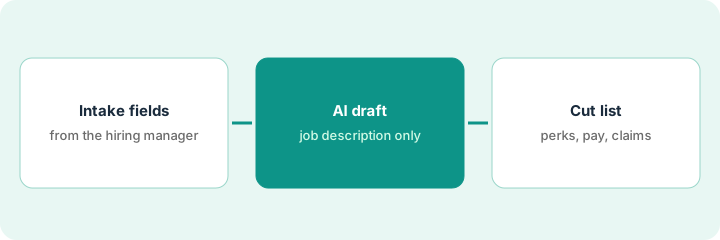
1. Step 1 — Capture the intake fields
What it is: Turn the hiring manager's notes into a short set of fields before any AI touches them.
- Role title, team, and who the person reports to.
- The three things this person will do in their first six months.
- Must-have skills (no more than five) and nice-to-haves.
- Location and work arrangement, and the pay range if your company publishes one.
- Anything the hiring manager explicitly doesn't want in the post.
Intake for an Operations Coordinator: reports to the Head of Ops; first six months are vendor onboarding, weekly reporting, and office moves; must-haves are spreadsheets and vendor communication; hybrid in Denver; pay range approved by finance.
Keep a reusable intake form with those five fields. Don't start a draft until each field is filled or marked "Not provided."
2. Step 2 — Generate the draft
What it is: Paste the filled fields into Workable's AI job description generator and let it produce a first draft.
- Give it only the intake fields, not old job posts from other roles.
- Ask for plain language and short bullets.
- Note which sections it adds that weren't in your intake. Those are your cut candidates.
- Generate once or twice, not ten times. Extra generations can use AI credits.
The draft includes a "What we offer" section listing unlimited time off and a learning budget. Neither was in the intake.
Prompt (if your tool accepts one): "Write a job post using only these intake fields. Short bullets, plain language. If a field says 'Not provided,' leave that section out. Don't add benefits, perks, or salary that aren't listed."
3. Step 3 — Run the cut list
What it is: A fixed review that removes anything invented before the post goes live.
- Perks and benefits: keep only ones HR has confirmed.
- Pay: use only the approved range, or nothing if your company doesn't publish one. Check local pay-transparency rules with HR.
- Claims: remove "fast-growing," "industry-leading," and anything you can't point to.
- Requirements creep: cut any must-have the hiring manager didn't list.
- Send the final post to the hiring manager for a five-minute read before publishing.
Removed: unlimited time off (not offered), learning budget (not offered), "industry-leading team," and a degree requirement the manager never asked for. The post gets shorter and more accurate.
Print the draft and highlight every sentence you can't trace to an intake field. Delete or confirm each highlight.
Pricing context (October 2026)
This how-to isn't a price sheet. Workable plan and AI credit notes live on the Workable AI review. Check Workable's pricing page and your account's credit balance before you budget. Dated October 2026.
Checked Oct 12, 2026 on the vendor’s own pricing page: Workable’s pricing page (1–20 employees view) lists Standard at $299 per month ($3,588 per year), Premier at $599 per month ($7,188 per year), and Enterprise at $719 per month ($8,628 per year), with higher employee bands on the same page. Add-ons include texting (+$89/mo), video interviews (+$109/mo), assessments (+$59/mo) and performance (+$39/mo on Standard). Workable Agent AI credits start with 3,000 free on paid accounts; extra packs show 5,000 credits at $0.12/credit ($600), 10,000 at $0.10 ($1,000) and 50,000 at $0.095 ($4,750).
Uncertainty: AI credit rules change. If your invoice and our review disagree, trust the invoice. The only prices this site sells here are the optional $9 AI toolkit spreadsheet and $19 AI toolkit audit.
When this helps (honest take)
Useful when Workable is where you post jobs, you post often enough that drafting from scratch is slow, and someone owns the cut list.
Not useful when the hiring manager hasn't decided what the role is. AI will happily write a confident post for a vague job.
Related options (educational)
| Need | Where to look | Why |
|---|---|---|
| Workable AI features | Workable AI | Primary path on this page |
| Language guidance | Textio | Checks wording on the finished post |
| People ops stack | Stack map for people ops | Who owns what |
| Before another seat | Three checks before an AI seat | Live how-to |
FAQ
Can I paste an old job post instead of intake notes?
You can, but old posts carry old perks and requirements. Starting from intake keeps the draft tied to this role.
Is this legal or HR advice?
No. Check pay-transparency and anti-discrimination rules with HR or counsel.
Where do current prices live?
On the Workable AI review and Workable's site. This page doesn't invent list prices. Our Oct 12, 2026 check of the vendor’s own pricing page is summarized in the pricing section above.
Do I need Workable Agent credits for a job-post draft?
Not for this routine. The job description generator and AI credits for the Agent are separate; check which features your plan and credit balance actually include before you budget Agent packs.
Optional next step
Free reviews stay free. If you pay for Workable's AI, a separate job-post writer, and a general AI assistant that all draft posts, the $9 AI toolkit spreadsheet or the $19 AI toolkit audit can help you pick one home.