Tool · Recruiting + feedback writing · Oct 2026
Textio review (Oct 2026): AI job posts and performance feedback writing
Textio is a writing coach for HR words: job posts, recruiting emails, interview notes, and performance reviews. It highlights phrases that could put people off or don’t belong in feedback, suggests better wording, and can draft from a few details. It is guidance, not autopilot — a recruiter or manager still chooses every word that goes out. This page walks through each part with a real job, a Try this, and where a person still decides.
What this Textio page covers
This page is for recruiters and talent leaders who write a lot of job posts and outreach, hiring managers who write interview notes, and people teams trying to improve performance reviews. The question it answers: what does Textio actually flag and write, where does it plug in, and how do you check that it helped?
Company (checked 6 October 2026): Textio was founded in 2014 and has two product lines — Recruiting (job posts, sourcing messages, employer branding, interview feedback) and Feedback (manager, peer, upward, and self reviews). In March 2026 it launched Lavalier, a separate interview tool at lavalier.ai. Textio says 25% of the Fortune 500 have used it and that more than 100,000 managers use its feedback product. Those are Textio’s figures.
How its AI is built: Textio says its models are trained on HR documents and real hiring and performance outcomes, including data customers opt to share, and it publishes how it tests for bias — for example, masking people’s names before text goes to its generative AI and checking whether outputs change when only a name changes. Those are the vendor’s statements. Your team still owns what gets published and every hiring or performance decision. Everything below comes from Textio’s pages as we read them on 6 October 2026.

Major features (with how someone uses them)
Examples at a glance: each feature has a concrete example from a real job plus a short Try this you can run this week.
1. Job-post guidance and the Textio Score (primary)
What it is: Paste or write a job post in Textio and it highlights phrases as you go, with suggested replacements. The Textio Score is Textio’s prediction of who will apply based on your wording. Two visual checks sit alongside it: an age graph showing how the language may land across generations, and a gender meter showing whether the wording skews one way. Custom brand guidance lets you program your own preferences — Textio’s example is preferring “teammate” over “employee.” Posts can live in a shared library with templates, groups, and statuses.
These checks are about the words in the post, not about any candidate. Treat the score as a prediction to test against your own apply data, not as proof.
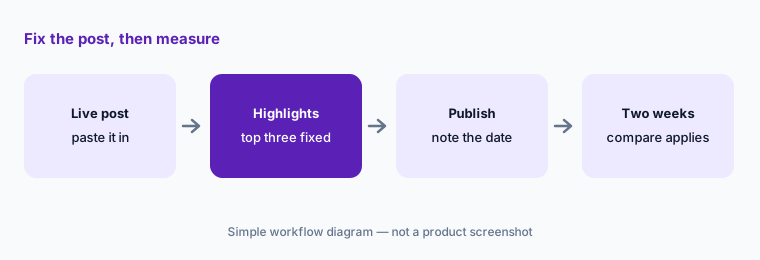
Primary workflow:
Paste one live job post. Fix the top three flagged phrases. Compare apply rates over the next two weeks.
2. Write it with Textio AI: first drafts
What it is: Write it with Textio AI takes a few details about a role and produces a first draft of a job post that you then edit. Textio says its outputs are “Textio Verified” — screened for workplace safety, accuracy for the task, and quality — and tuned to your brand guidance. A draft still needs the hiring manager’s facts: real duties, real requirements, real pay range where your location requires one.
Check the facts:
Generate one draft from your intake notes. Underline every claim about duties, tools, or requirements, and have the hiring manager confirm or cut each one before it goes live.
3. Sourcing messages and employer branding
What it is: Textio applies the same guidance to sourcing messages and recruiting emails, and to careers-site and employer branding content. Textio extensions bring the guidance into your ATS, HRIS, and LinkedIn so recruiters get it where they already write. A recruiter still decides who to contact and sends the message.
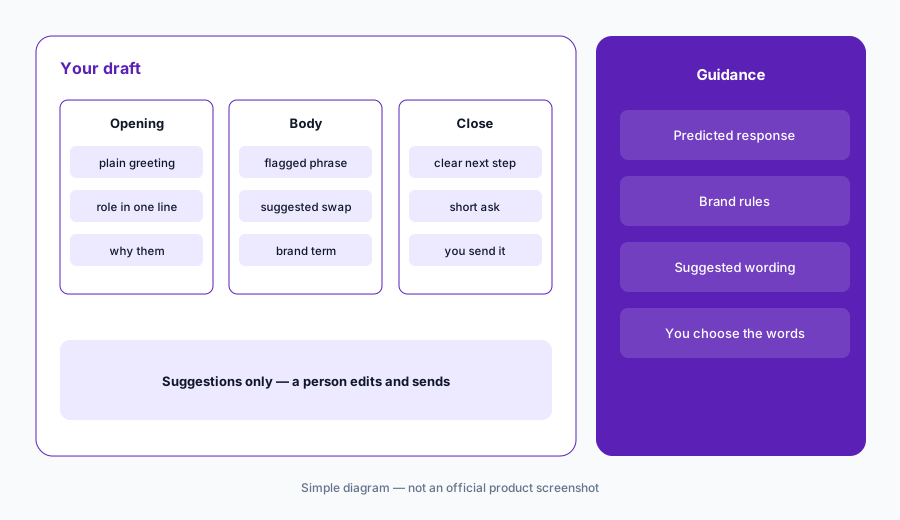
Test one template:
Run your most-used outreach template through Textio, keep only the edits you agree with, and track replies on the next 40 messages against the old version.
4. Interview feedback in Workday or Greenhouse
What it is: Textio Interview Feedback helps interviewers write structured, skills-based notes that tie back to the skills in the job post, and flags problematic language while keeping a person in the loop. Textio says it works inside Workday and Greenhouse. The interview feedback form is still written and submitted by the interviewer, and the hiring manager makes the decision.
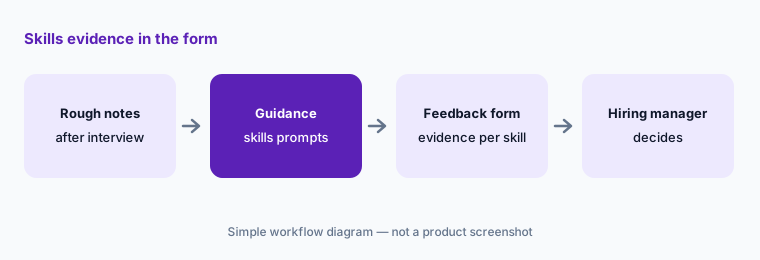
Evidence, not vibes:
Pull the last ten interview feedback forms for one role. Count how many name a job skill and the evidence for it. Turn on Textio guidance for the next ten and count again.
5. Performance and everyday feedback for managers
What it is: Textio Feedback helps managers write performance reviews, informal feedback, self assessments, and peer and upward feedback. Features listed on Textio’s pages: shortcut prompts, real-time guidance on language that doesn’t belong in feedback, Write it with Textio AI to turn raw notes into a draft, risk detection that flags comments about things like physical appearance or parental status for removal, a tone adjuster, and a feedback organizer to keep past feedback in one place. Textio offers a free trial for its feedback product.
Before you submit:
Draft one review your usual way, then run it through Textio. Remove anything it flags as personal or off-topic, and replace each vague adjective with one specific example of the work.
6. Lavalier: Textio’s interview tool
What it is: Lavalier, launched by Textio in March 2026, helps a hiring team agree on what a role needs, generates a structured interview guide, guides interviewers during the conversation, and pulls the evidence together after interviews. Lavalier connects to your calendar and ATS. Its site says it is “not an automated decision-making tool,” that insights trace back to their source, and that your team makes every hiring decision. Textio’s launch announcement said Lavalier is free to start.
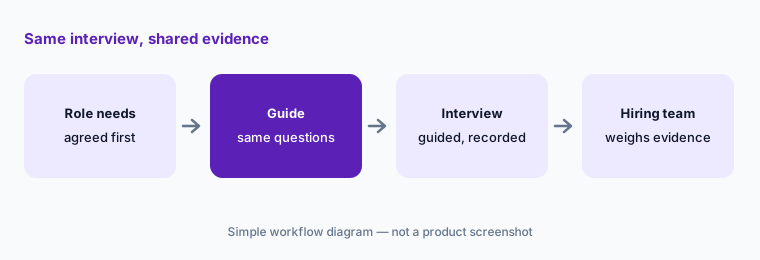
Trace it back:
If you try Lavalier, open three insights from one candidate and follow each back to the transcript. Tell candidates up front that the interview is recorded, and keep anything that doesn’t trace to their words out of the debrief.
Pricing context (October 2026)
Textio does not publish a price list. On 6 October 2026, textio.com/pricing returned Textio’s page-not-found message. Textio’s home page offers a free trial account or a package designed with sales (sales@textio.com). The Interview Feedback FAQ says pricing is based on your organization’s size and includes unlimited users, unlimited feedback, and unlimited AI-driven insights.
Lavalier has its own site at lavalier.ai. Textio’s March 2026 launch announcement said Lavalier is free to start with transparent, scalable pricing; we did not find a published price on lavalier.ai on 6 October 2026, so check there.
Uncertainty: Pricing is quote-based and tied to company size, so budget from a written quote that names which products you get (Recruiting, Feedback, Interview Feedback) and which extensions (ATS, HRIS, LinkedIn). Ask how customer data is used for training, whether you can opt out, and what Textio’s published bias testing covers for your languages and regions.
When it’s useful (honest take)
Useful when many people write job posts, outreach, or reviews and the quality varies a lot; you want consistent brand language; and you will actually measure applications, replies, or review quality before and after. Useful too when managers struggle to give specific feedback and you want guidance inside the tools they already use.
Less useful when one or two people write everything and already write well, or nobody will check the numbers afterward. Less useful if you expect it to decide anything: Textio suggests words. Recruiters, interviewers, and managers choose the words, and the hiring manager or manager makes the decision.
Paying for Textio and a few other AI tools? The $9 AI toolkit spreadsheet lists every AI subscription you have, what each one costs, and how fast it pays for itself, so you can see which ones are worth the money.
Want someone to do it for you? AI toolkit audit — $19
Related options (educational)
| Need | Better home | Why |
|---|---|---|
| Job-post and feedback language guidance with outcome data | Textio (this page) | Purpose-built for HR writing |
| Skills matching for hiring and internal moves | Eightfold AI | Matching people to roles, not writing |
| Performance reviews inside your performance tool | Lattice AI | Fewer tools if reviews already live there |
| Interview feedback forms inside your ATS | Greenhouse AI or Workday AI | Textio can plug into both |
| Interview notes from recorded calls | Metaview or BrightHire | Notes layer, not writing guidance |
| General writing help across the company | Grammarly Business or ChatGPT for HR | Broader, less HR-specific |
FAQ
Does Textio decide who gets hired or promoted?
No. Textio suggests wording and flags language. Recruiters and interviewers write and submit their own work, and hiring managers and managers make the decisions. Textio describes its interview feedback product as keeping human oversight in the loop.
How much does Textio cost in October 2026?
Textio does not publish a price list; textio.com/pricing returned a page-not-found message on 6 October 2026. Textio offers a free trial account or a package from sales, and its Interview Feedback FAQ says pricing is based on organization size with unlimited users. Contact Textio.
What is the Textio Score?
Textio’s prediction of who will apply to a job post based on its wording. Use it as a guide and check it against your own application numbers.
Where does Textio work?
In textio.com and through extensions for your ATS, HRIS, LinkedIn, and performance management tool. Textio says its Interview Feedback product works in Workday and Greenhouse.
What is Lavalier?
An interview tool Textio launched in March 2026 at lavalier.ai. It builds structured interview guides, guides interviewers, and pulls evidence together after interviews. Its site says it is not an automated decision-making tool and your team makes every hiring decision.
Optional next step (if seats overlap)
If you pay for Textio, a general writing assistant, and AI features in your ATS or performance tool — and more than one of them edits the same job posts or reviews — that overlap is worth a look. Map the overlap with the $19 AI toolkit audit or the $9 AI toolkit spreadsheet. Email Audit $19 or Toolkit spreadsheet $9.
Checkout is live via Stripe. After you pay, we email delivery (spreadsheet) or intake next steps (audit).