Tool · Recruiting · Interview intelligence · Oct 2026
BrightHire review (Oct 2026): interview intelligence, notes, and interviewer coaching
BrightHire records and transcribes interviews, writes structured notes, drafts each interviewer’s feedback form in the ATS, and turns recorded interviews into coaching for interviewers. Zoom bought it in late 2025, and BrightHire still runs as its own brand across Zoom, Google Meet, and Microsoft Teams. This page walks through each piece with a real hiring job, a Try this, and where the hiring team stays in charge.
What this BrightHire page covers
This page is for talent leaders and recruiting ops teams who want consistent interview notes and better interviewers, and for anyone checking whether BrightHire’s 2025 sale to Zoom changes how it is sold. The question it answers: what does BrightHire do beyond a notetaker, and where does a person have to check its output?
Ownership (checked 6 October 2026): Zoom announced it was acquiring BrightHire on 13 November 2025 and says the deal closed in December 2025; Zoom’s quarterly filing lists 1 December 2025 and about $98 million in cash. BrightHire’s own announcement says it continues as a standalone product and brand, stays cross-platform, and remains open to new customers.
BrightHire now sells two products. Interview Intelligence covers interview planning, recording and transcription, AI interview notes, interview insights, and a set of AI copilots and agents, in three tiers (Recruiters, Teams, Enterprises). BrightHire Screen is an asynchronous AI interviewer you can buy on its own or with the platform. Everything below comes from BrightHire’s and Zoom’s pages as we read them on 6 October 2026.
Major features (with how someone uses them)
Examples at a glance: each feature has a concrete example from a real job plus a short Try this you can run this week.
1. AI interview notes and feedback-form drafts (primary)
What it is: BrightHire records the interview and writes structured notes organized around the competencies your team set before the interview. Its auto-draft maps those notes to the fields of each interviewer’s feedback form in your ATS and pushes the draft after the call; the interviewer reviews, adjusts, and submits in one click. Notes can be customized with templates for intake calls, interviews, and debriefs, and interview highlights can be played from inside the ATS. BrightHire lists integrations with Greenhouse, Lever, Ashby, and Workday.
The draft is only as good as what was said out loud. An interviewer’s own judgment — what impressed them, what worried them — still has to be written by the interviewer.
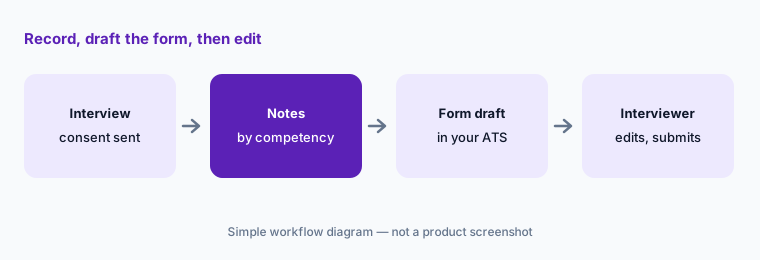
Primary workflow:
Pick one interview. Compare BrightHire’s notes to the interviewer’s own feedback; list what each missed. Share both lists with the interviewer before the next debrief.
2. Interview Assistant, joining calls, and consent
What it is: BrightHire connects to interviewers’ calendars. On Zoom, its Interview Assistant opens inside Zoom with the interview guide and note capture in one place, without a separate bot joining. On Google Meet it joins as a participant; on Microsoft Teams you add its recorder address or a tag to the invite. It can also capture phone and in-person interviews. BrightHire says it sends consent notifications to candidates automatically before interviews, offers an opt-out, and supports role-based access, custom data retention, and zero-data-retention options.
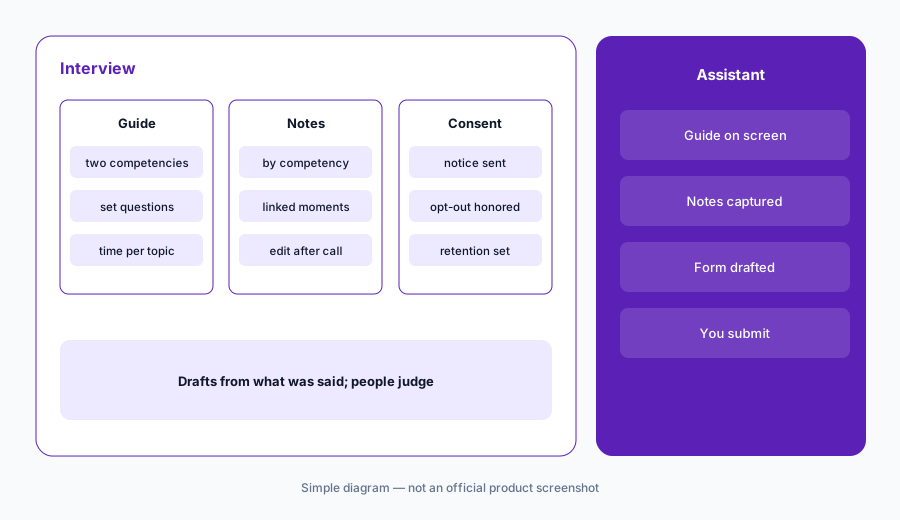
Consent before capture:
Check your last ten scheduled interviews: did each candidate get the consent notice, and does anyone have an opt-out on file? Fix the scheduling template so the notice and opt-out are never skipped.
3. Interview planning, intake, and debrief agents
What it is: BrightHire’s planning copilot drafts job descriptions and structured interview plans. On the Teams tier and above, BrightHire lists an intake and debrief agent and a candidate rediscovery agent, along with an AI chat assistant that answers questions about any candidate from recorded context and candidate summaries and highlights. The plan matters most: notes and coaching are measured against the questions and competencies you set up front.
Plan before you record:
Generate an interview plan for one open role. Give every interviewer no more than two competencies to cover, and delete any question you cannot tie to a requirement in the job description.
4. BrightHire Screen: the AI interviewer
What it is: BrightHire Screen runs first-round interviews asynchronously. Recruiters choose which applicants move forward, then candidates are invited from the ATS to a two-way interview by voice or video, on any device, at any time. You set the questions, scoring rubric, tone, and candidate messaging, and BrightHire says you must approve the questions before they are asked. After each screen recruiters get summaries, transcripts, audio, rubric-based scores, and a ranking. BrightHire’s summer 2026 updates added multilingual interviews and faster setup. Every candidate gets the same questions; a recruiter still decides who moves on.
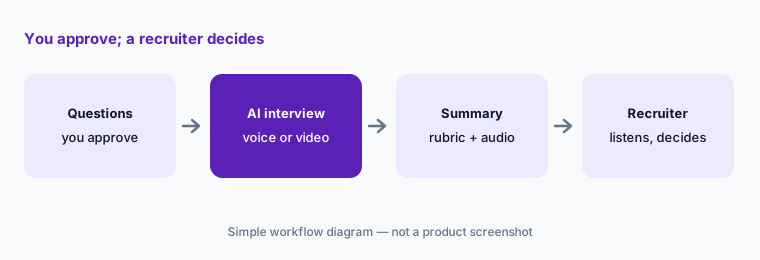
Listen to the bottom:
Take BrightHire Screen yourself as a candidate first. Then, for one role, listen to the full audio for the ten lowest-scored screens before acting on the ranking. Fix the rubric if any of them should advance.
5. Interview insights and interviewer coaching
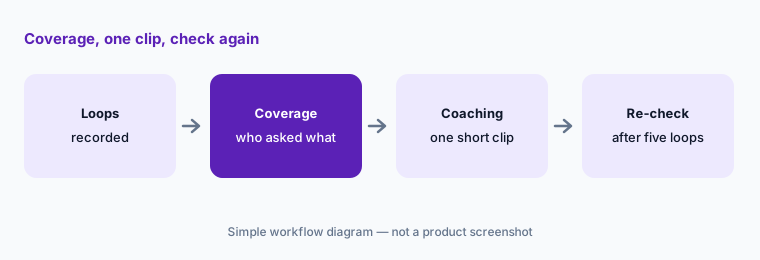
What it is: From recorded interviews BrightHire reports interview topic coverage, candidate side-by-side comparisons, and interview quality analytics, and on the Teams tier it lists an interviewer coaching tips agent that sends personalized coaching to each interviewer. Its newer Insights Explorer answers plain-language questions about your interviews with linked evidence. Coaching works best when it is about the interview plan — did each interviewer cover their competencies — not about personal style.
Coach the plan:
Pull topic coverage for one interview loop. For each interviewer who missed an assigned competency, send one clip of a colleague covering it well. Re-check coverage after five more loops.
6. Fraud signals, MCP, and Zapier
What it is: BrightHire surfaces candidate fraud signals in both AI and live interviews so the team can spot suspicious candidates early. Its summer 2026 updates also added a BrightHire MCP connection and Zapier integration to bring interview data into other tools, and Slack and email integrations post updates where the team already works. A fraud signal is a reason for a person to verify, never a reason to reject on its own.
Verify, then log:
Write a short rule for what happens after a fraud signal: who verifies, how, and how the result is logged. Review the log after a month and count how many signals were confirmed.
Pricing context (October 2026)
BrightHire does not publish prices. Its pricing page (checked 6 October 2026) lists three Interview Intelligence tiers — Recruiters, Teams, and Enterprises — each with a “Request a demo” button and no figures, plus BrightHire Screen, sold on its own or with the platform. The FAQ says plans are tailored to your goals and budget, and that training and implementation carry no extra fees.
What changes by tier: Recruiters covers recording, transcription, customizable AI notes, an AI chat assistant, candidate summaries, one-click feedback-form completion, and Slack; Teams adds sharing and clips, the planning copilot, intake/debrief, rediscovery, and coaching agents, interview analytics, SSO, and dedicated success; Enterprises adds custom reporting and integrations, custom compliance detection, data retention and redaction, and a REST API.
Uncertainty: BrightHire became part of Zoom in December 2025. Packaging and pricing may change as it integrates with Zoom Workplace; confirm current tiers, contract terms, and whether any Zoom bundle applies before you budget.
When it’s useful (honest take)
Useful when you run many structured interview loops, want feedback forms drafted from what was actually said, and care about making interviewers better over time — coverage, clips, and coaching are where BrightHire goes beyond a notetaker. Useful too if your team interviews on Zoom, where the assistant runs inside the call.
Less useful when your ATS already includes a notetaker you pay for, or you run few interviews. Less useful if your interview plan is loose: notes and coaching have nothing to measure against without set competencies. Tell candidates in advance, honor opt-outs, and treat every draft, score, and fraud signal as something a person checks.
Paying for BrightHire and a few other AI tools? The $9 AI toolkit spreadsheet lists every AI subscription you have, what each one costs, and how fast it pays for itself, so you can see which ones are worth the money.
Want someone to do it for you? AI toolkit audit — $19
Related options (educational)
| Need | Better home | Why |
|---|---|---|
| Interview notes plus interviewer coaching | BrightHire (this page) | Feedback-form drafts, topic coverage, coaching |
| Hiring-specific notes and recruiting agents | Metaview | Published per-agent prices; notes on any ATS |
| Notes built into your ATS | Greenhouse Notetaker, Ashby AI Notetaker, or Lever AI Interview Companion | One less vendor if you run that ATS |
| General meeting notes inside Zoom | Zoom AI Companion | Internal meetings, not candidate workflows |
| Deciding which notetaker owns which calls | Meeting notes seats | Avoid two recorders on one interview |
| Sales-call coaching | Gong | Same idea for revenue teams |
FAQ
Who owns BrightHire now?
Zoom. It announced the acquisition on 13 November 2025 and says it closed in December 2025. BrightHire says it continues as a standalone brand that works across Zoom, Google Meet, and Microsoft Teams.
How much does BrightHire cost in October 2026?
BrightHire does not publish prices. On 6 October 2026 its pricing page listed Recruiters, Teams, and Enterprises tiers and BrightHire Screen, all by demo. Check brighthire.com/pricing.
Does BrightHire fill in our ATS interview feedback forms?
It drafts them: notes are mapped to your feedback-form fields and pushed after the interview, and the interviewer reviews, adjusts, and submits. The interviewer’s own judgment still has to be added by the interviewer.
Does BrightHire Screen decide who advances?
No. It asks questions you approve and scores answers with your rubric, and recruiters review summaries, transcripts, and audio before deciding. Listen to the lowest-scored screens before acting on a ranking.
How does BrightHire handle candidate consent?
BrightHire says it sends consent notifications before interviews and offers an opt-out, with role-based access and custom retention. It cites SOC 2 Type II, GDPR and CCPA, and a third-party bias audit. Check local recording rules with counsel.
Optional next step (if seats overlap)
If you pay for BrightHire, an ATS notetaker, and Zoom AI Companion — and more than one can capture the same interview — that overlap is worth a look. Map the overlap with the $19 AI toolkit audit or the $9 AI toolkit spreadsheet. Email Audit $19 or Toolkit spreadsheet $9.
Checkout is live via Stripe. After you pay, we email delivery (spreadsheet) or intake next steps (audit).