How-to · Recruiting · Textio · Oct 12, 2026
Run Textio on three live job posts before you rewrite all of them
When a team buys a job-post language tool, the temptation is to rewrite every post in week one. This page shows a recruiting lead how to test Textio's guidance on three live posts first, read the flags carefully, and then decide the rewrite scope.
Who this is for
Recruiting leads and employer-brand owners who have Textio, or are trialing it, and a backlog of live job posts. If you mainly need first drafts rather than language guidance, see Workable AI.
How to do it
This is a how-to, not a ranking. Feature detail on job-post guidance, the Textio Score, and first drafts lives on the Textio review.

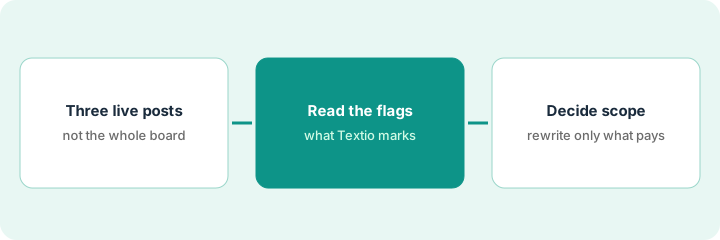
1. Step 1 — Pick three posts
What it is: Choose three live posts that differ from each other, so the test tells you something.
- One post that gets lots of applicants, one that gets few, and one for a hard-to-fill role.
- Use the live text exactly as candidates see it.
- Save a copy of each original before you change anything.
- Write down each post's current applicant count so you have a before number.
Picked: Customer Support Rep (high volume), Senior Data Engineer (few applicants), and Payroll Specialist (open for 70 days). Originals saved in a shared folder with today's date.
Make a sheet with Post | Role type | Live since | Applicants so far | Link to saved original.
2. Step 2 — Read the flags
What it is: Run each post through Textio and read what it flags, sorting the flags by type instead of accepting them all.
- Group flags into a few kinds: wording that may put off some candidates, length, structure, and repeated corporate phrases.
- Note which flags show up on all three posts. Those are probably habits in your template.
- Note flags that only appear on one post. Those are probably that hiring manager's writing.
- Don't rewrite yet. Just sort.
All three posts share the same boilerplate opening paragraph, and Textio flags it each time. The Data Engineer post also has a long requirements list that Textio flags for length.
Add columns: Flag | Post(s) | Template habit or one-off | Fix in template? (Y/N).
3. Step 3 — Decide the rewrite scope
What it is: Use what you found to decide what's actually worth rewriting.
- If most flags are template habits, fix the template first. That fixes every future post.
- Rewrite the three test posts and watch applicants for two to three weeks.
- Only then decide whether to rewrite other live posts, starting with hard-to-fill roles.
- A human approves every rewritten post. Textio guides the words; it doesn't decide who gets hired.
The boilerplate opening goes. The template gets a new two-line opening, and the three test posts are updated. The team waits three weeks before touching the other 20 live posts.
Put a calendar reminder three weeks out: "Compare applicants on the three Textio test posts to the before numbers."
Pricing context (October 2026)
This how-to isn't a price sheet. Textio pricing is quote-based; packaging notes live on the Textio review. Confirm what your contract covers with Textio. Dated October 2026.
Checked Oct 12, 2026 on the vendor’s own pricing page: Textio shows no public list price on a dedicated pricing URL (the old /pricing address returned a missing-page response on Oct 12, 2026). Textio’s site routes buyers to a demo. This page quotes no Textio dollar figure; confirm coverage with Textio or your contract.
Uncertainty: Applicant counts move for lots of reasons, like season, pay, and market, so a change after a rewrite isn't proof the words caused it. If your contract and our review disagree, trust your contract. The only prices this site sells here are the optional $9 AI toolkit spreadsheet and $19 AI toolkit audit.
When this helps (honest take)
Useful when you have enough live posts that a template fix pays off, and someone will check results after a few weeks.
Not useful when you post a handful of roles a year. A careful human edit may be enough. It's also not a fix for a pay range that isn't competitive.
Related options (educational)
| Need | Where to look | Why |
|---|---|---|
| Textio features | Textio | Primary path on this page |
| First drafts in the applicant tracking system | Workable AI | Drafting rather than guidance |
| Applicant tracking system with AI drafting | Greenhouse AI | Drafting help inside Greenhouse |
| Before another seat | Three checks before an AI seat | Live how-to |
FAQ
Does Textio decide who gets hired?
No. It gives guidance on language. Hiring decisions stay with people.
Why only three posts?
Three different posts show you whether problems come from your template or from individual writers, without committing to a big rewrite.
Where do current prices live?
On the Textio review and with Textio. This page doesn't invent list prices. Our Oct 12, 2026 check of the vendor’s own pricing page is summarized in the pricing section above.
Why only three posts?
Three is enough to see whether the flags are useful on your real openings before you commit to rewriting every live post.
Optional next step
Free reviews stay free. If you're paying for Textio plus AI drafting in your applicant tracking system and a general assistant, the $9 AI toolkit spreadsheet or the $19 AI toolkit audit can help you decide which one owns job posts.