Tool · Recruiting · Video interviews + assessments · Oct 2026
HireVue review (Oct 2026): AI-assisted video interviews and assessments for high-volume hiring
HireVue runs first-round hiring at volume: candidates record on-demand video answers or talk with a voice-based AI Interviewer, take game-based or job-specific assessments, and book their own interview slots. Because it scores people, the questions that matter most are about explainability, candidate notice, and audits. This page walks through each piece with a real hiring job, a Try this, and where a person still makes the call.
What this HireVue page covers
This page is for talent acquisition leaders running high-volume roles — hourly, campus, contact center, nursing — and for the legal, HR, and IT people who have to sign off on an AI tool that assesses candidates. The question it answers: what does HireVue actually measure, how is it explained to candidates, and where does a recruiter stay in charge?
Company (checked 6 October 2026): HireVue — which now writes its name “Hirevue” on its own site — is based in Salt Lake City. The Carlyle Group became its majority investor in 2019. In March 2026 HireVue bought the technology behind Hireguide, an agentic AI hiring company, and in June 2026 it launched the voice-based AI Interviewer as the first product from that deal. HireVue says it has run more than 70 million video interviews and more than 180 million assessments.
Explainability history: HireVue says it stopped using visual (facial) analysis in its assessment models in March 2020 and announced that in January 2021, saying language analysis was more predictive. Today it publishes an AI Explainability Statement and ethical principles, and says its assessment models are locked before deployment rather than learning on the fly. Those are the vendor’s statements; your team still owns candidate notice, accommodations, and every hiring decision. Everything below comes from HireVue’s pages as we read them on 6 October 2026.
Major features (with how someone uses them)
Examples at a glance: each feature has a concrete example from a real job plus a short Try this you can run this week.
1. On-demand video interviews (primary)
What it is: In an on-demand (one-way) interview, recruiters set the questions once and candidates record answers whenever they like, on a phone or computer, with no app to download. Formats include video, text, and multiple choice, and HireVue lists SMS and WhatsApp for reaching candidates. Before the real questions, HireVue gives every candidate three generic practice questions they can redo as often as they want; practice answers are never submitted. In the real interview every candidate gets the same time to read, prepare, and answer. HireVue’s recruiter help describes settings for audio-only interviews and a “special accommodation” option that gives candidates with disabilities adequate time.
The candidate’s side of the screen is where confusion shows up first: unclear instructions, a question that sounds like a trick, or a timer nobody explained. Fix those before you look at any scores.
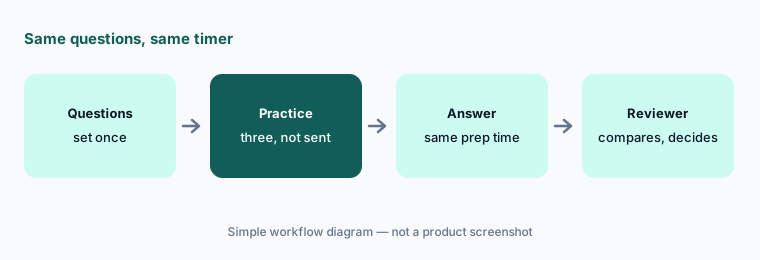
Primary workflow:
Take your own on-demand interview as a candidate (send the invitation to a test address you control, the way you invite real candidates). Write down every moment you were unsure what was being assessed, and fix the instructions or questions before the next invite goes out.
2. AI Interviewer: voice first-round screens
What it is: HireVue’s AI Interviewer holds a two-way voice conversation with each applicant. It suggests questions and answer rubrics from your job description; you customize and approve the content, voice, and permissions; it asks the questions, probes with follow-ups, and records. It then checks each answer against your criteria and explains why: qualification questions come back as “Meets” or “Does not meet,” and skill questions use a custom 1–5 rubric or HireVue’s validated competencies. Recruiters see the results in the ATS and decide next steps. HireVue lists English, Spanish, French, and Portuguese, candidate AI opt-out and accommodation paths, an equivalent non-AI path, script locks, version history, and audit logs.
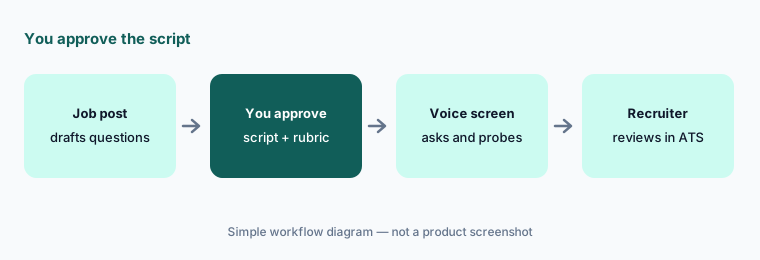
Read the “Does not meet” pile:
For one role, open ten transcripts the AI Interviewer marked “Does not meet” and read the answers yourself. If any candidate meets the requirement in different words, fix the rubric wording before the next batch.
3. Assessments: games, job tryouts, and coding
What it is: HireVue’s assessments are short tasks: game-based exercises for cognitive ability, language prompts, coding exercises that are scored automatically, and the Virtual Job Tryout, a realistic job simulation. HireVue says games and AI-scored interviews use AI and the Virtual Job Tryout does not. Outputs can include scores, fit, strengths, and suggested follow-up questions. Assessment Builder creates role-specific assessments for lower-volume roles. Ask which parts of an assessment are AI-scored before you write your candidate notice.
Know what is measured:
For one assessment you use, write one sentence each on what it measures, whether AI scores it, and how it links to the job. If you cannot write any of the three, ask HireVue before the next hiring wave.
4. Live interviews and interview insights
What it is: For live interviews, teams meet in HireVue, Zoom, Microsoft Teams, or Webex with a shared interview guide and real-time notes. HireVue’s interview insights produce AI summaries, searchable transcripts, role-specific competency mapping, and highlighted moments, and reviewers can tag moments and share recordings. HireVue says it keeps more than 1,000 job-specific interview guides maintained by industrial-organizational psychologists. Summaries help reviewers move faster, but the interviewer’s own judgment still belongs in the feedback.
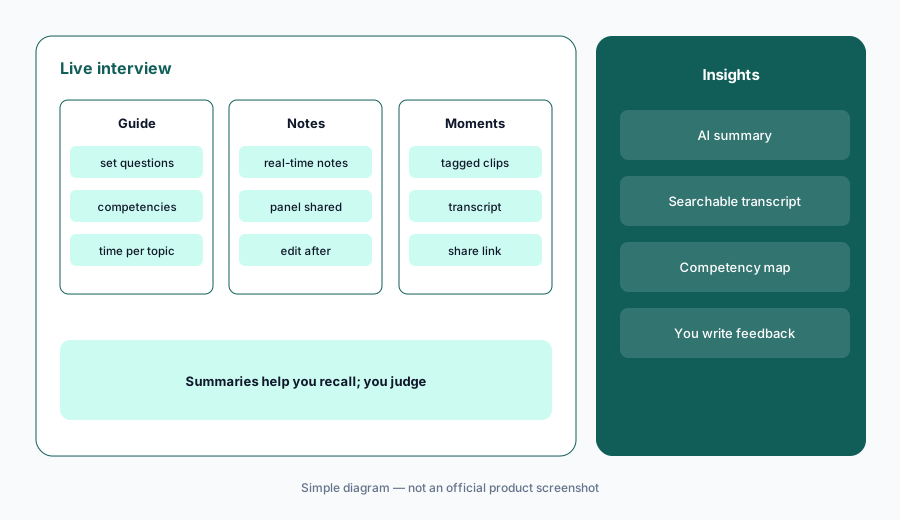
Check the summary:
After one live interview, pick three lines from the AI summary and open the tagged moment or transcript behind each. Correct anything the candidate did not say before you submit feedback.
5. Scheduling and rule-based progression
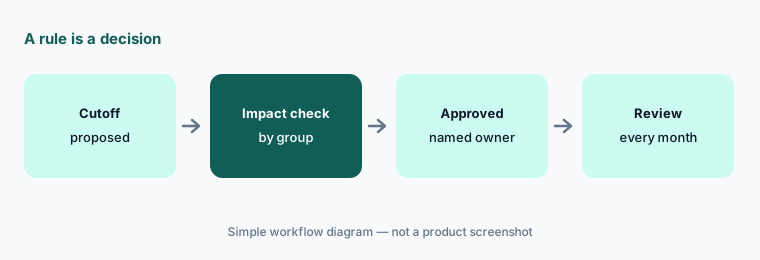
What it is: HireVue’s automation lets candidates self-schedule across interviewers’ shared calendars: they get an invitation by email or SMS, pick an open time, and reschedule when needed, and the same tools support hiring events. Recruiters can take bulk actions and set rule-based progression — HireVue’s own example is moving every candidate who scores above 80% to the next stage — with each stage change written back to the ATS. A progression rule is a hiring decision your team made in advance, so it needs the same review as any other: who set it, what evidence supports the cutoff, and whether selection rates differ across groups.
Own the rule:
List every rule-based progression rule in your account. For each, write who approved it, why the cutoff is where it is, and when it was last checked for adverse impact. Pause any rule nobody can explain.
6. Integrity checks for cheating and fraud
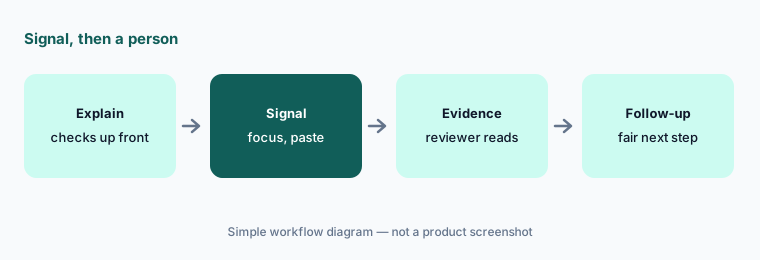
What it is: HireVue’s integrity layer explains identity, environment, audio, screen, and browser checks to candidates before the interview, then flags signals such as loss of browser focus and unexpected session changes. It can limit copy-and-paste and capture images during eligible on-demand interviews. Reviewers get the fraud indicators and the underlying evidence in one report so they can decide what needs follow-up. A signal is a reason for a person to check, not a rejection.
Signal, then a person:
Write a short rule for integrity signals: who reviews the evidence, what follow-up a candidate gets, and how the outcome is logged. Check after a month how many signals were confirmed.
Pricing context (October 2026)
HireVue does not publish prices. Its pricing page (checked 6 October 2026) describes the platform for mid-market and enterprise buyers and offers a demo, with no plan names or figures. The FAQ on that page says HireVue is free for candidates, includes training from its professional services team, integrates with leading ATS and CRM systems, and offers 24/7 support in 20+ languages.
Security claims on the same page: SOC 2 Type 2, ISO/IEC 27001:2013, GDPR compliance, and FedRAMP certification. The AI Interviewer page lists alignment with the NIST AI RMF, the EU AI Act, and ISO 42001, and fairness audits covering NYC Local Law 144, EEOC, and OFCCP — those are HireVue’s claims; ask for the audit documents.
Uncertainty: Pricing is quote-only, so budget from a written quote that names every module (on-demand, live, AI Interviewer, assessments, scheduling). Ask which features are AI-scored, request the latest bias audit and AI Explainability Statement, and confirm how candidates opt out or request accommodation in your regions.
When it’s useful (honest take)
Useful when you screen thousands of applicants for similar roles, need every candidate to get the same questions on the same timer, and want first rounds available after hours. Useful too when legal and IT need audit documents, opt-out paths, and enterprise security before any AI touches candidates.
Less useful when you hire a handful of people a year, or your roles change too fast to keep a validated question set current. Less useful if nobody owns candidate notice, accommodations, and adverse-impact checks: HireVue gives you the controls, but a person has to run them. Scores inform recruiters; recruiters decide.
Paying for HireVue and a few other AI tools? The $9 AI toolkit spreadsheet lists every AI subscription you have, what each one costs, and how fast it pays for itself, so you can see which ones are worth the money.
Want someone to do it for you? AI toolkit audit — $19
Related options (educational)
| Need | Better home | Why |
|---|---|---|
| Video interviews, AI Interviewer, and assessments at volume | HireVue (this page) | One platform for first rounds, with audit documents |
| Text-based apply, screening, and scheduling for hourly roles | Paradox | Conversation over SMS and chat; now part of Workday |
| An async AI interviewer next to interview notes | BrightHire Screen | Pairs with interview intelligence |
| Screening help inside your ATS | Greenhouse AI or Workable AI | Fewer vendors if the ATS covers it |
| Notes for live interviews only | Metaview | Notes layer, not assessment |
| Workday customers comparing suite options | Workday AI | See what your HR suite already includes |
FAQ
Does HireVue decide who gets hired?
No. HireVue says its scores are inputs to recruiter judgment and that recruiters make the final call. Rule-based progression can move candidates automatically, but only on rules your team sets — review those rules like any other decision.
How much does HireVue cost in October 2026?
HireVue does not publish prices. On 6 October 2026 its pricing page offered a demo with no plan names or figures, and said HireVue is free for candidates. Check hirevue.com/pricing.
Does HireVue analyze candidates’ faces?
HireVue says it stopped using visual analysis in its assessment models in March 2020 and announced it in January 2021. It publishes an AI Explainability Statement describing how its current models work.
Can candidates opt out of the AI Interviewer?
HireVue lists AI opt-out and accommodation request paths, an equivalent non-AI path, and human support for candidates. Confirm how those are set up in your account and what your candidate notice says before launch.
What is HireVue’s AI Interviewer?
A voice-based interviewer launched in June 2026, built on technology HireVue acquired from Hireguide in March 2026. It drafts questions and rubrics from your job description, you approve them, it interviews and probes, and recruiters review the results in the ATS.
Optional next step (if seats overlap)
If you pay for HireVue, an ATS screening add-on, and a separate scheduling tool — and more than one touches the same first round — that overlap is worth a look. Map the overlap with the $19 AI toolkit audit or the $9 AI toolkit spreadsheet. Email Audit $19 or Toolkit spreadsheet $9.
Checkout is live via Stripe. After you pay, we email delivery (spreadsheet) or intake next steps (audit).