How-to · Recruiting · Juicebox · Oct 12, 2026
Build a 20-person sourcing shortlist in Juicebox that a recruiter actually reviews
AI sourcing tools can return hundreds of profiles in seconds. Nobody reads hundreds. This page shows a recruiter how to write tight criteria in Juicebox, cap the list at 20, and screen each person by hand before anyone gets a message.
Who this is for
Recruiters and sourcers using Juicebox's PeopleGPT search for outbound roles. If your team sources mainly inside LinkedIn Recruiter, compare the two in Juicebox vs LinkedIn Hiring Assistant.
How to do it
This is a how-to, not a ranking. Feature detail on PeopleGPT search, filters and criteria, Agents, and shortlists lives on the Juicebox review.

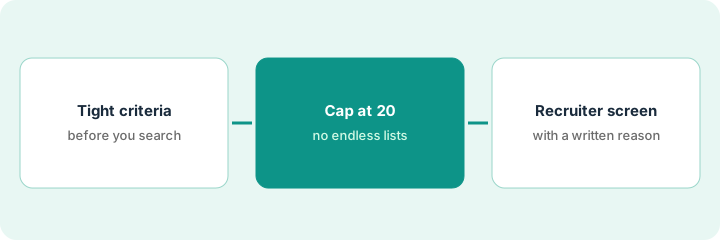
1. Step 1 — Write the search criteria
What it is: A short, plain-English brief that PeopleGPT can search on, written from the hiring manager's must-haves.
- Two or three must-haves only. Everything else is a nice-to-have.
- Location and work arrangement, stated plainly.
- Leave out anything that shouldn't influence a search, like age, gender, or school prestige used as a stand-in for skill.
- Save the criteria so you can reuse and adjust them.
Brief: "Backend engineers with 4+ years in Go, who've worked on payments or billing systems, based in or willing to work in Mountain time."
Write your brief in one sentence first. If you need three sentences, you probably have too many must-haves.
2. Step 2 — Cap the list at 20
What it is: Take only the first 20 results into review, even if the search returns far more.
- Twenty is a number one recruiter can read carefully in an hour.
- If the first 20 look wrong, change the criteria and search again. Don't scroll to result 200.
- If you use Juicebox Agents to keep sourcing in the background, keep the same 20-a-batch cap.
- Watch credits and exports, since big pulls can cost more than they're worth.
The search returns 300 profiles. The sourcer reviews the first 20. Six are clearly off (front-end only), so she tightens the criteria and pulls a fresh 20.
Add a rule to your sourcing doc: "No batch over 20 until the last batch is fully screened."
3. Step 3 — Recruiter screen with reasons
What it is: A person reviews each of the 20 and writes one short reason for yes or no.
- Open each profile. Read it, not just the AI's summary.
- Mark yes, no, or maybe, with a one-line reason tied to the must-haves.
- Only "yes" profiles go into a sequence, and check do-not-contact lists first.
- Share the yes list with the hiring manager as a shortlist for a quick gut check.
Of 20, the sourcer marks 7 yes, 10 no, 3 maybe. One "yes" is on the company's do-not-contact list because he's a recent former employee, so he's removed. The hiring manager confirms 5 to contact.
Columns: Name | Yes/No/Maybe | Reason (tied to a must-have) | Do-not-contact checked | Hiring manager OK.
Pricing context (October 2026)
This how-to isn't a price sheet. Juicebox plan and credit notes live on the Juicebox review, and LinkedIn's on the LinkedIn Hiring Assistant review. Check vendor pricing pages before you budget. Dated October 2026.
Checked Oct 12, 2026 on the vendor’s own pricing page: Juicebox’s pricing page lists Free at $0 per seat per month (limited free searches), Starter at $99, Growth at $179, and a higher team tier at $199 per seat per month (USD), with contact and export credit allotments by plan. Credits are used when you reveal email and phone contact info.
Uncertainty: Sourcing tool credits and plans change. If your invoice and our review disagree, trust the invoice. The only prices this site sells here are the optional $9 AI toolkit spreadsheet and $19 AI toolkit audit.
When this helps (honest take)
Useful when you source outbound regularly, the hiring manager has clear must-haves, and a recruiter has time to screen.
Not useful when the role isn't defined yet, or when the goal is volume for its own sake. Long unread lists waste credits and candidates' patience.
Related options (educational)
| Need | Where to look | Why |
|---|---|---|
| Juicebox features | Juicebox | Primary path on this page |
| LinkedIn-native sourcing | LinkedIn Hiring Assistant | When LinkedIn Recruiter is home |
| Side by side | Juicebox vs LinkedIn Hiring Assistant | Which fits your team |
| Before another seat | Three checks before an AI seat | Live how-to |
Free: seat-waste calculator if you pay for Juicebox and LinkedIn Recruiter seats that do the same searches.
FAQ
Why not let the AI pick who to contact?
Because the recruiter is accountable for who gets a message. AI ranking helps you start; a person decides.
Is 20 a magic number?
No. It's a number one person can review properly. Pick your own cap and stick to it.
Where do current prices live?
On the Juicebox and LinkedIn Hiring Assistant reviews. This page doesn't invent list prices. Our Oct 12, 2026 check of the vendor’s own pricing page is summarized in the pricing section above.
Why cap at 20?
Long AI shortlists hide the screening work. Twenty people is enough for a recruiter to leave a reason on each row in one sitting.
Optional next step
Free reviews stay free. If you're paying for two sourcing tools that search the same people, the $9 AI toolkit spreadsheet or the $19 AI toolkit audit can help you decide which one to keep.