Role guide · Recruiting · ChatGPT Business · Oct 2026
ChatGPT for recruiting (Oct 2026): job posts, outreach drafts, and structured interview questions
Recruiting role guide — a shared Outreach drafts GPT in a ChatGPT Business workspace, plus job-post drafts and structured interview questions. ChatGPT drafts; recruiters edit and press send, and the hiring manager and panel decide. Companion to Claude for recruiting and the other ChatGPT role guides.
Who this guide is for
Recruiters, sourcers, and recruiting coordinators whose company already has ChatGPT Business (formerly ChatGPT Team — OpenAI renamed it on August 29, 2025) or Enterprise, and who want shared, repeatable drafts for job posts, outreach, and interview questions. If your team works in Claude instead, see Claude for recruiting. Product deep-dive: ChatGPT. Sibling role guides: ChatGPT for HR, ChatGPT for ops.
What changed this fall (from OpenAI’s help center, read 6 October 2026): new GPT creation and publishing are no longer available on personal accounts (Free, Go, Plus, Pro); Business, Enterprise, and Edu users can still create GPTs if their workspace allows it. OpenAI also plans to retire custom GPTs on December 11, 2026 and recommends moving them to plugins, which bundle reusable instructions (as skills), reference files, and connected apps. Existing GPTs keep working until then. This guide uses a GPT because that is what most recruiting teams have today, and section 6 covers the move.
Ground rules: ChatGPT never decides who to contact, advance, or reject — recruiters choose who to message and press send, and the hiring manager and interview panel decide. Instructions must forbid assumptions about age, gender, race, disability, family status, background, or any other protected trait. Every message a candidate sees goes out under a recruiter’s name and says how to opt out of further contact; if interviews are recorded by another tool, candidates get notice and can decline first. Keep candidate profiles out of personal ChatGPT accounts; use the Business workspace and paste sanitized text where names aren’t needed.
Major features (with how someone uses them)
Examples at a glance: each feature has a concrete example from a real job plus a short Try this you can run this week.
1. Custom GPT Outreach drafts (primary)
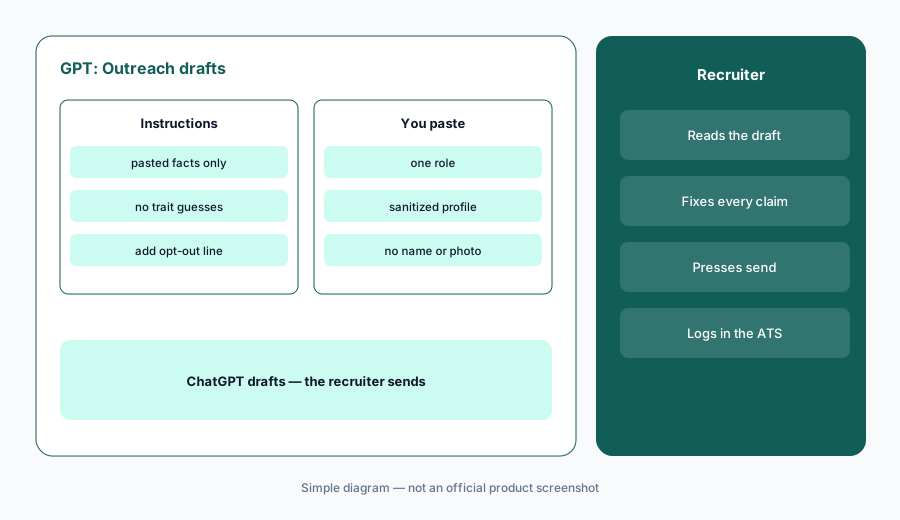
What it is: In a Business workspace (with permission to create GPTs), open Explore GPTs, select Create, and use the configuration view. Name it Outreach drafts. In Instructions, write the rules: draft a short first message from the recruiter, use only facts from the role description and the profile you paste, say why this person’s listed experience fits, include how to opt out, and make no assumptions about age, gender, or background. OpenAI’s guidance is to put rules and tone in instructions and reference material in knowledge files, and to test in Preview before saving. Share it with your recruiting team only. GPT builders cannot see the conversations people have with a GPT.
Primary workflow:
Custom GPT Outreach drafts. Instructions: no assumptions about age, gender, or background. Paste one role and one sanitized profile.
2. Job-post drafts from the intake
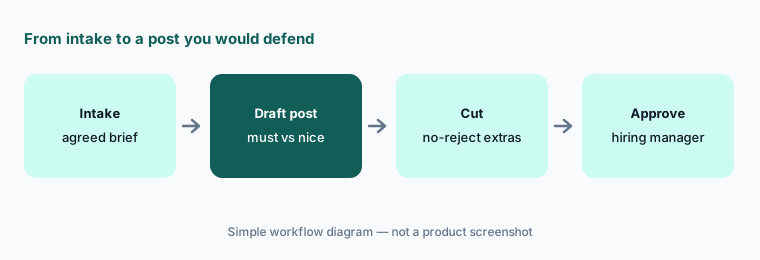
What it is: Paste the agreed intake brief and ask for a job post: what the person will do in the first six months, must-have requirements, nice-to-haves clearly labeled, pay range and location as your company publishes them, and how to apply. Then cut every requirement you would not actually reject someone for. Ask ChatGPT to flag phrases that are vague or could discourage qualified people (“rockstar,” “digital native,” degree requirements the role doesn’t need), and decide each one yourself. The recruiter and hiring manager own the final post.
Cut the extras:
Paste one agreed intake brief and ask for a job post with must-haves and nice-to-haves separated. Delete every must-have you would not reject a candidate for, and ask ChatGPT to flag vague or exclusionary phrases.
3. Structured interview questions
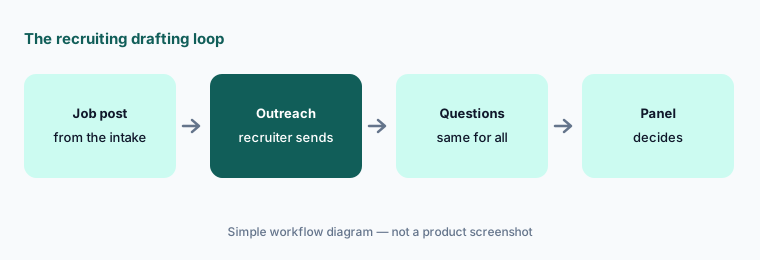
What it is: Structured interviews ask every candidate the same job-related questions and have interviewers write evidence in an interview feedback form. Ask ChatGPT for two behavioral questions and one work-sample prompt per requirement, plus what a strong answer would show — in plain words, not points. Then check: every question maps to a requirement, none invites personal topics (family, age, health, religion, national origin), and the set is the same for everyone. Put the final questions into your ATS interview kit; that is where interviewers should use them.
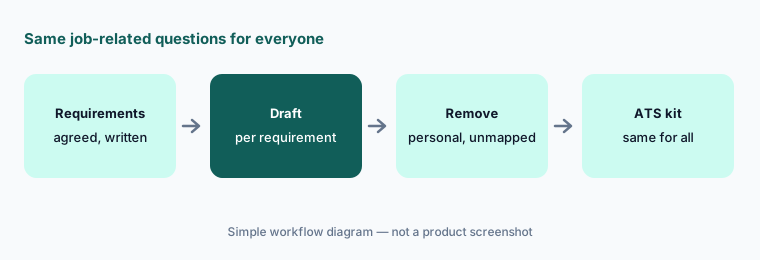
Same questions for everyone:
Paste three agreed requirements. Ask for two behavioral questions and one work-sample prompt per requirement. Remove any question that does not map to a requirement or could lead to personal topics, then load the rest into your ATS kit.
4. One project per open role
What it is: OpenAI’s Business overview lists Projects alongside GPTs in Standard seats. A project per open role keeps the agreed brief, the approved job post, and the interview kit together, so drafts later in the search use the same facts. Keep the project to role documents; candidate-specific notes belong in your ATS, not in a chat project that may outlive the search.
Keep facts in one place:
For one open role, put the agreed brief, the live job post, and the interview kit in a single project. Regenerate one outreach template from it and check every fact against the live job post.
5. Where candidate data belongs (plans and data controls)
What it is: OpenAI says it does not train on ChatGPT Business, Enterprise, or Edu data by default, and that for consumer plans (Free, Plus, Go, Pro) data may be used for training depending on whether you have opted out. Business includes SAML SSO, multi-factor authentication, Member/Admin/Owner roles, and GPT controls to enable or disable third-party GPTs. When a GPT uses connected apps or external actions, parts of your input may go to that third-party service, and OpenAI says it does not audit how those services use your data. OpenAI’s Business overview also notes that zero data retention and some contract options require a sales-led plan rather than self-serve Business.
Practical rule: no candidate names, resumes, or profiles in a personal account. In Business, keep recruiting GPTs free of connected apps or actions unless your admin has reviewed them, and paste sanitized profiles.
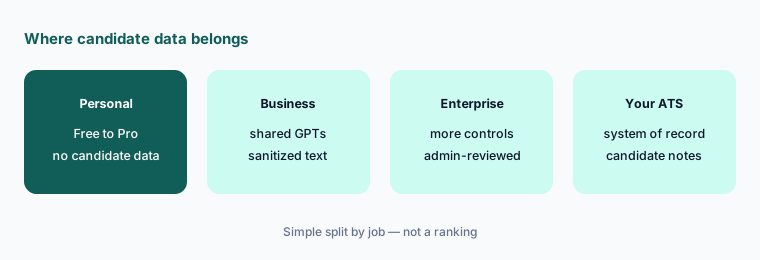
Check the account first:
List everyone drafting recruiting messages in ChatGPT and which plan each account is on. Move candidate data out of personal accounts, and list every recruiting GPT that uses apps or actions for your admin to review.
6. Custom GPTs are retiring: plan the move to plugins
What it is: OpenAI’s retirement FAQ (updated October 2026) says custom GPTs are scheduled to retire on December 11, 2026 (February 11, 2027 for Enterprise workspaces with an approved deferral), and that existing conversations stay accessible. When migration is available, My GPTs offers Migrate to plugin: the GPT’s instructions become a skill, knowledge files become reference files, and connected apps carry over, but custom actions do not transfer, the selected model does not carry over, and sharing settings do not move — the new plugin starts private. After migration the original GPT is read-only. Compare familiar prompts on the plugin before your team switches, and confirm the protected-trait rule survived word for word.
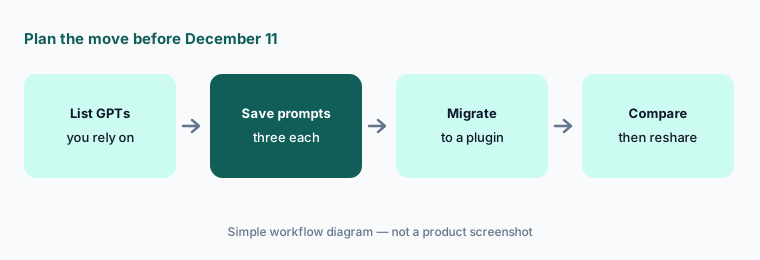
Test the replacement:
Before December 11, 2026, list every recruiting GPT your team relies on and save three familiar prompts for each. After migrating one to a plugin, run the same prompts and check that the protected-trait instruction is still there.
Pricing context (October 2026)
OpenAI’s ChatGPT Business overview (checked Oct 6, 2026, USD for most countries): Standard seat $25 per user per month billed monthly or $20 per user per month billed annually; Premium seat $125 per user per month billed monthly or $100 billed annually, with 5x the usage of Standard. A Business workspace needs at least two seats. OpenAI says pricing may vary by country and currency, and API usage is billed separately.
We could not load chatgpt.com/pricing on Oct 6, 2026 (it returned a bot check to our fetch), so this page does not quote personal-plan or Enterprise prices. Full dated notes are on the ChatGPT deep-dive.
Uncertainty: Seat types, usage limits, and the GPT-to-plugin migration timeline can change; OpenAI says migration may reach accounts at different times. Hiring rules differ by location; this is product education, not legal advice.
When it’s useful (honest take)
Useful when your company already pays for ChatGPT Business or Enterprise, recruiters write similar outreach and job posts every week, and someone owns the shared GPT (and its plugin replacement) and its instructions.
Useful when you want the same structured questions for every candidate and a hiring manager will review them before they go into the ATS.
Less useful when recruiters would paste profiles into personal accounts, nobody will plan the December 2026 GPT retirement, or anyone expects ChatGPT to choose who to contact or hire. Recruiters send; the hiring manager and panel decide.
Paying for ChatGPT and a few other AI tools? The $9 AI toolkit spreadsheet lists every AI subscription you have, what each one costs, and how fast it pays for itself, so you can see which ones are worth the money.
Want someone to do it for you? AI toolkit audit — $19
Related options (educational)
| Need | Better home | Why |
|---|---|---|
| Same job with Projects in Claude | Claude for recruiting | Intake, kits, and debrief summaries |
| Sourcing outreach inside a sourcing tool | Juicebox or LinkedIn Hiring Assistant | See the compare |
| Job-post language guidance | Textio | Wording guidance built for job posts |
| AI job posts inside a small-team ATS | Workable AI | Drafts where the post is published |
| People-ops FAQ and policy drafts | ChatGPT for HR | Sibling role guide |
FAQ
How should a recruiting team set up ChatGPT?
In a Business or Enterprise workspace, create an Outreach drafts GPT whose instructions use only pasted facts and forbid assumptions about age, gender, or background. Share it with the recruiting team only, paste sanitized profiles, and have a recruiter edit and send every message.
Are custom GPTs going away?
OpenAI says custom GPTs are scheduled to retire on December 11, 2026 (later for Enterprise workspaces with an approved deferral) and recommends migrating them to plugins. Instructions become a skill and knowledge files become reference files; custom actions and sharing settings do not carry over.
Can ChatGPT decide which candidates to contact or hire?
It should not, and this guide never asks it to. Recruiters choose who to message and press send; the hiring manager and interview panel make hiring decisions.
Is candidate data used to train OpenAI models?
OpenAI says ChatGPT Business, Enterprise, and Edu data is not used for training by default; on consumer plans it may be, depending on your opt-out setting. Keep candidate data out of personal accounts and paste sanitized profiles.
What does ChatGPT Business cost in October 2026?
OpenAI’s Business overview listed Standard seats at $25 per user per month billed monthly or $20 billed annually, and Premium seats at $125 monthly or $100 annually, with a two-seat minimum, on Oct 6, 2026. See OpenAI’s help center.
Optional next step (if seats overlap)
If recruiting pays for ChatGPT, Claude, a sourcing tool’s AI outreach, and an ATS writing assistant that all draft the same messages, fix that overlap before adding another seat. Map the overlap with the $19 AI toolkit audit or the $9 AI toolkit spreadsheet. Email Audit $19 or Toolkit spreadsheet $9.
Checkout is live via Stripe. After you pay, we email delivery (spreadsheet) or intake next steps (audit).