Role guide · Recruiting · Claude · Oct 2026
Claude for recruiting (Oct 2026): intake briefs, interview kits, and debrief summaries with Projects
Recruiting role guide — a Recruiting Project in Claude that turns a hiring manager’s intake into a brief, a structured interview kit, and, after interviews, a summary of what interviewers wrote. Claude drafts; recruiters, interviewers, and the hiring manager decide. Companion to ChatGPT for recruiting and the other Claude role guides.
Who this guide is for
Recruiters, recruiting coordinators, and hiring managers who already have Claude (or are deciding on it) and want a repeatable intake → interview kit → debrief loop — not an AI that picks candidates. If your team uses ChatGPT instead, the same job is covered in ChatGPT for recruiting. Product deep-dive: Claude. Sibling role guides: Claude for HR, Claude for ops.
How Projects work (from Anthropic’s help center, read 6 October 2026): a project is a self-contained workspace with its own chat history and knowledge base. You upload documents or paste text into project knowledge, and set project instructions that apply to every chat in it. Projects are available on every plan; Free accounts can create up to five. On Team and Enterprise plans you can share a project with specific colleagues as Can view or Can edit, or with the whole organization if your admin allows it.
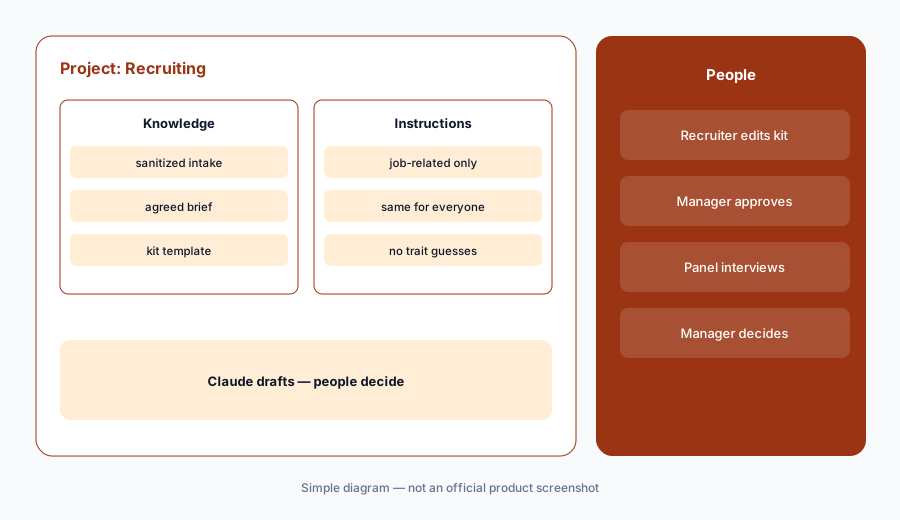
Ground rules for this guide: Claude never decides who advances, gets an offer, or is rejected — the hiring manager and interview panel do, and the recruiter runs the process. Use only job-related requirements. Never ask Claude to guess or infer age, gender, race, disability, family status, or any other protected trait. Keep candidate names, resumes, and interview notes out of personal accounts; use a Team or Enterprise workspace with the data controls Anthropic describes, and paste sanitized text wherever you can.
Major features (with how someone uses them)
Examples at a glance: each feature has a concrete example from a real job plus a short Try this you can run this week.
1. Project Recruiting + interview kit (primary)
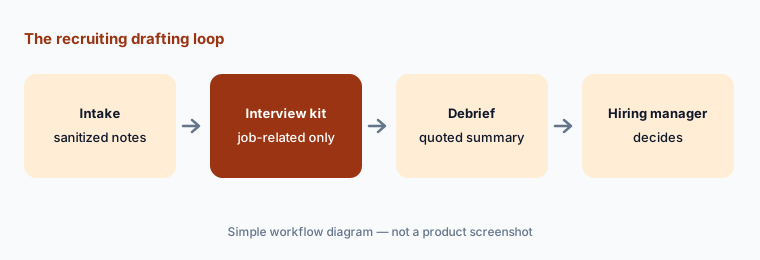
What it is: Create a project called Recruiting. In project instructions, write the rules once: use only the requirements in the intake, write questions that are job-related and the same for every candidate, mark anything you cannot support as a question for the hiring manager, and never ask about or infer protected traits. Paste a sanitized intake note — the role, team, must-haves, and nice-to-haves, with no candidate or employee names — and ask for an interview kit: a short competency list, two or three questions per competency, and what a strong, mixed, or weak answer sounds like in plain words.
Primary workflow:
Project Recruiting. Paste one sanitized intake note. Ask for an interview kit with job-related questions only.
2. Intake briefs from the hiring-manager call
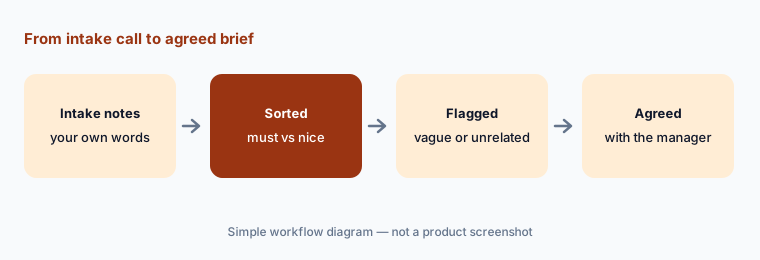
What it is: Before the kit, there is the brief. Paste your own notes from the intake call (not a recording of the hiring manager unless they agreed to it) and ask Claude to sort them into must-haves, nice-to-haves, and open questions, and to flag any requirement that is vague (“culture fit”), not tied to the work, or could screen people out for reasons unrelated to the job (for example a degree requirement the role doesn’t need). The recruiter and hiring manager then agree the final brief; Claude’s list is a checklist for that conversation.
Flag the vague ones:
Paste your notes from one intake call. Ask Claude to sort them into must-have, nice-to-have, and open questions, and to flag every requirement that is vague or not tied to the work. Agree the final list with the hiring manager.
3. Check the kit before anyone uses it
What it is: A structured interview works because every candidate gets the same job-related questions and every interviewer writes down evidence, not impressions. Ask Claude to review your draft kit against the brief: map each question to one requirement, list any question with no requirement behind it, and point out questions that could lead an interviewer toward personal topics (family plans, age, health, religion, where someone grew up). Then a person — the recruiter or whoever owns hiring compliance — makes the final edit.
Put the finished kit in your ATS interview kit or interview feedback form so interviewers use it there; Claude is the drafting room, not the system of record.
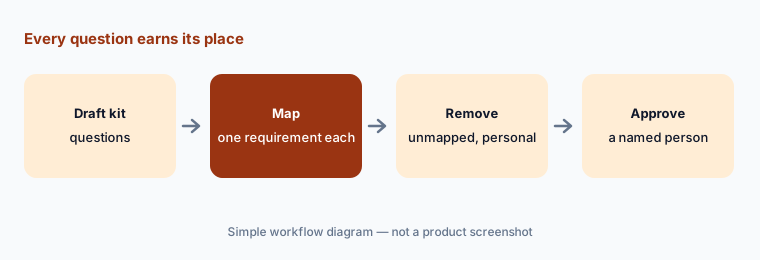
Map every question:
Paste your interview kit and the agreed brief. Ask Claude to map each question to one requirement, list unmapped questions, and flag any that could lead to personal or protected topics. Remove or rewrite each one yourself.
4. Debrief summaries from consented notes
What it is: After interviews, each interviewer writes their own feedback in your interview feedback form. If a call was recorded, the candidate was told in advance and agreed. For the debrief, paste the interviewers’ written notes (sanitized: initials or Candidate A, no contact details) and ask Claude to summarize, per competency, where interviewers agree, where they disagree, and which claims have no example behind them — quoting the notes. Tell it not to recommend hire or no-hire. The hiring manager runs the debrief and makes the call with the panel.
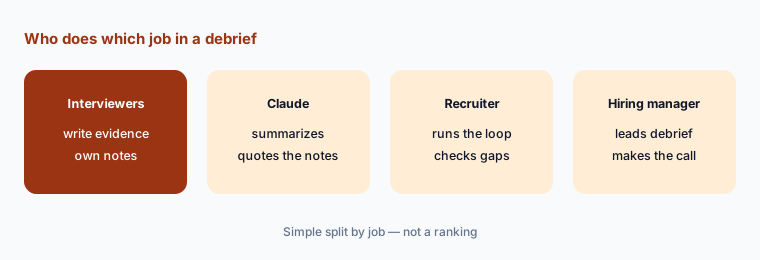
Summarize, don’t decide:
Paste sanitized written notes from one interview loop. Ask Claude for agreements, disagreements, and unsupported claims per competency, with quotes, and no hire or no-hire recommendation. Bring the summary to the debrief.
5. Where candidate data belongs (plans and data controls)
What it is: On claude.com/pricing (checked Oct 6, 2026), Anthropic lists model training as “Opt-out” on Free, Pro, and Max — consumer plans — and says Team has “no model training on your content by default.” Anthropic’s privacy center says that by default it does not use inputs or outputs from commercial products such as Claude for Work (Team and Enterprise) to train its models, unless you send feedback or otherwise choose to allow it; Team and Enterprise owners can turn off the thumbs up/down feedback setting for the organization. Team adds SSO, central billing and administration, and project sharing. Audit logs, role-based access, and custom data retention controls are listed for Enterprise.
Practical rule: no candidate names, resumes, or interview notes in a personal Free, Pro, or Max account. Use a Team or Enterprise workspace, keep the Recruiting project private or shared only with the hiring team, and still paste sanitized text when names aren’t needed.
Check the account first:
List everyone who uses Claude for recruiting work and which plan each account is on. Move any candidate data out of personal accounts, and keep the Recruiting project private or shared only with the hiring team.
6. Guardrails + vs ChatGPT for recruiting
What it is: Claude speeds up drafting; it does not replace the ATS, the interview panel, or anyone responsible for hiring compliance. Prefer Claude when Projects with shared knowledge and instructions are already the team habit. Prefer ChatGPT for recruiting when a ChatGPT Business workspace and its GPTs (now moving to plugins) are already where your team drafts. Paying for both just to draft the same interview kits is usually seat overlap. If your ATS or interview notetaker already drafts kits or summaries, compare that first — see Ashby vs Greenhouse and Metaview vs BrightHire.
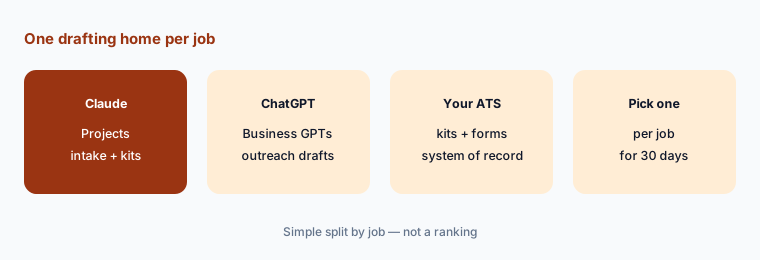
One drafting home:
List every paid AI seat your recruiting team uses to draft intake briefs, interview kits, or debrief summaries. Pick one home per job for 30 days and note which seats nobody missed.
Pricing context (October 2026)
On Anthropic’s pricing page (checked Oct 6, 2026, USD, before tax): Free $0 (Projects up to 5); Pro $17 per month with the annual discount ($200 billed up front) or $20 billed monthly; Max from $100 per month. Team (2 to 150 people): Standard seat $20 per seat per month billed annually or $25 monthly; Premium seat $100 per seat per month billed annually or $125 monthly. Enterprise: $20 per seat per month billed annually plus usage at API rates.
For candidate data, the relevant line is not the price but the plan: Team and Enterprise are Anthropic’s commercial plans with no model training on your content by default, project sharing, and admin controls. Full dated notes are on the Claude deep-dive.
Uncertainty: Anthropic says prices and plans are subject to change and usage limits apply. Its help center also notes a new version of projects is rolling out in beta, starting with Claude Code, so the Projects screen may change. Hiring rules differ by location (for example notice rules for automated tools); this is product education, not legal advice.
When it’s useful (honest take)
Useful when your team already has Claude Team or Enterprise, recruiters write intake briefs and interview kits by hand today, and a hiring manager will review every kit before it goes into the ATS.
Useful when debriefs drift into opinions and you want a quick, quoted summary of what interviewers actually wrote.
Less useful when recruiters would paste resumes into personal accounts, your ATS or notetaker already drafts kits and summaries you trust, or anyone expects Claude to pick the candidate. People decide: the hiring manager and panel make the call.
Paying for Claude and a few other AI tools? The $9 AI toolkit spreadsheet lists every AI subscription you have, what each one costs, and how fast it pays for itself, so you can see which ones are worth the money.
Want someone to do it for you? AI toolkit audit — $19
Related options (educational)
| Need | Better home | Why |
|---|---|---|
| Same job in a ChatGPT Business workspace | ChatGPT for recruiting | GPTs (moving to plugins) and Projects |
| Interview kits and feedback forms inside the ATS | Greenhouse AI or Ashby AI | System of record for kits and feedback |
| Interview notes from recorded calls | Metaview or BrightHire | Consent and opt-out built in |
| Job-post language guidance | Textio | Guidance on wording |
| Policy and people-ops drafts | Claude for HR | Sibling role guide |
FAQ
How should a recruiting team set up Claude?
Create a Recruiting project in a Team or Enterprise workspace, write instructions that require job-related questions only and forbid inferring protected traits, paste a sanitized intake note, and ask for an interview kit. A person reviews every kit before it goes into the ATS.
Can Claude decide which candidate to hire?
It should not, and this guide never asks it to. Claude summarizes what interviewers wrote; the hiring manager and interview panel decide, and the recruiter runs the process. Tell Claude not to recommend hire or no-hire.
Is it safe to paste candidate resumes into Claude?
Not into a personal account. Anthropic lists model training as opt-out on Free, Pro, and Max, and says commercial plans such as Team and Enterprise are not used for training by default. Use a Team or Enterprise workspace, share the project only with the hiring team, and sanitize text when names are not needed.
What does Claude cost for a recruiting team in October 2026?
On Oct 6, 2026, Claude Team listed Standard seats at $20 per seat per month billed annually ($25 monthly) and Premium seats at $100 ($125 monthly), for 2 to 150 people. Check claude.com/pricing before budgeting.
What about recorded interviews?
Tell candidates in advance what is recorded and why, and let them say no without affecting their application. This guide works from interviewers’ written notes; if you use a notetaker, see Metaview vs BrightHire for consent workflows.
Optional next step (if seats overlap)
If recruiting pays for Claude, ChatGPT, an ATS AI add-on, and an interview notetaker that all draft the same kits and summaries, fix that overlap before adding another seat. Map the overlap with the $19 AI toolkit audit or the $9 AI toolkit spreadsheet. Email Audit $19 or Toolkit spreadsheet $9.
Checkout is live via Stripe. After you pay, we email delivery (spreadsheet) or intake next steps (audit).