Role guide · Nonprofits · Claude Team · Oct 2026
Claude for nonprofits (Oct 2026): the up-to-75% Team discount, Goodstack verification, Blackbaud, Candid, and Benevity connectors, and grant drafts your development team checks
Nonprofit role guide — Anthropic's Claude for Nonprofits program, launched in December 2025, gives eligible organizations up to 75% off Claude Team and Enterprise, three nonprofit connectors (Blackbaud, Candid, Benevity), and a free AI Fluency course. This page covers what it costs, how to qualify, and six jobs where Claude drafts and your development team checks every fact before anything reaches a donor or funder. Donor names, gift amounts, and anything confidential stay out of prompts unless your data policy and the contract allow it. If your donor CRM already has AI inside it, start there: see Blackbaud AI or Bloomerang AI.
Who this guide is for
Development directors, grants managers, communications leads, and executive directors at a 501(c)(3) or international equivalent who want Claude for grant drafts, appeals, board reports, and program writeups. Anthropic's nonprofit page (read 23 October 2026) also lists K-12 public and private schools and certain mission-based healthcare providers as eligible; its getting-started tutorial says government agencies, political campaigns, higher education institutions, and healthcare systems are not. Product deep-dive: Claude.
Donor data stays out by default. The tutorial says Anthropic does not use data from Team or Enterprise accounts to train models by default. That is a vendor setting, not a decision about your donors. Your data policy, donor privacy promises, and contracts decide what may go in; this guide keeps every prompt free of donor names, addresses, and gift amounts so confidential records stay where they are, and it is not legal, tax, or gift-acceptance advice.
Ground rules for every section below: Claude drafts and summarizes; it does not decide who to ask, how much to ask for, or what to promise a funder, and a named person owns every donor-facing message, gift record, ask amount, and funder submission: the grants manager owns every proposal, the development director every appeal and ask amount, the database manager every gift record, and the executive director every funder submission.
Major features (with how someone uses them)
Examples at a glance: each feature has a concrete example from a real job plus a short Try this you can run this week.
1. Project Grant library: need-statement first drafts (primary)
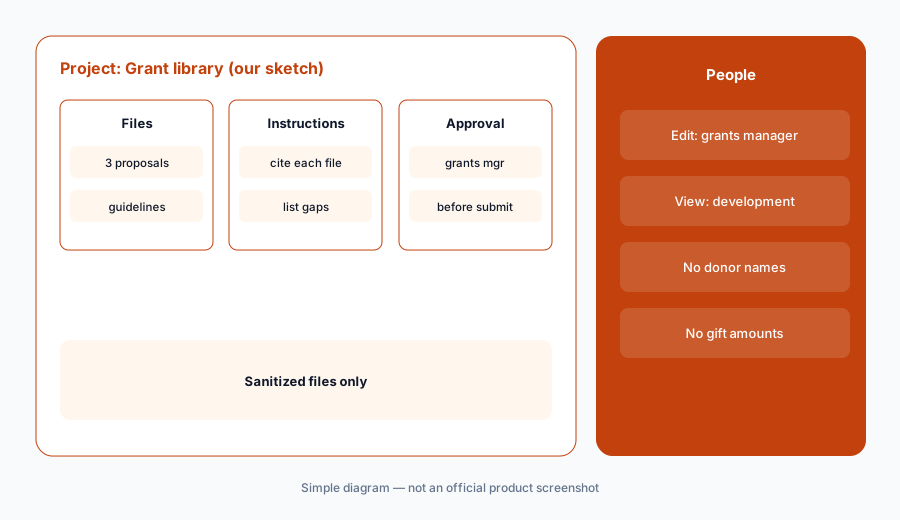
What it is: Create a project named Grant library. Add your last three funded proposals, your current program budget narrative, and the funder's published guidelines, with donor names and gift amounts removed. In the project instructions, ask Claude to draft only from these files, mark every number with the file it came from, and list anything the funder asks for that the files do not cover. Anthropic's projects help article says each project keeps its own files and instructions, and on Team a project can be shared with named colleagues.
Grant writing is the first use case Anthropic lists for nonprofits. The risk is not tone; it is a confident number or outcome that no file supports. Every figure goes back to the grants manager.
Primary workflow:
Create a Claude project with your last three funded grant proposals and the funder's published guidelines, with no donor names or gift amounts. Ask for a first draft of the need statement, and have the grants manager check every fact and figure against your records before it goes into the application.
2. Qualify first: Goodstack verification and who is eligible
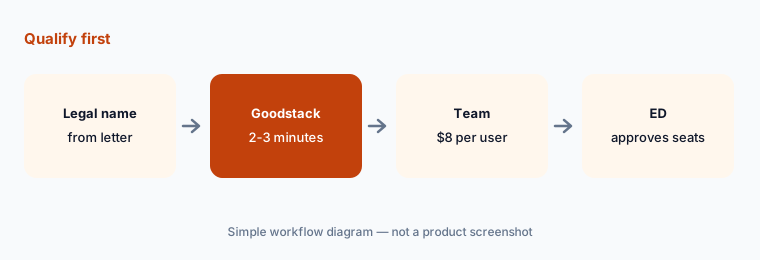
What it is: Anthropic's nonprofit page says organizations with fewer than 20 people verify their nonprofit status with Goodstack, and larger organizations contact sales. The tutorial says Team verification takes 2 to 3 minutes. Eligible: registered 501(c)(3) organizations and international equivalents, K-12 schools, and certain mission-based healthcare providers. The discount stays active as long as the organization keeps its nonprofit status, and an existing full-price account can switch in Admin settings under Billing.
Verification runs on the legal entity, so use the name and registration on your IRS determination letter or national register, not a program or brand name.
Check the legal name:
Have the operations manager copy the legal name and registration number from your determination letter before starting Goodstack verification, and the executive director approve the seat count.
3. The Blackbaud, Candid, and Benevity connectors
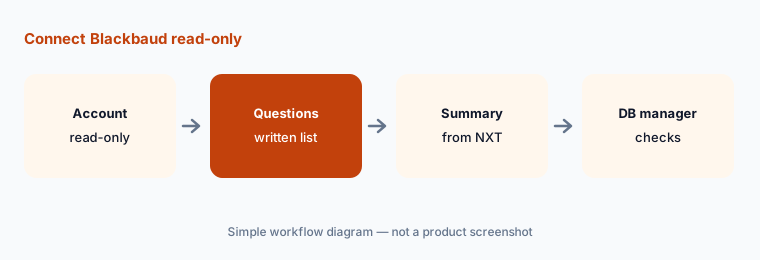
What it is: The tutorial lists three nonprofit connectors built on the Model Context Protocol: Blackbaud connects to Raiser's Edge NXT for donor records, gift history, and events; Candid searches 1.9M+ nonprofits and foundations with profiles, financials, and grant data; Benevity searches 2.4M+ validated nonprofits. Microsoft 365, Gmail, Google Drive, Asana, Slack, and HubSpot connectors are also listed. A connector reads with the permissions of the person who connects it.
The Blackbaud connector is the one that touches donor records. Decide who may connect it, and which questions are allowed, before anyone does.
Read-only first:
Have the database manager connect Blackbaud from a read-only account, list the questions staff may ask, and check the first ten answers against Raiser's Edge NXT.
4. Funder research with Candid, checked before it goes on the calendar
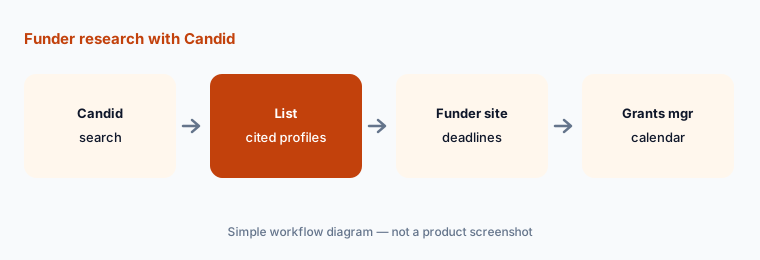
What it is: With the Candid connector, ask Claude for foundations that fund your program area and region, with each one's stated priorities and recent grants from Candid's data. Ask it to cite the Candid profile for every claim and to say when data is missing. It shortens the first list; it does not decide fit. Deadlines and eligibility come from the funder's own site.
Funder data ages. A foundation can change priorities or pause open applications between Candid updates.
Check the funder's own site:
Ask Claude for ten funders in your program area from Candid with a cited profile for each. Have the grants manager check every deadline and eligibility rule on the funder's own site before anything goes on the calendar.
5. What stays out of every prompt
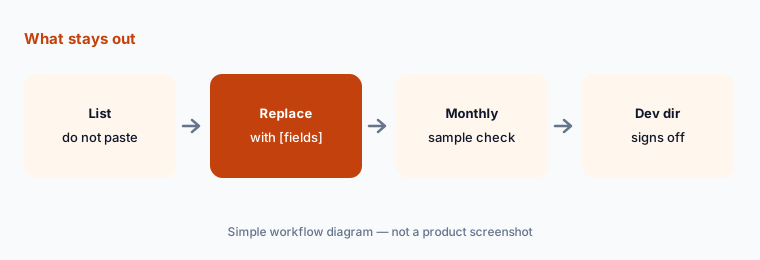
What it is: Write a one-page do-not-paste list: donor names, addresses, emails, gift amounts tied to people, giving history, health or case details about clients, and anything a donor asked to keep private. Replace them with bracketed fields like [donor], [gift], or [program]. Put the list in each project's instructions so Claude flags anything that looks like personal data.
Sanitized prompts still produce useful drafts. A thank-you letter with [donor] and [gift] is as easy to review as one with real names.
Write the list first:
Have the development director write a one-page do-not-paste list and add it to every Claude project's instructions before anyone shares the project.
6. Team or Enterprise for a nonprofit
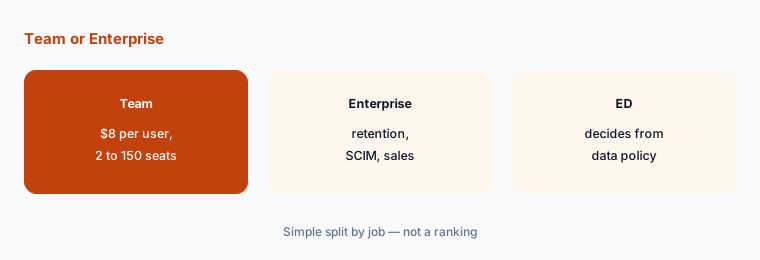
What it is: Anthropic's nonprofit page lists Team for 2 to 150 seats with nonprofit connectors, SSO and domain capture, Claude Code, file creation, and central billing. Enterprise adds more usage, a larger context window, a Compliance API, SCIM, and custom data retention controls. The tutorial lists Enterprise at $10 per user per month for nonprofits; the nonprofit page sends Enterprise buyers to a buying specialist, so get the quote in writing.
Most small development teams need Team. Enterprise is for audit and retention controls your board or a funder actually requires.
Start from the policy:
Have the operations manager list the controls your data policy requires (retention, provisioning, logs) and the executive director check them against Team and Enterprise before choosing a plan.
Pricing context (October 2026)
As listed on Anthropic's Claude for Nonprofits page (checked 23 October 2026): Team, nonprofit standard $8 per user per month; nonprofit access $3 per user per month for nonprofits based in low- or middle-income countries; minimum 2 seats; for organizations buying 2 to 150 seats. Prices shown do not include tax. For comparison, Anthropic's pricing page lists standard Team seats at $20 per seat per month billed annually or $25 monthly.
Enterprise: Anthropic's announcement says the discount is up to 75% on Team and Enterprise, and the tutorial lists the nonprofit Enterprise plan at $10 per user per month; the nonprofit page routes Enterprise to sales. Organizations under 20 people verify through Goodstack; larger ones contact sales. The tutorial says tax-exempt organizations can submit an exemption certificate through support for a refund on future invoices.
Uncertainty: Anthropic's nonprofit prices, eligibility, and connectors change; use the live nonprofit page and your invoice. The Enterprise price comes from Anthropic's tutorial and may differ from a sales quote. Connector behavior is described from Anthropic's pages as read on 23 Oct 2026, not tested against a live Raiser's Edge NXT database. Whether donor data may go into any tool is a decision for your organization, its counsel, and the contract, not this page.
When it’s useful (honest take)
Useful when you are a verified nonprofit with two or more staff who write grants, appeals, and reports, and a named person checks every draft — the grants manager for proposals, the development director for appeals, the executive director for submissions.
Less useful when your donor CRM already drafts appeals with data inside it (Blackbaud AI, Bonterra Que, Virtuous AI), your team already works in ChatGPT (ChatGPT for nonprofits), or the job is prospect research on named people (DonorSearch AI).
Paying for Claude and a few other AI tools? The $9 AI toolkit spreadsheet lists every AI subscription you have, what each one costs, and how fast it pays for itself, so you can see which ones are worth the money.
Want someone to do it for you? AI toolkit audit — $19
Related options (educational)
| Need | Better home | Why |
|---|---|---|
| Grant drafts, funder research, and appeals in a project | Claude for nonprofits (this page) | $8 per user/month Team (nonprofit) |
| Appeals and grant drafts in shared projects | ChatGPT for nonprofits | Nonprofit Business pricing |
| Donor records and appeals inside the CRM | Blackbaud AI | Quote |
| Donor-level next steps in a small-shop CRM | Bloomerang AI | CRM from $125/month annual |
| Choosing a donor CRM | DonorPerfect vs Bloomerang | Compare |
FAQ
How much does Claude cost for nonprofits?
Anthropic's nonprofit page lists Team at $8 per user per month (nonprofit standard) or $3 per user per month for nonprofits in low- or middle-income countries, with a 2-seat minimum, before tax. Anthropic's tutorial lists Enterprise at $10 per user per month; larger organizations go through sales.
How do we qualify?
Organizations with fewer than 20 people verify with Goodstack, which Anthropic says takes 2 to 3 minutes for Team; larger organizations contact sales. Eligible: registered 501(c)(3) organizations and international equivalents, K-12 schools, and certain mission-based healthcare providers. Government agencies, political campaigns, higher education, and healthcare systems are not eligible.
What do the Blackbaud, Candid, and Benevity connectors do?
Per Anthropic's tutorial: Blackbaud connects to Raiser's Edge NXT for donor records, gift history, and events; Candid searches 1.9M+ nonprofits and foundations; Benevity searches 2.4M+ validated nonprofits. A connector reads with the access of the person who connects it, so start from a read-only account.
Can we paste donor records into Claude?
This guide says keep donor names, addresses, and gift amounts out of prompts by default. Anthropic says Team and Enterprise data is not used for training by default, but your data policy, donor promises, and contracts decide what goes in. This is not legal, tax, or gift-acceptance advice.
Who approves outputs?
The grants manager for every proposal, the development director for every appeal and ask amount, the database manager for every gift record and connector, and the executive director for every funder submission and the plan choice.
Optional next step (if seats overlap)
If your organization pays for Claude, a donor CRM with built-in AI, and other chat seats that all draft the same appeals, map that overlap before adding another seat. Map the overlap with the $19 AI toolkit audit or the $9 AI toolkit spreadsheet. Email Audit $19 or Toolkit spreadsheet $9.
Checkout is live via Stripe. After you pay, we email delivery (spreadsheet) or intake next steps (audit).