Tool · Logistics ops · Blue Yonder · Oct 2026
Blue Yonder AI review (Oct 2026): AI agents and cognitive planning across supply chain planning and execution
Blue Yonder sells supply chain planning, warehouse, transportation, order management, and returns software on one platform, now marketed as Cognitive Solutions. Its AI comes in three kinds: predictive machine learning for forecasts, generative AI for explanations and answers, and agentic AI — named domain agents coordinated by an Orchestrator that can act on your systems. This page is about using the forecasts and agents to spot problems sooner while a named planner, buyer, or manager still approves every change to a plan, order, or load. Each section has a Try this.
What this Blue Yonder AI page covers
This page is for a demand or supply planner, a warehouse or transportation manager, or a supply chain lead whose company runs Blue Yonder or is comparing planning and execution suites. It answers: what the forecasts and agents actually do, which actions Blue Yonder says agents take on their own, what changed in 2026, and who must approve before a plan, purchase order, or load changes.
Blue Yonder’s AI and machine learning page (read 17 October 2026) says its predictive, generative, and agentic AI “can see, analyze, decide and act”, and claims 25 billion AI and machine learning predictions a day. At its ICON 2026 conference on 19 May 2026 it announced new agent skills, a Workforce Management Knowledge Agent, and planning features that explain forecast changes in plain language. Its current 2026.2 release page adds agent-to-agent planning and network agents.
Ground rules: a named planner approves every forecast override and plan change before it is published, a buyer approves every purchase order, a warehouse manager approves labor and placement changes, and a transportation manager approves anything tendered to a carrier. Nobody pastes customer details, supplier contract prices, or driver information into an outside chat tool, and Blue Yonder’s accuracy and speed figures are its claims, not our measurement.

Major features (with how someone uses them)
Examples at a glance: each feature has a concrete example from a real job plus a short Try this you can run this week.
1. AI demand forecasts that explain what changed (primary)
What it is: Blue Yonder Demand Planning combines statistical methods, machine learning, and AI for demand sensing and forecasts, with what it calls a “glass box” view of the causal factors behind each forecast. Blue Yonder claims a 12% improvement in forecast accuracy. At ICON 2026 it added Demand and Supply Insight-Driven Planning, which explains optimization decisions in plain language and shows what changed in a forecast and why, plus an audit trail of every forecast change, override, and approval.
A forecast with a tidy explanation can still be wrong for reasons the model never saw, such as a lost listing or a promotion that was never loaded. Compare it with what actually sold before it shapes the next plan.
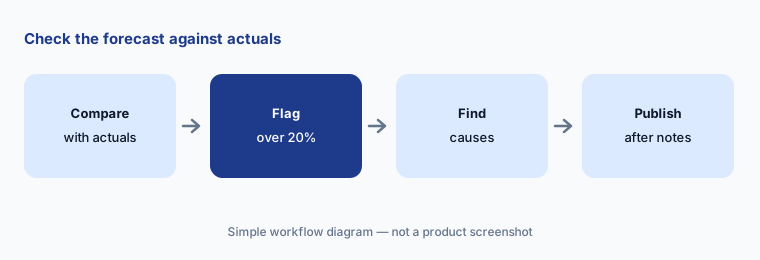
Primary workflow:
Compare Blue Yonder's AI demand forecast with actual units for your top ten SKUs last month. Have the planner note every SKU off by more than 20% before the next plan is published.
2. Domain agents and the Orchestrator: the see, analyze, decide, act loop
What it is: Blue Yonder’s AI agents page describes “5 Domain Agents. One Orchestrator.” Each agent runs what Blue Yonder calls the SADA loop — seeing signals, analyzing impact, deciding on trade-offs, and acting — against your warehouse, transportation, order, and planning systems. The page names the Network Ops Agent (traces multi-tier impact through bills of materials), the Warehouse Agent, and the Shelf Ops Agent (bulk planogram swaps, overflow fixes, versions, and distribution reports). It says agents keep persistent memory, take “governed actions, logged and reversible”, resolve disruptions “without human-in-the-loop latency”, and go live in 6–12 weeks. The August 2026 retail release added a prompt-driven Orchestrator experience for moving from insight to action.
“Without human-in-the-loop latency” is a design choice you can push back on. Decide which actions an agent may take alone and which wait for a named person, and get that in writing before go-live.
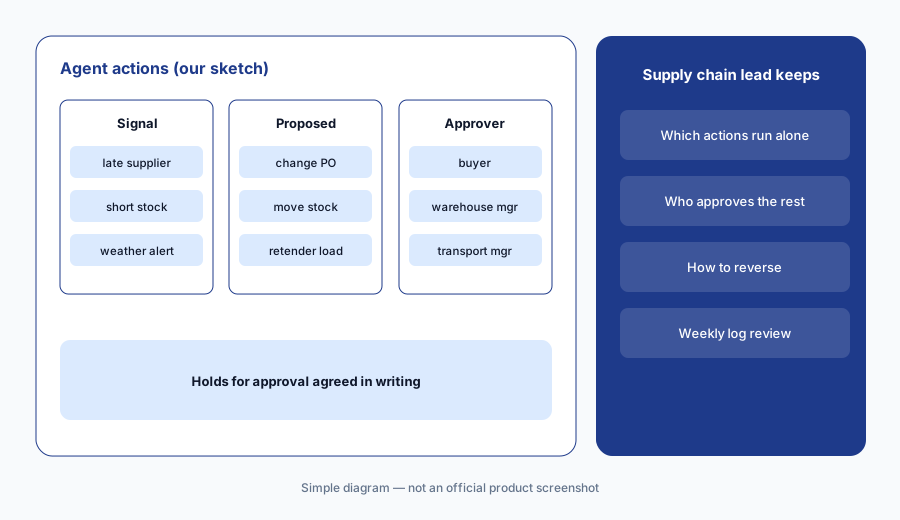
Mark approvals in writing:
List every action Blue Yonder's agents could take in your WMS, TMS, or order system. Mark which ones wait for a named approver, and ask Blue Yonder to show how each hold and reversal works.
3. Inventory Ops agent and supplier ordering: purchase orders a buyer signs
What it is: At ICON 2026 Blue Yonder gave the Inventory Ops Agent new skills: an agentic ordering workflow that speeds up supplier order approvals and shows planners how each decision was made. Blue Yonder Network Supplier Ordering goes further: based on rules you set, AI generates purchase orders that balance network constraints, supplier choices, and carrying costs, and planners can automate and monitor SKU availability and order timing.
A purchase order is a commitment to a supplier. Rules that look sensible in a meeting can still order too much ahead of a slow month, so keep a person on approval until you have watched several cycles.
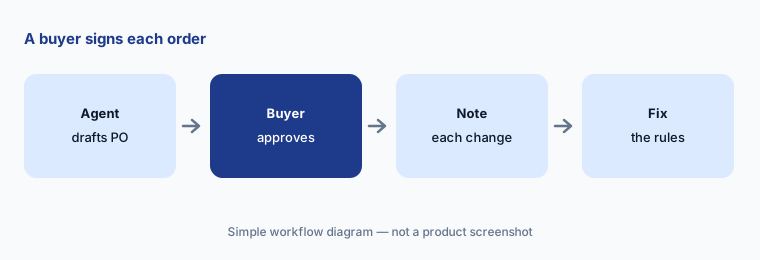
Approve every order:
For two weeks, have the buyer approve every purchase order Blue Yonder's Inventory Ops agent drafts. Note the reason for each change and update the ordering rules before automating anything.
4. Warehouse decisioning: labor, placement, returns, and a manager’s app
What it is: The agents page describes warehouse agents that guide product placement and staffing with alerts and recommendations. At ICON 2026 Blue Yonder added Advanced Slotting (moving SKUs with high expected demand into forward pick locations), a mobile app for warehouse managers on Android and iOS, return-to-vendor handling inside Warehouse Management, and a Workforce Management Knowledge Agent that answers questions about your configured system. Its August 2026 retail release claims returned items get back to sellable stock about 25% faster on average.
Every SKU you move costs labor and disrupts pick paths. Check that the demand behind a move is real and that you have the people to make it.
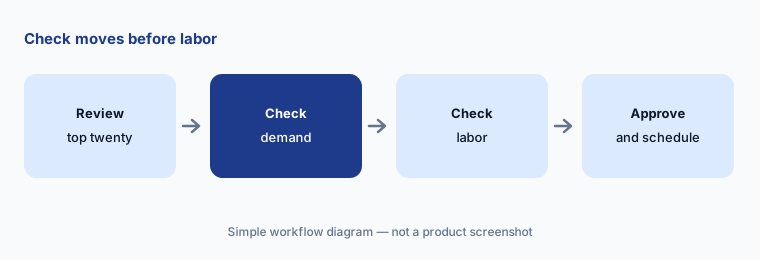
Check moves before labor:
Before moving any SKU on Blue Yonder's suggestion, have the warehouse manager check the top twenty moves against next month's order forecast and the labor needed to make them.
5. Transportation and network agents: backhauls, unroutable loads, and disruptions
What it is: Blue Yonder says its transportation agents look for ways to cut freight spend and improve service by tuning modeling strategies and flagging backhaul opportunities, unroutable loads, weather alerts, and delivery changes (agents page). The 2026.2 release describes Agentic Supply Chain Optimization on the Blue Yonder Network: agents that identify disruptions, analyze impacts, recommend actions, and automate workflows across suppliers, carriers, customers, and logistics partners.
A backhaul that saves money on paper can break a carrier relationship or a driver’s hours. Keep tendering and carrier messages with the transportation manager until the suggestions prove themselves.
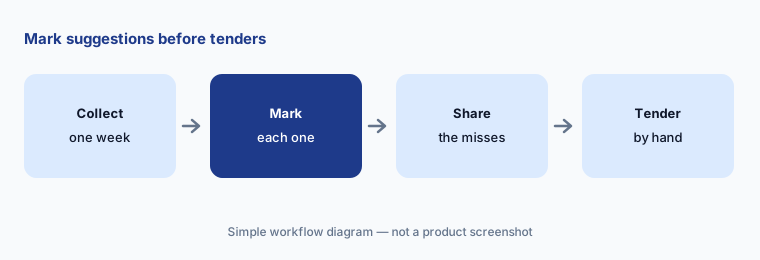
Mark before you tender:
Take one week of Blue Yonder's backhaul and unroutable-load suggestions. Have the transportation manager mark which she would have accepted before any agent is allowed to tender a load.
6. Responsible AI, citations, and the supply chain knowledge graph
What it is: Blue Yonder’s Responsible AI principles commit to human-centered design that matches “automation, oversight, and safeguards with the level of risk”, telling users when AI is in use, and governance with defined roles and escalation paths; the page cites the EU AI Act and GDPR. Its supply chain knowledge graph, built with RelationalAI inside Snowflake, adds business meaning to your data (AI page). At ICON 2026 it added a command bar with citations to data sources, AI-generated answers in search, and a digital assistant for product questions.
Principles describe intent; your contract and configuration decide what actually happens. A citation helps only if someone opens it.
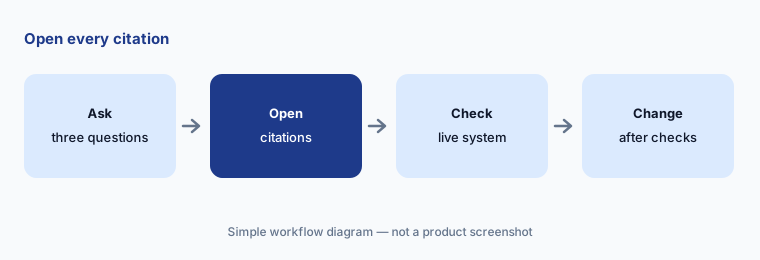
Open the citations:
Ask Blue Yonder's assistant three questions about your own configuration. Have the systems lead open every citation and check it against the live system before any setting changes.
Pricing context (October 2026)
Blue Yonder does not publish prices; blueyonder.com/pricing returns “page not found” and the site offers demos and sales contact only. Pricing is quote-only as of 17 Oct 2026.
The 2026.2 release page points licensed customers to the Customer Portal for details and to their sales representative for questions. Ask which domain agents and Orchestrator features your Cognitive Solutions subscription includes, whether implementation services are extra (the agents page says agents go live in 6–12 weeks), and how Snowflake or Microsoft costs are handled.
Uncertainty: Blue Yonder’s agents page says there are five domain agents but names only three (it calls one both the Network Agent and the Network Ops Agent), so we do not list five. It says agents act “without human-in-the-loop latency” while its Responsible AI principles stress oversight matched to risk; ask how both apply to you. The 25 billion predictions a day, $2 billion invested, 12% accuracy gain, about 25% faster returns, and 6–12 week timelines are Blue Yonder’s claims, not our measurement. The 2026.2 release page carries no date, and the retail release date comes from trade press (26 August 2026).
When it’s useful (honest take)
Useful when you plan and execute in Blue Yonder (or are moving to its platform), your planners spend their days explaining forecast misses and chasing orders, and you have named people ready to approve plan, order, and tender changes while the agents earn trust.
Less useful when you only need warehouse and transportation execution with built-in agents (Manhattan Active AI), planning with fast what-if scenarios is the main job (Kinaxis AI), or your gap is tracking freight across carriers (project44 AI).
Paying for Blue Yonder AI and a few other AI tools? The $9 AI toolkit spreadsheet lists every AI subscription you have, what each one costs, and how fast it pays for itself, so you can see which ones are worth the money.
Want someone to do it for you? AI toolkit audit — $19
Related options (educational)
| Need | Better home | Why |
|---|---|---|
| Planning and execution suite with domain agents | Blue Yonder AI (this page) | Quote only |
| Execution suite with built-in agents and an agent builder | Manhattan Active AI | Quote only |
| Planning platform with agents and scenarios | Kinaxis AI | Quote only |
| Shipment visibility with a digital workforce | FourKites AI | Quote only |
| Inventory and reordering for smaller brands | Cin7 AI | See its review |
| One-off analysis of a sanitized forecast export | Claude (sanitized export) | General chat; no system actions |
FAQ
What are Blue Yonder’s AI agents?
Domain agents built into the Blue Yonder Platform, coordinated by an Orchestrator. Blue Yonder says they see signals, analyze impact, decide, and act against warehouse, transportation, order, and planning systems. Named examples include the Network Ops, Warehouse, Shelf Ops, and Inventory Ops agents.
What did Blue Yonder add in 2026?
At ICON 2026 (19 May) it added Inventory Ops ordering skills, a Workforce Management Knowledge Agent, plain-language forecast explanations, audit trails, and AI-generated purchase orders on its Network. The 2026.2 release adds agent-to-agent planning and network agents.
How much does Blue Yonder cost in October 2026?
Blue Yonder does not publish prices; its pricing URL returns page not found. Treat it as quote-only and ask which agents your subscription includes.
Can Blue Yonder’s agents act without a person?
Blue Yonder says they can trigger governed, logged, reversible actions without human-in-the-loop latency. Decide which actions need a named approver and confirm how holds work before go-live.
Who should approve Blue Yonder agent actions?
A named demand or supply planner for forecasts and plans, a buyer for purchase orders, a warehouse manager for labor and placement, and a transportation manager for tenders and carrier messages.
Optional next step (if seats overlap)
If you pay for a planning suite with agents, a visibility platform with its own AI analyst, and chat seats that all explain “why the forecast missed”, that overlap is worth mapping. Map the overlap with the $19 AI toolkit audit or the $9 AI toolkit spreadsheet. Email Audit $19 or Toolkit spreadsheet $9.
Checkout is live via Stripe. After you pay, we email delivery (spreadsheet) or intake next steps (audit).