How-to · Ecommerce · Cin7 · Oct 17, 2026
Use Cin7 ForesightAI reorder suggestions, and have the inventory lead approve every purchase order
Cin7 ForesightAI forecasts demand and can generate purchase orders from the forecast. An automatically generated purchase order spends real money with a real supplier. This page shows how to read the forecast for one product group, check the suggestion, and have the inventory lead approve every purchase order.
Who this is for
Inventory leads at product brands on Cin7 Core or Omni who want ForesightAI's reorder help without unchecked spend. For rewriting an Amazon listing with Jungle Scout and having the brand lead approve it — a different job — see Jungle Scout listing approval.
How to do it
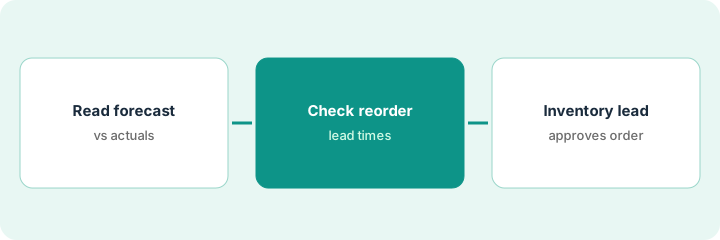
This is a how-to, not a ranking of inventory tools. Per the Cin7 AI review, ForesightAI is an add-on that predicts demand per product up to 24 months ahead and supports smart replenishment and draft purchase orders; Cin7 recommends at least six months of sales history; and Cin7 Automations include multi-stage purchase order approval workflows. The ground rule: the inventory lead approves every purchase order.

1. Read the forecast for one product group
What it is: Pick one product group and compare last month's forecast with what actually sold.
- Pick a group with at least six months of history.
- Compare last month's forecast with actual sales, product by product.
- Note products the forecast missed and why (promotion, stock-out, new launch).
- Name the inventory lead who approves purchase orders.
The inventory lead picks retail coffee bags. The forecast was close for most, but undercounted a seasonal blend that sold out in week two.
Write each product, forecast, actual, and a one-line reason for any big miss.
2. Review the reorder suggestion
What it is: Read ForesightAI's reorder suggestion and check it against lead times, minimum order quantities, and cash.
- Check supplier lead times and minimum order quantities.
- Check multi-location needs so one site's spike is not hidden.
- Adjust the forecast manually where you know about a promotion or launch.
- Check the total against this month's cash plan.
ForesightAI suggests 600 bags of the house blend. The supplier minimum is 500 and lead time is three weeks; a planned promotion adds demand, so the lead raises it to 700.
Add lead time, minimum, and cash impact next to each suggested line.
3. Inventory lead approves the purchase order
What it is: Send the purchase order through a Cin7 approval workflow with the inventory lead as approver and a spending limit.
- Set a multi-stage approval with a spending limit.
- Inventory lead approves or edits each line.
- Send only approved purchase orders.
- Compare next month's actuals with the forecast again.
- Log approvals and changes.
The lead approves the purchase order at 700 bags of the house blend and trims two slow lines. Finance is copied because the total is above the spending limit.
Keep a purchase order log: supplier, lines, suggested vs approved, approved by, date.
Pricing context (October 2026)
This how-to isn't a price sheet. Per the Cin7 AI review and Cin7's pricing page (checked Oct 17, 2026), Cin7 Core is $349, $599, or $1,199 a month (Standard, Pro, Advanced). ForesightAI is an add-on priced on GMV with no published amount — ask for a quote. Dated October 2026.
Checked Oct 17, 2026 on the vendor’s own pricing page: Cin7’s pricing page lists Cin7 Core Standard at $349, Pro at $599, and Advanced at $1,199 per month. ForesightAI is an add-on priced on GMV with no published amount; Omni is by quote.
Uncertainty: The only prices this site sells here are the optional $9 AI toolkit spreadsheet and $19 AI toolkit audit.
When this helps (honest take)
Useful when you hold stock across channels or locations, have six months of sales history, and an inventory lead who owns spend.
Not useful when you sell mostly on Amazon and your job is the listing — see the Jungle Scout how-to — or nobody checks forecasts against actuals.
Related options (educational)
| Need | Where to look | Why |
|---|---|---|
| Cin7 AI features | Cin7 AI | Primary path |
| Jungle Scout listing approval | Jungle Scout listing approval | A different job |
| Ecommerce stack map | Stack map: ecommerce ops | Where Cin7 fits |
| Restaurant ordering approval | MarketMan Smart Ordering | Same idea, kitchens |
FAQ
Does ForesightAI send purchase orders on its own?
Cin7 describes generating purchase orders from the forecast. In this routine they are drafts until the inventory lead approves them in a workflow.
How much history does ForesightAI need?
Cin7 recommends at least six months of sales history and lets you import older sales.
Where do Cin7 prices live?
Core plans at $349, $599, and $1,199 a month on the page we checked; ForesightAI is by quote. Our Oct 17, 2026 check of the vendor’s own pricing page is summarized in the pricing section above.
Is ForesightAI included in Cin7 Core?
No. Basic forecasting is included; ForesightAI is a GMV-priced add-on. Ask for a quote.
Optional next step
If you want a one-page toolkit map for the tools you already pay for, use the optional $9 AI toolkit spreadsheet. If you want a short review of seat waste and unused tools, use the optional $19 AI toolkit audit. Neither is required to follow this how-to.