How-to · Ecommerce · Jungle Scout · Oct 17, 2026
Rewrite one Amazon listing with Jungle Scout AI Assist, and have the brand lead approve it
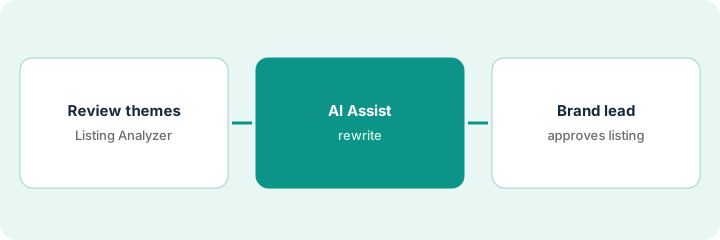
Jungle Scout's AI Assist writes Amazon titles, bullets, and descriptions from your keyword bank, and Listing Analyzer summarizes themes from recent customer reviews. Keyword-led copy can read well and still overclaim. This page shows how to rewrite one listing and have the brand lead approve every line before it goes back to Amazon.
Who this is for
Amazon sellers and brand teams on Jungle Scout Catalyst who want better listings without claims nobody checked. For approving Cin7 ForesightAI purchase orders — a different job — see Cin7 ForesightAI purchase order approval.
How to do it
This is a how-to, not a ranking of Amazon tools. Per the Jungle Scout AI review, AI Assist in Listing Builder writes a title, five bullets, or a description from your keyword bank and replaces text already in those fields; Listing Analyzer reads the 50 most recent, most helpful reviews; and AI Assist Chat is labelled early beta by Jungle Scout and shows no sources. Review requests go only through Amazon's own Request a Review, under Amazon's rules.
1. Read Listing Analyzer review themes
What it is: Run Listing Analyzer on your product and one competitor, and note the themes customers raise.
- Run it on your listing and one close competitor.
- Note positive themes you can honestly support.
- Note negative themes the listing should address (for example sizing).
- Read a handful of the reviews behind each theme.
- Name the brand lead who approves.
Listing Analyzer shows buyers love the grip but complain the peeler is not left-hand friendly. A competitor's reviews praise its dishwasher-safe claim.
Write three themes to address and one claim you will not make because it is not true for your product.
2. Rewrite the listing with AI Assist
What it is: Copy the current listing somewhere safe, then use AI Assist to draft a new title, bullets, and description.
- Save the current listing text first — AI Assist replaces what is in the fields.
- Generate the title, bullets, and description from your keyword bank.
- Choose Replace or Discard for each result, then edit.
- Remove any claim the spec sheet does not support.
- Check Amazon's title and category rules on Seller Central, not in AI Assist Chat.
AI Assist drafts a bullet saying 'ambidextrous design'. The brand lead's notes say the blade is right-handed only, so the line is cut and a sizing bullet is added.
Put old and new text side by side and mark every changed claim.
3. Brand lead approves before pushing to Amazon
What it is: The brand lead approves the final text, then you sync it to Amazon and check the live page.
- Brand lead checks every line against the spec sheet.
- Sync approved text to Amazon from Listing Builder.
- Check the live listing the next day.
- Keep review requests to Amazon's Request a Review only — no incentives, no asking only happy buyers.
- Log the change and approver.
The brand lead approves the new title and bullets. The live listing updates overnight and the old version stays in the log in case the change needs to be reversed.
Keep a listing log: field, old text, new text, approved by, date.
Pricing context (October 2026)
This how-to isn't a price sheet. Per the Jungle Scout AI review and Jungle Scout's Catalyst plans page (checked Oct 17, 2026), Starter is $49, Growth Accelerator $79, and Brand Owner $149 a month on monthly billing. AI Assist allowances differ by plan. Dated October 2026.
Checked Oct 17, 2026 on the vendor’s own pricing page: Jungle Scout’s Catalyst plans page lists Catalyst Starter at $49, Growth Accelerator at $79, and Brand Owner at $149 per month on monthly billing. AI Assist allowances differ by plan; Cobalt and the Jungle Scout MCP are sold after a demo.
Uncertainty: The only prices this site sells here are the optional $9 AI toolkit spreadsheet and $19 AI toolkit audit.
When this helps (honest take)
Useful when you sell on Amazon, use Jungle Scout Catalyst, and have a brand lead who owns product claims.
Not useful when you need to approve stock buys rather than copy — see the Cin7 how-to — or nobody has a spec sheet to check against.
Related options (educational)
| Need | Where to look | Why |
|---|---|---|
| Jungle Scout AI features | Jungle Scout AI | Primary path |
| Cin7 purchase order approval | Cin7 ForesightAI approval | A different job |
| Syndicated product claims | Salsify syndication claim approval | Retailer copy |
| Ecommerce stack map | Stack map: ecommerce ops | Where Jungle Scout fits |
FAQ
Is AI Assist Chat reliable for Amazon policy questions?
Jungle Scout labels AI Assist Chat early beta, says it may produce inaccurate results, and shows no sources. Check policy on Amazon's own Seller Central help pages.
Can Jungle Scout send review requests for us?
Yes, through Amazon's own Request a Review for eligible orders, once per order. Never pair a request with an incentive or send it only to happy buyers.
Where do Jungle Scout prices live?
Catalyst at $49, $79, and $149 a month on monthly billing on the page we checked; see the pricing section. Our Oct 17, 2026 check of the vendor’s own pricing page is summarized in the pricing section above.
Does AI Assist keep text I already wrote?
No. Jungle Scout notes bullets are written from the keyword bank, so text already in those fields is replaced. Save the old version first.
Optional next step
If you want a one-page toolkit map for the tools you already pay for, use the optional $9 AI toolkit spreadsheet. If you want a short review of seat waste and unused tools, use the optional $19 AI toolkit audit. Neither is required to follow this how-to.