How-to · Ecommerce · Salsify · Oct 17, 2026
Optimize product content in Salsify before syndication, and have the merchandiser approve every claim
Salsify's Intelligence Suite can rewrite and optimize product copy inside workflows, and its OpenAI channel (launched as a pilot) can send product data to AI shopping experiences. Once a claim is syndicated, shoppers may see it without visiting your page. This page shows how to optimize one product set and have the merchandiser approve every claim first.
Who this is for
Brand and retail content teams on Salsify who syndicate to retailers and want AI-optimized copy without sending unchecked claims downstream. For accepting Akeneo attribute values with cited sources — a different job — see Akeneo Ziggy enrichment.
How to do it
This is a how-to, not a ranking of PXM tools. Per the Salsify AI review, the Intelligence Suite adds AI steps to workflows with accept-or-change review, governance rules audit content against data-quality rules and retailer style guides, Angie is the in-platform assistant, and the OpenAI syndication channel launched as a pilot with a readiness report. Salsify does not say whether its MCP layer is generally available, so this routine does not use it.
1. Pick one product set and its claim sources
What it is: Choose a small product set and gather the source for every claim it will carry.
- Pick 10 to 20 products going to one retailer.
- Collect the spec sheet, packaging text, and any certificates.
- List claim types that need proof: dimensions, materials, certifications, health or safety lines.
- Name the merchandiser who approves claims.
The content lead picks 12 body lotions for one retailer. She lists 'dermatologist tested' and 'fragrance free' as claims that need a document behind them.
Make a claim sheet: product, claim, proof document, approver.
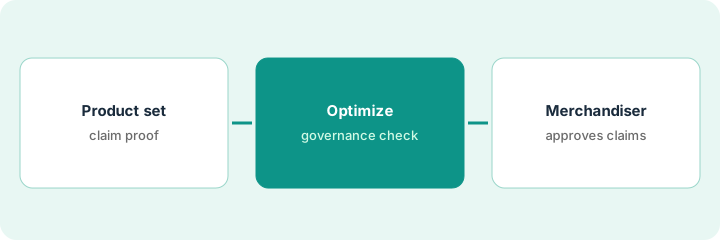
2. Run content optimization and a governance check
What it is: Add an Intelligence Suite step to rewrite or optimize the copy, then run governance rules against retailer requirements.
- Run optimization on the product set only.
- Keep the accept-or-change review step after generation.
- Run governance rules and fix anything that fails the retailer style guide.
- Compare every claim in the new copy with your claim sheet.
- Ask Angie to explain any mapping you are unsure about, then test it on a few products.
Optimization tightens all 12 descriptions. One draft adds 'hypoallergenic' to a lotion — a claim with no document behind it. Governance flags two titles that are too long for the retailer.
Highlight every claim the AI added that is not on the claim sheet.
3. Merchandiser approves every claim before syndication
What it is: The merchandiser approves each claim against its proof, and only approved content is syndicated.
- Approve claims with a document behind them; remove the rest.
- Fix titles that fail governance.
- Check the readiness report before any OpenAI channel send.
- Syndicate only the approved set.
- Log what was approved and who approved it.
The merchandiser removes 'hypoallergenic', approves the other claims, and the set goes to the retailer. The OpenAI channel stays off until the brand decides on the pilot.
Keep a syndication log: product, claim changes, approved by, channel, date.
Pricing context (October 2026)
This how-to isn't a price sheet. Per the Salsify AI review, Salsify publishes no prices; PXM, the Intelligence Suite, Angie, and the OpenAI channel are all by quote. If you use your own AI provider, that provider bills you separately. Dated October 2026.
Checked Oct 17, 2026 on the vendor’s own pricing page: Salsify shows no public list price. Salsify’s pricing link leads to a platform overview and contact form; PXM, the Intelligence Suite, Angie, and the OpenAI channel are by quote. This page quotes no Salsify dollar figure; confirm what your contract includes with Salsify or your admin.
Uncertainty: The only prices this site sells here are the optional $9 AI toolkit spreadsheet and $19 AI toolkit audit.
When this helps (honest take)
Useful when you syndicate to retailers from Salsify and have a merchandiser who can check claims against proof.
Not useful when nobody owns claim proof, or your job is filling attribute gaps — see the Akeneo how-to.
Related options (educational)
| Need | Where to look | Why |
|---|---|---|
| Salsify AI features | Salsify AI | Primary path |
| Salsify vs Akeneo | Salsify vs Akeneo | Side-by-side |
| Akeneo attribute acceptance | Akeneo Ziggy enrichment | A different job |
| Amazon listing approval | Jungle Scout listing approval | Marketplace copy |
FAQ
How is this different from the Akeneo how-to?
A different job: this page is claims approved by the merchandiser before syndication from Salsify. The Akeneo page is attribute values accepted by the product data lead from cited sources.
Is the OpenAI syndication channel generally available?
Per our review, Salsify launched it as a pilot and has not stated its current status. Ask before planning around it.
Where do Salsify prices live?
Salsify publishes no prices; ask for a quote. Our Oct 17, 2026 check of the vendor’s own pricing page is summarized in the pricing section above.
Does Salsify train models on our data?
Salsify says it never uses your data to train models. If you bring your own AI provider, that provider’s terms also apply.
Optional next step
If you want a one-page toolkit map for the tools you already pay for, use the optional $9 AI toolkit spreadsheet. If you want a short review of seat waste and unused tools, use the optional $19 AI toolkit audit. Neither is required to follow this how-to.