How-to · Ecommerce · Akeneo · Oct 17, 2026
Let Akeneo's Ziggy enrich attributes with cited sources, and have the product data lead accept every value
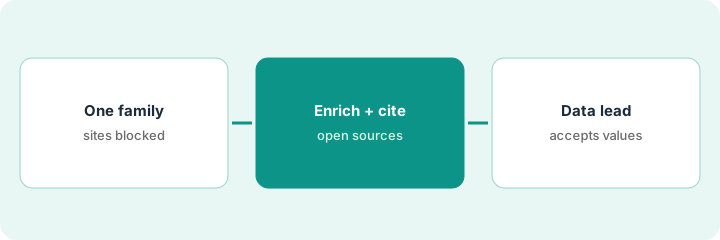
Akeneo's web-based attribute enrichment proposes missing product values with at least one source website for each. A citation shows where a value came from, not that it is right. This page shows how to run enrichment on one attribute family, open every source, and have the product data lead accept values one by one.
Who this is for
Product data leads and PIM teams on Akeneo Growth, Advanced, or Premium who want AI to fill gaps without filling the catalog with wrong specs. For optimizing content in Salsify before syndication, with a merchandiser approving claims — a different job — see Salsify syndication claim approval.
How to do it
This is a how-to, not a ranking of PIM tools. Per the Akeneo AI review, web-based attribute enrichment proposes values with cited sources and requires a review step in workflows; Ask Ziggy is a read-only helper; and Agentic Ziggy (introduced in Akeneo's Summer Release, 8 Jul 2026) proposes execution plans you approve. Akeneo calls that release the first phase, so ask what Agentic Ziggy may change on your account.
1. Pick one attribute family
What it is: Choose one family of products and the three to five attributes that are most often missing.
- Pick a family with a known manufacturer source (for example cordless drills).
- List the missing attributes: weight, battery voltage, warranty length.
- Block retailer and forum sites known to get specs wrong.
- Name the product data lead who accepts values.
The data lead picks 40 cordless drills missing weight and voltage. She blocks two marketplace sites that often copy specs badly.
Write the family, attributes, blocked sites, and approver before you run anything.
2. Run enrichment and read every citation
What it is: Run web-based enrichment on the family and open the cited source for every proposed value.
- Run enrichment on the chosen attributes only.
- Open each source; prefer the manufacturer's own page.
- Flag values whose source is a reseller or does not show the number.
- Use Ask Ziggy to explain any attribute rule you are unsure about.
- Do not switch on automated enrichment yet.
Enrichment proposes 76 values. 70 cite the manufacturer. Six cite a reseller page that lists the weight with the battery included, which differs from your tool-only attribute.
Add a column to your sheet: value, source, source type, keep or reject.
3. Product data lead accepts each value before channel mapping
What it is: The data lead accepts or rejects each value, then only accepted values move to channel mapping.
- Accept values backed by the manufacturer source.
- Reject or correct values that measure something different.
- Keep sources in product history.
- Run channel readiness or mapping only after acceptance.
- If Agentic Ziggy proposes a plan, review it on a small set first.
The lead accepts 70 values, corrects six weights to tool-only from the manufacturer's spec sheet, and only then maps the family to the marketplace channel.
Keep a short acceptance log: attribute, value, source, accepted by, date.
Pricing context (October 2026)
This how-to isn't a price sheet. Per the Akeneo AI review, Akeneo publishes no real price for its paid packages: Advanced and Premium are call for quote, and web-based enrichment is listed for Growth, Advanced, and Premium. Treat it as quote-only and ask how many AI credits are included. Dated October 2026.
Checked Oct 17, 2026 on the vendor’s own pricing page: Akeneo shows no real price for paid packages. Akeneo’s package comparison page marks Advanced and Premium as call for quote; web-based enrichment is listed for Growth, Advanced, and Premium. This page quotes no Akeneo dollar figure; confirm what your contract includes with Akeneo or your admin.
Uncertainty: The only prices this site sells here are the optional $9 AI toolkit spreadsheet and $19 AI toolkit audit.
When this helps (honest take)
Useful when you run Akeneo with real attribute gaps, a manufacturer source for most products, and a data lead with time to check citations.
Not useful when nobody owns product data, or your real job is approving syndicated claims — see the Salsify how-to.
Related options (educational)
| Need | Where to look | Why |
|---|---|---|
| Akeneo AI features | Akeneo AI | Primary path |
| Salsify vs Akeneo | Salsify vs Akeneo | Side-by-side |
| Salsify syndication claims | Salsify syndication claim approval | A different job |
| Store-side catalog enrichment | BigCommerce Catalog Enrichment | Storefront option |
FAQ
How is this different from the Salsify how-to?
A different job: this page is attribute values accepted by the product data lead inside Akeneo. The Salsify page is content optimization and claims approved by the merchandiser before syndication.
Is Agentic Ziggy generally available?
Akeneo introduced it in the Summer Release on 8 Jul 2026 and calls that release a first phase. Ask which agents and actions are switched on for your account.
Where do Akeneo prices live?
Paid packages are by quote; see the pricing section. Our Oct 17, 2026 check of the vendor’s own pricing page is summarized in the pricing section above.
Does web enrichment save values automatically?
Akeneo’s guide says each value comes with its sources for review before saving, and workflows need a review step before automated enrichment can be switched on.
Optional next step
If you want a one-page toolkit map for the tools you already pay for, use the optional $9 AI toolkit spreadsheet. If you want a short review of seat waste and unused tools, use the optional $19 AI toolkit audit. Neither is required to follow this how-to.