How-to · Ecommerce · BigCommerce · Oct 17, 2026
Run BigCommerce Catalog Enrichment on one category, and have the merchandiser approve every enriched field
BigCommerce's Catalog Enrichment writes titles, descriptions, feature bullets, FAQs, and metadata in bulk, and one click can apply them across the catalog. That one click is the risk. This page shows how to run it on one category, read every enriched field, and publish only what the merchandiser approves.
Who this is for
Ecommerce managers and merchandisers on BigCommerce who have joined the early-access Catalog Enrichment or Smart Edits programme and want bulk product copy without bulk mistakes. The job here is field-by-field approval for one category. For a small Wix store where the owner signs off on AI product descriptions and prices — a different job — see Wix AI product descriptions.
How to do it
This is a how-to, not a ranking of store platforms. Per the BigCommerce AI review, Companion (the control-panel assistant) is included with every store, while Catalog Enrichment, Smart Edits, conversational search, and the Shopping Agent were marked Early Access on BigCommerce's agentic commerce page when we checked on Oct 17, 2026. Enriched fields end up in front of shoppers and AI shopping agents, so a named merchandiser approves each one.
1. Pick one category and write down the facts
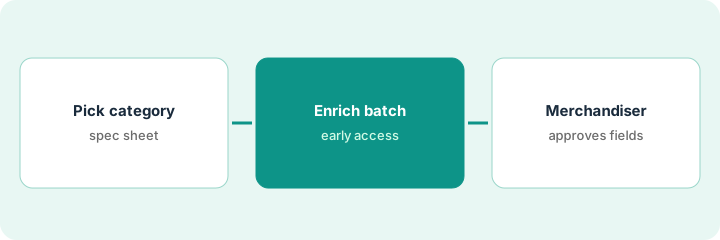
What it is: Choose one category of 15 to 25 products where you have a clean spec sheet for every item, and name the merchandiser who approves.
- Pick a category with stable specs (for example knives and pans, not a new seasonal range).
- Export the spec sheet: sizes, materials, care, warranty, and anything that reads like a safety claim.
- Name one merchandiser as the approver and one backup.
- Note which fields feed conversational search or the Shopping Agent if you are in that early-access test.
A merchandiser picks 20 pans and knives. She marks care instructions and dishwasher claims as must-check lines, because the old supplier file is known to be loose about them.
Write the category, product count, spec source, and approver name at the top of one sheet before you open Catalog Enrichment.
2. Run Catalog Enrichment and Smart Edits on that batch only
What it is: Generate enriched titles, descriptions, bullets, FAQs, and metadata for the chosen products, and use Smart Edits for any single change you want applied across the batch — but do not apply anything yet.
- Give Catalog Enrichment your brand inputs (tone, words to avoid).
- Run it on the chosen products only, not the whole catalog.
- Use Smart Edits for one described change, such as adding the material to every title.
- Leave the results unapplied so the merchandiser sees them first.
- Treat both tools as early access: scope and behaviour may change.
Catalog Enrichment drafts all 20 products. Eighteen read well. Two call hand-wash-only knives dishwasher safe, picked up from a generic phrase in the old supplier file.
Before approval, highlight every size, material, care, and safety line in the drafts so the merchandiser can find them fast.
3. Merchandiser approves field by field before publish
What it is: The merchandiser checks each enriched field against the spec sheet, rejects or edits what is wrong, and only then applies the approved fields.
- Compare every highlighted line with the spec sheet, not with the old copy.
- Fix the source spec when a draft repeats a bad supplier phrase, then rerun those products.
- Apply only the approved fields; leave the rest on the old copy.
- Ask the Shopping Agent (if you are in that test) three questions about the category and check its answers.
- Log what was approved, by whom, and when.
The merchandiser fixes the knife spec, reruns two products, approves 20 sets of fields, and applies them. A test question to the Shopping Agent now gives the correct care line.
Keep an approval log with product, field, approved by, and date — and widen to the next category only after a week with no customer corrections.
Pricing context (October 2026)
This how-to isn't a price sheet. Per the BigCommerce AI review and BigCommerce's pricing page (checked Oct 17, 2026), Core is $39, Growth $105, and Scale $399 per month on monthly billing. Companion is included with the store; no separate price is shown for the early-access AI features. Dated October 2026.
Checked Oct 17, 2026 on the vendor’s own pricing page: BigCommerce’s pricing page lists Core at $39, Growth at $105, and Scale at $399 per month on monthly billing. Companion is included with the store; Catalog Enrichment and Smart Edits were Early Access on BigCommerce’s agentic commerce page, with no separate price shown.
Uncertainty: The only prices this site sells here are the optional $9 AI toolkit spreadsheet and $19 AI toolkit audit.
When this helps (honest take)
Useful when you run a BigCommerce store with a real merchandiser, a clean spec sheet, and access to the early-access catalog tools.
Not useful when nobody owns product facts, or you run a small Wix shop where the owner writes and approves everything — see the Wix how-to instead.
Related options (educational)
| Need | Where to look | Why |
|---|---|---|
| BigCommerce AI features | BigCommerce AI | Primary path |
| Small-store AI product descriptions | Wix AI product descriptions | A different job |
| Product data in a PIM | Akeneo Ziggy enrichment | Cited-source enrichment |
| Ecommerce stack map | Stack map: ecommerce ops | Where BigCommerce fits |
FAQ
Is Catalog Enrichment generally available?
Not when we checked. BigCommerce's agentic commerce page listed Catalog Enrichment, Smart Edits, conversational search, and the Shopping Agent as Early Access on Oct 17, 2026.
Should we apply enrichment across the whole catalog in one click?
Not in this routine. Approve one category field by field first, and widen only after a quiet week.
Where do BigCommerce prices live?
Core $39, Growth $105, and Scale $399 per month on monthly billing on the page we checked; see the pricing section. Our Oct 17, 2026 check of the vendor’s own pricing page is summarized in the pricing section above.
Does BigCommerce check enriched content itself?
BigCommerce says generated content goes through its own quality check. We have not tested how strict it is, so the merchandiser still approves every field.
Optional next step
If you want a one-page toolkit map for the tools you already pay for, use the optional $9 AI toolkit spreadsheet. If you want a short review of seat waste and unused tools, use the optional $19 AI toolkit audit. Neither is required to follow this how-to.