How-to · Engineering and ops · Linear AI · Oct 10, 2026
Cut a sprint line from Linear issues without inventing scope
“Sprint cut line” here means sorting issues you already trust into themes and blockers, then having a person decide what ships this cycle. It is not asking AI to invent stories, estimates, or owners from a thin board.
Who this is for
Engineering leads and the ops people who glue projects together, when the issue tracker everyone actually uses (the system of record) is already Linear, and you want Linear’s AI help to group themes before planning without inventing scope. If Jira is the engineering system of record, start with Jira AI. If Asana holds the ops workstream, see Asana AI. To compare homes, read Linear vs Jira for ops and Asana vs Jira for ops. If you are about to buy a second project-management seat for the same triage job, read Three checks before you add another AI seat first.
How to do it
This page is a how-to. It is not a ranking of issue-tracker AI products. The Linear AI review covers the features (Triage Intelligence, Loops, the Linear Agent) and the credit notes; this page is the narrower planning routine: one filtered set of issues, one blocker table, and one person who owns the line. Check which AI features your plan shows before you run anything on the whole backlog.

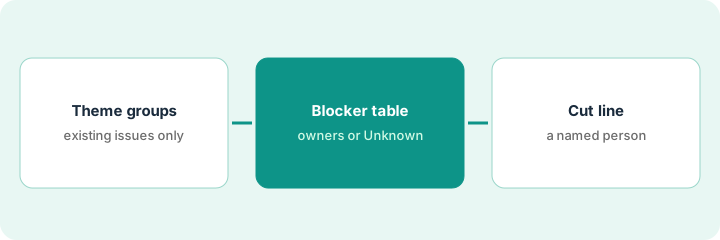
1. Step 1 — Group the issues you already trust into themes
What it is: Pull a filtered set of issues you already believe in (labeled, assigned, or sitting in triage) and ask Linear’s AI for theme groups only. No new issues in this pass.
- Filter to one team or project and a date window (this week’s triage or next cycle’s candidates).
- Ban new titles, estimates, or assignees in this pass.
- Ask for three to five theme labels grounded in the titles and descriptions that are already there.
- Mark thin or duplicate issues as Unknown instead of merging them silently.
Triage Intelligence (Linear’s feature that suggests labels, duplicates, and related issues for incoming work) can help here. It is listed on the Business plan, so check your plan before you assume it is on.
Filter: team Ops-Glue, status Triage or Todo, updated in the last 14 days. Themes returned: “vendor webhook reliability,” “onboarding checklist gaps,” “billing sync retries.” Two issues with no description stay Unknown. They are not merged into a made-up epic (a parent issue for a big piece of work).
Open the triage view. Prompt: “Group these issues into themes using only the titles and descriptions present; do not create issues; label anything unclear as Unknown.” Paste the theme list into the planning doc. Delete any suggested issue that was not already on the board.
2. Step 2 — List blockers without inventing owners
What it is: From the same filtered set, list likely blockers and dependencies. Owners stay human. AI may point at “blocked by X” language already in an issue; it does not pick a person.
- Pull out blocker phrases and linked issues that are already in Linear.
- If the owner field is blank, write Unknown. Do not assign anyone.
- Separate “needs a decision” from “needs engineering work.”
- Drop anything that only works if you invent a dependency that is not linked.
A blocker table is short on purpose. If it runs past a screen, the filter in Step 1 was too wide.
Three issues say “waiting on Stripe webhook docs” and link the same dependency; the owner is Unknown until the engineering lead names one. One issue says “blocked by design” with no Figma link, so it stays Unknown. AI writes no assignee fields.
Ask for a four-column table: Issue ID | Blocker phrase (quoted) | Linked issue or Unknown | Owner or Unknown. A person fills owners in Linear. Do not accept AI-proposed assignees.
3. Step 3 — A named person owns the cut line
What it is: A named person draws the sprint (Linear calls it a cycle) cut line from the themes and blockers. AI may propose a list; the commitment and the capacity call stay human.
- Propose above-the-line and below-the-line from existing issues only.
- The product manager or engineering lead edits capacity and risk. Never paste AI estimates in as fact.
- Publish the cut line in Linear (cycle, project, or milestone) with a person’s name and the date.
- If Linear stays the system of record, cancel any parallel “AI planning” seat in another tracker for the same team.
If design work is one of the blockers, the matching handoff routine is Prepare an eng handoff in Figma AI without a parallel design seat. If the cut line feeds a leadership update, Write Friday’s leadership update from the monday board and Draft standup notes from ClickUp tasks you already trust show the same no-invented-work rule in other trackers.
Above the line: six issues under “vendor webhook reliability” plus two checklist fixes. Below the line: billing sync retries (owner Unknown). The engineering lead commits the cycle in Linear; the AI draft is kept as notes only.
Write one sentence: “Cut line owner: ___ · Cycle: ___ · AI draft is advisory.” Move issues above the line in Linear yourself. If you cannot name the capacity, do not ship the AI list as the plan.
Pricing context (October 2026)
This how-to is not a price sheet. Plan detail for Linear AI, Jira AI and Asana AI lives on those reviews. Recheck each vendor’s site before you budget. Dated October 2026.
Checked Oct 10, 2026 on the vendor’s own pricing page: linear.app/pricing lists Free at $0 (unlimited members, 2 teams, 250 issues, Linear Agent included), Basic at $10 and Business at $16 per user per month billed yearly, and Enterprise at custom pricing with annual billing only. Triage Intelligence and Loops are listed on Business, not Basic. The page did not show monthly-billing prices, so we do not quote them. Jira and Asana were not rechecked.
Uncertainty: Plan names, which AI features each plan includes, the AI credit meters for coding sessions and Loops, and prepaid top-ups change. If an invoice and a review disagree, trust the invoice. Do not paste a marketing list price you did not pay. The only prices this site sells here are the optional $9 AI toolkit spreadsheet and $19 AI toolkit audit.
When this helps (honest take)
Useful when Linear is already the issue system of record, triage is noisy, and a person will own the cut line.
Not useful when the backlog has no owners, you want AI to invent sprint scope, or Jira or Asana is already the real engineering or ops home. Buying Linear “for AI triage” while Jira stays the commitment system usually creates two cut lines. If ops work lives in Asana, Build Monday’s overdue plan from Asana without inventing work is the closer routine.
Related options (educational)
| Need | Where to look | Why |
|---|---|---|
| Linear triage and themes | Linear AI | When Linear is the system of record |
| Jira’s AI features | Jira AI | When Jira is the system of record |
| Asana’s AI features | Asana AI · Build Monday’s overdue plan from Asana without inventing work | When Asana holds ops work |
| Compare homes | Linear vs Jira for ops · Asana vs Jira for ops | Educational only |
| Before another seat | Three checks before you add another AI seat · See which AI tools you pay for and never open | Live how-tos |
Related reviews: Linear AI · Jira AI · Asana AI. Related how-tos: Prepare an eng handoff in Figma AI without a parallel design seat · Draft standup notes from ClickUp tasks you already trust · Clean messy status text in Airtable before you buy another tracker. Free: seat-waste calculator if Linear AI and another tracker’s AI cover the same triage job.
FAQ
Can Linear AI create new issues with this routine?
No. The theme and blocker passes use issues you already have. People create scope when the work is real.
Who owns the sprint cut line?
A named engineering lead or product manager. AI drafts are advisory. Capacity and the commitment stay human.
Do I need the Business plan for this?
Only for Triage Intelligence. On Oct 10, 2026, linear.app/pricing listed Triage Intelligence and Loops under Business ($16 per user per month billed yearly), not Basic. The routine itself works on any plan if you sort the themes by hand or with a general chat assistant.
Where do dated prices live?
On the Linear AI review (and the Jira and Asana reviews if relevant) plus linear.app/pricing. This October 2026 how-to only repeats prices we checked on the vendor’s own pricing page on Oct 10, 2026.
Optional next step
Free reviews stay free. Neither offer is required to use this page. If Linear AI and another tracker’s AI seat already triage the same backlog, optional help: $9 AI toolkit spreadsheet (seats, spend, owner, cancel-by, overlap) or $19 AI toolkit audit when you want a written memo.