Tool · Compliance & trust · Thoropass · Oct 2026
Thoropass AI review (Oct 2026): compliance automation with the audit in the same platform
Most compliance automation tools stop at readiness: they collect evidence and then hand you to an outside audit firm. Thoropass sells both halves — an Audit Lifecycle Platform for evidence and controls, and audits delivered by its own licensed firm, Thoropass Assurance. Its AI sits between the two: First Pass AI pre-checks evidence before an auditor sees it, Smart Sort AI files exports from other GRC tools into the right audit requests, questionnaire autofill drafts answers, and a new MCP server lets your own AI agents work with evidence requests. This page explains those features, how Thoropass keeps the auditor independent of the software, and who still signs off. Each section has a Try this.
What this Thoropass page covers
This page is for a security lead, a head of engineering, or the person who “owns SOC 2” at a growing company, who is tired of collecting the same evidence for a readiness tool and then again for an audit firm. The question it answers: what changes when the software and the auditor come from the same company, what Thoropass’s AI actually checks, and where your own people still have to decide.
Thoropass describes itself as an end-to-end cybersecurity auditor. Its site lists audits for SOC 1, SOC 2, ISO 27001, HITRUST, PCI DSS, HIPAA, and other frameworks; penetration testing by a CREST-accredited team; a Compliance Suite for monitoring; and a Trust Center (launched September 2025). Its footer names Laika Compliance, LLC dba Thoropass Assurance as a licensed CPA firm registered with the AICPA, and in September 2026 a subsidiary, Thoropass Certification LLC, was accredited to run ISO/IEC 27001:2022 certification audits. Thoropass says its platform can also sit on top of another GRC tool rather than replace it.
Ground rules: your company remains responsible for designing and running its controls; the auditor evaluates them and reaches the conclusion; AI pre-checks are a second pair of eyes, not a pass. A platform doesn’t make anyone compliant or certified — the attestation or certificate comes from the audit. Facts below come from Thoropass’s website, newsroom, blog, and help center as read on 10 October 2026; its customer counts and time-saved percentages are vendor claims and aren’t repeated here.
Major features (with how someone uses them)
Examples at a glance: each feature has a concrete example from a real job plus a short Try this you can run this week.
1. Evidence asked for twice: what gets collected once (primary)
What it is: The pitch of a combined platform is that the evidence your team uploads for readiness is the same evidence the auditor tests, in the same place. Thoropass collects evidence through integrations and monitors (cloud, identity, HR, ticketing), lets you attach files straight from Google Drive, Confluence, or SharePoint with Audit Connected Documents (files are labeled in the source system and can be refreshed until the request is submitted), and says its in-house auditors review and approve which monitors count as evidence for your audit. Its help center is also blunt about one thing: evidence from a previous audit can’t be reused, because each audit tests its own period.
Start from your own pain, not the feature list. Pull the request list from your last audit and mark every item someone had to provide twice — once to a readiness tool, once to the auditor — or chase across two email threads. Those are the items a single platform can help with. For each, note whether Thoropass would collect it from a system automatically, whether a person still uploads it, and who signs off before it’s submitted to the auditor.
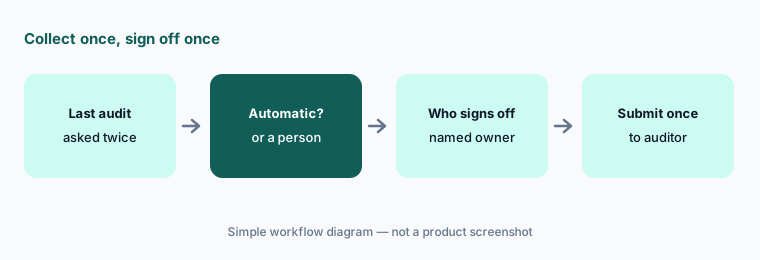
Primary workflow:
List the evidence your last audit asked for twice. Check which of those Thoropass would collect automatically and who signs off.
2. Software and auditor together: how independence is kept
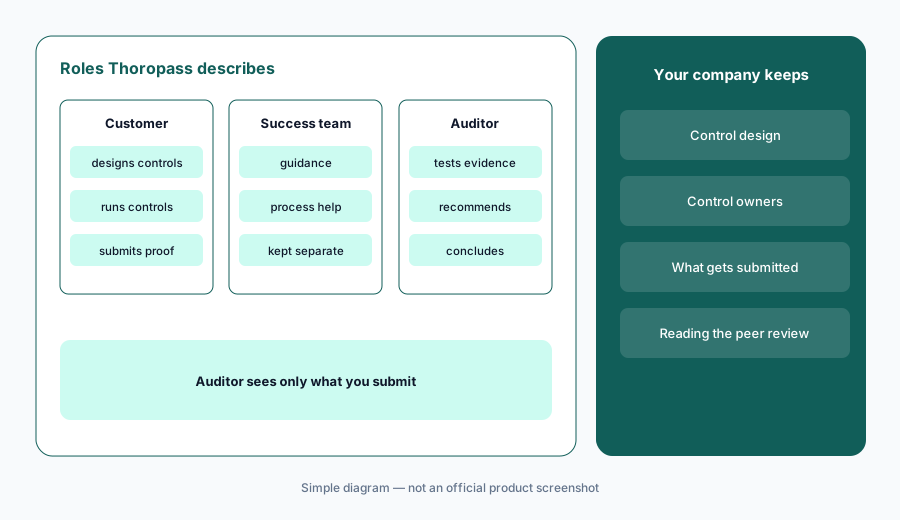
What it is: If the company that sells you compliance software also audits you, the obvious question is whether the auditor is checking its own work. Thoropass answers this on its Independence and Excellence page. It describes three separate parties on every audit — the customer, Thoropass’s Customer Success team, and the auditor — and says the auditor may recommend practices but cannot design or operate your controls; the customer remains responsible for them. Its auditors can’t see your information until you submit evidence for review, and then only what you chose to submit. Thoropass says the platform is not a system of internal control — it aggregates data from your systems, and neither you nor the auditor can change your infrastructure through it — and it cites the AICPA’s December 2022 peer-reviewer alert about self-review risk when a tool vendor has a related CPA firm. Thoropass says its 2025 AICPA peer review result was a “pass.”
Treat this as due diligence, not marketing copy. Ask for the peer review report (Thoropass says it’s available on request), ask which people will work on your readiness and which on your audit, and keep your own control owners as the ones who design controls and answer evidence requests. If your customers or board have a policy on auditor independence, show them the page and let them decide. A Vanta or Drata setup with an outside audit firm is the other model.
Ask for it in writing:
Ask Thoropass for its latest peer review report and a written split of who helps with readiness and who performs your audit. File both with your audit notes.
3. First Pass AI: pre-checking evidence before the auditor
What it is: First Pass AI (introduced December 2024) pre-screens evidence before it goes to the auditor. Thoropass describes it as checking evidence for completeness and timing — the wrong date range, a missing field, a screenshot that doesn’t show what the request asks for — so fewer items bounce back. Thoropass’s product lead also describes Audit Copilot AI, which helps its auditors test large volumes of evidence; the conclusion still belongs to the auditor.
A clean First Pass result means the evidence looks complete, not that the control works. Have the control owner look at every flag and either fix the evidence or write a short note on why it stands, and keep the “why” in your own words — Thoropass’s own blog makes the point that auditors need the human story of how a control runs, which AI can’t supply.
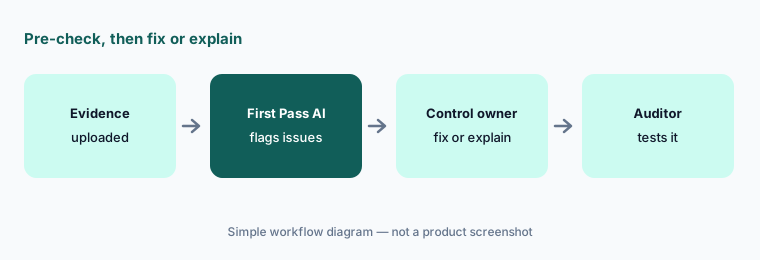
Fix or explain each flag:
Run First Pass AI on five evidence items before you submit them. For each flag, have the control owner fix the evidence or write why it stands.
4. Smart Sort AI: exports from other GRC tools into audit requests
What it is: Smart Sort AI (launched January 2026) is for teams that keep their GRC program somewhere else. You upload files, folders, or zipped evidence packages — Thoropass’s help center names exports from Vanta, Hyperproof, OneTrust, Archer, Drata, Sprinto, and AuditBoard — and Smart Sort reads each file and recommends the evidence request it belongs in. Matches appear inside each request for you to confirm, replace, or remove. Per the help center, it’s available for SOC 2 Type 1 and Type 2 audit cycles, in an Evidence Smart Sort tab that appears once your audit opens.
Sorting is where a confident mistake hides: a policy filed under the wrong request looks fine until the auditor opens it. Spot-check placements against the request text before you confirm, and make sure every file is from the current audit period. If you’re weighing whether to keep your GRC tool, see Drata AI, Hyperproof AI, or Scrut AI.
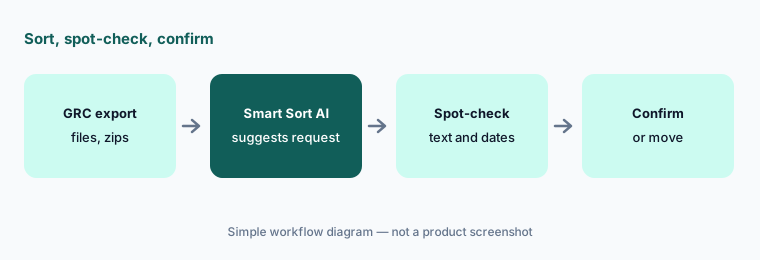
Spot-check before confirming:
Upload one folder of last quarter’s exports to Smart Sort. Open ten placements and check each against the request text before you confirm them.
5. Questionnaire autofill: exact matches, AI drafts, and gaps
What it is: Thoropass’s questionnaire tool (it calls them DDQs) builds a library from questionnaires you’ve already completed and drafts answers to new ones. Per its help center, answers pulled from your library are labeled Exact Match; answers drafted from your policies, reports, and procedures are labeled AI-Generated Response, with where the information came from and how confident the AI is; and questions it can’t answer well are marked No Response Found. You upload a .csv or .xlsx questionnaire, run autofill, then review and approve before exporting; questions can be assigned to teammates. Thoropass warns that outdated source documents produce inaccurate answers.
Give the AI only current, approved documents, and treat every AI-Generated Response as a draft for the person who owns that area. A No Response Found is useful: it’s either a real gap or a missing document, and both are worth knowing before a customer asks. Our how-to on answering a row with evidence or “Unknown” applies here too.
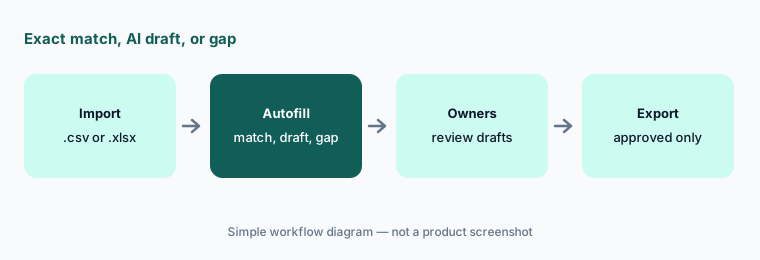
Review every AI draft:
Autofill one past questionnaire from your library and current policies. Check every AI-Generated Response against its source before you export.
6. Draft report approvals and the Thoropass MCP server
What it is: Before a SOC 2 report is issued, you review the draft. Thoropass’s Draft Report Approvals (help article updated in September 2026) let you set one report owner as final approver, assign reviewers to the whole report, and assign other people to individual sections, each with an “any one reviewer” or “all must approve” rule. A section approval can’t be undone from the dialog, and only the report owner can choose “Final Approve and Send to Auditors.” Separately, Thoropass announced an MCP server on 9 July 2026 that lets your own AI agents work with audit scope, evidence request details, and API documentation to help gather, validate, and submit known evidence; customers request access through their customer success manager.
The section-level setup is the right instinct: the person who runs access management should read the access section, not the CEO. If you connect agents through the MCP server, start with read-only questions and one recurring evidence item, and keep submission to the auditor as a step a named person takes. For drafting with your own sanitized notes, see Claude for security ops.
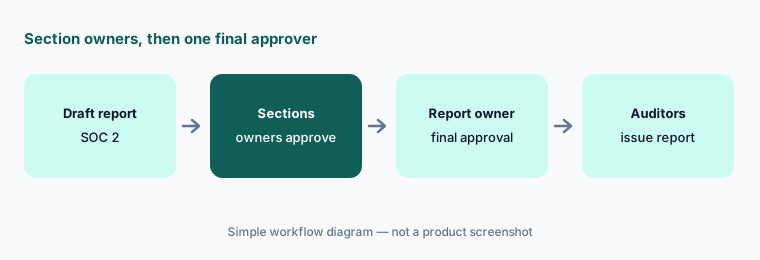
Section owners, one final approver:
Assign each section of your SOC 2 draft report to the person who owns that area. Keep final approval with one named report owner.
Pricing context (October 2026)
Thoropass publishes no plan prices (checked 10 Oct 2026). Its pricing address redirects to the homepage, where the FAQ says pricing depends on the frameworks, audit scope, company size, and services, that it reflects both the software and the audit, and that each customer gets a tailored quote. Ask for the platform, the audit, penetration testing, and any AI features as separate lines so you can compare with a software-plus-outside-auditor setup.
One published add-on price: a July 2025 release note in Thoropass’s help center lists Advanced Reporting (embedded dashboards) at $3,500/year for five seats, plus $500/year per additional seat, and says Asset Inventory is included with all plans. Confirm it’s still current before you budget for it.
Uncertainty: No plan prices are published, so which AI features come with which package is unconfirmed until you get a quote. Smart Sort AI is documented for SOC 2 audits; other frameworks aren’t stated. A Thoropass blog post lists a chat interface, AI help for final audit stages, and a quarterly attestation feature as planned, without dates. MCP access is by request. Customer counts differ across Thoropass’s own pages and aren’t repeated here; time-saved percentages are vendor claims.
When it’s useful (honest take)
Useful when you want one vendor for readiness and the audit, you’re tired of collecting evidence twice, your team is small enough that in-platform auditor questions save real time, and you’ve read how Thoropass separates its software, customer success, and audit teams and are comfortable with it.
Less useful when your customers or board insist on an audit firm with no tie to your software vendor, you already have an audit firm you like and only need a GRC tool, or you hope the platform or its AI will make the compliance decisions. Your company still owns the controls; the auditor still reaches the conclusion.
Paying for Thoropass AI and a few other AI tools? The $9 AI toolkit spreadsheet lists every AI subscription you have, what each one costs, and how fast it pays for itself, so you can see which ones are worth the money.
Want someone to do it for you? AI toolkit audit — $19
Related options (educational)
| Need | Better home | Why |
|---|---|---|
| Readiness and the audit from one company | Thoropass AI (this page) | In-house audit firm, First Pass AI, Smart Sort AI |
| GRC platform plus an outside audit firm | Vanta vs Drata | Compare agents, questionnaires, vendor risk |
| Agentic questionnaires and vendor reviews | Drata AI | AIQA, TPRM Agent, SafeBase |
| Many frameworks mapped to one control set | Hyperproof AI | Crosswalks and AI agents |
| Policy drafts and gaps for a growing team | Scrut AI or Sprinto AI | Teammates; Sprinto Assist |
| Drafting from your own sanitized notes | Claude for security ops | Projects, no vendor data |
FAQ
Is Thoropass software or an audit firm?
Both. Thoropass sells an Audit Lifecycle Platform for evidence and controls, and audits are performed by its licensed CPA firm, Thoropass Assurance (Laika Compliance, LLC). A subsidiary was accredited in September 2026 to run ISO/IEC 27001:2022 certification audits.
How does Thoropass keep its auditors independent of its software?
Its Independence and Excellence page describes separate customer, customer success, and audit roles; auditors who may recommend but can’t design or run your controls; auditors who only see evidence you submit; and a platform that aggregates data rather than acting as a system of internal control. Ask for its peer review report and judge for yourself.
How much does Thoropass cost?
Thoropass publishes no plan prices (checked 10 October 2026); it quotes per customer based on frameworks, scope, size, and services, covering software and audit. A July 2025 help-center note lists Advanced Reporting at $3,500/year for five seats plus $500 per extra seat.
Does Thoropass make us SOC 2 compliant?
No tool does. Your company designs and runs the controls; Thoropass’s auditors test them and issue the report if the evidence supports it. The AI features pre-check and organize evidence; they don’t decide the outcome.
What AI features does Thoropass have in October 2026?
First Pass AI for pre-checking evidence, Smart Sort AI for filing GRC exports into SOC 2 audit requests, questionnaire autofill with exact matches and AI drafts, Audit Copilot AI on the auditor side, and an MCP server announced in July 2026 for connecting your own AI agents.
Optional next step (if seats overlap)
If you pay for a GRC platform, a separate audit firm, a questionnaire tool, and chat seats that all touch the same evidence, that overlap is worth a look. Map the overlap with the $19 AI toolkit audit or the $9 AI toolkit spreadsheet. Email Audit $19 or Toolkit spreadsheet $9.
Checkout is live via Stripe. After you pay, we email delivery (spreadsheet) or intake next steps (audit).