How-to · Compliance / GRC · Thoropass AI · Oct 13, 2026
Run First Pass AI on your evidence before the auditor sees it
Evidence that bounces back from the auditor costs a week: a wrong date range, a missing approver, a screenshot that doesn't show what the request asked for. This page shows a security lead or head of engineering how to run Thoropass's First Pass AI on evidence before it's submitted, have the right person fix or explain each flag, and keep the auditor's conclusion where it belongs. Below, "evidence" means the exports, tickets, screenshots, and documents you submit against each audit request.
Who this is for
Security leads, heads of engineering, and whoever "owns SOC 2" at a growing company that runs readiness and the audit through Thoropass. Thoropass sells the software and, through its licensed CPA (certified public accountant) firm Thoropass Assurance, performs the audit. If you use a different GRC (governance, risk, and compliance) platform with an outside audit firm, the habit in this page still works; the tool names change.
How to do it
This is a how-to, not a ranking of audit platforms. Feature detail, including how Thoropass describes keeping its auditors independent from its software team, lives on the Thoropass AI review.
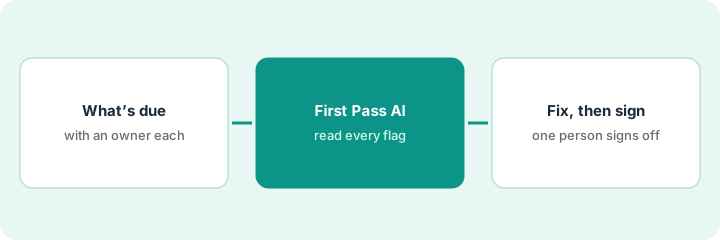
1. Step 1 — List what's due and who owns each item
What it is: A plain list of the evidence requests due in the next submission round, with the control owner beside each one.
- Pull the open evidence requests for this audit period.
- Write the control owner beside each request: the person who runs the access review, approves changes, or manages backups.
- Mark how each item arrives: collected by an integration, attached from Google Drive, Confluence, or SharePoint with Audit Connected Documents, or uploaded by hand.
- Remember that evidence from a previous audit can't be reused. Thoropass's help center says each audit tests its own period, so anything dated last year goes on the "redo" pile now.
Twenty-two requests are due Friday. Eleven come from integrations, six are connected documents, and five are manual uploads. The IT lead owns access reviews and onboarding, the platform lead owns change management and backups, and the security lead owns policies.
Make a sheet with Request | Control owner | How it arrives | Ready (Y/N). Don't run any check until every row has an owner.
2. Step 2 — Run First Pass AI and read every flag
What it is: First Pass AI pre-screens evidence before it goes to the auditor. Thoropass describes it as checking for completeness and timing: the wrong date range, a missing field, a screenshot that doesn't show what the request asks for.
- Start with five items, ideally the manual uploads, since those are where mistakes usually hide.
- Send each flag to the control owner for that request, not to whoever happens to be in the platform.
- Read a clean result for what it is: the evidence looks complete. It doesn't mean the control works.
- Once the first five are clean, run the rest of the round.
First Pass flags an access review export dated outside the audit window and a change-management ticket with no approver shown. The other three items pass.
Add a "First Pass result" column to your sheet with three values: Clean, Flagged, Fixed or explained.
3. Step 3 — Fix or explain, then one person signs off the draft report
What it is: Every flag ends in one of two places: fixed evidence, or a short note in the owner's own words about why it stands. Later, the draft report gets the same discipline.
- The owner fixes the evidence (a fresh export, an added approval) or writes two or three sentences on why it stands. Keep the "why" human. Thoropass's own blog makes the point that auditors need the story of how a control actually runs, which AI can't supply.
- Submit only after every flag is fixed or explained.
- When the draft SOC 2 report arrives, use Thoropass's Draft Report Approvals: assign each section to the person who owns that area, and keep one report owner as final approver.
- Only the report owner chooses "Final Approve and Send to Auditors." A section approval can't be undone from the dialog, so reviewers should read before they click.
The IT lead pulls a fresh access review export inside the window. The change owner adds the missing approval to the ticket. Both go in. A month later, the IT lead reviews the access and change sections of the draft report, spots a tool listed that was retired in May, and it's corrected before the security lead gives final approval.
For every flag, write one line: "Fixed: [what changed]" or "Stands because: [reason, in your words], [owner name]."
Pricing context (October 2026)
This how-to isn't a price sheet. Thoropass publishes no plan prices (checked 10 October 2026); it quotes each customer based on frameworks, audit scope, company size, and services, covering both software and audit. Ask for the platform, the audit, and any AI features as separate lines. Details live on the Thoropass AI review. Dated October 2026.
Checked Oct 13, 2026 on the vendor’s own pricing page: Thoropass shows no public list price. Its /pricing address redirected to Thoropass’s home page on our check, and no plan prices were shown. This page quotes no Thoropass dollar figure; confirm what your contract includes with Thoropass or your admin.
Uncertainty: Which AI features come with which package is unconfirmed until you get a quote. If your contract and our review disagree, trust your contract. The only prices this site sells here are the optional $9 AI toolkit spreadsheet and $19 AI toolkit audit.
When this helps (honest take)
Useful when you run readiness and the audit through Thoropass, evidence keeps bouncing back for dates and missing fields, and each control has an owner who'll answer a flag.
Not useful when the real problem is controls that don't run, or when the hope is that a clean First Pass result means you'll pass. Your company runs the controls; the auditor reaches the conclusion.
Related options (educational)
| Need | Where to look | Why |
|---|---|---|
| Thoropass AI features | Thoropass AI | Primary path on this page |
| GRC platform plus an outside audit firm | Vanta vs Drata | The other model |
| Evidence checks inside another platform | Secureframe AI | AI Evidence Validation |
| Many frameworks, one control set | Hyperproof AI | Crosswalks and validation tests |
| Compliance stack overview | Stack map for compliance ops | Job, tool, and owner in one view |
FAQ
Does a clean First Pass result mean the auditor will accept the evidence?
No. It means the evidence looks complete and correctly timed. The auditor still tests whether the control works.
Can we reuse last year's evidence?
Not per Thoropass's help center. Each audit tests its own period, so evidence needs to come from the current one.
Where do current prices live?
With Thoropass's sales team. It publishes no plan prices (checked 10 October 2026), and this page doesn't invent any. Our Oct 13, 2026 check of the vendor’s own pricing page is summarized in the pricing section above.
Does First Pass AI replace the auditor?
No. It flags evidence gaps before the auditor sees the evidence. The auditor still works independently, and a named person on your side signs off.
Optional next step
Free reviews stay free. If you're paying for a GRC platform, a separate audit firm, and chat seats that all touch the same evidence, the $9 AI toolkit spreadsheet helps you lay them out, or the $19 AI toolkit audit gets you a written memo.