Tool · Compliance & trust · Scrut · Oct 2026
Scrut AI review (Oct 2026): compliance automation and risk management for growing teams
Scrut is a compliance automation and risk management platform aimed at growing companies — the team that needs SOC 2 this year, ISO 27001 next, and a risk register before the board asks. Its AI layer, branded Scrut Teammates, drafts policies, suggests which controls a policy covers, flags policy gaps, checks evidence against audit periods, proposes infrastructure fixes, scores vendor risk, and fills in security questionnaires from your answer library. This page is about using that help while a named approver still decides what your company commits to. Each section has a Try this.
What this Scrut page covers
This page is for the person who ends up owning compliance at a growing company — often a security engineer, an operations lead, or a first GRC hire — who wants to know which Scrut AI features save real hours and which ones need careful reading before anything is published or sent.
Scrut describes itself as compliance automation and risk management, with 70+ frameworks (including ISO 42001 for AI management systems) and 150+ integrations. Its AI features sit under Scrut AI settings and are opt-in: an admin turns Teammates on, and individual features can be enabled per workspace. Scrut sells three plans — Foundation, Growth, and Scale — and some AI features, such as questionnaire autofill and AI vendor assessments, depend on plan or an add-on.
Ground rules: an AI-drafted policy describes what you intend to do, so every line has to match a process you actually run; AI gap checks guide a review rather than replace one (Scrut’s own docs say so); and no tool makes you compliant or certified — your auditor tests and attests. Facts below come from Scrut’s website and docs as read on 10 October 2026.
Major features (with how someone uses them)
Examples at a glance: each feature has a concrete example from a real job plus a short Try this you can run this week.
1. Policy drafts from your template: mark what you don’t run (primary)
What it is: Scrut’s policy editor starts from templates, and Scrut says Teammates generate policy drafts from your live data — the controls, integrations, and people already in your account. A drafted policy stays in Draft until it goes through Scrut’s approval workflow, which supports up to five approvers in order; editing a policy after approval clears the approvals, so a changed policy has to be approved again before it’s published to employees.
The risk with any policy draft is that it reads well and promises things nobody does — quarterly access reviews, a 24-hour incident notice, encrypted backups tested monthly. An auditor will test you against what the policy says. Read the draft line by line, mark every sentence that describes a process you don’t actually run, and either change the sentence or start running the process before the approver signs.
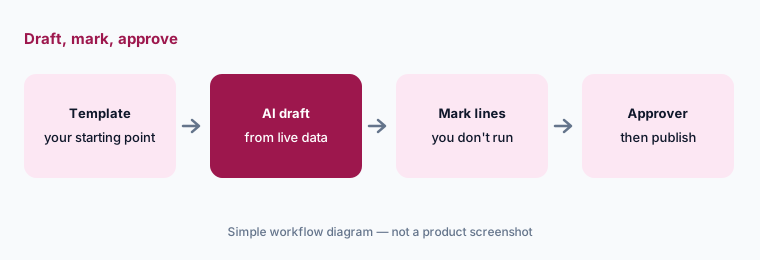
Primary workflow:
Ask Scrut’s AI to draft one policy from your template. Mark every line that describes a process you don’t actually run.
2. Policy-to-control mapping suggestions and AI policy gaps
What it is: Two features check a policy against the rest of your program. Policy-control mapping suggestions propose which controls a policy covers; you accept, reject, or adjust each one, and a suggestion you mark Ignore won’t come back. AI policy gaps (run with Run AI Gap Analysis) compare a policy with its mapped controls and framework requirements and list what seems to be missing; you mark each gap Done or Ignore. Gaps aren’t visible to auditors. Scrut’s docs are direct that the feature is meant to guide you, not replace a full compliance review.
Use the gap list as a reading guide. For each gap, open the requirement it points to and decide whether the policy really needs a new sentence or whether another policy already covers it. A mapping suggestion is a claim that this policy proves that control — accept it only if an auditor reading the policy would agree.
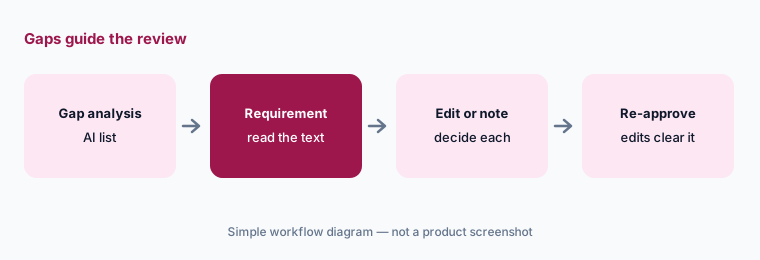
Read the requirement behind each gap:
Run AI gap analysis on one policy. For each gap, open the requirement it cites and decide whether to edit the policy or ignore it with a note.
3. Evidence checker: right period, right system
What it is: Scrut’s AI-powered evidence checker reviews the evidence you submit, identifies problems and gaps, and recommends fixes aligned with common audit expectations. It runs automatically on evidence for the current audit period; you mark each finding Done or Ignore and can refresh the check after uploading a replacement. Combined with evidence collected through Scrut’s integrations, it helps catch first-audit mistakes before your auditor does.
A checker pass means nothing obvious is wrong, not that the evidence is right. For the controls your auditor tested hardest last time, open the evidence yourself and check the date, the system it came from, and the population it covers.
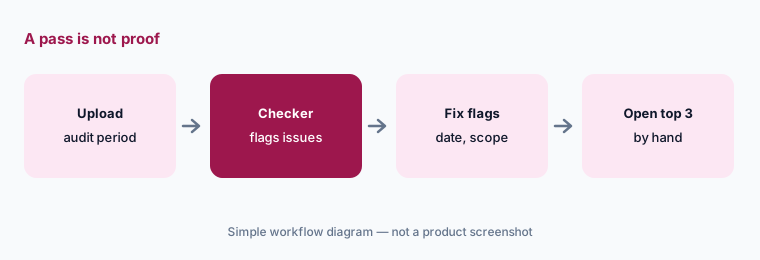
Check the flagged items first:
Open the evidence checker for your current audit period. Fix every flag, then open the three items your auditor tested hardest last year yourself.
4. Code Fix and risks from failed tests
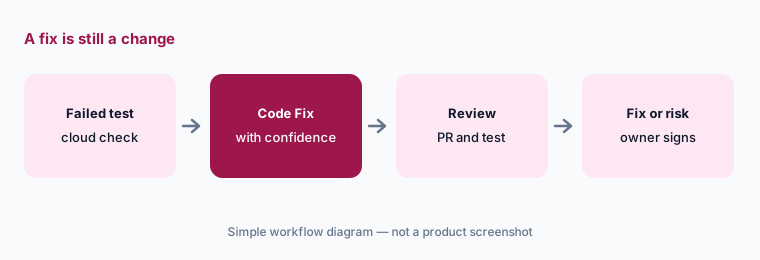
What it is: When an automated cloud test fails — an S3 bucket without encryption, a security group open to the internet — Scrut’s Code Fix proposes a remediation in Terraform, AWS CLI, or CloudFormation, with a confidence score. If you can’t fix it right away, you can create a risk straight from the test finding so it lands in the risk register with context instead of in someone’s inbox.
Treat a Code Fix like any other change: put it through code review and your normal pipeline, and test it in a non-production account first. Don’t paste an AWS CLI command into production because the confidence score is high. If you accept the risk instead of fixing it, the risk owner — not the person who clicked — should sign off on why.
Review it like any change:
Take one failed cloud test and open its Code Fix. Put the change through code review and check it against your own policy before merging.
5. Questionnaire autofill and Trust portal drafts
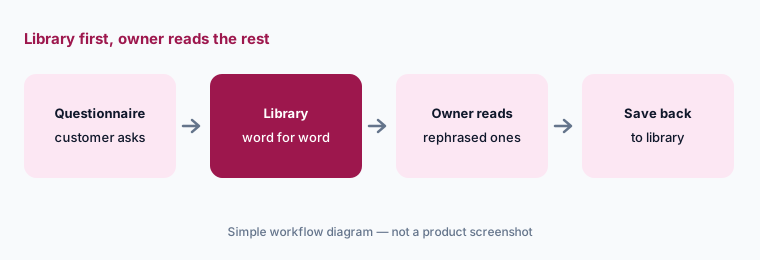
What it is: Questionnaire autofill answers security questionnaires from your Answer Library first — using approved answers word for word where they match — and then from other sources such as policies, rephrased. An August 2026 update added interpretations for ambiguous questions, shown with a match score. Autofill is included in the Growth and Scale plans and is an add-on on Foundation. Scrut can also draft content for your Trust portal; its docs ask you to review every item before publishing.
Answers word for word from the library are the ones you’ve already approved; rephrased answers are new statements. Have the owner of each topic read every rephrased answer and every answer to an ambiguous question before the questionnaire goes back to the customer. Add the good ones to the Answer Library so next time they come back verbatim.
Read the rephrased answers:
Run autofill on one questionnaire. Have the topic owner read every rephrased or ambiguous answer, and save the good ones to the Answer Library.
6. AI vendor assessments and the read-mostly Scrut MCP
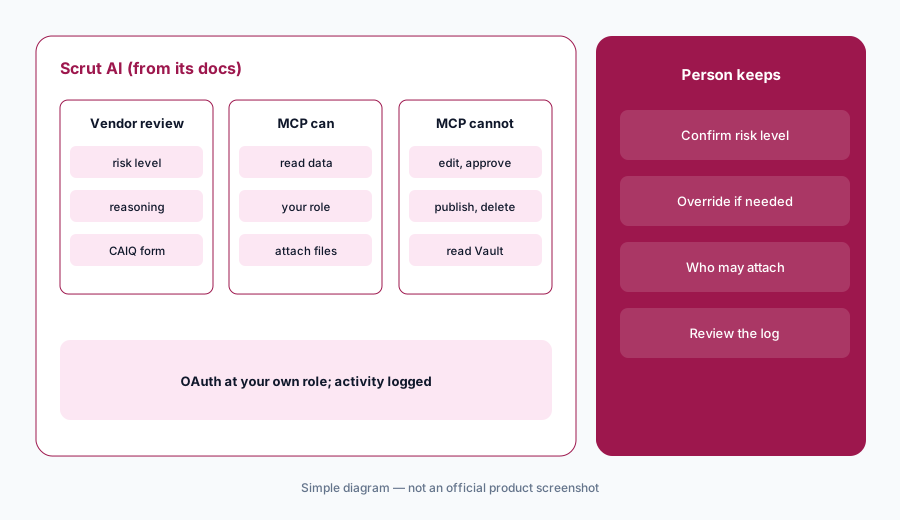
What it is: For third parties, Teammates can run a vendor assessment: it suggests an inherent risk level (Low, Medium, High, or Critical) with its reasoning, can send a CAIQ-style questionnaire, and lets you override the level by hand. This is in the Scale plan or the Vendor Advanced add-on. Separately, the Scrut MCP server (July 2026, all plans) lets AI assistants like Claude read your Scrut data with your own role’s permissions via OAuth. Its only write action is attaching files to evidence; it can’t create, edit, approve, publish, or delete, and it can’t read the Vault, vendors, risks, people, or the Audit Center. Activity is logged.
An inherent risk level decides how hard you look at a vendor, so the vendor’s internal owner should confirm it — they know what data the vendor actually touches. For MCP, start with read-only questions and decide who is allowed to attach evidence through an assistant before anyone does.
The owner sets the level:
Run one vendor assessment. Have the vendor’s internal owner confirm or override the suggested risk level before the questionnaire goes out.
Pricing context (October 2026)
Scrut publishes no prices (checked 10 Oct 2026): its pricing address returns a not-found page, and buying runs through a demo and quote. Plans are named Foundation, Growth, and Scale.
Plan notes from Scrut’s docs: questionnaire autofill is in Growth and Scale and an add-on for Foundation; AI vendor assessments are in Scale or the Vendor Advanced add-on; the Scrut MCP is available on all plans. Ask your quote to confirm which Teammates features you get and whether any add-on is needed.
Uncertainty: No published prices, so the real cost of AI features depends on plan and add-ons in your quote. Scrut’s homepage and docs describe Teammates at different levels of detail, so check in a demo which features are generally available. Code Fix suggestions and gap lists come from AI analysis and can be wrong; review them like any other change. The Scrut MCP was released in July 2026 and its permissions may expand.
When it’s useful (honest take)
Useful when you’re a growing team heading into your first or second framework, want policies, evidence, cloud tests, vendor risk, and questionnaires in one place, and have a named approver who will read AI drafts line by line.
Less useful when you run many frameworks against a large mature control set (a heavier GRC platform may fit better), nobody will own policy approvals, or you want a tool to tell you you’re compliant. Tools don’t certify anyone; your auditor does the testing.
Paying for Scrut AI and a few other AI tools? The $9 AI toolkit spreadsheet lists every AI subscription you have, what each one costs, and how fast it pays for itself, so you can see which ones are worth the money.
Want someone to do it for you? AI toolkit audit — $19
Related options (educational)
| Need | Better home | Why |
|---|---|---|
| Policies, evidence, and risk for a growing team | Scrut AI (this page) | Teammates, Code Fix, MCP |
| Fast first SOC 2 with AI checks | Sprinto AI or Secureframe AI | Sprinto AI; Comply AI |
| Software and the audit from one company | Thoropass AI | In-house auditors |
| Many frameworks, one control set | Hyperproof AI | Crosswalks, agents |
| Comparing two large platforms | Vanta vs Drata | Agents, questionnaires, TPRM |
| Drafting from your own sanitized notes | Claude for security ops | Projects, no vendor data |
FAQ
What AI features does Scrut have in October 2026?
Scrut Teammates draft policies, suggest policy-to-control mappings, flag AI policy gaps, check evidence against the audit period, propose Code Fix remediations for failed cloud tests, suggest vendor inherent risk levels, autofill questionnaires from your Answer Library, and draft Trust portal content. A Scrut MCP server lets AI assistants read your data.
Can Scrut’s AI publish a policy by itself?
No. Policies stay in Draft until they go through Scrut’s approval workflow, which supports up to five ordered approvers, and editing a policy clears earlier approvals. A named approver should read every AI-drafted line first.
How much does Scrut cost?
Scrut publishes no prices (checked 10 October 2026); it sells Foundation, Growth, and Scale plans by quote. Questionnaire autofill is in Growth and Scale or an add-on on Foundation, and AI vendor assessments need Scale or the Vendor Advanced add-on.
What can the Scrut MCP do?
It lets an AI assistant read Scrut data with your own role’s permissions via OAuth, and its only write action is attaching files to evidence. It can’t create, edit, approve, publish, or delete, and it can’t read the Vault, vendors, risks, people, or the Audit Center.
Will Scrut make us SOC 2 compliant?
No tool does. Scrut organizes policies, evidence, and tests and its AI helps draft and check them, but your auditor tests the controls and issues the report, and your team has to actually run the processes your policies describe.
Optional next step (if seats overlap)
If you’re paying for a compliance platform, a questionnaire tool, and chat seats that all draft the same policies, that overlap is worth a look. Map the overlap with the $19 AI toolkit audit or the $9 AI toolkit spreadsheet. Email Audit $19 or Toolkit spreadsheet $9.
Checkout is live via Stripe. After you pay, we email delivery (spreadsheet) or intake next steps (audit).