How-to · Compliance / GRC · Scrut AI · Oct 13, 2026
Draft a security policy in Scrut and name the one person who publishes it
An AI-drafted policy reads well and can promise things nobody does, like quarterly restore tests or a 24-hour incident notice. Your auditor will test you against what it says. This page shows the person who owns compliance at a growing company how to draft one policy with Scrut's AI, check it for gaps, and route it to one named approver who reads every line before employees see it. Below, "Teammates" is Scrut's name for its AI features.
Who this is for
Security engineers, operations leads, and first GRC (governance, risk, and compliance) hires at a growing company on Scrut, heading into a first or second framework. If you're still choosing a platform, Sprinto AI is a similar option for growing teams.
How to do it
This is a how-to, not a ranking of compliance tools. Feature detail lives on the Scrut AI review. Scrut's AI is opt-in: an admin turns Teammates on, and individual features can be enabled per workspace, so check they're on before you start.
1. Step 1 — Pick one template and one approver
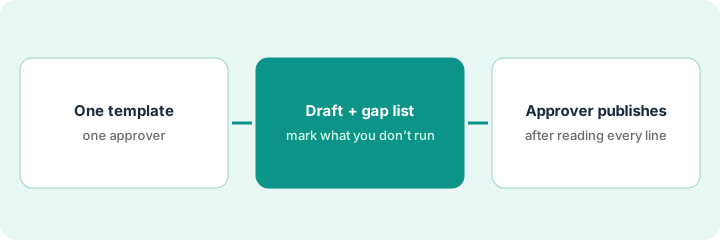
What it is: One policy, started from a Scrut template, with the person who will publish it named before anything is drafted.
- Pick a policy your auditor will read closely, like backup and recovery, access control, or incident response.
- Name the approver: the person who runs that process or is accountable for it, such as the CTO for backups.
- Scrut's approval workflow supports up to five approvers in order. For a first policy, one named approver is easier to make accountable.
- Tell the approver now that they'll be asked to read every line, not skim and click.
An operations lead picks the backup and recovery policy and names the CTO as approver, because the CTO's team runs the backups.
Write one line at the top of your working doc: "Policy: [name]. Approver: [name]. Publishes after: line-by-line read."
2. Step 2 — Draft it, mark what you don't run, and check the gaps
What it is: Scrut says Teammates draft policies from your live data, meaning the controls, integrations, and people already in your account. Then you check the draft against reality and run AI gap analysis.
- Generate the draft from the template.
- Read it line by line and mark every sentence that describes a process you don't actually run. Change the sentence, or start running the process before the approver signs.
- Click Run AI Gap Analysis. It compares the policy with its mapped controls and framework requirements and lists what seems to be missing.
- For each gap, open the requirement it cites. Edit the policy, or mark the gap Ignore with a note if another policy covers it. Scrut's docs say this feature guides a review rather than replacing one.
The draft says backups are restored as a test every quarter. The team has never done a restore test. The ops lead changes it to "at least annually" and books the first test for next month. Gap analysis flags a missing retention period, which she adds from the current backup settings.
Use three marks while reading: "Do" (we do this), "Don't" (we don't, so change the sentence), and "Ask" (check with the owner).
3. Step 3 — The named approver reads every line and publishes
What it is: A drafted policy stays in Draft until it goes through Scrut's approval workflow. Editing a policy after approval clears the approvals, so a changed policy has to be approved again before it's published to employees.
- Send the approver the draft along with your "Don't" and "Ask" marks and the gap decisions.
- The approver resolves every "Ask" with you, then reads the whole policy.
- The approver approves, and the policy is published to employees.
- If anyone edits it later, it goes back through approval. That's a feature, not a hassle.
The CTO confirms the backup frequency, corrects the retention period from 30 to 35 days to match the actual configuration, and approves. The edit clears the earlier approval, so the CTO approves the final version once more and it's published.
After publishing, put the policy's next review date in the approver's calendar, not yours.
Pricing context (October 2026)
This how-to isn't a price sheet. Scrut publishes no prices (checked 10 October 2026); it sells Foundation, Growth, and Scale plans through a demo and quote. Ask your quote which Teammates features you get and whether any add-on is needed. Details live on the Scrut AI review. Dated October 2026.
Checked Oct 13, 2026 on the vendor’s own pricing page: Scrut shows no public list price. Scrut’s pricing address returned a page-not-found response on our check, and the site routes buyers to a demo. This page quotes no Scrut dollar figure; confirm what your contract includes with Scrut or your admin.
Uncertainty: Scrut's homepage and docs describe Teammates at different levels of detail, so confirm in a demo which features are generally available. If your contract and our review disagree, trust your contract. The only prices this site sells here are the optional $9 AI toolkit spreadsheet and $19 AI toolkit audit.
When this helps (honest take)
Useful when you're writing policies for a first or second framework and have a named approver who'll read AI drafts line by line.
Not useful when nobody will own policy approvals, or the goal is a stack of polished policies by Friday regardless of what the company actually does. An auditor tests the processes your policies describe.
Related options (educational)
| Need | Where to look | Why |
|---|---|---|
| Scrut AI features | Scrut AI | Primary path on this page |
| Similar platform for growing teams | Sprinto AI | AI Playground and Sprinto Assist |
| Policy writing inside another platform | Secureframe AI | Policy Writing Assistant |
| Many frameworks, one control set | Hyperproof AI | Crosswalks and agents |
| Compliance stack overview | Stack map for compliance ops | Job, tool, and owner in one view |
FAQ
Can Scrut's AI publish a policy by itself?
No. Policies stay in Draft until they go through Scrut's approval workflow, and editing a policy clears earlier approvals.
Are AI policy gaps visible to auditors?
Scrut's docs say they aren't. They're a reading guide for you, and each one ends as Done or Ignore.
Where do current prices live?
With Scrut's sales team. It publishes no prices (checked 10 October 2026), and this page doesn't invent any. Our Oct 13, 2026 check of the vendor’s own pricing page is summarized in the pricing section above.
Why name just one approver?
So publishing has a clear owner. Reviewers can comment, but one named person reads every line and publishes the policy.
Optional next step
Free reviews stay free. If you're paying for a compliance platform, a questionnaire tool, and chat seats that all draft the same policies, the $9 AI toolkit spreadsheet helps you lay them out, or the $19 AI toolkit audit gets you a written memo.