Compare · Compliance & trust · First audits · Oct 2026
Secureframe vs Sprinto (Oct 2026): compliance automation for first audits and growing programs
Secureframe and Sprinto both sell compliance automation to companies facing their first SOC 2 or ISO 27001 audit: connect your cloud and HR tools, run automated checks, collect evidence, manage vendors, and hand an auditor a clean view. The differences show up in the plan grid and in how the AI helps — Secureframe’s Comply AI writes fix code and checks evidence, while Sprinto leans on AI agents and a browser assistant that clicks through consoles and customer portals for you. This page compares them by first-audit path, AI help, auditor access, and add-ons — not as a ranking — with a Try this for each.
What this comparison covers
This page is for a founder, head of engineering, or first security hire who has a date for a first audit — often because a customer asked for a SOC 2 report — and wants to know which platform gets them there without paying again for every framework that comes after. It is also for the person deciding at renewal whether the plan they bought for the first audit still fits.
The short version: Secureframe publishes a starting price for its Fundamentals plan, lists one compliance framework on each plan (more can be added), and its AI — Comply AI — writes remediation code for failing cloud tests, checks uploaded evidence, drafts risk assessments, and answers questionnaires with sources. Sprinto publishes no prices, says its Foundation plan is for a first certification with 25+ frameworks automated out of the box, and spreads AI across vendor document reviews, a questionnaire engine that can answer Not Evidenced, custom AI agents, and the Sprinto Assist browser extension. Both work with auditor networks; Sprinto lists bringing your own auditor on its Growth plan.
Facts were read on each vendor’s website, help center, and documentation on 10 October 2026, the same day as our Secureframe AI and Sprinto AI reviews. Ground rules: a named person on your team approves every AI answer, fix, and vendor decision; neither tool makes you compliant or certified — an independent auditor tests your controls and issues the report; and time-saved or accuracy figures on either site are vendor claims, not repeated here.
| Question | Secureframe | Sprinto |
|---|---|---|
| Plans | Fundamentals, Complete, and Defense (for CMMC) | Foundation (“for startups on their first certification”) and Growth, plus add-ons |
| Frameworks in the plan | One compliance framework listed on each plan; more can be added; custom frameworks on both plans | 25+ frameworks automated out of the box; Additional Frameworks listed as an add-on |
| AI help | Comply AI for remediation code, policies, and risk; AI Evidence Validation; questionnaire answers with sources; Comply AI for TPRM on Complete | Custom AI agents, AI vendor document reviews, questionnaire engine with a Not Evidenced answer, Sprinto Assist browser extension, AI evidence gap analysis |
| Auditor access | Audit Partner Network on both plans; auditors work through a read-only Auditor role tied to an audit in the Audits Module | Auditor network access on Foundation; bring your own auditor on Growth; auditors get a read-only view of a shared audit |
| Questionnaire allowance | 100 AI-answered questions a year on Fundamentals; 15,000 on Complete | AI security questionnaire automation listed as “20/year” on Foundation |
| Published prices | Fundamentals “Starting at $7,500/year”; Complete and Defense by quote | None; talk to sales |
Major features (with how someone uses them)
Examples at a glance: each feature has a concrete example from a real job plus a short Try this you can run this week.
1. Your first audit date and the frameworks after it (primary)
What it is: The plan you buy for a first audit is rarely the plan you need a year later. Secureframe’s pricing grid shows one compliance framework on Fundamentals and on Complete, with a note that additional quantities can be added, and custom frameworks, controls, and tests on both plans; Defense is a separate plan for CMMC work. Sprinto’s Foundation plan is described as “for startups on their first certification” and lists 25+ frameworks automated out of the box and 200+ digitized, while its add-on list includes Additional Frameworks. Neither page says exactly how many frameworks a base quote covers, so the only safe comparison starts from your own dates.
Write the month of your first audit, then the next two or three frameworks customers or regulators are likely to ask for — ISO 27001 after SOC 2, HIPAA if you sell to health care, ISO 42001 if buyers ask about AI. For each one, ask both vendors in writing whether it is included in the plan you are quoting, an extra framework, or an add-on. A framework that needs an add-on next year is a cost you can plan for; one you didn’t ask about is a surprise at renewal.
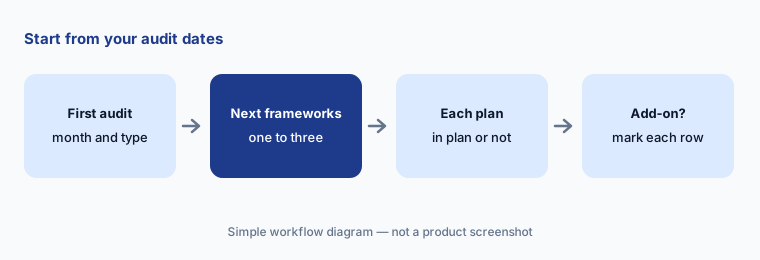
Primary workflow:
Write the date of your first audit and the frameworks after it. Note which tool’s plan covers each without an add-on.
2. AI help: Comply AI drafts vs Sprinto’s agents and browser assistant
What it is: Secureframe’s Comply AI mostly writes drafts a person uses: remediation steps and infrastructure-as-code (CLI, Terraform, CloudFormation, CDK) for a failing cloud test, AI Evidence Validation of uploaded files, risk assessment fields with written justifications, policy help, and questionnaire answers with sources. Comply AI for third-party risk is listed on Complete only. Sprinto’s pricing page lists custom AI agents, AI security questionnaire automation, AI vendor document reviews, and AI evidence gap analysis on Foundation. Its Sprinto Assist Chrome extension goes further: “Fix it for me” navigates a supported console such as AWS and completes remediation steps with your own browser session, and it can fill a customer’s questionnaire portal after you approve its plan. Sprinto’s audit docs also describe an AI-powered evidence review you can request before sharing an audit.
The practical difference is who presses the button. With Secureframe, an engineer reads the generated fix and runs it through normal change review. With Sprinto Assist, the assistant can make the change while you watch, so the review moves to the plan it shows before you confirm. Either way, decide in advance which systems an AI may touch and who approves — and if your infrastructure lives in Terraform, a console fix may be undone by the next apply.
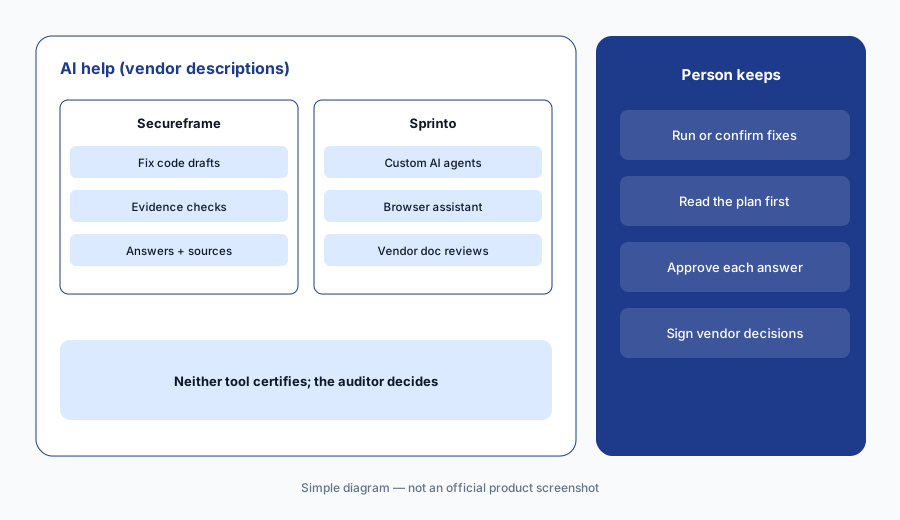
Same failing check, both tools:
Pick one failing check in each trial. Note whether the AI writes a fix for a person to run or makes the change itself, and who approves either way.
3. Auditor access: partner networks, your own auditor, and read-only views
What it is: Secureframe lists access to its Audit Partner Network on both plans. Its help center says you create the audit in the Audits Module, add the audit firm with an access start date (so you can prepare evidence first), and the auditor works through a read-only Auditor role; Tests, Frameworks, and Controls are hidden from auditors by default unless an admin grants them, and when you complete the audit it becomes read-only and the auditor’s access ends. Sprinto lists access to its auditor network and an in-app audit communications channel on Foundation, and bring your own auditor (BYOA) on Growth. Its docs say auditors get a read-only view of a shared audit and can comment if enabled; once shared, you can’t change the auditor or the evidence collection dates, and you can revoke access at any time.
If you already have an audit firm — or a customer that expects a particular one — this row matters more than any AI feature. Ask each vendor whether your firm already works in its platform, whether your plan allows it, and what the firm sees. On Sprinto, bring-your-own-auditor is listed on Growth, not Foundation. On both, the auditor’s independence is the point: your team prepares and owns the evidence; the auditor decides.
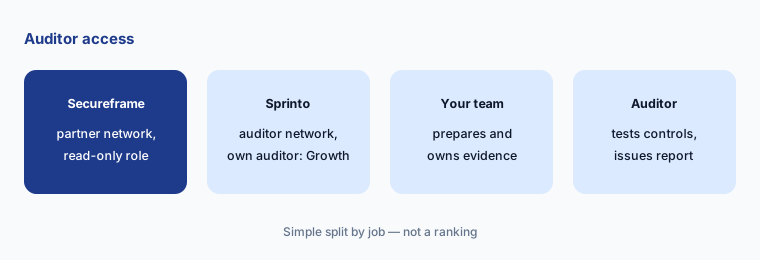
Name your auditor first:
Ask each vendor whether your preferred audit firm can work in its platform on the plan you are quoting, and what that firm will be able to see.
4. Questionnaire allowances and the Trust Center
What it is: A first SOC 2 report usually brings security questionnaires with it. Secureframe’s grid lists 100 AI-answered questionnaire questions a year on Fundamentals and 15,000 on Complete, a Knowledge Base on both, and a Trust Center with 15 document requests a year on Fundamentals versus unlimited on Complete. Its questionnaire workflow sorts answers into Unanswered, Draft, and Complete and lets you assign reviewers. Sprinto lists AI-powered security questionnaire automation as “20/year” on Foundation and a public trust center with a custom domain; its August 2026 answer engine checks whether a question applies, picks Yes, No, Not Applicable, or Not Evidenced, and records sources, and an Enterprise Trust Management add-on lists an Ask AI assistant on the trust center.
The two allowances are counted in different units — questions on Secureframe, a yearly number on Sprinto that its page doesn’t define further — so convert your own history before comparing. Count last year’s questionnaires and the questions in each, then ask both vendors what happens when you go over. Whatever the count, a named owner reads every answer before it goes to a customer.
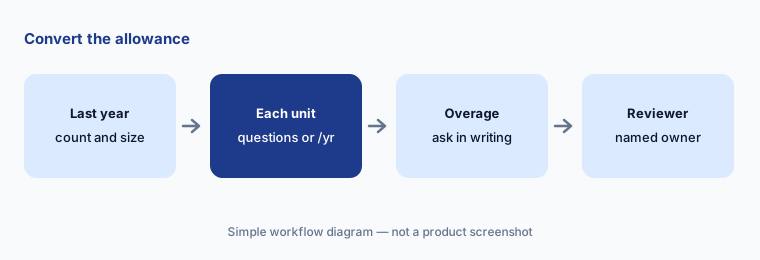
Convert the units:
Count last year’s questionnaires and the questions in each. Ask both vendors which unit their allowance uses and what happens when you go over.
5. Add-ons: what sits outside the base plan
What it is: On Secureframe, several features move from Fundamentals to Complete rather than to separate add-ons: Comply AI for third-party risk, a vendor portal for questionnaires and documents, automatic vendor and shadow-IT detection, SSO and SCIM, custom fields, and advanced user access reviews; extra workspaces are an add-on on Complete. On Sprinto, Growth adds programmable monitors, custom workflows and API, bring-your-own-auditor and controls, multi-approval policy workflows, and role-based access, and the add-on list names Additional Frameworks, Professional Services, Enterprise Risk Management, Enterprise Trust Management, AI Governance, Unified Commitments, Enterprise Vendor Risk Management, and Zones for multiple business units.
Add-ons aren’t bad — they let a small team start small. The risk is buying the base plan for the first audit and discovering that the vendor review workflow, single sign-on, or your own auditor sits one tier up. Put the features you expect to need within 12 months on one list and ask each vendor to price them now.
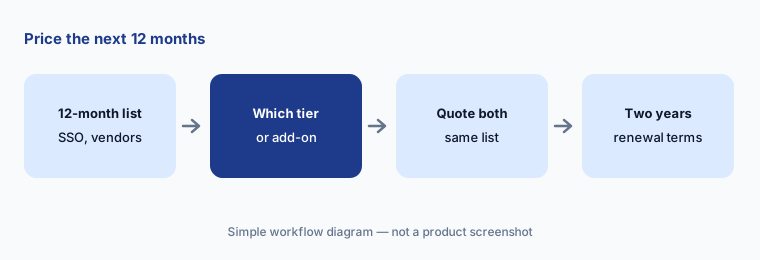
Price the 12-month list:
List the features you expect to need within 12 months — SSO, vendor reviews, a second framework, your own auditor. Ask both vendors to quote that list for year one and year two.
6. Published prices and asking for the same quote
What it is: Secureframe publishes one number: Fundamentals “Starting at $7,500/year”; Complete and Defense are by quote. Sprinto publishes no prices and asks you to talk to sales. A starting price is useful as a floor, not an estimate — real quotes depend on frameworks, headcount, integrations, questionnaire volume, and add-ons. Audit fees are separate from both platforms; Sprinto’s docs say its success team can quote audits from its partner network, and both vendors work with outside audit firms.
Send both vendors the same one-page scope and compare like with like: same frameworks, same headcount, same questionnaire count, same vendor count, and the same auditor question. Ask for the audit fee as a separate line so the platform price and the attestation price don’t blur together.
Quote the same scope:
Send both vendors the same scope: frameworks, headcount, questionnaire count, vendor count, and your auditor. Ask for the platform price and the audit fee as separate lines.
Pricing context (October 2026)
Secureframe lists Fundamentals “Starting at $7,500/year” and Complete and Defense by quote (checked 10 Oct 2026). Its grid shows one compliance framework on each plan (more can be added), 100 versus 15,000 AI-answered questionnaire questions a year, 15 versus unlimited Trust Center document requests, and Comply AI for third-party risk on Complete only. See secureframe.com/pricing.
Sprinto publishes no prices (checked 10 Oct 2026). Its pricing page lists Foundation and Growth plus add-ons, with AI questionnaire automation on Foundation listed as “20/year” and bring-your-own-auditor on Growth. See sprinto.com/pricing.
Uncertainty: Only Secureframe publishes a number, and it is a starting price; neither vendor states how many frameworks a typical base quote includes, and the two questionnaire allowances are counted in different units. Some Sprinto documentation still uses older plan names (Plan 1–4, or Starter to Enterprise) that don’t match today’s Foundation and Growth, and some features — Sprinto’s AI Playground, Secureframe’s vendor-document review — are described as beta or possibly on an upgraded plan. Audit fees are separate from both platforms. Confirm everything on your quote.
When it’s useful (honest take)
Secureframe is useful when you want a published starting price, your engineers manage cloud resources in code and will review generated fixes, and you can name the frameworks and questionnaire volume you need so the per-plan allowances can be checked.
Sprinto is useful when you want a first-certification plan with many frameworks automated out of the box, AI help that reviews vendor documents and fills customer portals, and someone who will read Sprinto Assist’s plan before confirming it — and you know whether you’ll need your own auditor (Growth).
Less useful when (either one) you have no date for an audit and no customer asking, nobody to own the controls and approvals, or you expect a platform to make you compliant — your auditor still tests the controls and issues the report.
Still choosing between Secureframe and Sprinto? The $19 AI toolkit audit gives you a written plan for which tools to keep using and which to drop across your whole AI stack, including this pair.
Prefer to do it yourself? Spreadsheet — $9
Related options (educational)
| Need | Better home | Why |
|---|---|---|
| Fix code for failing tests, published starting price | Secureframe AI | Comply AI, per-plan allowances |
| Browser assistant and AI vendor reviews | Sprinto AI | Sprinto Assist, Not Evidenced answers |
| Agents on schedules vs drafts with approval | Vanta vs Drata | The other common shortlist |
| Software and the audit from one company | Thoropass AI | In-house audit firm |
| Questionnaires and RFPs beyond the GRC tool | Conveyor AI or Loopio AI | Knowledge base, SME approvals |
| Large RFP and DDQ programs | Responsive AI | AI Draft modes, reviewers |
FAQ
Is Secureframe or Sprinto better for a first audit?
Neither in general, and this page is not a ranking. Secureframe publishes a starting price and leans on Comply AI drafts that a person runs; Sprinto calls its Foundation plan a first-certification plan and leans on AI agents and a browser assistant. Write your first audit date and the frameworks after it, and check which plan covers each without an add-on.
How much do Secureframe and Sprinto cost in October 2026?
Secureframe lists Fundamentals starting at $7,500 a year, with Complete and Defense by quote. Sprinto publishes no prices (both checked 10 October 2026). Audit fees are separate. Send both the same scope and compare like with like.
Can I use my own auditor?
Secureframe lists its Audit Partner Network on both plans and adds auditors to an audit through a read-only Auditor role. Sprinto lists its auditor network on Foundation and bring-your-own-auditor on Growth. Ask each vendor whether your firm already works in its platform on the plan you are quoting.
How many security questionnaires are included?
Secureframe lists 100 AI-answered questions a year on Fundamentals and 15,000 on Complete. Sprinto lists AI questionnaire automation as “20/year” on Foundation without defining the unit further. Count last year’s questionnaires and questions and ask both vendors to confirm.
Will either tool make us SOC 2 compliant?
No tool does. Both collect evidence, monitor controls, and draft answers and fixes, but your team runs the controls and an independent auditor tests them and issues the report.
Optional next step (if seats overlap)
If you pay for a compliance platform, a separate questionnaire tool, and chat seats that all read the same policies and evidence, that overlap is worth mapping before your first renewal. Map the overlap with the $19 AI toolkit audit or the $9 AI toolkit spreadsheet. Email Audit $19 or Toolkit spreadsheet $9.
Checkout is live via Stripe. After you pay, we email delivery (spreadsheet) or intake next steps (audit).