Tool · Learning ops · WorkRamp (now Learn:Up by Confirm) · Oct 2026
WorkRamp AI review (Oct 2026): AI for employee and customer learning
WorkRamp was a learning platform for employee and customer training at fast-growing companies. It still exists, under new names: Learning Pool bought WorkRamp in October 2025, Learning Pool renamed itself Confirm on 10 August 2026, and the WorkRamp Employee Learning Cloud is now Learn:Up while the Customer Learning Cloud is now Academy. workramp.com now redirects to Confirm. The AI is the same family: AI course drafts from your documents and help articles, learner-chosen formats, Practice (formerly AI Simulations) for roleplay, and a new read-only AI Assistant Connector for Claude and ChatGPT. This page is for current WorkRamp customers and anyone who searched for it. Each section has a Try this.
What this WorkRamp page covers
This page is for an enablement, customer education, or L&D lead at a SaaS or fast-growing company who runs WorkRamp today, is renewing it, or found it on a shortlist. The question it answers: what WorkRamp is called now, which AI features exist for employee and customer training, what each one drafts or answers, and who should check the result.
The status, checked on 11 October 2026: Learning Pool announced its acquisition of WorkRamp on 15 October 2025 and said WorkRamp would “continue to operate as a core product.” On 10 August 2026 Learning Pool rebranded as Confirm, saying customers keep “the same products, people, and support.” WorkRamp’s help center says that from 10 August, Learn:Up is the new name for the WorkRamp Employee Learning Cloud and Academy the new name for the Customer Learning Cloud; Practice is the former AI Simulations. The help center still carries the WorkRamp name and ships monthly product updates. We kept the WorkRamp name on this page because that is what most people search for.
Ground rules: an AI-drafted lesson is not accurate until the person who owns the process — support, for customer training — has checked every step against the product; completion and certification are not competence; roleplay feedback is coaching input, not a verdict; and AI answers about training data are checked against a standard report before anyone acts on them. Facts come from Confirm’s and WorkRamp’s websites and help center; Confirm’s customer results and ramp-time figures are not repeated here.
Major features (with how someone uses them)
Examples at a glance: each feature has a concrete example from a real job plus a short Try this you can run this week.
1. Academy: a customer lesson from one help article (primary)
What it is: Academy (formerly the WorkRamp Customer Learning Cloud) is for customer and partner training on your own domain, with your SSO and branding. Its AI course creation, per Confirm, turns “product documentation, release notes, help articles, and onboarding materials into structured learning experiences” with “AI-generated course outlines from existing content,” so customer success and product teams can build and update content “without waiting on L&D.” Academy also offers certifications customers can publish to LinkedIn, ecommerce for paid courses, and SEO-ready academy pages.
A help article is a good source and a risky one: it may describe last quarter’s screens, and a lesson adds steps and quiz answers the article never stated. Have the support team walk through each step in the live product before the lesson is published — and remember that a certification customers post publicly carries your name.
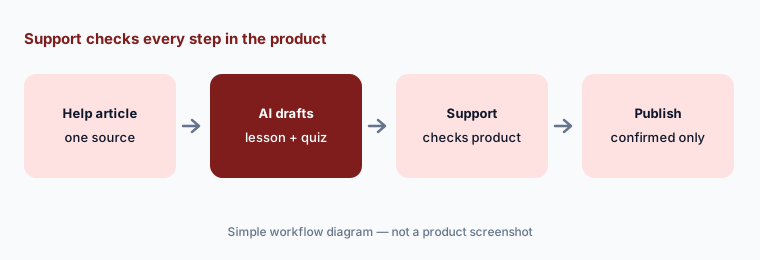
Primary workflow:
Let WorkRamp’s AI draft one customer-training lesson from a help article. Have support confirm every step against the product.
2. Learn:Up AI Assist: drafts from uploads, images, Q&A, and captions
What it is: For employee training, Confirm describes Learn:Up’s AI Assist as handling “the tactical work of content development”: draft courses from file uploads, brainstorm and refine content, generate imagery, Q&A, and more, and automate captioning and translation. Learn:Up imports SCORM, video, PDFs, and documents, and supports assessments, live training, and certifications for onboarding, compliance, and go-to-market enablement.
Use your own approved files as the source, and give each AI draft one named reviewer who knows the work. Generated Q&A deserves its own pass — check every answer key — and captions and translations need a reader who knows your product names. Keep the reviewer’s sign-off in the Guide’s notes so the next editor knows what was checked.
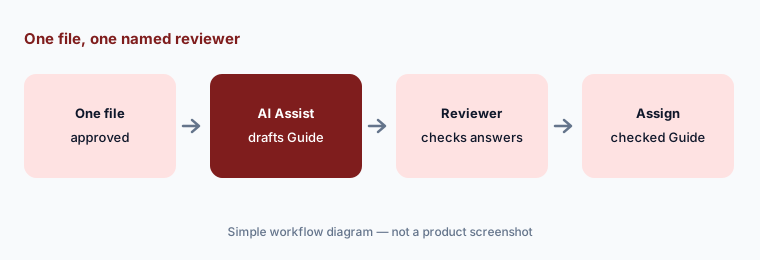
One file, one named reviewer:
Upload one approved file and let AI Assist draft a Guide with questions. Have one named reviewer check every answer key before it is assigned.
3. Personalized learning: podcast, read-aloud, reader mode, and translation
What it is: WorkRamp’s Personalized Learning (announced 16 April 2025) lets admins enable format options on any Guide. Learners click Personalize and choose an AI-generated podcast version, an AI read-aloud narration of the source, or a reader mode, with AI Translations under the same option. Confirm’s Learn:Up page still lists “learner-selected content modalities.”
A word-for-word read-aloud is low risk; an AI podcast is a rewrite in conversational style, and rewrites drift. Before you switch the podcast option on for a required Guide, listen to it once with the content owner, especially for policy and safety material. For translations, ask a fluent colleague to check warnings and terms.
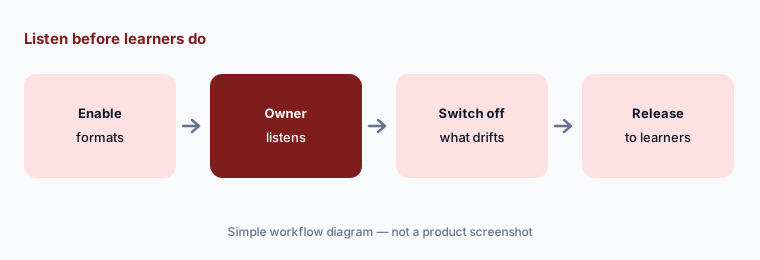
Listen before learners do:
Turn on learner formats for one required Guide. Have the content owner listen to the AI podcast version and switch it off if it changes the meaning.
4. Practice (formerly AI Simulations): AI roleplay with success criteria
What it is: Practice lets learners rehearse a conversation with an AI character by voice or text, from inside Learn:Up. Per Confirm, you describe the scenario and upload context — a product brief, an objection list, a call transcript — and it generates the character, personality, rubric, and learner briefing, which “you review, refine, and publish.” The 16 September 2026 update rebuilt authoring into three steps (Set the Scene, Success Criteria, Character), added four ways to judge a session (from pass/fail to a rubric scale or a percentage), required criteria, time limits, attempt caps, a choice of whether learners see live progress, and multiple languages. Each session ends with a summary of strengths and areas to improve.
The success criteria are the part a manager should write or approve, because they decide what “good” sounds like for your team. Run a few sessions yourself first and have two managers read the same summaries — if they disagree with the AI’s judgment, fix the criteria. Use results for coaching conversations, not for performance reviews.
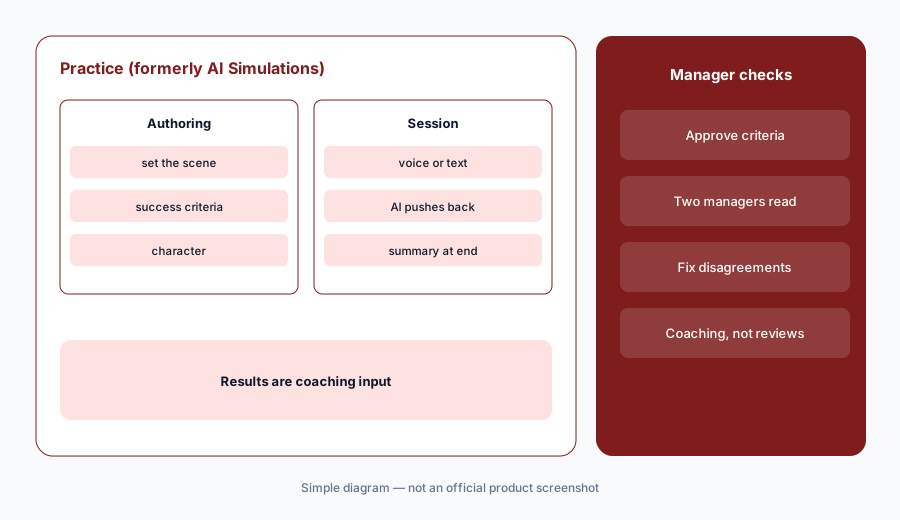
Managers write the criteria:
Build one Practice simulation and have two managers run it and read the session summaries. Fix the success criteria wherever they disagree with the AI.
5. AI Assistant Connector (MCP): read-only questions from Claude and ChatGPT
What it is: The Learn:Up AI Assistant Connector is an MCP server that lets people ask Learn:Up questions from Claude or ChatGPT (the two WorkRamp tests and supports). Per the help center, it is read-only: it can report on people, content, progress, and live sessions through 18 defined tools, but cannot create or edit content, assign training, send reminders, or change due dates — write tools are planned later, delete after that. An admin adds it once for the organization, then each person signs in with their own account and sees only what their Learn:Up permissions allow. It is “included with Learn:Up at no extra cost,” but needs a paid Team or Enterprise plan on the AI assistant, and usage counts against that plan. At launch it is for employee learning admins, managers, and learners; Academy admins come later.
Read-only is a good place to start, but the answer still leaves Learn:Up and sits in your AI assistant’s chat history, so treat it like any export of training records. Ask narrow questions — one course, one team, one date range — which WorkRamp’s own guidance says are cheaper and more accurate, and compare the first few answers with a standard report.
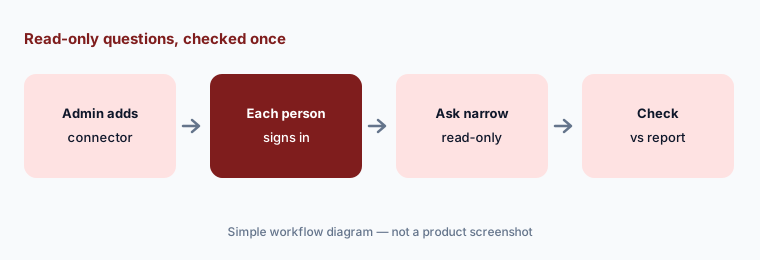
Narrow and checked:
Connect Learn:Up to Claude or ChatGPT for a small group. Ask one narrow overdue-training question and compare the answer with the standard report.
6. Analytics Studio AI Skills and pass/fail automations
What it is: The 16 September 2026 update added AI Skills in Analytics Studio: saved, reusable report requests you can call by name, built from scratch, from a file, or by telling the Omni AI assistant to “turn this into a Skill”; a Skill can ask for inputs such as which team before it runs. The same update added Passes content and Fails content triggers for Automations, so a learner who fails a Guide, Path, SCORM course, or Challenge can be assigned a refresher automatically, plus folders for Automations and a way to reset a failed Guide. Confirm’s Learn:Up page also lists AI-prompted data visualizations and configurable dashboards.
A saved AI report recipe is only as right as the logic you saved, so check it once against a standard report and note its filters in the Skill’s description. For pass/fail automations, decide with the content owner what a failed attempt should trigger, and look at the first week’s results — a badly written question will send many people to a refresher they don’t need.
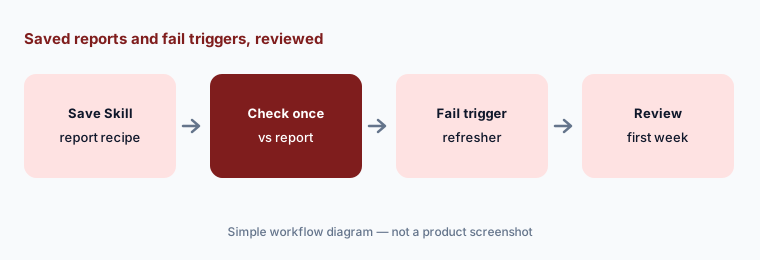
Check the first week:
Set one Fails content automation that assigns a refresher. Review the first week of fails with the content owner before you add more.
Pricing context (October 2026)
Confirm publishes starting prices for some WorkRamp products (checked 11 Oct 2026, on its scale-up pricing page): Learn:Up (formerly WorkRamp) “starting from $9 / £7 per user per month,” and Practice “starting from $4 / £3 per user per month,” both “billed annually” and “based on a 200-person company.” Learn:Up’s listed core features include AI simulations, a skills engine, personalized learning, and analytics.
Academy (formerly the WorkRamp Customer Learning Cloud) is quote-only — the page says “Get pricing” with no figure — as are Create (formerly Elucidat), the content Library, and custom content. WorkRamp’s help center calls Annual Unique Users — the people active in your academy in the last twelve months — “the number that matters for your Academy plan.” The AI Assistant Connector is included with Learn:Up; your Claude or ChatGPT plan is separate.
Uncertainty: WorkRamp’s products are mid-rename: confirm.com says Learn:Up and Academy, while the help center and support address still say WorkRamp, and Confirm itself changed CEO on 2 September 2026. Starting prices are for a 200-person company billed annually; your price will differ, and Academy has no public price. The AI Assistant Connector was listed as coming soon on 16 September and was documented as available by 11 October — confirm it is on for your account; write tools are not available yet. Confirm’s pages don’t say which AI features are in which package. Customer results and ramp-time figures on Confirm’s site are not repeated here.
When it’s useful (honest take)
Useful when you train employees and customers or partners from one vendor, product and support teams can check AI lessons against the live product, you want roleplay practice for sales or support, and a published starting price helps your budget.
Less useful when you need a vendor whose name and roadmap won’t change for a while (WorkRamp has just been renamed and folded into a larger suite), you only need SOPs for a small team, or nobody will review AI drafts. Certification and completion show someone finished, not that they can do the job.
Paying for WorkRamp AI and a few other AI tools? The $9 AI toolkit spreadsheet lists every AI subscription you have, what each one costs, and how fast it pays for itself, so you can see which ones are worth the money.
Want someone to do it for you? AI toolkit audit — $19
Related options (educational)
| Need | Better home | Why |
|---|---|---|
| Employee and customer learning from one vendor | WorkRamp AI (this page, now Learn:Up and Academy) | AI drafts, Practice, MCP |
| LMS for several audiences with AI course drafts | Absorb LMS AI | Aura agents, eCommerce |
| Enterprise LMS with AI roleplay, agents, and MCP | Docebo AI | Creator, roleplay |
| Small-team course LMS with published prices | TalentLMS AI | TalentCraft, AI Coach |
| Sales call recordings and coaching | Gong | Real calls, not practice |
| In-app guidance for customers | Whatfix AI | Guides inside the product |
FAQ
Does WorkRamp still exist?
Yes, under new names. Learning Pool acquired WorkRamp in October 2025 and renamed itself Confirm on 10 August 2026; the WorkRamp Employee Learning Cloud is now Learn:Up and the Customer Learning Cloud is now Academy. workramp.com redirects to Confirm, and the WorkRamp help center is still live.
How much does WorkRamp (Learn:Up) cost?
Confirm’s pricing page lists Learn:Up from $9 per user per month and Practice from $4 per user per month, billed annually and based on a 200-person company (checked 11 October 2026). Academy for customer training is quote-only.
What AI does WorkRamp have?
AI course drafts from files and help articles (AI Assist in Learn:Up, AI course creation in Academy), learner-chosen AI formats such as podcast and read-aloud, AI translation and captions, Practice AI roleplay, Analytics Studio AI Skills, and the read-only AI Assistant Connector for Claude and ChatGPT.
Can Claude or ChatGPT change things in WorkRamp?
Not yet. The Learn:Up AI Assistant Connector is read-only: it answers questions about people, content, progress, and sessions within each person’s permissions, but can’t create content, assign training, send reminders, or change due dates. WorkRamp says write tools come later.
What is Practice in WorkRamp?
Practice is the new name for WorkRamp’s AI Simulations: learners rehearse a conversation with an AI character by voice or text, against success criteria you set, and get a summary of strengths and areas to improve. Have managers approve the criteria and use results for coaching.
Optional next step (if seats overlap)
If you pay for an employee LMS, a customer academy, a roleplay tool, and chat seats from different vendors that all train on the same product, that overlap is worth mapping. Map the overlap with the $19 AI toolkit audit or the $9 AI toolkit spreadsheet. Email Audit $19 or Toolkit spreadsheet $9.
Checkout is live via Stripe. After you pay, we email delivery (spreadsheet) or intake next steps (audit).