Tool · Ops & automation · AI video · Oct 2026
Synthesia review (Oct 2026): AI video for ops enablement clips
Avatar/script video for SOPs and enablement — when it beats Loom for polished internal clips. Pair with HeyGen for GTM/ops explainers.
What Synthesia covers here
This page is for ops and enablement leads who need polished internal SOP clips — not for inventing an ad studio. We discuss Synthesia’s avatar + script workflow for enablement when consistency and checklist cues matter more than a one-off human Loom. We do not invent feature SKUs beyond public packaging (Basic / Starter / Pro / Enterprise on synthesia.io/pricing). Cross-link HeyGen for GTM/ops explainers, Loom AI for async human status, and Descript for heavy edit of human footage. Confirm live on synthesia.io.
Major features (with how someone uses them)
Examples at a glance: each feature has a concrete ops example plus a short Try this.
1. SOP → script with on-screen checklist cues (primary)
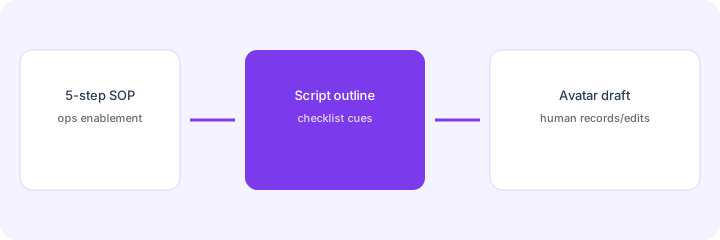
What it is: Turn a real five-step SOP into a script outline with on-screen checklist cues a human records or edits. The model drafts wording and scene beats — humans own every process step. Never invent a step that is not in the source SOP.
Primary SoT workflow:
Turn a 5-step SOP into a script outline with on-screen checklist cues a human records/edits.
2. Avatar clips for enablement reuse
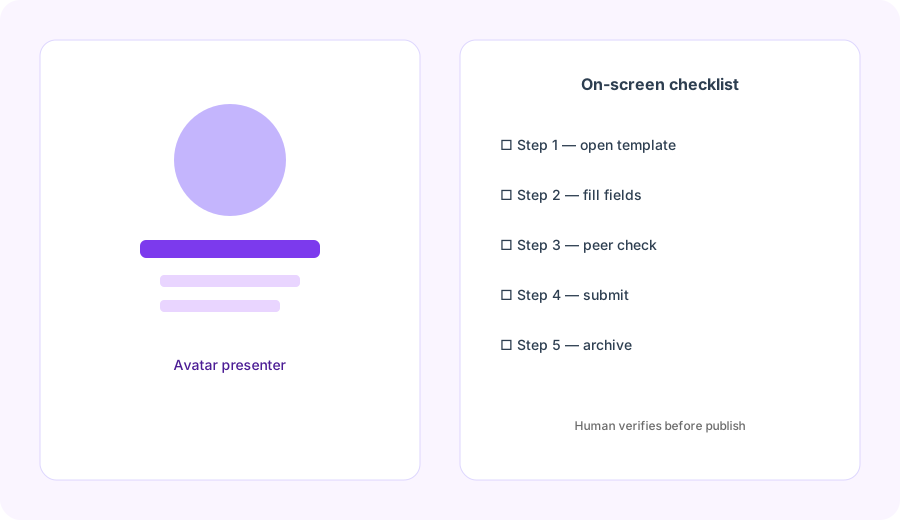
What it is: Avatar presenters deliver the same SOP voice without booking a subject-matter expert for every remake. Useful when the procedure changes quarterly and you need consistent branding — not when the audience needs a trusted human face for sensitive change management.
Reuse test:
List 3 SOPs you remake every quarter. For each: would an avatar clip with checklist cues save SME time, or does the audience need a named human on camera? One sentence each.
3. Human record/edit before publish
What it is: Treat Synthesia drafts as starting points. Humans verify SOP accuracy, legal/compliance wording, and whether any step should stay human-filmed (sensitive tools, customer data screens).
Human gate:
From your script outline: mark each scene Avatar-OK or Must-stay-human. Delete any invented step. Name the human who approves before publish.
4. Vs Loom / HeyGen / Descript
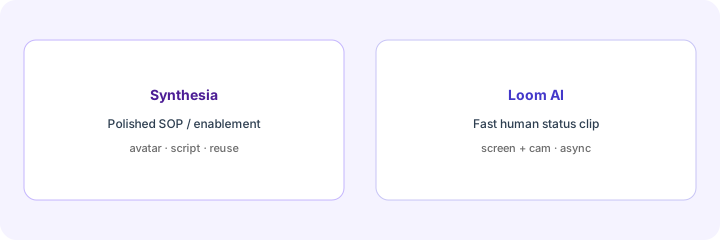
What it is: Synthesia for polished reusable SOP/enablement avatars; Loom AI for fast human async status; HeyGen for GTM/ops explainers with scenes and CTAs; Descript when you already have human footage to edit. We do not ship a KEEP/CUT scorecard.
Home-for-the-job:
List 6 video jobs this quarter. Assign each to Synthesia, HeyGen, Loom AI, or Descript — one sentence why. Do not invent a tool you do not use.
Pricing context (Nov 8, 2026)
From synthesia.io/pricing as checked on Nov 8, 2026 (monthly billing; confirm live):
- Basic (Free): $0 — 500 credits/month, videos carry a Synthesia watermark.
- Starter: $19/month billed monthly (first month $9) — 1,250 credits/month for regular creation.
- Pro (replaces the old Creator plan): $89/month billed monthly (first month $49) — 6,000 credits/month; bigger credit tiers run $176, $347, $514 and $676/month.
- Enterprise: custom — unlimited-style packaging, org controls, SSO, brand kits (confirm live).
Uncertainty: Synthesia has moved toward credit-based usage alongside minutes; yearly billing is advertised as saving up to 4 months, but the yearly per-month price is not shown in the public page text, so check it at checkout; Personal plans may be in maintenance mode. Feature gates and credit costs change — never budget from this page alone. Verify on live Synthesia pricing and your admin.
When Synthesia is useful (honest take)
Useful when you need reusable polished SOP/enablement clips with checklist cues and an avatar can carry the narration without booking an SME every remake. Less useful when a two-minute human Loom is enough, when audiences need a trusted human for sensitive change, or when you hoped AI alone would invent process steps you have not written down.
Paying for Synthesia and a few other AI tools? The $9 AI toolkit spreadsheet lists every AI subscription you have, what each one costs, and how fast it pays for itself, so you can see which ones are worth the money.
Want someone to do it for you? AI toolkit audit — $19
Related options (educational)
| Need | Better home | Why |
|---|---|---|
| Polished SOP / enablement avatars | Synthesia (this page) | Script + checklist cues + reusable clips |
| GTM / ops explainers with CTA | HeyGen | Scenes, CTA, human-filmed trust bits |
| Fast human async status | Loom AI | Screen + cam without avatar studio |
| Edit existing human footage | Descript | Transcript-first edit, not avatar render |
FAQ
What is Synthesia for ops?
AI avatar video for SOP/enablement scripts — polished internal clips when reuse beats a one-off Loom. Not consulting advice.
How much does it cost?
Confirm on synthesia.io/pricing — as of Nov 8, 2026 the public plans are Basic / Starter / Pro / Enterprise, priced in credits. This page does not invent exact SKUs beyond public packaging.
Synthesia vs Loom / HeyGen?
Polished SOP reuse (this page), fast human status (Loom AI), GTM explainer scenes (HeyGen).
Should AI invent SOP steps?
No. Humans own the SOP. Never invent process steps missing from your source doc.
Optional next step (if seats overlap)
If Synthesia would sit beside Loom, HeyGen, and Descript seats on the same enablement jobs, optional help mapping overlap: $19 AI toolkit audit or $9 AI toolkit spreadsheet. Email Audit $19 or Toolkit spreadsheet $9.
Checkout is live via Stripe. After you pay, we email delivery (spreadsheet) or intake next steps (audit).