Tool · Learning ops · Highspot · Oct 2026
Highspot AI review (Oct 2026): AI for sales content, coaching, and enablement
Highspot is a sales enablement platform: one governed place for sales content, plays, training, coaching, and meeting insights. Its AI engine is called Nexus, and its assistants are Highspot Agents — a Deal Agent for sellers and a GTM Agent for marketing and enablement. Since 18 August 2026 Highspot is part of Seismic; the product carries on as “Highspot by Seismic.” This page is about using that AI while the enablement team stays the owner of what counts as approved content. Each section has a Try this.
What this Highspot page covers
This page is for a sales enablement lead, a content or product marketing manager, or a sales manager whose team already lives in Highspot — or is choosing an enablement platform — and wants to know what Highspot’s AI does with content, training, and coaching, and where a person still has to check. The question it answers: which enablement jobs Highspot’s AI can start for you, and who signs off on each one.
Ownership, checked on 17 October 2026, after Seismic Shift (12–15 October 2026). On 18 August 2026 Seismic announced it had “completed its merger with Highspot,” operating under the Seismic name. Highspot’s merger page says there is “no immediate change to how you use Highspot, including the same login, workflows, and support,” that “Highspot’s product plans continue,” and that there are “no migration plans for Highspot by Seismic customers.” The page still says this on 17 October. At Shift, Seismic’s 13 October 2026 press release said Deal Agent is “now available in both the Highspot by Seismic and Seismic platforms”; it announced no migration and no Highspot price or package change, and Highspot’s pricing page was unchanged. The merger page adds that the company sees “near-term opportunities to bring the best AI from each platform to the other, with more details to be shared in the coming months,” so treat how the two products fit together as still to come.
Ground rules: Highspot’s AI recommends, summarizes, drafts, and flags; it doesn’t decide what is approved. Enablement and product marketing stay the owners of approved content, managers own coaching, and AI feedback on a role play or a call is coaching input, not a verdict on a rep. Highspot’s security page says customer content isn’t “stored, shared, or used to train third-party models.” Highspot’s customer results and case-study figures are not repeated here.
Major features (with how someone uses them)
Examples at a glance: each feature has a concrete example from a real job plus a short Try this you can run this week.
1. Which content shows up in won deals (primary)
What it is: Highspot Agents give “fast, trusted answers and guidance … grounded in your approved content,” in Highspot, Slack, the CRM, and search. Highspot’s content intelligence aims to show “which sales content influences pipeline progression and deal conversion, down to the slide,” and the GTM Agent analyzes content, training, and analytics to surface top- and bottom-performing content and content gaps.
Why it matters: an answer like “reps used the security one-pager in eight of the last ten won deals” is useful only if it matches what happened. Usage data reflects what was shared through Highspot, not every file a rep attached elsewhere, and a deal can be won despite the content. Spot-check the answer against the deal records before you build next quarter’s content plan on it.
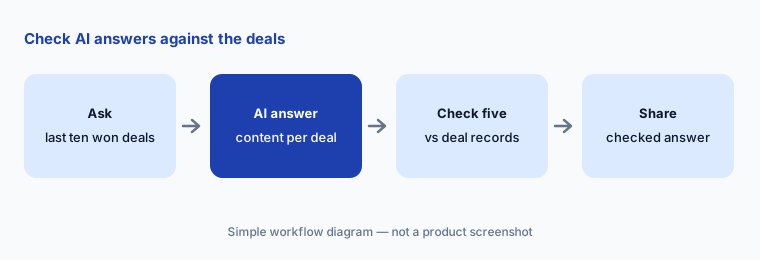
Primary workflow:
Ask Highspot’s AI which content reps used in the last ten won deals. Check five of the answers against the deal records.
2. Deal Agent: next steps, recaps, and Digital Rooms
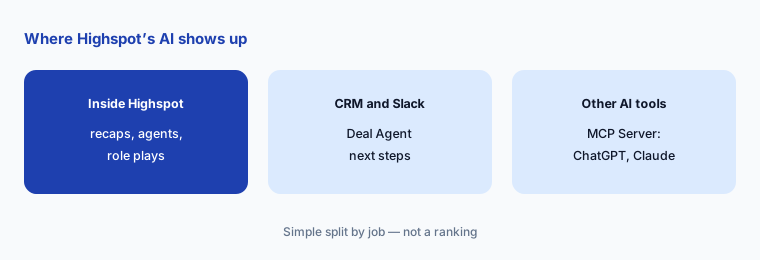
What it is: Deal Agent (launched in Highspot’s Fall Launch ’25, now also in Slack and Salesforce) brings together “calls, emails, and CRM data and buyer activity” to flag deal risks such as a missing stakeholder, recommend next steps and content, write meeting recaps with objections and follow-ups, and build a deal-specific Digital Sales Room in a click. It can also generate a role play from a real deal’s context. At Seismic Shift, Seismic’s 13 October 2026 announcement said Deal Agent is now available in both Highspot by Seismic and Seismic, bringing together “CRM activity, meetings, emails and buyer engagement” to surface “risks, missing stakeholders and next-best actions.”
Why it matters: a next step built from incomplete CRM data can send a rep after the wrong person. Have the account owner check each recommendation against the opportunity record before acting, and look at a generated Digital Room before a buyer does — it should hold only approved content that fits this deal.
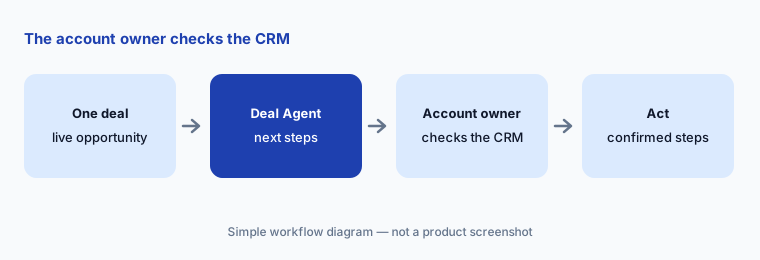
Check the deal record first:
Open Deal Agent on one live opportunity. Have the account owner confirm each suggested next step against the CRM before acting on it.
3. GTM Agent: content governance with an owner
What it is: The GTM Agent (Spring Launch ’26) is aimed at marketing and enablement. Highspot says it monitors “content usage, training adoption, and compliance,” can “archive dated assets, reassign owners, and apply labels,” assesses the health of a Spot (a Highspot content space), and pinpoints content gaps. Content management also has AI that builds filterable lists and generates descriptions to improve search.
Why it matters: bulk clean-up is where governance goes wrong — a low-use asset can be the only approved version of a regulated disclosure. Ask the agent for a list first, have the content owner approve each archive or reassignment, and keep a record of what changed and who approved it.
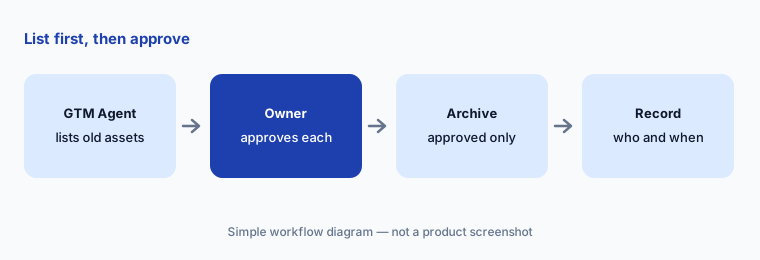
List first, then approve:
Ask the GTM Agent to list outdated assets in one Spot. Have the content owner approve each archive before anything is removed.
4. AI Role Play: practice with feedback a manager reviews
What it is: AI Role Play lets sellers practise conversations built from the content, messaging, and deal context already in Highspot, including multi-persona sessions with a champion, a skeptic, and economic and technical buyers. Scenarios can be set by persona, product, or objection, and feedback is tied to your own skills framework. Role plays can also be created through the Highspot MCP Server.
Why it matters: AI feedback on tone and delivery is quick, but it can miss what a buyer in your market would actually object to. Have the manager review the session with the rep and agree on one thing to practise next. Keep AI feedback as a coaching conversation starter, not a performance record.
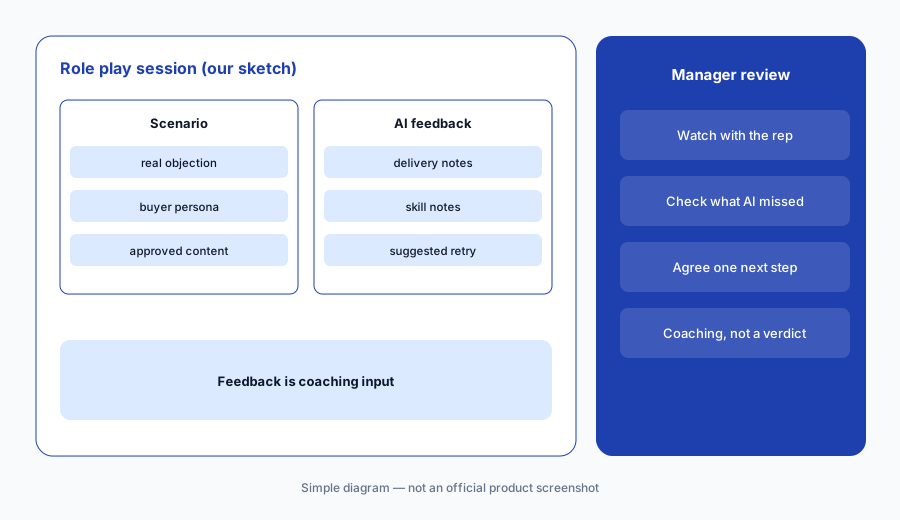
Manager and rep review together:
Build one AI Role Play from a real objection your team hears. Have the rep’s manager review the AI feedback with the rep before agreeing on what to practise next.
5. Training: AI-assisted authoring and knowledge checks
What it is: Highspot Training & Coaching includes AI-Generated Training and “AI-accelerated authoring of courses and criteria” from your existing content, certifications, adaptive learning paths where reps can test out of what they know, SCORM import, and methodology content from the Highspot Marketplace. The pricing page lists AI-generated knowledge checks on content items even in the entry package.
Why it matters: a knowledge check is only as good as its answer key, and a test-out lets a rep skip training on the strength of a few questions. Have the owner of the sales play check every generated question and answer, and decide who approves the test-out threshold — completion is not the same as being ready for a customer.
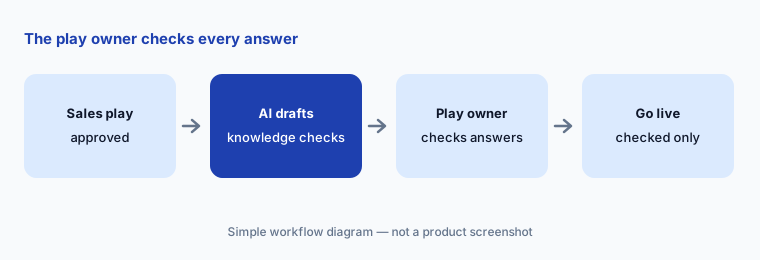
Owner checks every answer:
Generate knowledge checks for one sales play with Highspot’s AI. Have the play’s owner check every answer before it goes live.
6. Meeting Intelligence, and Highspot inside other AI tools
What it is: Meeting Intelligence captures calls with summaries, action items, objections, searchable transcripts, delivery feedback (filler words, pacing), and time-stamped comments for 1:1 coaching. The Highspot MCP Server brings Highspot content, deal answers, recommended content, Digital Rooms, and role plays into outside AI tools — Highspot names OpenAI, Anthropic, and Microsoft Copilot, and announced the MCP Server’s availability in the ChatGPT app store.
Why it matters: a recap that drops a commitment, or adds one, goes straight into a follow-up email. Have the rep compare the recap with the recording before it’s sent. If you connect the MCP Server to ChatGPT or Claude, start with a pilot group and confirm that answers respect each person’s Highspot permissions.
Recap against the recording:
Compare one Meeting Intelligence recap with the call recording. Have the rep correct any action item before the follow-up email goes out.
Pricing context (October 2026)
Highspot doesn’t publish prices (checked 17 Oct 2026 on its pricing page, https://www.highspot.com/pricing/; quote-only, no change since our 11 Oct check, and nothing new after Seismic Shift). It lists three packages, each marked “Contact sales”: Good — Equip and engage (content governance, AI search and answers, content autogeneration, Sales Plays, Digital Sales Rooms, AI-generated knowledge checks, AI-recommended content, CRM integration, Highspot Agents); Better — Train and practice (adds skills, AI-assisted training authoring, adaptive learning with test-out, AI feedback on training, Role Play in training); and Best — Coach and reinforce (adds Meeting Intelligence, Delivery Intelligence, meeting recaps, Role Play for coaching, agents with deal, meeting, and performance context, the MCP Server, Insights Layer APIs, and Highspot for Agentforce, Microsoft Copilot for Sales, and Slack AI).
Partner versions of the first two packages and enterprise add-ons (multi-step approvals, complex document generation, customer-managed encryption keys, 24/7 support) are also quote-based. Ask for a written quote that names the package, seat count, which AI features are included, and any usage limits — and, given the merger, what the renewal terms say about future packaging.
Uncertainty: Highspot became part of Seismic on 18 August 2026. Seismic Shift (12–15 October 2026) made Deal Agent available on the Seismic platform too, but brought no published Highspot price, package, or migration change; Seismic says more on sharing AI between the two platforms will come “in the coming months.” Packaging, names, and which AI features each platform gets may still change. Highspot says there are no migration plans for its customers today. No prices are published, and the pricing page doesn’t say whether AI features carry usage limits. Some features (such as the MCP Server in ChatGPT) are new; confirm availability in your region and package. Highspot’s customer results and percentages are not repeated here.
When it’s useful (honest take)
Useful when your sales team needs one governed home for content, plays, training, and coaching, enablement and product marketing will own what is approved, and you want AI to recommend content, draft knowledge checks, run role plays, and recap meetings — with managers and content owners checking the output.
Less useful when you mainly need a course LMS for employees or customers, nobody owns content governance, you can’t wait for clearer post-merger platform plans before a multi-year commitment (Seismic Shift didn’t publish any for Highspot), or you need a published price before talking to sales.
Paying for Highspot AI and a few other AI tools? The $9 AI toolkit spreadsheet lists every AI subscription you have, what each one costs, and how fast it pays for itself, so you can see which ones are worth the money.
Want someone to do it for you? AI toolkit audit — $19
Related options (educational)
| Need | Better home | Why |
|---|---|---|
| Sales content, plays, and coaching with AI agents | Highspot AI (this page) | Nexus, Deal and GTM Agents |
| Enablement platform with Aura AI agents (Highspot’s parent) | Seismic AI | Aura Agents, Lessonly inside |
| AI roleplay and sales readiness | Mindtickle AI | ElevateOS, credits |
| Conversation intelligence first | Gong | Calls and deals |
| Answers from an approved knowledge base | Guru AI | Knowledge cards |
| LMS for employee, partner, and customer training | Litmos AI | Compliance libraries |
FAQ
Is Highspot still available after the Seismic merger?
Yes. Seismic completed its merger with Highspot on 18 August 2026. Highspot’s merger page says nothing changes in how customers use Highspot today — same login, workflows, and support — that its product plans continue, and that there are no migration plans for Highspot by Seismic customers. The page still said this on 17 October 2026, after Seismic Shift.
What is Highspot’s AI called?
Highspot’s AI engine is called Nexus. Its assistants are Highspot Agents, including Deal Agent for sellers and GTM Agent for marketing and enablement, plus instant answers grounded in your approved content.
How much does Highspot cost in October 2026?
Highspot doesn’t publish prices. Its pricing page (checked 17 October 2026) lists three packages — Good, Better, and Best — each marked “Contact sales.” Seismic Shift (12–15 October 2026) brought no published price or package change. Ask for a written quote that lists the AI features and any limits.
Does Highspot use our content to train AI models?
Highspot’s security page says customer content is not stored, shared, or used to train third-party models, and lists SOC 2 Type II, ISO 27001, ISO 27701, GDPR, and EU AI Act coverage. Confirm the details in your contract.
Who should approve what Highspot’s AI produces?
Enablement and product marketing should approve content and knowledge checks, account owners should confirm Deal Agent next steps, and managers should review AI Role Play feedback with the rep. AI feedback is coaching input, not a final judgement.
Optional next step (if seats overlap)
If you pay for an enablement platform, a separate call recorder, a role-play tool, and chat seats that all summarize the same deals, that overlap is worth mapping. Map the overlap with the $19 AI toolkit audit or the $9 AI toolkit spreadsheet. Email Audit $19 or Toolkit spreadsheet $9.
Checkout is live via Stripe. After you pay, we email delivery (spreadsheet) or intake next steps (audit).