How-to · Sales enablement · Highspot · Oct 17, 2026
Ask Highspot's Deal Agent for deal prep, and keep every answer tied to enablement-approved content
Highspot's Deal Agent pulls together calls, emails, CRM data, and buyer activity to flag risks and recommend next steps and content. Highspot says its agents answer from approved content — which only works if enablement keeps that content current. This page shows how to tag approved content, ask for one deal brief, and check every cited item.
Who this is for
Sales enablement leads and account executives on Highspot who want Deal Agent's prep without sending buyers outdated or unapproved material. Highspot became part of Seismic on 18 Aug 2026; for the Seismic side, see the Seismic AI review.
How to do it
This is a how-to, not a ranking of enablement platforms. Per the Highspot AI review, Highspot Agents give answers grounded in approved content, Deal Agent recommends next steps and content and builds Digital Sales Rooms, and AI Role Play lets reps practise. Seismic's 13 Oct 2026 announcement said Deal Agent is now available in both Highspot by Seismic and Seismic. Packaging may still change after the merger.

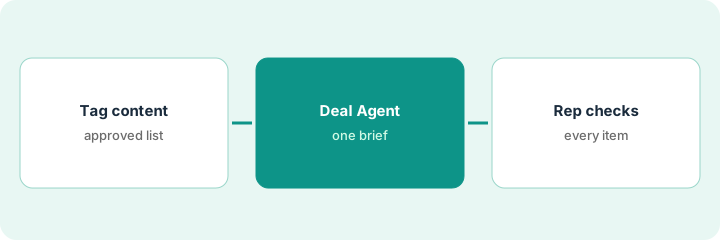
1. Tag approved content
What it is: Enablement marks which items are approved for buyers and archives what is out of date.
- List the items reps use most for one sales play.
- Mark approved items and give each an owner and review date.
- Ask the GTM Agent for a list of dated items — then have the owner approve each archive.
- Keep regulated disclosures even if usage is low.
Enablement reviews 30 items for the security sales play, approves 22, archives 6 old decks, and keeps 2 low-use compliance one-pagers.
Keep a content list: item, approved yes or no, owner, review date.
2. Ask Deal Agent for one deal brief
What it is: The rep asks Deal Agent for a brief on one open deal: risks, missing stakeholders, next steps, and recommended content.
- Pick one active opportunity.
- Ask for risks, next steps, and content.
- Compare each recommendation with the opportunity record.
- Look at any generated Digital Sales Room before a buyer does.
Deal Agent flags a missing security stakeholder and recommends the security one-pager and a case study. The opportunity record confirms nobody from security has joined a call.
Write the brief's three main points and whether the CRM record agrees with each.
3. Rep checks every cited item, then practises
What it is: Before sending anything, the rep opens every cited item and confirms it is approved and right for this buyer; then practises in AI Role Play.
- Open every recommended item.
- Confirm each one is on the approved list.
- Remove anything off-list or not right for this deal.
- Run one AI Role Play session on the main objection.
- Review the session with the manager and agree one thing to practise next.
The rep removes a case study from an industry the buyer does not work in, keeps the one-pager, and practises the security objection in a role play with a skeptic persona.
Add a line to each follow-up: items sent, all approved, checked by.
Pricing context (October 2026)
This how-to isn't a price sheet. Per the Highspot AI review, Highspot publishes no prices; all three packages are marked contact sales, and nothing new was published after Seismic Shift. Ask what the renewal says about packaging after the merger. Dated October 2026.
Checked Oct 17, 2026 on the vendor’s own pricing page: Highspot shows no public list price. Highspot’s pricing page lists three packages, each marked contact sales; nothing new was published after Seismic Shift. This page quotes no Highspot dollar figure; confirm what your contract includes with Highspot or your admin.
Uncertainty: The only prices this site sells here are the optional $9 AI toolkit spreadsheet and $19 AI toolkit audit.
When this helps (honest take)
Useful when your reps work deals in Highspot and enablement keeps an approved content library.
Not useful when nobody owns content approval, or your team works mainly in Seismic — see the Seismic review.
Related options (educational)
| Need | Where to look | Why |
|---|---|---|
| Highspot AI features | Highspot AI | Primary path |
| Seismic AI features | Seismic AI | Now the parent company |
| Highspot vs Seismic | Highspot vs Seismic | Side-by-side |
| Role play coaching | Mindtickle role play coaching | Practice option |
FAQ
Is Highspot still a separate product?
Highspot became part of Seismic on 18 Aug 2026. Per our review, Highspot says there are no migration plans for its customers today, and Deal Agent is available on both platforms.
Should reps send everything Deal Agent recommends?
No. Open every item, confirm it is approved, and remove anything that does not fit the deal.
Where do Highspot prices live?
Highspot publishes no prices; all packages are contact sales. Our Oct 17, 2026 check of the vendor’s own pricing page is summarized in the pricing section above.
Should AI Role Play feedback go in performance reviews?
Not in this routine. Use it to start a coaching conversation with the manager, not as a performance record.
Optional next step
If you want a one-page toolkit map for the tools you already pay for, use the optional $9 AI toolkit spreadsheet. If you want a short review of seat waste and unused tools, use the optional $19 AI toolkit audit. Neither is required to follow this how-to.