Tool · Audit, SOX & risk · AuditBoard (now Optro) · Oct 2026
AuditBoard AI review (Oct 2026): AI for internal audit, SOX, and risk teams
AuditBoard — the audit, SOX, and risk platform many internal audit teams know — renamed itself Optro on 9 March 2026; auditboard.com now redirects to optro.ai, and the company says it is the same team, platform, and roadmap. Its AI, formerly AuditBoard AI, is now Optro AI: it drafts control narratives and flowcharts from walkthrough notes, helps with sampling and tickmarking evidence, writes scoping memos and summaries, and, through Autonomous Testing, has agents run attribute tests across uploaded evidence and assemble Excel workpapers. Optro says every AI output goes through practitioner review. This page uses the name people still search for and explains each piece. Each section has a Try this.
What this AuditBoard (Optro) page covers
This page is for an internal audit manager, a SOX program lead, an IT auditor, or a risk manager who uses AuditBoard today or is comparing audit platforms. The question it answers: what the AI actually does in audit and controls work, what changed with the rename, and where an auditor’s judgment stays in charge.
On the name: Optro’s FAQ says AuditBoard “is now Optro,” rebranded on 9 March 2026, because the platform grew beyond internal audit into risk, infosec, compliance, and AI governance. Product names you will meet: Optro AI (generative features plus Intelligent Recommendations), Controls Management (SOX and other control frameworks), OpsAudit (operational audits), Autonomous Testing (from Optro’s acquisition of Midship, a SOX testing start-up), and AI Governance. An October 2025 launch under the AuditBoard name, called Accelerate, introduced an Audit Agent and Document Intelligence; you may still see those names in older material.
Ground rules: an AI-drafted narrative or a passed attribute test is a starting point. The auditor who signs the workpaper owns the conclusion, and the process owner confirms how the process really runs. Optro’s own FAQ says all AI-generated deliverables should go through practitioner review before they are accepted. Facts come from optro.ai as read on 10 October 2026; its ROI, savings, and hours figures are vendor claims and aren’t repeated here.
Major features (with how someone uses them)
Examples at a glance: each feature has a concrete example from a real job plus a short Try this you can run this week.
1. Control narratives and flowcharts from your notes (primary)
What it is: In Controls Management, Optro AI generates planning documentation “directly from your notes and policies”: AI-generated narratives and flowcharts that map risks and controls into the process. The 2025 Accelerate release described the same capability as Document Intelligence turning walkthrough notes into detailed narratives and cross-audit summaries. Controls Management also covers SOX 302/404 certification workflows, an out-of-the-box risk and control matrix, and frameworks such as SOX, FDICIA, J-SOX, and the UK Corporate Governance Code.
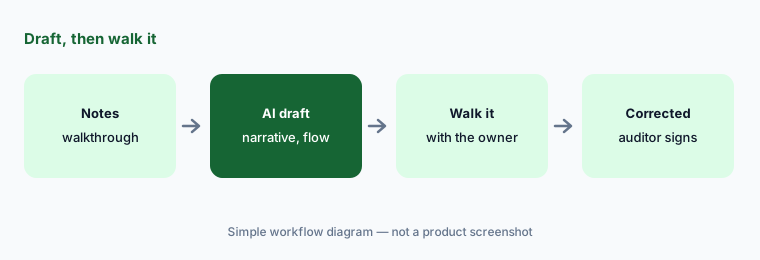
A narrative written from notes repeats whatever the notes got wrong, in confident prose. The fastest way to find out is to walk the process with its owner holding the draft: every step they correct is a step your notes — or the AI — missed. Keep the corrected version, not the first draft, as the documentation.
Primary workflow:
Let AuditBoard’s AI draft one control narrative. Walk through the process with its owner and correct every step it got wrong.
2. Fieldwork automation: sampling and tickmarking
What it is: Optro AI helps with fieldwork: selecting testing samples, tickmarking audit evidence, validating evidence, and annotating supporting documents such as receipts. In OpsAudit this is called Fieldwork Automation, alongside Document Intelligence for scoping memos and audit summaries and an AI Assistant that can start tasks, answer questions about your data, help you navigate, and search the internet. The Accelerate launch described AI that selects “representative, risk-based samples.”
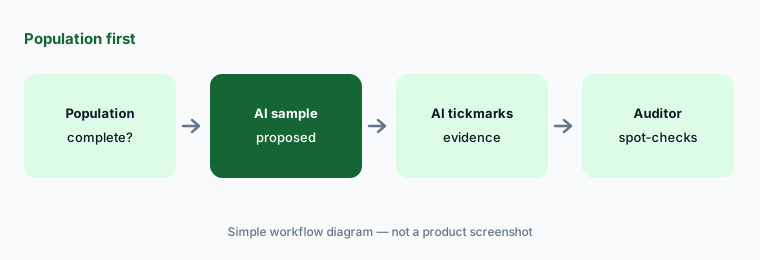
Sampling is methodology, not just arithmetic: your audit manual says how many items, from which population, and how to handle exceptions. Let the AI propose, and keep the reasoning for why the sample is adequate in the workpaper in your own words.
Population first:
For one control test, confirm the population is complete before the AI picks a sample. Then spot-check five of its tickmarks and write the sampling rationale yourself.
3. Autonomous Testing: agents run attribute tests
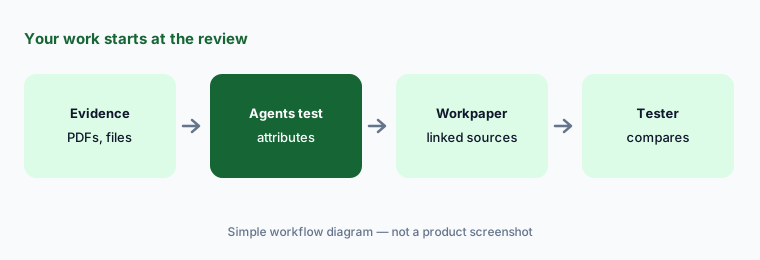
What it is: Autonomous Testing came from Optro’s acquisition of Midship, a Y Combinator-backed start-up founded in 2024 to automate SOX controls testing. AI agents read unstructured evidence — Optro mentions dense PDFs and even video walkthroughs — run attribute tests such as user access reviews and bank reconciliations, document each step, and assemble Excel workpapers linked back to the source evidence. It runs as a web app and an Excel add-in, sits alongside Controls Management, and, per Optro’s FAQ, doesn’t require other Optro products. The page’s line is “your work starts at the review.”
“Starts at the review” is exactly right: the agent prepares, you review. Before you rely on it, rerun a test you already completed by hand and compare attribute by attribute; the differences tell you which evidence types it reads well and which it doesn’t.
Rerun a known test:
Run Autonomous Testing on one test you already completed by hand. Compare every attribute with your workpaper and list the evidence types it misread.
4. Audit planning, scoping memos, and summaries
What it is: For audit planning, Optro says its AI draws risk insights from company and regulatory data to help build a risk-aligned audit plan, and it offers intelligent staffing recommendations that match auditors’ skills to engagements. Document Intelligence drafts scoping memos and audit summaries and consolidates progress across audits into status summaries; customers quoted on the AI page use it to refine issue descriptions and footnotes. Continuous auditing runs recurring analytics over full populations and surfaces exceptions with AI-generated summaries.
A summary for the audit committee is a judgment about what matters. Let the AI draft from the workpapers, then have the audit lead decide what the committee needs to hear and check every number back to its source.
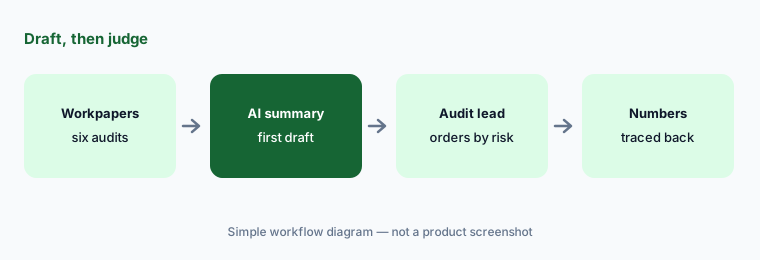
Judgment stays with you:
Let Document Intelligence draft one audit summary. Reorder it by risk yourself and trace every figure back to its workpaper before it leaves the team.
5. Human review, audit trail, and the MCP server
What it is: Optro’s FAQ lays out how its AI is governed: customers opt in to Optro AI through their customer success manager; AI-suggested controls or content need user review and manual approval before they are applied; AI workflows are clearly marked; and a logged record shows what the AI suggested, who reviewed it, and what was applied. Generative features use Microsoft Azure OpenAI, Intelligent Recommendations use in-house models, and Optro says customer data isn’t used to train them. An MCP server lets approved AI assistants query audit findings, risk registers, and control data with each user’s existing permissions.
The audit trail is only useful if someone reads it. Pick one AI-assisted workpaper a month and check the log: what the AI suggested, who accepted it, and whether the reviewer changed anything. A reviewer who never changes anything may not be reviewing.
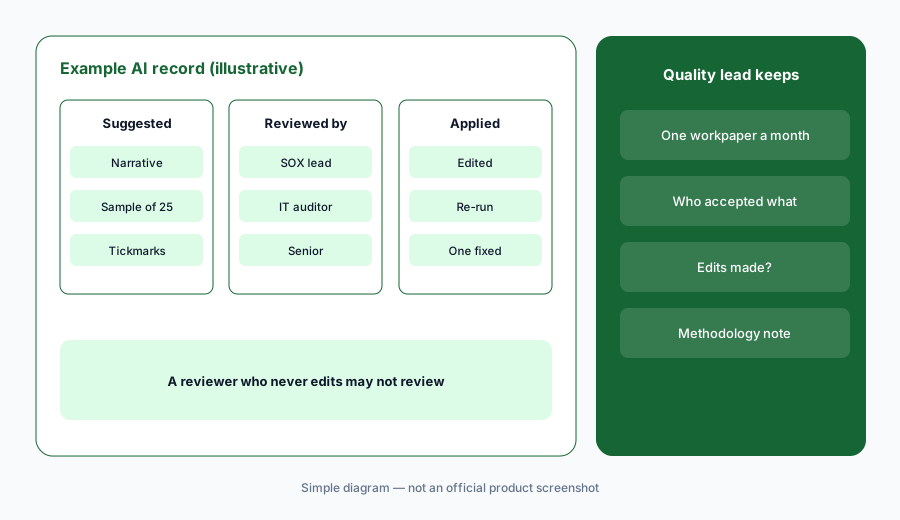
Read the log:
Each month, pull one AI-assisted workpaper and read its AI log: what was suggested, who accepted it, and what changed. Follow up on any reviewer who never edits.
6. AI Governance: inventory your own AI
What it is: Optro’s AI Governance product keeps an inventory of models, agents, and third-party AI apps from intake to production, with ownership, data inputs, and risk classification, and maps them to 25+ frameworks including the EU AI Act, ISO 42001, and the NIST AI RMF. It covers shadow AI, third-party AI risk, and what Optro calls agentic governance frameworks for autonomous systems. Because it sits on the same platform as audit and risk, internal audit can see the inventory it will later be asked to audit.
An inventory is only as good as its owners. Start with the AI tools people actually use, give each one an owner and a risk class, and let audit test the inventory against reality — expense reports and browser data often find tools the intake form missed.
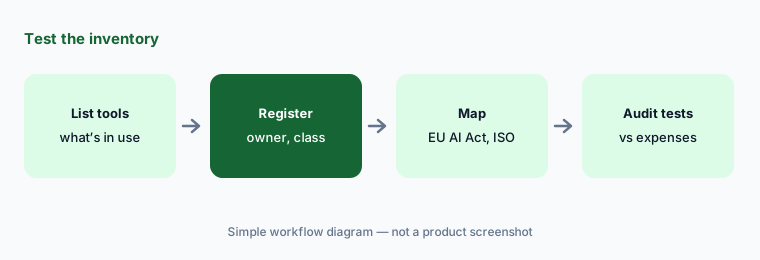
Test the inventory:
Compare the AI inventory with one other source, such as expense reports for AI subscriptions. Register every tool that’s missing and give each an owner.
Pricing context (October 2026)
Optro (AuditBoard) publishes no prices (checked 10 Oct 2026). Its pricing page is a “Request Optro Pricing” form, so pricing is quote-only. See optro.ai/pricing.
What the page does say: unlimited stakeholder licenses (no fee for additional business users who take part), flexible plans you can upgrade as needs grow, and paid implementation and success services. Products are sold as modules — Controls Management, Autonomous Testing, OpsAudit, AI Governance, risk, TPRM, and more — and Optro AI is opt-in through your customer success manager. Ask which AI features are included in your modules and whether Autonomous Testing is priced separately.
Uncertainty: Optro doesn’t publish prices, and the pricing page doesn’t say whether Optro AI or Autonomous Testing cost extra. The rename to Optro is recent, so older AuditBoard names (AuditBoard AI, Accelerate, Audit Agent) still appear in documentation and customer material. Optro doesn’t give a date for the Midship acquisition on the pages we read, and it describes more agents for compliance, cybersecurity, and risk as coming “in the near future.” ROI and savings figures on its site come from vendor-commissioned studies.
When it’s useful (honest take)
Useful when an internal audit or SOX team already runs its controls and workpapers in AuditBoard (Optro) and wants help with narratives, sampling, tickmarking, and summaries — with auditors who will walk processes with owners and review every AI output before it lands in a workpaper.
Less useful when you are a small company without SOX obligations or an internal audit function, you mainly need SOC 2 evidence collection, your evidence is mostly scanned paper, or you hope the AI will sign off tests. The auditor still owns the conclusion.
Paying for AuditBoard AI and a few other AI tools? The $9 AI toolkit spreadsheet lists every AI subscription you have, what each one costs, and how fast it pays for itself, so you can see which ones are worth the money.
Want someone to do it for you? AI toolkit audit — $19
Related options (educational)
| Need | Better home | Why |
|---|---|---|
| Internal audit and SOX workpapers with AI | AuditBoard AI, now Optro (this page) | Narratives, fieldwork, autonomous testing |
| Risk registers and configurable GRC workflows | LogicGate AI | Risk Cloud agents, control linking |
| Evidence collected as data from systems | Anecdotes AI | Data Engine, agents, ChatGRC |
| Privacy and AI governance programs | OneTrust AI | AI inventory, privacy assessments |
| IT risk inside your service management tool | ServiceNow AI | Same platform as IT tickets |
| Multi-framework compliance mapping | Hyperproof AI | Control mapping, evidence linking |
FAQ
Is AuditBoard now called Optro?
Yes. Optro’s FAQ says AuditBoard rebranded as Optro on 9 March 2026 and is the same company, team, and platform. auditboard.com redirects to optro.ai, and AuditBoard AI is now called Optro AI.
What does AuditBoard’s AI (Optro AI) do for internal audit and SOX?
It drafts control narratives and flowcharts from notes and policies, helps select samples and tickmark evidence, drafts scoping memos and summaries, and through Autonomous Testing has agents run attribute tests on uploaded evidence and build Excel workpapers linked to the sources.
How much does AuditBoard (Optro) cost in October 2026?
Optro publishes no prices (checked 10 October 2026); its pricing page is a request form, so pricing is quote-only. It advertises unlimited stakeholder licenses and flexible plans, with implementation services on top.
Does Optro AI sign off audit work?
No. Optro says AI-suggested content needs user review and manual approval before it is applied, and that all AI-generated deliverables should go through practitioner review. The auditor who signs the workpaper owns the conclusion.
Does Optro use our audit data to train its AI?
Optro says it does not use customer data to train Optro AI or its models. Generative features run on Microsoft Azure OpenAI and Intelligent Recommendations on in-house models; confirm the details in your contract.
Optional next step (if seats overlap)
If audit, SOX, risk, and compliance each pay for their own platform and their own AI add-ons, mapping where the work overlaps is a good first step. Map the overlap with the $19 AI toolkit audit or the $9 AI toolkit spreadsheet. Email Audit $19 or Toolkit spreadsheet $9.
Checkout is live via Stripe. After you pay, we email delivery (spreadsheet) or intake next steps (audit).