How-to · Internal audit / SOX · AuditBoard (Optro) AI · Oct 13, 2026
Turn walkthrough notes into a SOX control narrative the control owner signs
A narrative written from walkthrough notes repeats whatever the notes got wrong, and AI makes it sound more certain. This page shows a SOX lead or internal auditor how to let Optro AI draft a control narrative and flowchart from notes, then walk it with the process owner so the signed version describes what really happens. A quick note on names: AuditBoard rebranded as Optro on 9 March 2026, so you'll see both names in your account and in older material. Terms: ERP means enterprise resource planning, the core finance and operations system.
Who this is for
SOX program leads, internal audit managers, and IT auditors whose controls and workpapers already live in AuditBoard (Optro) Controls Management. If you're a small company without SOX obligations and mainly need SOC 2 evidence, this isn't your page; see the stack map for compliance ops.
How to do it
This is a how-to, not a ranking of audit platforms. Feature detail lives on the AuditBoard (Optro) AI review. Optro AI is opt-in through your customer success manager, so check it's enabled for Controls Management before you start.
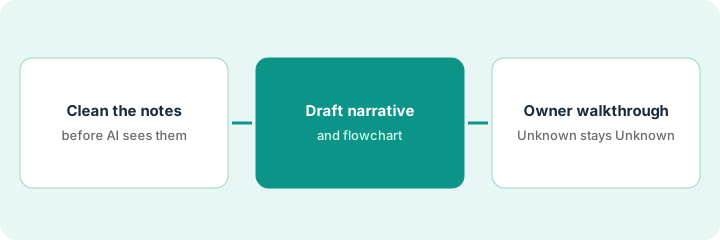
1. Step 1 — Clean the notes before the AI sees them
What it is: Your walkthrough notes, tidied so that facts, guesses, and open questions are clearly separated. The AI will treat everything you give it as fact.
- Put each step on its own line in the order it happens.
- Mark anything you heard secondhand or aren't sure about with "(unconfirmed)".
- Write open questions as questions, not as steps. "Who approves changes under the threshold?" is better than guessing "the controller approves."
- Attach the policy that governs the process. Optro says it drafts "directly from your notes and policies."
The SOX lead's notes on vendor master-data changes have 11 steps. She marks two as unconfirmed (who approves small changes, and whether there's a callback before bank details change) and attaches the vendor management policy.
Before uploading, count your "(unconfirmed)" marks. If there are none, read the notes again. Almost every walkthrough has at least one.
2. Step 2 — Draft the narrative and flowchart
What it is: In Controls Management, Optro AI generates narratives and flowcharts that map risks and controls into the process. Older material calls the same capability Document Intelligence.
- Upload the cleaned notes and the policy, and generate the narrative and flowchart.
- Compare the draft against your notes line by line. Look for steps the AI added, merged, or made more certain than your notes said.
- Wherever an unconfirmed item became a confident sentence, change it back to "Unknown — confirm with owner."
- Keep the first draft as a working file. The signed version comes after Step 3.
The draft says all vendor changes are approved by the controller, which was one of the unconfirmed items. The flowchart has no callback step at all. The SOX lead marks the approval as Unknown and adds the callback as an open question for the owner.
Highlight every sentence in the draft that has no matching line in your notes or policy. Each one is either a useful inference to confirm or a mistake to delete.
3. Step 3 — Walk it with the owner; unconfirmed steps stay Unknown
What it is: The process owner reads the draft with you, step by step, and corrects it. Optro's own FAQ says AI-generated deliverables should go through practitioner review before they're accepted.
- Book 30 minutes with the process owner and walk the flowchart together.
- Every step they correct goes into the narrative in their words.
- Anything they can't confirm stays marked Unknown, with a named person to follow up.
- Record who confirmed the process and when, then link key controls and save the corrected version as the documentation.
The accounts-payable manager explains that a second accounts payable clerk approves changes under a set amount, and the controller only approves above it. The bank-detail callback does exist and is a key control. The SOX lead corrects both, links the callback as a key control, and records the manager's confirmation with the date.
End the narrative with one line: "Process confirmed by [name, role] on [date]. Open items: [list, or none]."
Pricing context (October 2026)
This how-to isn't a price sheet. Optro (AuditBoard) publishes no prices (checked 10 October 2026); its pricing page is a request form. It sells products as modules, and Optro AI is opt-in. Ask which AI features come with Controls Management. Details live on the AuditBoard (Optro) AI review. Dated October 2026.
Checked Oct 13, 2026 on the vendor’s own pricing page: Optro (AuditBoard) shows no public list price. Optro’s pricing page is a “Request Optro Pricing” page that describes unlimited stakeholder licenses and flexible plans, with no dollar figures. This page quotes no Optro dollar figure; confirm what your contract includes with Optro or your admin.
Uncertainty: The pricing page doesn't say whether Optro AI costs extra, and older AuditBoard feature names still appear in documentation. If your contract and our review disagree, trust your contract. The only prices this site sells here are the optional $9 AI toolkit spreadsheet and $19 AI toolkit audit.
When this helps (honest take)
Useful when your SOX documentation lives in AuditBoard (Optro), narratives take hours to write from notes, and process owners will give you 30 minutes to walk the draft.
Not useful when nobody can get time with the process owner, or the plan is to file the AI's first draft as documentation. The auditor who signs the workpaper owns the conclusion.
Related options (educational)
| Need | Where to look | Why |
|---|---|---|
| AuditBoard (Optro) AI features | AuditBoard AI, now Optro | Primary path on this page |
| Risk registers and configurable GRC (governance, risk, and compliance) workflows | LogicGate AI | Risk Cloud agents and control linking |
| Multi-framework compliance mapping | Hyperproof AI | Control mapping and evidence linking |
| Finance stack overview | Stack map for finance ops | Job, tool, and owner in one view |
| Controller gates in the ERP | NetSuite jobs that stay controller-owned | Live how-to on where approvals sit |
FAQ
Is AuditBoard now called Optro?
Yes. Optro's FAQ says AuditBoard is now Optro, rebranded on 9 March 2026.
Can Optro AI write the narrative without a walkthrough?
It can draft from notes and policies, but a narrative nobody walked with the owner is just your notes in better prose. The owner's corrections are what make it documentation.
Where do current prices live?
With Optro's sales team. It publishes no prices (checked 10 October 2026), and this page doesn't invent any. Our Oct 13, 2026 check of the vendor’s own pricing page is summarized in the pricing section above.
What happens to a step nobody can confirm?
It stays marked Unknown in the narrative until the control owner confirms it. The AI draft never fills the gap with a guess.
Optional next step
Free reviews stay free. If your audit team pays for an audit platform plus separate chat seats that rewrite the same narratives and summaries, the $9 AI toolkit spreadsheet helps you lay them out, or the $19 AI toolkit audit gets you a written memo.