How-to · Ops intake · Typeform AI · Oct 8, 2026
Design vendor intake in Typeform with branches a human approves
“Intake with branches” here does not mean Typeform’s AI publishes a form nobody read. It means AI drafts the questions and logic, a person locks the required fields and both skip paths, and response summaries mark Unknown instead of inventing a risk label.
Who this is for
Ops leads who own vendor or internal request intake and want a conversational Typeform with logic branches — software vendor versus agency, touches customer data or not — plus short summaries for the review queue. If budget is tight and everyone already lives in Google Workspace, Google Forms plus a chat tool may be enough; the trade-off is on Typeform AI.
How to do it
This page is a how-to. It is not a ranking of form builders. The Typeform AI review covers the AI form builder, logic, and summaries; this page is the approval routine around them — a sticky-note field list, a click-through of both branches, and a summary rule. Dated pricing also lives on that review.
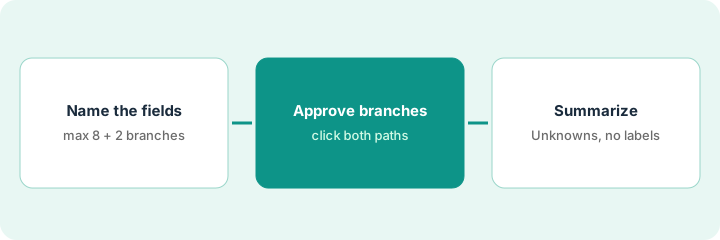
1. Step 1 — Name the fields that matter
What it is: Before you prompt the AI form builder, write down the required fields and the two branch decisions people actually care about. AI drafts the structure; you own the compliance fields.
- List required fields that must never sit behind a skip — legal name, primary contact, whether personal data is handled, a security contact, or whatever your policy already asks for.
- Limit the first version to two branch questions (for example: vendor type; touches customer data yes or no).
- Write what is out of scope. Choosing a procurement system is not this form’s job.
- Name who approves the published form — ops plus one compliance or finance reviewer.
Required: legal name, primary contact, vendor type, whether personal data is processed, and a security contact. Branches: software vendor versus agency; personal data yes or no. Out of scope: contract edits.
On a sticky note, write Required (max 8) and Branches (max 2). Do not open the AI form builder until both lists fit on that note.
2. Step 2 — Draft the branches, then click through both
What it is: Use Typeform’s AI form creation to draft questions from your list, then check every logic jump by hand. Conditional logic is listed on all paid plans. See Typeform AI.
- Generate a draft from your sticky-note list, then delete any question you did not ask for.
- Walk both branch paths as if you were the vendor. Confirm required compliance fields cannot be skipped on either path.
- Use AI follow-up questions (Typeform calls this Clarify with AI) only on open text where a fuzzy answer is fine — never on tax IDs or other hard identifiers.
- Publish only after a person has clicked through both paths.
The AI adds a “budget range” question nobody asked for; ops deletes it. On the personal-data-yes path, the security contact is required; on the no path it is skipped. Both paths still require the legal name. A finance reviewer signs off before the form goes live.
Build the draft, then fill it in yourself twice — once down each branch. Screenshot any required field that disappeared and fix the logic before anyone outside the team sees the form.
3. Step 3 — Summarize responses with Unknowns
What it is: When responses arrive, use the summary feature your plan includes (our review covers Ask AI and response summaries; the pricing page lists its AI analysis as Smart Insights on Growth plans) — or export the responses and paste them into your chat tool. Either way, the summary reports what people wrote and nothing more.
- Ask for five theme bullets and three follow-up questions for a person to send.
- Delete any risk score, deadline, or owner the respondent never wrote.
- Send the summary to the intake owner. People decide approve, reject, or ask for more.
- Keep the full response export as the record. The summary helps; it is not the archive.
The summary says three vendors process personal data and two left the security contact blank. It also labels one vendor “high risk.” Ops deletes the label, keeps the missing-contact fact, and assigns the follow-ups to the intake owner.
After ten responses, ask: Five bullets for ops from these responses only. No risk scores or labels. End with Unknowns and three follow-up questions. Paste only the cleaned bullets into your team channel.
Pricing context (October 2026)
This how-to is not a price sheet. Plan detail for Typeform AI lives on that review. Recheck the vendor’s site before you budget. Dated October 2026.
Checked Oct 8, 2026 on the vendor’s own pricing page: typeform.com/pricing lists Basic at $28 per month billed yearly ($39 billed monthly) with 100 responses a month, 1 user, AI-powered form creation, and conditional logic; Plus at $56 yearly ($79 monthly) with 1,000 responses and 3 users; and Business at $91 yearly ($129 monthly) with 10,000 responses and 5 users. Clarify with AI appears in the feature list, and Smart Insights (AI analysis) is listed on the Growth plans. The plan comparison lower on the same page showed different, lower figures, so confirm the price at checkout.
Uncertainty: Which AI features sit on which plan, response limits, and analysis features change. If an invoice and a review disagree, trust the invoice. Do not paste a marketing list price you did not pay. The only prices this site sells here are the optional $9 AI toolkit spreadsheet and $19 AI toolkit audit.
When this helps (honest take)
Useful when Typeform is already (or is about to be) your intake form, someone approves both branches before publishing, and summaries are edited before they drive decisions.
Not useful when a free Google Form and a manual read of the export would do, or you want AI to approve vendors. That is a procurement and ownership question — a form does not replace judgment.
Related options (educational)
| Need | Where to look | Why |
|---|---|---|
| AI form creation, branches, summaries | Typeform AI | Ops intake focus |
| Scheduling intake copy | Calendly AI · Rewrite Calendly intake event copy | Different job: booking pages, not vendor forms |
| An SOP bot after intake | ChatGPT Custom GPTs · Build a Custom GPT that only answers from your pasted SOP | Answers from a written SOP — separate from the form |
| Routing responses after submit | Make · Zapier · Ship one Sheet → Slack approval scenario in Make | Route answers; still name a failure owner |
Related reviews: Typeform AI · Calendly AI · Cal.com AI. Related how-tos: Build a clause checklist handoff in DocuSign · Rewrite Calendly intake event copy. Free: automation glue calculator if the form already feeds three tools.
FAQ
Can the AI publish the form without a person clicking through it?
Not on this page’s pattern. A person approves the required fields and both branch paths before publishing.
Should the summary assign a risk score?
No. Summarize what respondents wrote and mark Unknowns. People decide risk.
Typeform AI or Google Forms plus a chat tool?
Typeform when the conversational form and in-form branches matter. Google Forms plus a chat tool when budget is tight and Google Workspace is already home. Details on Typeform AI.
Where do dated prices live?
On the Typeform AI review and typeform.com/pricing. This October 2026 how-to only repeats prices we checked on the vendor’s own pricing page on Oct 8, 2026.
Optional next step
Free reviews stay free. Neither offer is required to use this page. If two form or intake tools already cover the same vendor-request job, optional help: $9 AI toolkit spreadsheet (seats, spend, owner, cancel-by, overlap) or $19 AI toolkit audit when you want a written memo.