How-to · Automation · Make · Oct 8, 2026
Ship one Sheet → Slack approval scenario in Make with a failure owner
“Slack approval” here does not mean Make decides who can spend money. It means one scenario moves a sheet row to a Slack approve-or-reject message, writes the decision back, and alerts a named person when nobody clicks in time.
Who this is for
Finance and ops leads who already track approval requests in a Google Sheet and want Slack buttons with write-back — without losing requests when nobody clicks. If the path is a simple two-step automation and your team already uses Zapier, start with Automate one handoff in Zapier before you buy another AI seat; Make tends to fit when you need routers (branches), more control over credits, and a visible failure path.
How to do it
This page is a how-to. It is not a ranking of automation tools. The Make scenarios review explains the approval pattern and its parts; this page is the build-and-test checklist — an owner card, a sandbox run of both buttons, and a no-click test before production. Platform detail and dated pricing live on Make.
1. Step 1 — Name the timeout owner
What it is: Before adding any modules, decide what happens when Slack goes quiet. Automations fail as people problems more often than connector problems.
- Write the job in one line: “New sheet row → Slack approve or reject → write Status, Approver, and Timestamp back.”
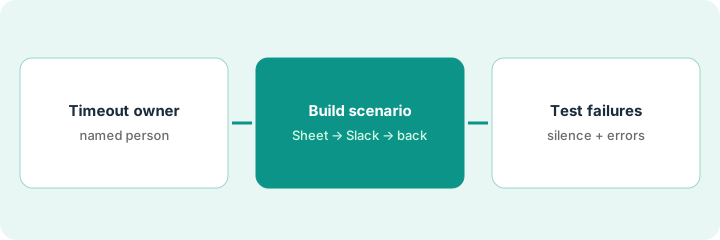
- Name the timeout owner — the person alerted after 24 hours, or whatever response time you agree.
- Name who may approve (a Slack user or user group). The scenario never picks an approver on its own.
- Define the end states: Approved, Rejected, Timed out. No vague “done.”
Vendor purchase requests land as sheet rows. The approver is the finance lead’s Slack account. If nobody clicks within 24 hours, Make alerts the timeout owner (the ops on-call alias) and sets Status to Timed out. Nobody treats silence as a yes.
Fill in one card: Job — Approver — Timeout hours — Timeout owner — Sheet columns for Status, Approver, Timestamp. If the timeout owner is blank, do not build yet.
2. Step 2 — Build the Sheet → Slack → write-back scenario
What it is: In Make, build one scenario: sheet trigger → filter → Slack message with Approve and Reject → write-back to the sheet. The approval pattern is described on Make scenarios.
- Trigger only on rows that need approval (Status empty or “Waiting”).
- Map every field on purpose. No module should fill in an amount or vendor on its own.
- The Slack message shows the facts from the row plus Approve and Reject.
- On a click, write Status, Approver, and Timestamp back to the same row; on Reject, add an optional reason column.
- Estimate credits: most module actions use one credit, while routers and error-handler modules use none. Count modules × weekly runs before picking a plan.
Watch rows → filter Waiting → Slack message with buttons to finance → router for Approve or Reject → update the sheet row. An error handler emails the timeout owner if the Slack or sheet step fails. Five credit-using modules × twenty runs a week is about 430 credits a month — inside even the Free plan’s 1,000, though Free runs at most every 15 minutes, which is slow for approvals.
Build it against a test sheet with three fake rows. Run it once with Approve and once with Reject, and confirm the write-back columns fill correctly. Do not point it at the real sheet until both paths work.
3. Step 3 — Test the failure path
What it is: Test silence and a broken step on purpose. A scenario without a failure path is a queue that fails quietly.
- Leave one test request unclicked until it times out. Confirm Status becomes Timed out and the owner was alerted.
- Break one mapping on purpose in the test copy. Confirm the error route alerts a person — not only Make’s own history screen.
- Write down who re-runs Timed out rows. That is a person’s job, not “the bot will remember.”
- Only then switch the scenario to the real sheet and schedule.
A test row sits for 24 hours. The timeout fires, the ops alias gets a Slack alert, and Status flips to Timed out. A second test forces a sheet permission error, and the error handler emails finance. The scenario goes live the next morning with both tests written down.
Run one no-click test this week. If the timeout alert does not arrive, fix that before any real purchase waits on the scenario. Put the timeout owner’s name in the scenario’s description field.
Pricing context (October 2026)
This how-to is not a price sheet. Plan detail for Make, Make scenarios, and Zapier lives on those reviews. Recheck each vendor’s site before you budget. Dated October 2026.
Checked Oct 17, 2026 on the vendor’s own site: Make’s official Make vs Zapier page lists Free at $0 with 1,000 credits a month and, starting at 10,000 credits a month, Core at $9, Pro at $16, and Teams at $29 per month; Enterprise is custom. On Oct 8, make.com/en/pricing showed higher prices at the same credit setting. The pricing page has a monthly/annual toggle and says annual is cheaper, so confirm which billing period your figure is for. Make’s FAQ says most module actions use one credit and that router and error-handler modules use none. Zapier was not rechecked.
Uncertainty: Credits per step, plan bundles, and connector behavior change. Budget from runs × modules, not from a blog table. If an invoice and a review disagree, trust the invoice. Do not paste a marketing list price you did not pay. The only prices this site sells here are the optional $9 AI toolkit spreadsheet and $19 AI toolkit audit.
When this helps (honest take)
Useful when the approval queue already lives in a sheet, approvers already live in Slack, and you can name a timeout owner who will act.
Not useful when nobody will own failures, the approval belongs in a tool you already pay for (your CRM or e-signature workflow), or you want silence to count as approval. Zapier is often enough when the path stays simple and linear and your team already builds Zaps; see n8n vs Make if self-hosting is on the table.
Related options (educational)
| Need | Where to look | Why |
|---|---|---|
| Scenarios, credits, routers | Make | Platform walkthrough |
| Approval, Slack, and failure path | Make scenarios | The pattern this page builds |
| Simple two-step automations | Zapier · Automate one handoff in Zapier before you buy another AI seat | Often enough for linear paths |
| Make vs self-hosted n8n | n8n vs Make | Educational compare |
Related reviews: Make · Make scenarios · Zapier. Related how-tos: Automate one handoff in Zapier before you buy another AI seat · Design vendor intake in Typeform with branches a human approves. Free: automation glue calculator · seat-waste calculator if Make and Zapier both automate the same approval.
FAQ
What if nobody clicks Approve?
The timeout owner gets an alert and Status becomes Timed out (or the label you chose). Silence never means approved.
Make or Zapier for this job?
Make when you want branches and credit-level control over the approval path. Zapier when the path is simple and Zaps are already your team’s habit. Compare cost per successful run — not brand feel.
Should the scenario pick an approver if the cell is blank?
No. Fail closed: leave the row Waiting or Timed out and alert the timeout owner.
Where do dated prices live?
On the Make review and make.com/en/pricing. This October 2026 how-to only repeats prices we checked on the vendor’s own pages on Oct 17, 2026.
Optional next step
Free reviews stay free. Neither offer is required to use this page. If Make and Zapier (or another automation seat) already cover the same approval job, optional help: $9 AI toolkit spreadsheet (seats, spend, owner, cancel-by, overlap) or $19 AI toolkit audit when you want a written memo.