How-to · Automation · Zapier · Oct 6, 2026
Automate one handoff in Zapier before you buy another AI seat
“Handoff” here means a repetitive move of data or a notification between apps you already use — not a new chatbot that summarizes the same pile. You leave the week with one Zap running and a named human who owns failures.
Who this is for
Ops leads considering a new AI seat because “someone has to move this field every day.” If the pain is judgment, coaching, or writing — not a repetitive handoff — a Zap will not replace that seat. If no one will watch failure emails, do not automate yet.
How to do it
This page is a how-to. It is not a ranking of automation platforms. Product detail and dated pricing live on the reviews linked below.
1. Step 1 — Name the handoff in one sentence
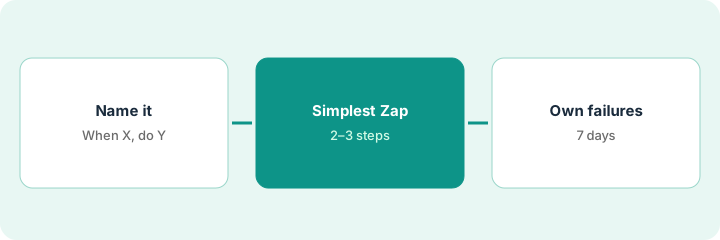
What it is: Write the job as When X happens in App A, do Y in App B — with apps you already pay for.
- Prefer two steps over a twelve-step build.
- Estimate monthly runs × steps before you pick a tier — Zapier counts each successful action step as a task (see Zapier and the pricing note below).
- If the connector you need is awkward in Zapier but clean in Make, or you need self-hosted control, read Make or n8n instead of forcing Zapier.
- Do not add a third AI tool to “watch” the handoff. The automation is the job.
When a Typeform vendor-intake form is submitted, create an Asana task with requester, vendor name, and a due date three business days out, then post the link in #ops-vendors. That is one handoff — not a new “AI intake seat.”
Write one sentence in the When/Then shape. If you need more than three apps or a human judgment call mid-flow, stop — that may still be a person’s job, not a Zap.
2. Step 2 — Build the simplest Zap
What it is: In Zapier, create the minimum Zap that completes the handoff. Map only fields that exist in both apps.
- Use a filter so junk submissions do not create tasks. Zapier lists Filters & Paths on paid plans, not Free.
- Avoid branching on day one unless Make’s routers are clearly the better canvas — see Make scenarios if you already lean toward Make.
- Test with one real (or sanitized) sample. Confirm the row in Asana, Slack, or the sheet looks right.
- Name the Zap after the job, not “Test 3.”
The Zap maps email → requester, vendor name → task name, notes → description. It does not invent a risk score or an owner the form never collected.
Ship a two- or three-step Zap today (Zapier’s Free plan allows two-step Zaps; multi-step needs a paid plan). Turn it on only after one test run you personally checked in the destination app.
3. Step 3 — Own failures for 7 days
What it is: Unowned Zaps are silent risk. Name a human who gets failure alerts and will fix expired connections, renamed fields, and API errors.
- Put the owner’s name in the Zap description or folder.
- For seven days, check the Zap history daily (or turn on error alerts).
- Log one line per failure: cause → fix → prevention. If failures need judgment calls, pause the Zap — do not buy another AI seat to interpret bad data.
Day 3: the Slack step fails because a channel was renamed. The owner fixes it in ten minutes. Day 7: zero open errors. The request for a new AI seat is withdrawn.
Add Owner: [Name] to the Zap. Put a 10-minute daily check on the calendar for seven days. If you skip three checks, turn the Zap off until ownership is real.
Pricing context (October 2026)
This how-to is not a price sheet. Plan detail for Zapier, Make, and n8n lives on those reviews. Recheck each vendor’s site before you budget. Dated October 2026.
Checked Oct 6, 2026 on the vendor’s own pricing page: zapier.com/pricing lists Free at 100 tasks per month with two-step Zaps, and Professional from $19.99 per month billed annually for 750 tasks ($29.99 billed monthly). Higher task tiers cost more. Make and n8n prices were not rechecked for this page — see their reviews and vendor sites, and model cost per successful run for your volume.
Uncertainty: Task metering, credits, task tiers, and connector quality change. If an invoice and a review disagree, trust the invoice. Do not paste a marketing list price you did not pay. The only prices this site sells here are the optional $9 AI toolkit spreadsheet and $19 AI toolkit audit.
When this helps (honest take)
Useful when the pain is a repetitive, well-defined handoff between apps you already use, and someone will own failures.
Not useful when you need writing, coaching, or policy judgment — or when you run Zapier and Make for the same two-step sync “just in case.” Use the free automation glue calculator when comparing paths.
Related options (educational)
| Need | Where to look | Why |
|---|---|---|
| Polished connectors, simple Zaps | Zapier | Primary path on this page |
| Visual scenarios, routers, credits | Make · Make scenarios | Branching and credit math |
| Self-hosted or cost-sensitive runtime | n8n · n8n vs Make | You own the runtime |
| Compare glue cost | automation glue calculator | Free on-site tool |
Related reviews: Zapier · Make · n8n. Free: automation glue calculator · seat-waste calculator.
FAQ
Should I buy an AI seat instead of a Zap?
If the job is “move this field when X happens,” try the Zap (or Make or n8n) first. AI seats help when the job is language, judgment, or synthesis — not a pipe.
How complex should the first Zap be?
Two or three steps. Branching and AI steps can wait until the simple path has an owner and runs cleanly.
Who owns a failed Sunday-night run?
A named human. If nobody will watch alerts, do not turn the Zap on.
Where do dated prices live?
On the linked reviews and the vendor sites. This October 2026 how-to only repeats prices we checked on the vendor’s own pricing page on Oct 6, 2026.
Optional next step
Free reviews stay free. Neither offer is required to use this page. Optional help when automation and AI seats overlap: $9 AI toolkit spreadsheet or $19 AI toolkit audit.