How-to · Legal ops · DocuSign AI · Oct 8, 2026
Build a clause checklist handoff in DocuSign without legal advice
“Clause checklist” here does not mean AI decides risk or signs off for counsel. It means ops builds a handoff — clauses to confirm, questions for legal, and a hard “do not send until” line — using DocuSign’s agreement AI where your plan includes it. This page is not legal advice.
Who this is for
Ops and legal-ops leads who already send NDAs, master service agreements, or vendor paperwork in DocuSign and want AI search or checklist help for handoffs before counsel reviews. If you are still choosing an e-signature tool, this is the wrong page. If the real job is a full contract lifecycle (CLM) system, evaluate that separately — a checklist does not replace it.
How to do it
This page is a how-to. It is not legal advice and not an e-signature comparison. The DocuSign AI review explains Agreement Manager, Workflow Builder, and the plan split; this page is the handoff routine — a bounded pilot, a fixed checklist shape, and a send gate. For drafting internal checklist language next to DocuSign (still not legal advice), see Claude for legal ops.
1. Step 1 — Name the agreement types in scope
What it is: Limit the pilot to agreement types you already send on a known template. AI search and checklists help most when the set of documents is small and familiar.
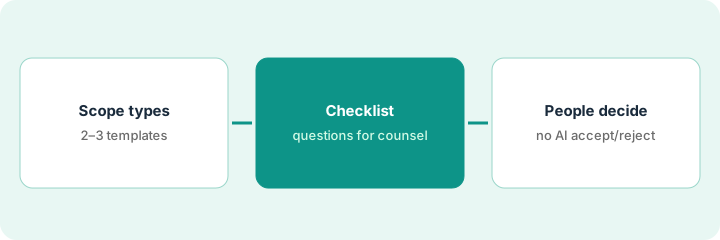
- Pick two or three types for the first version — for example mutual NDA, standard vendor agreement, order form.
- Name who may create envelopes and who must approve before anything is sent.
- Count how often someone digs through old PDFs for a clause versus how often you only need to send. That count matters for the plan question later (see DocuSign AI).
- Out of scope for now: negotiated one-off deals with no playbook.
Pilot: mutual NDAs and the standard vendor agreement only; order forms wait. Two ops people create envelopes; counsel clears every vendor agreement before send. NDAs follow the existing playbook checklist.
Write the three agreement types you send most. Circle one for a two-week checklist pilot. If you cannot name the template file for it, fix that before trying any AI feature.
2. Step 2 — Build the checklist and the counsel gate
What it is: Use Agreement Manager’s AI search and extraction where your plan includes it — or a structured prompt beside DocuSign — to draft a clause checklist plus questions for counsel. People still own the answers. See DocuSign AI.
- Fixed shape: clause to confirm | present / missing / Unknown | question for counsel | “do not send until” line.
- Treat extracted dates and party names as drafts. A wrong renewal date still causes a bad renewal.
- Send anything that sounds like accepting risk to counsel. Ops does not approve a liability cap through a chatbot.
- Keep the checklist where counsel already looks — a ticket, a shared doc, or a comment on the agreement.
Ops runs the checklist on governing law, limitation of liability, data processing, termination, and auto-renewal. Two rows come back Unknown and five questions go to counsel. The envelope waits on the “do not send until” line.
From one cleaned agreement outline, produce: a checklist of at most ten rows, five questions for counsel, and one Do not send until: line. Do not create the envelope until counsel answers or waives the wait under your policy.
3. Step 3 — Never let AI accept or reject
What it is: Standing rule, during the pilot and after: AI drafts checklists and extractions; AI never accepts, rejects, or finalizes an edit. People send.
- No automatic sending from any AI output.
- A named counsel (or playbook-approved person) signs off on anything outside the playbook.
- Log Unknowns. Do not fill them with confident guesses.
- If you draft the handoff memo in a chat tool, keep the same gate — see Claude for legal ops.
An AI-assisted review labels a liability clause “standard.” Ops almost sends. Counsel rejects the label, edits the clause, then approves. The new rule: no AI severity or “standard” labels in the send packet — only checklist rows and counsel’s answers.
Add one line to your envelope checklist: Did an AI accept or reject anything? Yes → stop. Then run a five-minute dry run: pretend the AI said “approve” and confirm your process still blocks the send without a person.
Pricing context (October 2026)
This how-to is not a price sheet. Plan detail for DocuSign AI and Claude for legal ops lives on those reviews. Recheck each vendor’s site before you budget. Dated October 2026.
Checked Oct 8, 2026 on the vendor’s own pricing page: docusign.com/products-and-pricing lists eSignature Personal at $11 per month (5 envelopes a month), Standard at $30 and Business Pro at $45 per user per month on annual plans billed monthly, each with 100 envelopes per user per year. Agreement Manager (the AI-powered agreement library) and Workflow Builder show up only under Intelligent Agreement Management (IAM) plans, which this page quotes through sales.
Uncertainty: IAM plan names, envelope allowances, and which AI features sit on which plan change, and IAM prices are easy to mix up with eSignature-only prices. If an invoice and a review disagree, trust the invoice. Do not paste a marketing list price you did not pay. The only prices this site sells here are the optional $9 AI toolkit spreadsheet and $19 AI toolkit audit.
When this helps (honest take)
Useful when DocuSign is already where your agreements live, clause hunts or counsel handoffs happen every week, and a person-only send gate is not up for debate.
Not useful when you only need basic envelopes and a shared folder, or you want AI to replace counsel. Paying for IAM just for the AI when nobody searches old agreements is a common overspend — count the handoff job first.
Related options (educational)
| Need | Where to look | Why |
|---|---|---|
| Agreement Manager, IAM vs eSignature | DocuSign AI | Ops and legal-ops handoff focus |
| Internal checklist drafts (not advice) | Claude for legal ops | Checklist language in a chat tool |
| Intake before a contract exists | Typeform AI · Design vendor intake in Typeform with branches a human approves | Forms, not envelopes |
| Routing after signature | Make · Zapier | Notify a channel or sheet, with a failure owner |
Related reviews: DocuSign AI · Claude for legal ops. Related how-to: Design vendor intake in Typeform with branches a human approves. Free: seat-waste calculator if IAM and a separate contracts tool cover the same handoff.
FAQ
Is this legal advice?
No. Checklists and extractions are drafts for people to review. Escalate to counsel before sending.
Can AI accept or reject a clause on this page’s pattern?
No. Never. People own accept, reject, and send.
Do we need IAM for a checklist?
Not always. Some teams draft the handoff checklist next to DocuSign with a chat tool and send on an eSignature plan. On Oct 8, 2026, Agreement Manager search showed only on IAM plans — buy it when searching old agreements is the weekly pain. Details on DocuSign AI.
Where do dated prices live?
On the DocuSign AI review and DocuSign’s pricing page. This October 2026 how-to only repeats prices we checked on the vendor’s own pricing page on Oct 8, 2026.
Optional next step
Free reviews stay free. Neither offer is required to use this page. If DocuSign IAM and another contracts AI seat already cover the same handoff job, optional help: $9 AI toolkit spreadsheet (seats, spend, owner, cancel-by, overlap) or $19 AI toolkit audit when you want a written memo.