How-to · Scheduling · Calendly · Oct 7, 2026
Rewrite Calendly intake event copy without inventing availability
“Intake copy” here does not mean an assistant decides when you are free. It means the two booking pages people misuse most get clearer descriptions, a few routing questions, and a short internal note on who takes which meeting — while every duration, buffer, and availability window stays exactly where a human set it.
Who this is for
Ops intake owners, founders, and small-team leads who already send guests to Calendly links and keep getting the wrong meeting booked — vendors in the customer slot, internal asks in the sales slot, everyone in the 30-minute catch-all. If you do not yet use Calendly (or Cal.com) as your booking page, this is not the place to start; pick the scheduling tool first.
How to do it
This page is a how-to. It is not a ranking of scheduling tools. Product detail and dated pricing live on the Calendly AI and Cal.com AI reviews. An “event type” is one kind of bookable meeting in Calendly, with its own link, length, and questions.

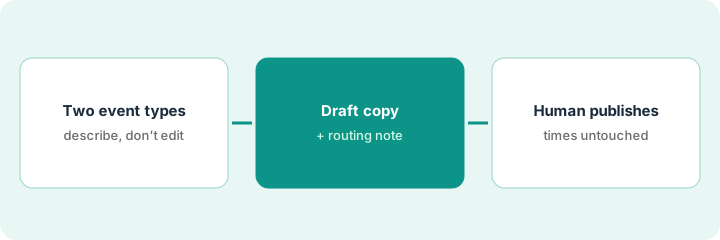
1. Step 1 — Pick two event types
What it is: Choose the two event types that get mis-booked most. Two is enough to learn the pattern; rewriting all twelve at once hides mistakes.
- List each event type’s current name, duration, and who it routes to — as set today in Calendly.
- Write one sentence on who should book it and one on who should not.
- Note the intake questions it asks now (if any).
- Do not change durations or availability in this step. You are describing, not editing.
Calendly’s Free plan lists one event type, so this two-event pattern assumes a paid plan (or one event type on Free).
“Intro call (30 min)” gets customers, vendors, and recruiters. The owner picks it plus “Vendor intro (45 min).” Notes: Intro should be prospects and partners; Vendor intro should be vendors with a named product and a renewal or purchase question. Recruiters should book neither.
Open your Calendly event types. Pick the two with the most wrong bookings last month. For each, write: current name, duration, current owner or routing, who should book, who should not. Leave times and availability untouched.
2. Step 2 — Draft copy and a routing note
What it is: Use Calendly’s AI assists where your plan shows them (see the Calendly AI review) — or any chat tool you already pay for — to draft guest-facing descriptions, two or three intake questions, and a short internal routing note.
- Give the model your Step 1 notes only. Do not ask it to suggest durations, buffers, or hours.
- Ask for plain descriptions: who this is for, what to bring, what happens next.
- Ask for intake questions that help routing (role, topic, urgency). If you have no rule for a topic, the answer is Unknown — not an invented routing matrix.
- Ban promises you cannot keep: response times, guaranteed follow-ups, “same-day” anything.
The Vendor intro draft says: “For vendors with a specific product and a renewal or purchase question. Please share your product name and current contract end date if you have one.” It also adds “We’ll reply within 24 hours” — which nobody committed to. That line is removed. The routing note says “Vendor intro → ops lead; Intro call → founder; recruiters → Unknown (no rule yet).”
Paste your Step 1 notes and ask: Draft guest-facing descriptions (under 60 words each) and 2–3 intake questions for these two event types, plus a 3-line internal routing note. Do not suggest durations, hours, buffers, or response times. If routing for a guest type is not stated, write Unknown.
3. Step 3 — Human edits times and publishes
What it is: A person pastes the copy into Calendly, checks every time-related field by hand, and publishes. AI never sets availability.
- Paste descriptions and intake questions. Read them as a guest would.
- Confirm duration, buffers, minimum notice, and availability windows directly in Calendly — unchanged unless a human decided to change them.
- Resolve Unknown routes (or leave them out of the copy) before publishing.
- Watch the next ten bookings. If the wrong people still book, edit the copy — not the calendar.
The owner pastes the new copy, notices the draft said “quick 15-minute chat” while the event is 30 minutes, and fixes the wording to match the real duration. Recruiters get a one-line note on the careers page instead of a Calendly route. Publish happens after that check, not before.
Before you publish, read each new description next to its event settings and tick: duration matches, no promised response time, no availability claims, Unknown routes resolved or removed. Publish only when all four are ticked.
Pricing context (October 2026)
This how-to is not a price sheet. Plan detail for Calendly AI and Cal.com AI lives on those reviews. Recheck each vendor’s site before you budget. Dated October 2026.
Checked Oct 7, 2026 on the vendor’s own pricing page: calendly.com/pricing lists Free (one event type, one calendar connection), Standard at $10 per seat per month and Teams at $16 per seat per month, both billed yearly, and Enterprise starting at $15k per year from 50 seats. Seats are for hosts; invitees do not need one. Calendly’s AI pieces — Notetaker (meeting recaps) and Callie (an email scheduling assistant, marked beta) — are shown as add-ons to Standard or Teams; the page we fetched did not show an add-on price. Cal.com was not rechecked for this page — see its review and Cal.com’s site.
Uncertainty: AI feature names, plan gates, routing-form availability, and seat counts change. If an invoice and a review disagree, trust the invoice. Do not paste a marketing list price you did not pay. The only prices this site sells here are the optional $9 AI toolkit spreadsheet and $19 AI toolkit audit.
When this helps (honest take)
Useful when Calendly (or Cal.com) is already your booking page, wrong bookings are a weekly annoyance, and someone owns the event types.
Not useful when the real problem is that nobody has decided who takes which meeting, or you want AI to manage your calendar. Routing decisions are a people call; calendar defense is a different job (see Reclaim.ai or Motion AI; Clockwise is no longer an option: as of Oct 11, 2026, Clockwise says it shut down on March 27, 2026, source).
Related options (educational)
| Need | Where to look | Why |
|---|---|---|
| Event copy, routing notes, follow-up drafts | Calendly AI | Overview when Calendly is the booking page |
| Open-source or self-host scheduling | Cal.com AI | Same copy job with more hosting control |
| Calendar-first task scheduling | Motion AI | Different job: planning your own week |
| Focus holds and meeting defense | Reclaim.ai (Clockwise is discontinued: as of Oct 11, 2026, Clockwise says it shut down on March 27, 2026, source) | Protecting time, not guest intake |
| Longer intake before booking | Typeform AI | When the form matters more than the slot |
Related reviews: Calendly AI · Cal.com AI · Motion AI · Reclaim.ai. Related how-to: Protect three focus blocks this week. Free: seat-waste calculator if two scheduling tools cover the same booking job.
FAQ
Can AI set my Calendly availability?
Not on this page’s pattern. Durations, buffers, and windows stay human-set in Calendly.
Why only two event types?
Two is enough to see whether clearer copy reduces wrong bookings. Expand after you have watched ten bookings.
Calendly or Cal.com?
Stay with the one you already use. Cal.com fits when open-source or self-hosting matters; Calendly fits hosted guest intake. This page is not a ranking.
Where do dated prices live?
On the Calendly AI and Cal.com AI reviews and the vendor sites. This October 2026 how-to only repeats prices we checked on the vendor’s own pricing page on Oct 7, 2026.
Optional next step
Free reviews stay free. Neither offer is required to use this page. If two scheduling seats already cover the same intake job, optional help: $9 AI toolkit spreadsheet (seats, spend, owner, cancel-by, overlap) or $19 AI toolkit audit when you want a written memo.