How-to · Calendar · Notion Calendar · Oct 9, 2026
Link three focus holds to Notion tasks without inventing attendees
“Focus holds” here means calendar time you protect for Notion tasks you already own — not fake meetings with made-up attendees. You leave the week with three holds linked to real work, and invite lists stay empty unless a real meeting already exists.
Who this is for
Ops leads whose tasks and docs already live in Notion and who want protected focus time without another AI scheduler seat. If Notion is not where your tasks really live, pick the calendar tool that matches your real home (see Reclaim.ai or Motion AI). If you already defend focus time with Reclaim, the companion how-to is Protect three focus blocks this week without inventing attendees. And if you will ignore every hold you create, no calendar sync will save you.
How to do it
This page is a how-to. It is not a ranking of calendar AI products. The Notion Calendar review covers the features and how the calendar connects to Notion; this page is the narrower weekly routine — three holds, each tied to a task that already exists, with no invented guests. Plan notes also live on that review.
1. Step 1 — Sketch the week from Notion tasks
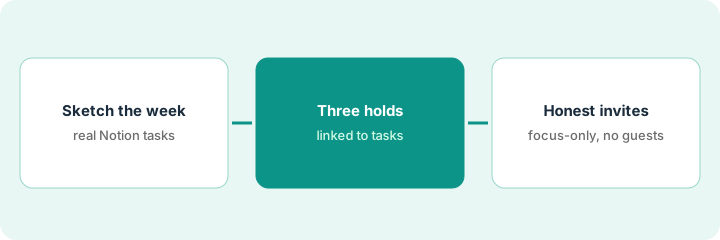
What it is: Before you place any holds, write a one-page sketch of the week from tasks that already exist in Notion. Do not invent work to fill empty calendar slots.
- Pull three to five tasks with owners and due dates you trust.
- Mark which ones need deep focus and which are already real meetings on the calendar.
- Cap the pilot at three focus holds this week — not eight new weekly habits.
- If a task has no owner or date, fix that in Notion first.
The sketch keeps the calendar honest: every hold you add in Step 2 has to point at one of these lines.
Week sketch: ship runbook v2 (due Thursday), vendor renewals triage (due Wednesday), Friday wrap notes. Two customer calls already on the calendar stay where they are. Nobody creates a new “sync with marketing” task just to justify a hold.
Open your Notion tasks view for this week. Write three lines: task title — owner — due date. Cross out any line that is not already a task. The lines left are the only candidates for focus holds.
2. Step 2 — Place three focus holds
What it is: In Notion Calendar, create three personal focus blocks named after those Notion tasks (or linked to them). Check which features your workspace actually shows before you assume it works like a dedicated scheduler.
- Title each hold with the task name — not a vague “deep work.”
- Link or paste the Notion task so the hold points at real work.
- Leave the invite list empty for focus-only blocks.
- Set and move the times yourself; do not accept a packed day of suggested meetings.
Notion Calendar is listed in Notion’s Free plan, so this routine does not need a new seat. It does not auto-decline meetings or repack your day; if that is the real need, see the related options below.
Three holds: “Runbook v2 — draft,” “Renewals triage,” “Friday wrap.” Each one links to its Notion task. The lead moves the runbook hold after a customer call lands on top of it. No invite list is generated for any of them.
Create exactly three holds for this week. In each description, paste the Notion task link. If you cannot find the task, delete the hold — do not invent a task to match the calendar.
3. Step 3 — Keep invite lists honest
What it is: Focus holds are not meetings. Never add attendees just because they are assigned to the task. Label each block focus-only or meeting, and only add people who already belong on a real invite.
- For each hold, decide: focus-only or meeting?
- Meeting: the attendees must already be on a real calendar event, or a person invites them on purpose.
- Decline any suggestion that invites task assignees to a focus block.
- Review once mid-week and drop holds you skipped twice — the habit failed, not the calendar.
If teammates need an update on the task, leave a comment on the Notion task or send a short video — Turn meeting notes into Notion tasks without inventing owners covers the handoff from meeting notes to tasks.
A suggestion appears to invite three assignees to “Ship runbook.” The lead clears the invite list, keeps a personal focus block, and leaves comments on the Notion task instead. The assignees get a comment, not a fake meeting.
Check this week’s three holds. Remove any invite that is not part of a real meeting. Then add one rule to your ops doc: “Focus holds never invent guests.”
Pricing context (October 2026)
This how-to is not a price sheet. Plan detail for Notion Calendar and Notion AI lives on those reviews. Recheck each vendor’s site before you budget. Dated October 2026.
Checked Oct 9, 2026 on the vendor’s own pricing page: notion.com/pricing lists Free at $0 per member per month, with Notion Calendar in the Free plan’s feature list. With the page’s “Pay yearly” option selected (it says yearly saves up to 20%), Plus is $10 and Business is $20 per member per month; we did not record the monthly figures, so confirm them at checkout. Enterprise is custom pricing. Notion Agent and AI Meeting Notes are listed under Business; Free and Plus show a trial of Notion AI.
Uncertainty: Which plans include which calendar and AI features, and how AI is packaged, change. If an invoice and a review disagree, trust the invoice. Do not paste a marketing list price you did not pay. The only prices this site sells here are the optional $9 AI toolkit spreadsheet and $19 AI toolkit audit.
When this helps (honest take)
Useful when Notion is already the system of record for your tasks and docs, you want the calendar next to those tasks without another scheduler seat, and you will actually honor three holds.
Not useful when you need strong habit defense with auto-decline (look at Reclaim.ai), automatic day planning (Motion AI), or you invent attendees to look busy. That is a calendar-hygiene problem first.
Related options (educational)
| Need | Where to look | Why |
|---|---|---|
| Calendar next to Notion tasks | Notion Calendar | Focus holds when Notion is the system of record |
| Writing help inside Notion | Notion AI | Docs and AI assists, not calendar defense |
| Habit and meeting defense | Reclaim.ai · Protect three focus blocks this week without inventing attendees | When auto-decline habits are the job |
| Automatic day planning | Motion AI | When Motion already plans the day |
| Meeting notes to Notion tasks | Turn meeting notes into Notion tasks without inventing owners | Live how-to for the notes handoff |
Related reviews: Notion Calendar · Notion AI · Reclaim.ai. Related how-tos: Protect three focus blocks this week without inventing attendees · Turn meeting notes into Notion tasks without inventing owners · Three checks before you add another AI seat. If your tasks live in a tracker instead, clean the statuses first with Clean messy status text in Airtable before you buy another tracker. Free: seat-waste calculator if Notion Calendar and another scheduler seat cover the same focus job.
FAQ
Should Notion Calendar invent meeting attendees?
No. Create focus holds linked to Notion tasks. Never invent attendees, invite lists, or meeting titles that suggest a commitment nobody made.
Do I need Reclaim if I already use Notion Calendar?
Only if habit defense and auto-decline are the weekly pain. Stay in Notion Calendar when the job is focus holds next to Notion tasks. See Three checks before you add another AI seat before adding a seat.
Does this need a paid Notion plan?
Not for the holds themselves. On Oct 9, 2026, Notion’s pricing page listed Notion Calendar in the Free plan. Check your workspace for any AI features you plan to use.
Where do dated prices live?
On the Notion Calendar review and notion.com/pricing. This October 2026 how-to only repeats prices we checked on the vendor’s own pricing page on Oct 9, 2026.
Optional next step
Free reviews stay free. Neither offer is required to use this page. If Notion Calendar and another calendar AI seat already cover the same focus job, optional help: $9 AI toolkit spreadsheet (seats, spend, owner, cancel-by, overlap) or $19 AI toolkit audit when you want a written memo.